
- Installs
- —
- Apple does not publish download counts
- Rating
- 4.65
- Ratings
- 4.3K
- 4.3K reviews
- Version
- 1.34.24
- Updated 10 Nov 2026
- Released
- 14 Jun 2020
- Tracked since 10 May 2026
- Size
- 133 MB
- Needs 17.2
Also on Google Play: HEY Email (3.6K ratings)
Screenshots
About HEY Email
The description on the store listing
It’s “you’ll never go back” better
HEY replaces workarounds, messy hacks, and daily frustrations, with built-in workflows, effortless organization, and clever features that levels-up email in meaningful ways.
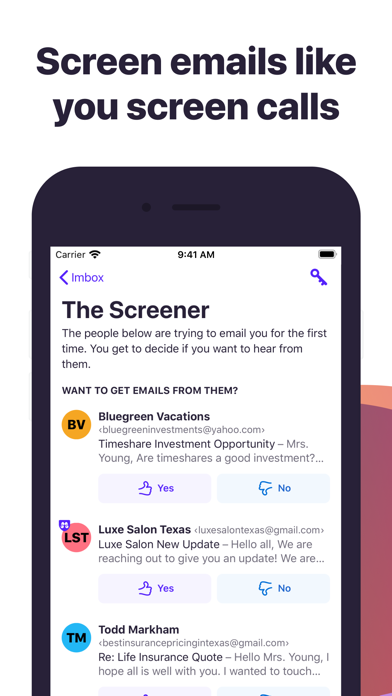
Screen emails like you screen calls
You screen your calls, so why can't you screen your emails? With HEY, you can. HEY puts you in complete control of who's allowed to email you. Don't want to hear from someone? Screen them out and won’t hear from them again.
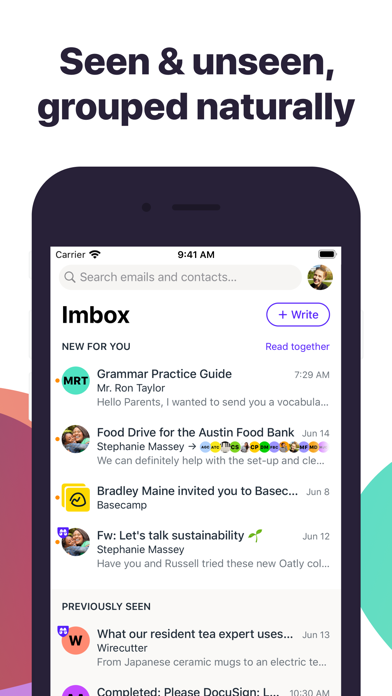
Naturally grouped
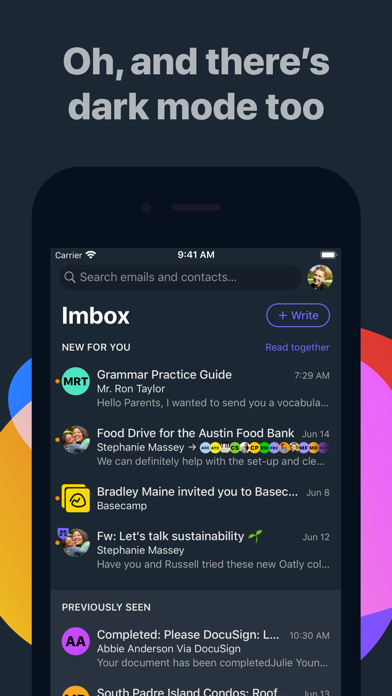
Inboxes are typically an intertwined mess of new and old messages haphazardly mixed together. Yuck. With HEY, new messages are always grouped together at the top, and previously seen emails are always at the …
Read the full description
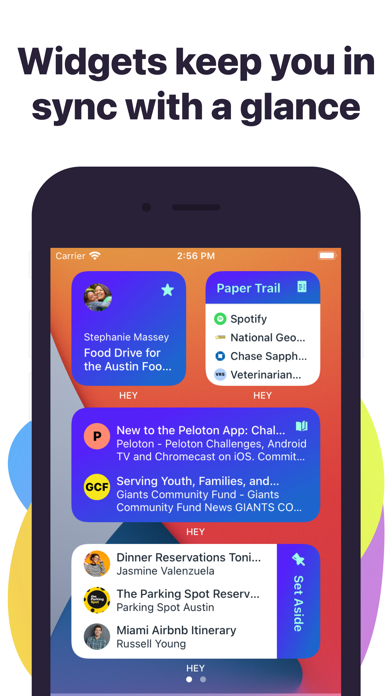
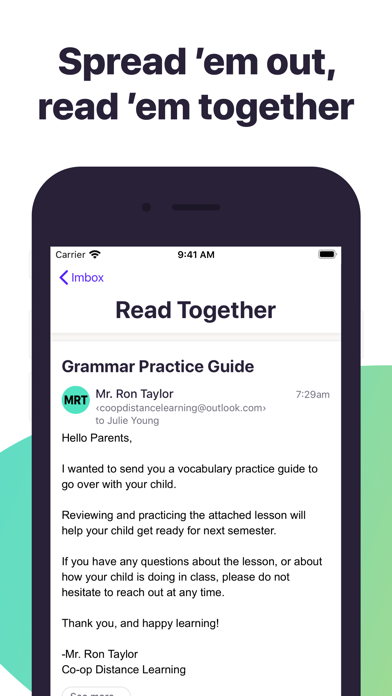
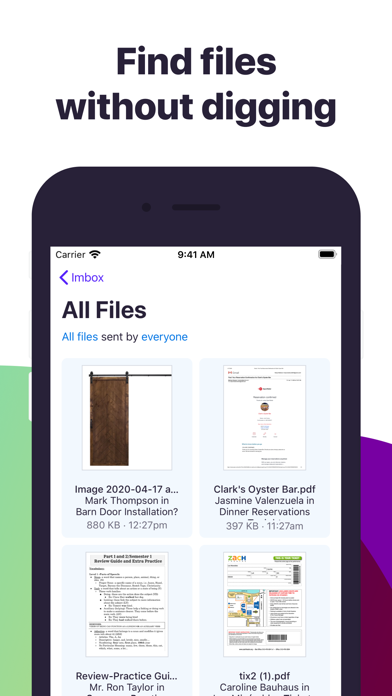
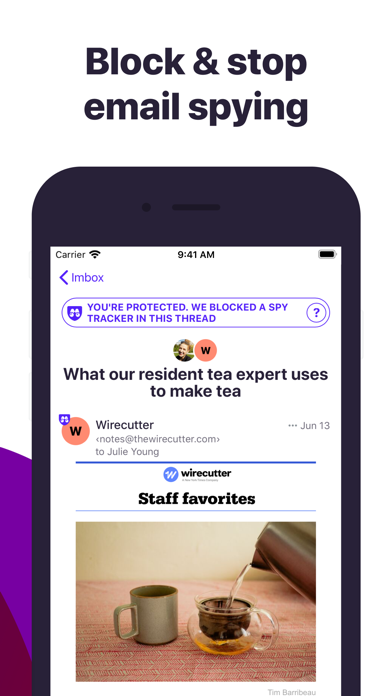
It’s “you’ll never go back” better HEY replaces workarounds, messy hacks, and daily frustrations, with built-in workflows, effortless organization, and clever features that levels-up email in meaningful ways. Screen emails like you screen calls You screen your calls, so why can't you screen your emails? With HEY, you can. HEY puts you in complete control of who's allowed to email you. Don't want to hear from someone? Screen them out and won’t hear from them again. Naturally grouped Inboxes are typically an intertwined mess of new and old messages haphazardly mixed together. Yuck. With HEY, new messages are always grouped together at the top, and previously seen emails are always at the bottom. Neat and orderly by default. No need to wade through the inbox jungle with a machete. Spread ’em out, read ’em together Let's say you have 7 unread emails. Why do you have to open one, close one, open one, close one, open one, close one, and so on. It's rediculously inefficient. With HEY, you can open multiple emails at once and just scroll though them, just like you would a newsfeed. It's a revolutionary way to read your emails. You'll never go back to the old way. Find files without pulling your hair out If you’re looking for an attachment, why should you have to find an email first? That’s backwards. With HEY, you get an attachment library that gathers up every attachment you’ve ever received in one organized, siftable place. Just set it aside Sometimes you get emails you need to reference later - travel info, handy links, numbers you need, etc. With HEY, you can 'Set Aside' any email in a neat little pile for easy access whenever you need it. At hand, but out of your face. Put receipts in The Paper Trail Receipts, confirmations, and transactional emails getting in your way? With HEY, you can send those types of emails to The Paper Trail where they'll be out of your way, but easy to find when you need them. Blocking email spies 24/7/365 Many companies track which emails you open, how often you open them, and even where you were when you opened them. It's a massive invasion of your privacy. HEY blocks these trackers and tells you who's spying on you. Fix bad subjects without busting threads If you don’t start the thread, you're often stuck with other people’s generic, non-descriptive email subjects. With HEY, you can rename a subject so it makes sense for you without changing things for the other person. Add private notes to any email thread Conversations may start in email, but they may continue somewhere else. Some emails turn into lunches or calls or video conferences. Where do you put the notes from those - especially if they relate to the initial email conversation? With HEY, you can add personal, private notes (and files) to any thread. This way you keep everything related to the conversation on one page, even if it didn't all happen via email. Notifications you control HEY push notifications are off by default so your phone doesn’t steal your attention every time an inconsequential email hits your inbox. However, HEY lets you selectively turn them on for specific contacts or threads so you don't miss the things you really care about. A built-in ‘Reply Later’ workflow What if you need to reply, but you don't have time right now? With HEY, just click the “Reply Later” button to move an email to a dedicated ‘Reply Later’ pile at the bottom of the screen so you don’t lose or forget it. Stop heavy senders from dominating your inbox When you get lots of emails from someone, they can take over your Inbox. With HEY, you can choose to bundle a sender into a single row. This means no matter how many emails they send you, they'll only take up a single row in your Inbox. Clean, controlled, and calm. Get off threads without having to ask Stuck on a mega email chain and want off? Good luck asking someone to remove you. With HEY, you can unfollow any thread and replies won’t show up as new emails anymore. Out of your face forever.
Installs, last 30 days
Apple does not publish download counts. Estimates are in testing.
Estimated store revenue Estimated Beta
App Store, worldwide, monthly rate from the last 12 chart days to 19 Nov 2026
Below the top 100 grossing apps in the markets we calibrate. In the United States that usually means under about $6.4M a month. App Store purchases and subscriptions only, before Apple's 15 to 30% fee. Ads and web payments are not included.
Ratings
4,325 ratings, 4,325 reviews
No rating breakdown published for this app.
Recent reviews
Latest public reviews from the store
- 17 Sep 2022
I love email again!
I don’t think I have ever left a review for anything, so the fact I am doing it now, is extremely telling. I’ve been so frustrated with email apps and website interfaces. I have tried many different ones, in hopes of actually feeling like each email has a spot and can easily be found. Too many other email softwares are overly complicated or not organized. I finally came across Hey and I’m never looking back! Seriously, this app is so user friendly, and everything can have its own spot, if that’s what I wish. Along with that, any of my emails can be easily located. Don’t hesitate! I know that it costs money, but to me, it was totally worth it. Sometimes “free” isn’t better.
- 27 Nov 2021
Okay, but needs improvement
I’ve been a subscriber since launch, and there’s a lot of things I like about Hey, but it’s lacking some basics that really hurt and are far behind other “free” email services. For one, the way Hey handles downloading files is awful. If you are emailed you several files, you cannot download them all at once or even select which ones to download from a list. You have to click each one manually, wait for it to load, then download it to your computer. Imagine doing this for a bunch of documents you need to fill out, rather than using select boxes/check marks and downloading the lot. Another major issue is how Hey handles drafts. I repeatedly lose the content to my draft messages. I don’t remember this being such a problem previously, so it may be related to an update, but I’ve been losing work and time due to this, and it’s really unacceptable in an email client to lose drafts. Finally, there needs to be more sorting/limiting options available when referencing previous emails or searching to find one that’s buried. There also doesn’t seem to be any searching done within files attached to emails, which is only a minor issue for me, but still crops up as problemati
- 7 Oct 2020
Great step forward in email
From my perspective, this is the first serious step forward in email since Google popularized threading with Gmail. The three-part organizational scheme (inbox, newsletter feed, and receipt box) works remarkably well. The screener is a great way of reducing clutter. The ability to change subjects and merge threads has come in useful several times. And adding notes and setting aside clips—both features contribute to productivity. The privacy features are also valuable and may be the clincher for some, but they mostly work in the background. It amazes me that something this polished sprung forth fully formed, as if from the brow of Zeus. And on top of that, the interface is really pretty. A few aspects (the domain name and the term “imbox”) feel a bit gimmicky, but don’t meaningfully detract from the product’s excellence. One tiny complaint: the threading seems to be based on some identifier distinct from subject lines and senders. When friends create new threads my “replying all” to old threads, clearing out the prior emails, and changing the subject line, Hey lumps them in with the old threads on which they are based. Given the frequency with which my friends (who s
- 30 Jul 2020
Excellent
I had kind of given up on trying to manage my Gmail account. Every time I tried to clean it up, it would only be a month or two before it was flooded again with unwanted messages, and random receipt and shipping emails obscuring the stuff I actually cared about. “Hey” really does put you in control of your email inbox, and successfully separates the different categories of emails that there are (standard, newsletters, transactional ones) so that you can address each of them appropriately. The ability to screen out all first time senders empowers you to decide what makes it into your inbox, and the general policy of zero ads and zero data collection is a breathe of fresh air. If you have $99 a year to spare on an email service, it’s definitely a worthwhile investment.
What reviewers bring up
Topics mentioned in the latest 8 reviews, by how many reviews mention them
Liked in good reviews (5 reviews)
- emails 5
- hey 5
- first 4
- gmail 4
- finally 3
- service 3
- inbox 3
- data 3
Raised in bad reviews (1 reviews)
No topic comes up twice.
Top chart positions
Latest App Store chart ranks by country, last 10 days
Not in any tracked top chart in the last 10 days.
HEY Email history
Release, install milestones, listing and store changes
- First released on the store 14 Jun 2020
Update frequency
How often HEY Email ships a new version, month by month
11 updates in the last 12 months. More often than most similar apps: they shipped a median of 1 updates in the same year.
Recent versions
Current version 1.34.24
- Version 1.34.2310 Nov 2026
Bug fixes and improvements
- Version 1.34.225 Nov 2026
Bug fixes and improvements
- Version 1.34.1525 Aug 2026
Bug fixes and improvements.
- Version 1.34.1424 Aug 2026
Bug fixes and improvements.
Listing keywords
Words and phrases HEY Email repeats most in its store listing
Top phrases: open one close (3), reply later (3), close one open (2), never go (2), paper trail (2).
Highlighted words also appear in the title. Counts cover the title, short description and description.
Compliance
What the listing and the app package show
- Store status
- Live
- Upkeep
- Updated 10 Nov 2026
- Age rating
- 4+
Apps like HEY Email
 Chatbot AI Assistant ChatPrimeWowoo Dijital Hizmetler Limited Sirketi★ 4.56
 App LockLilucat★ 4.53
 Kimi - Kimi K2.6 is LiveMoonshot AI★ 4.72
 Nomorobo Max Spam Call BlockerTelephone Science Corporation★ 4.47
 D-Link Wi-FiD-Link Corporation★ 4.25
 Easy Cleaner - Clean Storage !Cetreno Interactive Limited★ 4.58
 File Transfer AppEvgeniy Shcherbinin★ 4.71
 Updaty - Update & NewsApptitute GmbH & Co. KG★ 4.27
 Focus Plant:forest app blockerShikudo★ 4.72
HEY Email: questions and answers
Who makes HEY Email?
HEY Email is published by 37Signals LLC.
When was HEY Email last updated?
The latest version (1.34.24) was released on 10 Nov 2026.
Is HEY Email free?
Yes. HEY Email is free to download.
Is HEY Email still available?
Yes. HEY Email is live on App Store as of 19 Nov 2026.
Track HEY Email and its competitors
Watch any app for new versions, rating drops, chart moves and removals. Free plan, no card.