
- Installs
- —
- Apple does not publish download counts
- Rating
- 4.47
- Ratings
- 53
- 53 reviews
- Version
- 1.1
- Updated 4 Apr 2021
- Released
- 26 Dec 2020
- Tracked since 10 May 2026
- Size
- 38 MB
- Needs 14.0
Screenshots


About Home Screen Widgets Widgetizer
The description on the store listing
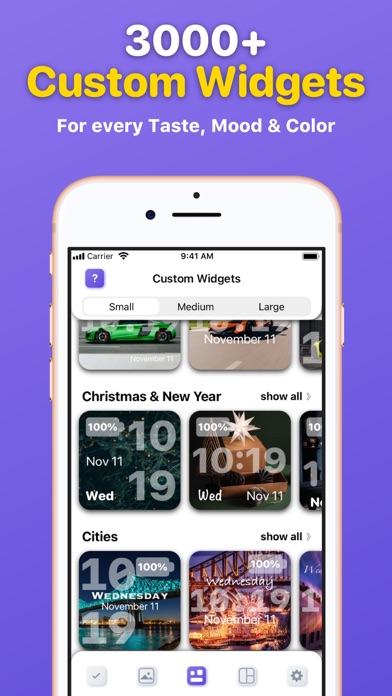
Make your Home Screen look fabulous using a Widgetizer! Discover a unique custom widgets gallery for every taste, color and mood, grouped in 30 different categories and more.
Main Widgetizer App Features:
■ Custom Widgets Gallery – choose, edit and activate custom widgets you like from the biggest, colorful collection to add them to your Home Screen.
■ Widget Preview – see how the selected widget will look before activating and adding it to your Home Screen;
■ Widget Editor – edit custom widgets as you like. Customize Font, Color, Style, Display (Date, Time, Day, Battery).
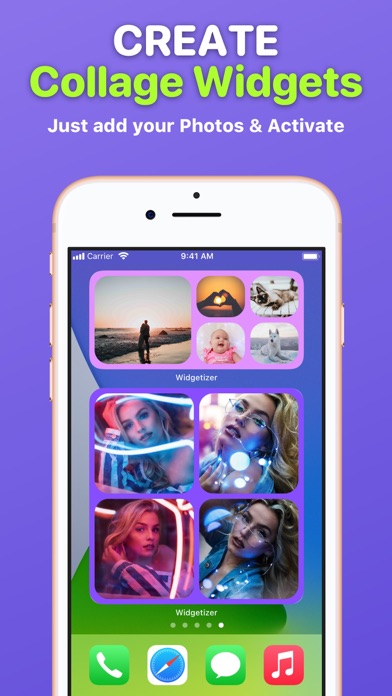
■ Collage Widgets – create beautiful collage widgets from your Photos. Pick Color and Layout that suit your collage …
Read the full description
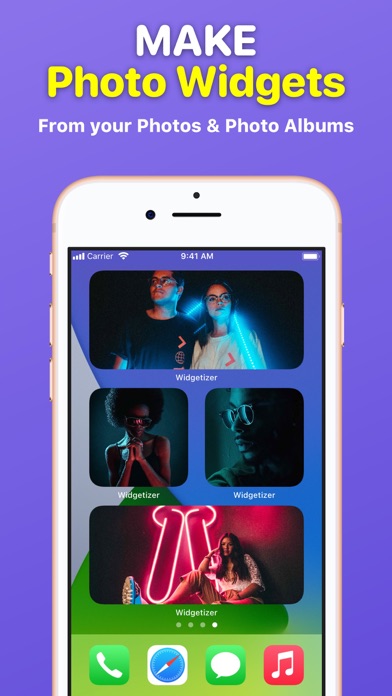
Make your Home Screen look fabulous using a Widgetizer! Discover a unique custom widgets gallery for every taste, color and mood, grouped in 30 different categories and more. Main Widgetizer App Features: ■ Custom Widgets Gallery – choose, edit and activate custom widgets you like from the biggest, colorful collection to add them to your Home Screen. ■ Widget Preview – see how the selected widget will look before activating and adding it to your Home Screen; ■ Widget Editor – edit custom widgets as you like. Customize Font, Color, Style, Display (Date, Time, Day, Battery). ■ Collage Widgets – create beautiful collage widgets from your Photos. Pick Color and Layout that suit your collage and widget size. Activate to add to your Home Screen; ■ Active Widgets – here are all your activated custom and collage widgets that you can add to your Home Screen; ■ Photo Widgets – make your own Photo and Photo Album widgets; Widgetizer App Also Includes Content: – 30 categories of custom widgets, such as: Animals, Landscapes, etc. – 3000+ custom widgets with daily updates; – 3 custom widgets in each category for free (90 custom widgets in each widget sizes for free in total); – No ads! How to add widgets to your Home Screen? 1. From the Home Screen, touch and hold a widget or an empty area until the apps jiggle. 2. Tap the “Add” button (+) in the upper-left corner. 3. Search for ”Widgetizer” or scroll down until you find the app. 4. Select a widget type, choose from three widget sizes, then tap ”Add Widget”. 5. Tap ”Done” and enjoy the widget! How to edit widgets? 1. Touch and hold a widget to open the quick actions menu. 2. Tap ”Edit Widget”. 3. Make your changes, then tap outside of the widget to exit. Unclear? Do not worry! You can find a more detailed guide with pictures inside the app by clicking on the (?) button. Note: Free version of the app is limited to: – 90 custom widgets in each widget sizes; – 1 active custom and collage widget in each widget sizes; – 3 collage widget layouts in each widget sizes. To use the app without limits, an auto-renewable subscription ”Widgetizer Pro” is available. Auto-renewable Subscription ”Widgetizer Pro” Includes: – Unlock all widgets; – Get daily new widgets; – Unlimited active widgets; – Unlock widget editor; – All collage widget layouts. Auto-renewable Subscription ”Widgetizer Pro” Info: By subscribing you get premium (full, unlimited) access to all the features and content offered by ”Widgetizer” app. The app contains the following auto-renewable subscription called ”Widgetizer Pro”: – Weekly (0,99 US$) with a 3-days for free period * Subscription price may vary depending on your location. * Payment will be charged to iTunes Account at confirmation of purchase; * Subscription automatically renews unless auto-renew is turned off at least 24-hours before the end of the current period; * Account will be charged for renewal within 24-hours prior to the end of the current period, and identify the cost of the renewal; * Subscriptions may be managed by the user and auto-renewal may be turned off by going to the user's Account; * Any unused portion of a free trial period, if offered, will be forfeited when the user purchases a subscription to that publication, where applicable. Privacy Policy: https://widgetizer-privacy.nethouse.ru Terms of Use: https://widgetizer-terms.nethouse.ru
Installs since 29 Aug 2026
Apple does not publish download counts. Estimates are in testing.
Estimated store revenue Estimated Beta
App Store, worldwide, monthly rate from the last 13 chart days to 20 Nov 2026
Below the top 100 grossing apps in the markets we calibrate. In the United States that usually means under about $6.4M a month. App Store purchases and subscriptions only, before Apple's 15 to 30% fee. Ads and web payments are not included.
Ratings
53 ratings, 53 reviews
No rating breakdown published for this app.
Recent reviews
Latest public reviews from the store
No reviews in our sample for this app yet.
Top chart positions
Latest App Store chart ranks by country, last 10 days
Not in any tracked top chart in the last 10 days.
Home Screen Widgets Widgetizer history
Release, install milestones, listing and store changes
- First released on the store 26 Dec 2020
Update frequency
How often Home Screen Widgets Widgetizer ships a new version, month by month
0 updates in the last 12 months. Less often than most similar apps: they shipped a median of 2 updates in the same year.
Recent versions
Current version 1.1
- Version 1.14 Apr 2021
We care about your Privacy, so we are happy to present you a new version of the app without any 3rd-party Analytics, Tracking and Data Collection. Update the app and enjoy private and safe app usage. Also: - Small Improvements; - Bug Fixes.
Listing keywords
Words and phrases Home Screen Widgets Widgetizer repeats most in its store listing
Top phrases: custom widgets (9), home screen (8), widget sizes (5), auto renewable subscription (4), auto renewable (4).
Highlighted words also appear in the title. Counts cover the title, short description and description.
Compliance
What the listing and the app package show
- Store status
- Live
- Upkeep
- No update since 4 Apr 2021
- Age rating
- 4+
Apps like Home Screen Widgets Widgetizer
 AI Face Swap Video Photo MakerSugar Social Networks★ 4.44
 Widget Maker - Create Widgetsabedalkareem omreyh★ 4.5
 Tattoo generator - InkMeYevhen Maslov★ 4.69
 Ev AI - Exterior Home DesignHarun Inam★ 3.74
 AI Baby Generator Future Baby颖 周★ 4.43
 ChatMoose - AI Image & VideoCoreMoose, LLC★ 4.61
 Promptchan aiWahid Khan★ 1.44
 Kitt AI Logo Design & PrintfulEdmond Lafond★ 3.89
 Invite Maker - RoosefyPAPYONLAB YAZILIM BILGI TEKNOLOJILERI TICARET LIMITED SIRKETI★ 4.67
Home Screen Widgets Widgetizer: questions and answers
Who makes Home Screen Widgets Widgetizer?
Home Screen Widgets Widgetizer is published by Uladzislau Yanushka.
When was Home Screen Widgets Widgetizer last updated?
The latest version (1.1) was released on 4 Apr 2021.
Is Home Screen Widgets Widgetizer free?
Yes. Home Screen Widgets Widgetizer is free to download.
Is Home Screen Widgets Widgetizer still available?
Yes. Home Screen Widgets Widgetizer is live on App Store as of 14 Nov 2026.
Track Home Screen Widgets Widgetizer and its competitors
Watch any app for new versions, rating drops, chart moves and removals. Free plan, no card.