
- Installs
- —
- Apple does not publish download counts
- Rating
- 4.77
- Ratings
- 56.7K
- 56.7K reviews
- Version
- 8.4
- Updated 9 Oct 2026
- Released
- 6 Nov 2009
- Tracked since 11 May 2026
- Size
- 52 MB
- Needs 16.2
Also on Google Play: Hours Tracker Time Tracking (6.4K ratings)
Screenshots


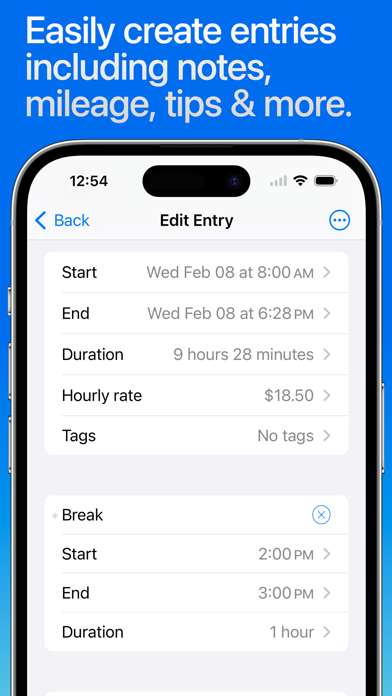
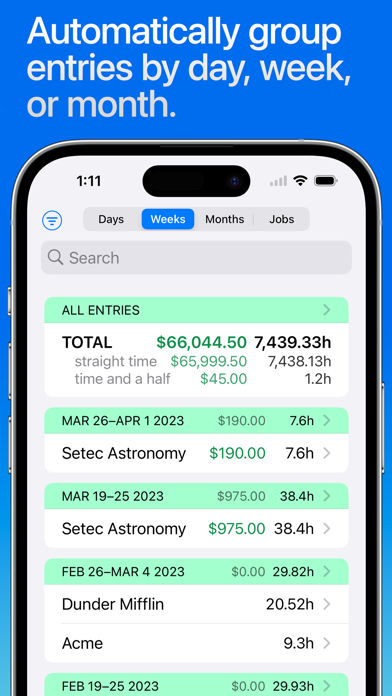

About Hours Tracker: Time Tracking
The description on the store listing
QUICK AND EASY time entry and editing make time tracking painless
• Record time using timers, complete with support for Breaks and Pauses, including automatic breaks
• Track your pay, including Tips, Mileage, and flexible ± time and earnings adjustments
• Pick any time to start, stop, break or pause the timer (7 minutes ago, 10 minutes from now, whatever you need)
• Set job locations to get clock in and out reminders when you arrive or leave or fully automate your time tracking (geofencing)
• Manually enter time entries with minimal effort thanks to smart, adaptive defaults
• Enter comments of any length with your time entries and optionally include them in your exports
• Control …
Read the full description
QUICK AND EASY time entry and editing make time tracking painless • Record time using timers, complete with support for Breaks and Pauses, including automatic breaks • Track your pay, including Tips, Mileage, and flexible ± time and earnings adjustments • Pick any time to start, stop, break or pause the timer (7 minutes ago, 10 minutes from now, whatever you need) • Set job locations to get clock in and out reminders when you arrive or leave or fully automate your time tracking (geofencing) • Manually enter time entries with minimal effort thanks to smart, adaptive defaults • Enter comments of any length with your time entries and optionally include them in your exports • Control timers, dictate comments, and apply tags using your Apple Watch ADVANCED FEATURES and customization set HoursTracker above the rest • Automatic daily and weekly overtime earnings calculations • Built-in reports by Day, Week, and Month and support for most common pay period schedules • Robust tagging and filtering allow you to build your own custom views • Reminders when you've worked your target number of hours per day (even takes time rounding into account) • Automatic time rounding: up, down, or to nearest (including 6 min) • Easily copy an existing job or time entry to save time and effort • Reminders you to clock in on your selected work days • Today Widget for at a glance time and pay monitoring • CSV and formatted text export via e-mail or the iOS Share Sheet • Passcode lock (with Touch ID & Face ID support) helps keep your HoursTracker data private • Cloud-based backup/restore with one re-usable backup slot included free (free account sign up is required) • Web-based reporting access, including charts, graphs, desktop exports, and rolling backups available with optional subscription • Customize your HoursTracker experience in the Preferences section under the More tab. Choose only one or many jobs clocked in at a time, opt-into prompts for comments, choose an elapsed time format (hours:minutes, or decimal hours), and more "Free Edition" stores up to 3 jobs and 21 days of entries. For unlimited entries, subscribe to "Premium" (up to 5 jobs) or "Unlimited" (unlimited jobs). Or, erase older data and continue to use the "Free Edition" until you're ready to buy. Visit our website at http://www.hourstrackerapp.com to learn more, and follow @HoursTracker on Twitter or facebook.com/HoursTracker to hear about upcoming features first. hourstrackerapp.com/privacy hourstrackerapp.com/terms
Installs, last 30 days
Apple does not publish download counts. Estimates are in testing.
Estimated store revenue Estimated Beta
App Store, worldwide, monthly rate from the last 12 chart days to 19 Nov 2026
Below the top 100 grossing apps in the markets we calibrate. In the United States that usually means under about $6.4M a month. App Store purchases and subscriptions only, before Apple's 15 to 30% fee. Ads and web payments are not included.
Ratings
56,656 ratings, 56,656 reviews
- 5 ★86%
- 4 ★9.4%
- 3 ★2.3%
- 2 ★0.7%
- 1 ★1.7%
Recent reviews
Latest public reviews from the store
- 12 May 2026
Great App, But Poor Support
Great app especially for tracking your wages in home care or other industries where wage theft is common. However, there are some bugs that force the app to close and break certain functionality (ie being able to input hourly wage) and Developers don’t respond to emails.
- 6 May 2026
Does everything I need.
As an independent contractor often juggling multiple jobs at various sites, I need help to keep track of billing. With Hours Tracker’s many options and lines it makes all of that much simpler. I highly recommend it.
- 6 May 2026
Helpful and easy to use
Great app for tracking hours. Easy to use.
- 4 May 2026
Ads
Way too many ads even on free account
What reviewers bring up
Topics mentioned in the latest 50 reviews, by how many reviews mention them
Liked in good reviews (39 reviews)
- track 15
- hours 13
- clock 6
- jobs 6
- pay 6
- highly recommend 5
- where 5
- each 4
Raised in bad reviews (7 reviews)
- subscription 3
- understand 2
- actually 2
- lifetime 2
- purchase 2
- options 2
- iphone 2
- backup 2
Top chart positions
Latest App Store chart ranks by country, last 10 days
- Countries ranked
- 16 of 50
- Best rank
- #32
- Top 10 placements
- 0
- of 16 chart placements
- Average rank
- #78.1
Best countries on App Store
- 🇧🇪 Belgium · Top grossing, Business#32
- 🇳🇱 Netherlands · Top grossing, Business#60
- 🇨🇭 Switzerland · Top grossing, Business#69
- 🇨🇿 Czechia · Top grossing, Business#70
- 🇰🇷 South Korea · Top grossing, Business#72
- 🇳🇿 New Zealand · Top grossing, Business#76
| Country | Chart | Category | Rank | Best (10 days) | Date |
|---|---|---|---|---|---|
| 🇧🇪 Belgium | Top grossing | Business | #32 | #32 | 19 Nov 2026 |
| 🇳🇱 Netherlands | Top grossing | Business | #60 | #56 | 13 Nov 2026 |
| 🇨🇭 Switzerland | Top grossing | Business | #69 | #69 | 18 Nov 2026 |
| 🇨🇿 Czechia | Top grossing | Business | #70 | #70 | 18 Nov 2026 |
| 🇰🇷 South Korea | Top grossing | Business | #72 | #35 | 12 Nov 2026 |
| 🇳🇿 New Zealand | Top grossing | Business | #76 | #32 | 19 Nov 2026 |
| 🇸🇬 Singapore | Top grossing | Business | #77 | #77 | 18 Nov 2026 |
| 🇳🇴 Norway | Top grossing | Business | #79 | #28 | 19 Nov 2026 |
| 🇦🇺 Australia | Top grossing | Business | #81 | #77 | 19 Nov 2026 |
| 🇩🇰 Denmark | Top grossing | Business | #85 | #24 | 17 Nov 2026 |
Hours Tracker: Time Tracking history
Release, install milestones, listing and store changes
- First released on the store 6 Nov 2009
Update frequency
How often Hours Tracker: Time Tracking ships a new version, month by month
4 updates in the last 12 months. Less often than most similar apps: they shipped a median of 10 updates in the same year.
Recent versions
Current version 8.4
- Version 8.3.29 Oct 2026
Bugs Fixed Editing comments now consistently uses the full screen. This fixes issues with keyboard covering up the text on some devices. The Manage Tags screen no longer crashes sometimes when editing data.
- Version 8.322 Aug 2026
The new spreadsheet attachment (.xlsx) supports proper date, time, and currency columns. Unlike the older plain-text CSV option–which requires manual importing—this file opens directly in Numbers, Excel, Sheets, and similar programs. The CSV format remains available for those who prefer it.
- Version 8.2.425 May 2026
This version fixes bugs: Reduce the chances that a purchase will need to be restored.
- Version 8.2.37 May 2026
BUILT-IN YEAR FILTERS By popular request! Have multiple years of data in the app and want to hide some of the older years? Now you can easily filter the Entries and Pay Periods reports by Year using the new Built-In Filters. Simply tap the Filter icon and select which years you want to include time entries for on each report screen. Bug fixes: The deselect all filters button no longer crashes the app. The by year Filters now display reliably. Some rare launch crashes are now fixed.
Listing keywords
Words and phrases Hours Tracker: Time Tracking repeats most in its store listing
Top phrases: hourstrackerapp com (2).
Highlighted words also appear in the title. Counts cover the title, short description and description.
Compliance
What the listing and the app package show
- Store status
- Live
- Upkeep
- Updated 9 Oct 2026
- Age rating
- 4+
Apps like Hours Tracker: Time Tracking
 LoopNet Real EstateLoopNet.com★ 4.81
 EgenciaEgencia LLC★ 4.73
 Invoice2go: Easy Invoice MakerInvoice2go.com★ 4.85
 Calendly MobileCalendly★ 4.85
 SlackSlack Technologies, Inc.★ 4.15
 TRANSFLO Mobile+Pegasus TransTech★ 4.75
 When I Work Staff SchedulingWhen I Work, Inc.★ 4.79
 My Energy CenterSmart Energy Systems LLC★ 4.77
 WEX CardControlWEX, Inc.★ 4.77
Hours Tracker: Time Tracking: questions and answers
Who makes Hours Tracker: Time Tracking?
Hours Tracker: Time Tracking is published by Cribasoft, LLC.
When was Hours Tracker: Time Tracking last updated?
The latest version (8.4) was released on 9 Oct 2026.
Is Hours Tracker: Time Tracking free?
Yes. Hours Tracker: Time Tracking is free to download.
Is Hours Tracker: Time Tracking still available?
Yes. Hours Tracker: Time Tracking is live on App Store as of 19 Nov 2026.
Track Hours Tracker: Time Tracking and its competitors
Watch any app for new versions, rating drops, chart moves and removals. Free plan, no card.