
- Installs
- —
- Apple does not publish download counts
- Rating
- 5.0
- Ratings
- 6
- Version
- 1.0.4
- Updated 31 Jul 2026
- Released
- 11 Jun 2026
- Tracked since 10 Nov 2026
- Size
- 52 MB
- Needs 26.2
Screenshots



About HTTPocket - WiFi File Transfer
The description on the store listing
HTTPocket turns your iPhone, iPad, or Mac into your own private file server. No cables, no cloud, no third-party apps.
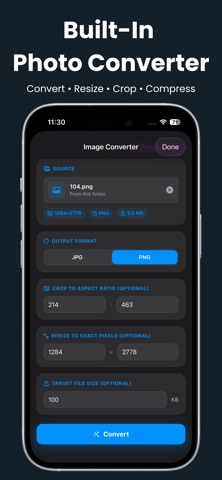
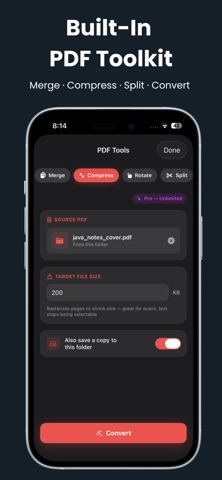
Send and receive files wirelessly between your devices, or share photos, videos, PDFs, and documents with anyone on the same Wi-Fi: laptop, phone, tablet, even a smart TV. Pick a folder, tap Start Server, and share instantly. Includes a Built-In Photo Converter & PDF Toolkit, so you can convert files right where they are.
TWO WAYS TO CONNECT
1. From Any Browser
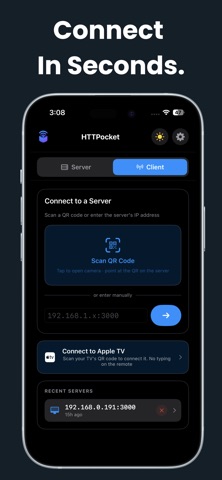
Open the server address in any browser. No app needed on the other device. Scan a QR code to connect in seconds. Works on PC, Mac, phone, tablet, or smart TV.
2. HTTPocket App (iPhone, iPad, Mac)
Connect to …
Read the full description
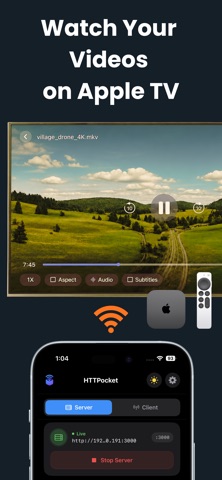
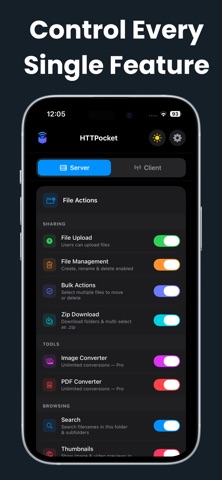
HTTPocket turns your iPhone, iPad, or Mac into your own private file server. No cables, no cloud, no third-party apps. Send and receive files wirelessly between your devices, or share photos, videos, PDFs, and documents with anyone on the same Wi-Fi: laptop, phone, tablet, even a smart TV. Pick a folder, tap Start Server, and share instantly. Includes a Built-In Photo Converter & PDF Toolkit, so you can convert files right where they are. TWO WAYS TO CONNECT 1. From Any Browser Open the server address in any browser. No app needed on the other device. Scan a QR code to connect in seconds. Works on PC, Mac, phone, tablet, or smart TV. 2. HTTPocket App (iPhone, iPad, Mac) Connect to another HTTPocket server using Client Mode for a smoother, native experience. Browse, view, and download right inside the app. 3. HTTPocket for Apple TV Install the free Apple TV app to browse your server and play videos on the big screen, controlled with your Apple TV remote. SEND & RECEIVE FILES (FREE) - Wireless File Sharing: share any folder over Wi-Fi, no cables or internet needed - Upload From Any Device: others can send you files from their browser, including drag-and-drop - Browser Access: anyone connects from any browser, no app required - QR Code Connect: scan to connect instantly, no typing IP addresses - Live Transfer Progress: see speed and time remaining for every file - In-App Chat: message connected devices right from the app - Custom Port: set your own port to fit your network - See Who's Connected: know how many devices are connected - Search & Thumbnails: find files fast, with instant previews - Slideshow: flip through a folder's photos without downloading them - Custom Video Player: play videos in the browser, no downloading needed - Download as Zip: grab a folder or several files as one .zip BROWSE ANOTHER DEVICE (FREE, CLIENT MODE) Skip the browser and connect to another HTTPocket server for a true native app experience, built right in. - Connect in one tap or QR scan - Fast native file browser, no tabs, no page loads - Native video player: switch audio and subtitles, change speed, resume where you left off - View photos with zoom, pan, and fit-to-screen - Read PDFs in a full-screen native viewer - Open text and HTML files without saving them - Save logins for password-protected servers - Remembers recent servers for quick reconnecting - Full Dark Mode support BUILT-IN PHOTO CONVERTER & PDF TOOLKIT No separate app, nothing uploaded. Everything happens on your device. - Photo Converter: JPG, PNG, HEIC, WebP, plus resize, crop, and compress - PDF Toolkit: combine images to PDF, merge, compress, rotate, split pages, or convert to and from Word, Excel, PowerPoint Try each tool free, 3 conversions each, then upgrade to Pro for unlimited use. HTTPOCKET PRO - File Management: create, rename, and delete files from the browser - Bulk Actions: select multiple files to move or delete - Password Protection: lock your server with a username and password - Multi-User Logins: separate logins for different people - Unlimited Conversions: no cap on Photo and PDF tools Available as Monthly, Yearly, or one-time Lifetime purchase. Subscriptions auto-renew unless cancelled 24 hours before the period ends. YOUR FILES STAY YOURS - Everything happens on your local Wi-Fi, nothing sent to an outside server - No account or sign-up needed, no internet connection required - Conversions happen entirely on your device, never uploaded anywhere - Built with Apple's own frameworks, no third-party dependencies By subscribing, you agree to Apple's standard Terms of Use: https://www.apple.com/legal/internet-services/itunes/dev/stdeula/ Privacy Policy: https://httpocket.pntapps.com/privacy-policy Terms of Use: https://httpocket.pntapps.com/terms-and-conditions
Installs
Apple does not publish download counts. Estimates are in testing.
We publish iOS estimates only after they pass a back-test against real numbers. Chart history below is measured.
Estimated store revenue Estimated Beta
App Store, worldwide, monthly rate from the last 13 chart days to 20 Nov 2026
Below the top 100 grossing apps in the markets we calibrate. In the United States that usually means under about $6.4M a month. App Store purchases and subscriptions only, before Apple's 15 to 30% fee. Ads and web payments are not included.
Ratings
6 ratings
No rating breakdown published for this app.
Recent reviews
Latest public reviews from the store
- 12 Aug 2026
Красиво и просто
Получилось бесплатно закинуть на киндл книжку в 7 мегабайт. Спасибо! Главное, чтобы один WiFi был и без впнов.
- 6 Aug 2026
Really cool and well polished app
I’ve been playing around with a free version of this for a little bit and it’s really a cool app. You can tell a lot of thought went into it and the interface is pretty intuitive.
Top chart positions
Latest App Store chart ranks by country, last 10 days
Not in any tracked top chart in the last 10 days.
HTTPocket - WiFi File Transfer history
Release, install milestones, listing and store changes
- First released on the store 11 Jun 2026
Update frequency
How often HTTPocket - WiFi File Transfer ships a new version, month by month
1 updates in the last 12 months. About as often as similar apps, which shipped a median of 1 updates in the same year.
Recent versions
Current version 1.0.4
- Version 1.0.431 Jul 2026
• Fixed an issue where Connect to Apple TV did not automatically fetch the server address. • Fixed an issue where the Scan TV's QR Code button remained disabled when a valid server address was available. • Fixed an issue where the first Apple TV connection could appear successful on iPhone but would not complete until a second attempt. Pairing now completes successfully the first time after scanning the TV's QR code. • Improved the Apple TV Quick Connect experience for faster and more reliable pairing. • Minor bug fixes and performance improvements.
Listing keywords
Words and phrases HTTPocket - WiFi File Transfer repeats most in its store listing
Top phrases: apple tv (3), pdf toolkit (3), photo converter (3), wi fi (3), another httpocket server (2).
Highlighted words also appear in the title. Counts cover the title, short description and description.
Compliance
What the listing and the app package show
- Store status
- Live
- Upkeep
- Updated 31 Jul 2026
- Age rating
- 4+
Apps like HTTPocket - WiFi File Transfer
 Library of AviationNazmi Yavuz★ 4.82
 MyNOVECNorthern Virginia Electric Cooperative★ 2.28
 打工人小组件光翔 卓★ 4.96
 TruckbaysTruckbays LLC★ 4.3
 Tornado PRO PlayerMohammed Altam★ 4.44
 VDX - Video ManagerARISEPEAK LP★ 1.74
 TV CastingZeasn Info Technology Co., Ltd.★ 1.86
 Mil-Dot BallisticsTom Holsten★ 3.82
 MySontiqSontiq, Inc.★ 2.4
HTTPocket - WiFi File Transfer: questions and answers
Who makes HTTPocket - WiFi File Transfer?
HTTPocket - WiFi File Transfer is published by Md Imran Ansari.
When was HTTPocket - WiFi File Transfer last updated?
The latest version (1.0.4) was released on 31 Jul 2026.
Is HTTPocket - WiFi File Transfer free?
Yes. HTTPocket - WiFi File Transfer is free to download.
Is HTTPocket - WiFi File Transfer still available?
Yes. HTTPocket - WiFi File Transfer is live on App Store as of 10 Nov 2026.
Track HTTPocket - WiFi File Transfer and its competitors
Watch any app for new versions, rating drops, chart moves and removals. Free plan, no card.