
- Installs
- —
- Apple does not publish download counts
- Rating
- 4.73
- Ratings
- 3.9K
- Version
- 14.0.1
- Updated 12 Apr 2026
- Released
- 21 Jun 2011
- Tracked since 10 May 2026
- Size
- 78 MB
- Needs 15.0
Also on Google Play: ibis Paint (12K ratings)
Screenshots
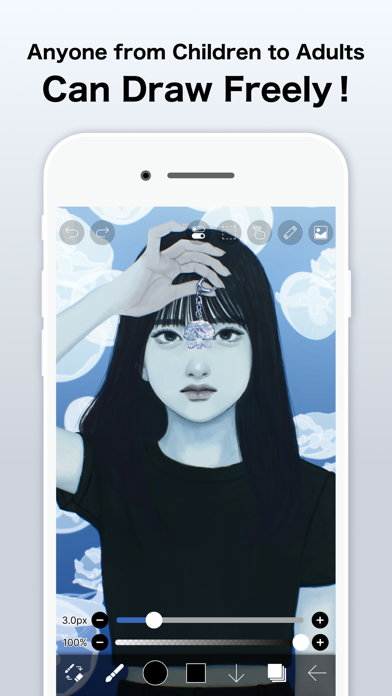
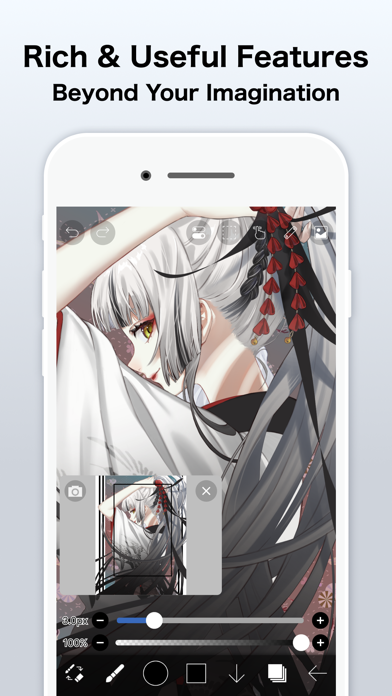
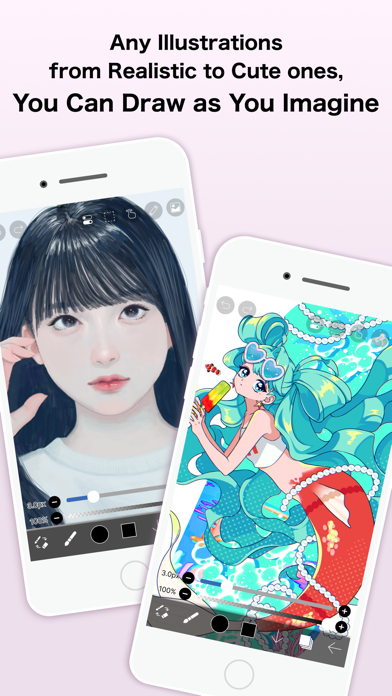

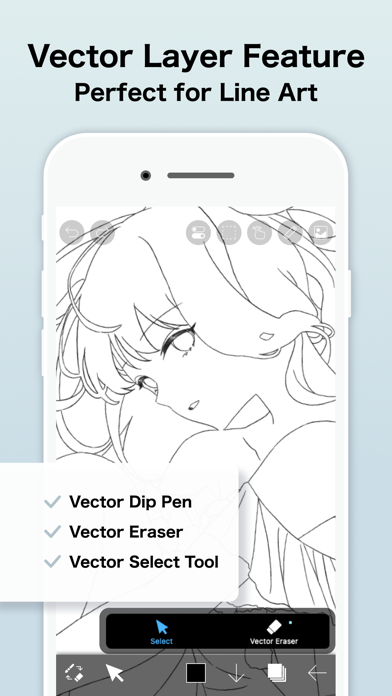


About ibis Paint
The description on the store listing
This app is an ad-removed version of ibisPaint X. An additional in-app purchase for Premium Membership is required to unlock all features, in which case it is cheaper to download ibisPaint X and purchase the Premium Membership there instead.
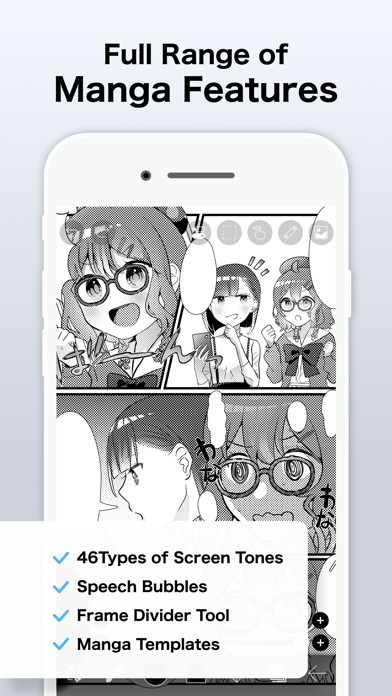
ibis Paint is a popular and versatile drawing app downloaded more than 500 million times in total as a series, which provides over 47000 brushes, over 27000 materials, over 2100 fonts, 84 filters, 46 screentones, 27 blending modes, recording drawing processes, stroke stabilization feature, various ruler features such as radial line rulers or symmetry rulers, clipping mask features.
*YouTube channel
Many tutorial videos on ibis Paint are uploaded to our …
Read the full description
This app is an ad-removed version of ibisPaint X. An additional in-app purchase for Premium Membership is required to unlock all features, in which case it is cheaper to download ibisPaint X and purchase the Premium Membership there instead. ibis Paint is a popular and versatile drawing app downloaded more than 500 million times in total as a series, which provides over 47000 brushes, over 27000 materials, over 2100 fonts, 84 filters, 46 screentones, 27 blending modes, recording drawing processes, stroke stabilization feature, various ruler features such as radial line rulers or symmetry rulers, clipping mask features. *YouTube channel Many tutorial videos on ibis Paint are uploaded to our YouTube channel. Subscribe it! https://youtube.com/ibisPaint *Concept/Features - A Highly functional and professional features surpassing that of desktop drawing apps. - Smooth and comfortable drawing experience realized by OpenGL technology. - Recording your drawing process as a video. - SNS feature where you can learn drawing techniques from other users' drawing process videos. *Features ibis Paint has high functionality as a drawing app along with features of sharing drawing processes with other users. [Brush Features] - Smooth drawing at up to 120 fps. - Over 47000 kinds of brushes including dip pens, felt tip pens, digital pens, air brushes, fan brushes, flat brushes, pencils, oil brushes, charcoal brushes, crayons and stamps. [Layer Features] - You can add layers as many as you need with no limit. - Layer parameters that can be set to each layers individually such as layer opacity, alpha blending, adding, subtracting, and multiplying. - A handy clipping feature for clipping images, etc. - Various layer commands such as layer duplication, import from the photo library, horizontal inversion, vertical inversion, layer rotation, layer moving, and zooming in/out. - A feature for setting layer names to distinguish different layers. [Manga Features] - Advanced text tool function featuring Vertical, Horizontal, Stroke, Font select, and Multiple text functions. *About ibis Paint purchase plan The following purchase plans are available for ibis Paint: - ibis Paint X (free version) - ibis Paint (paid version) - Ad Removal Upgrade - Premium Membership (Monthly plan / Yearly plan) There is no difference in features other than the presence or absence of advertisements for the paid version and the free version. If you purchase the Ad Removal Upgrade, the ads will not be displayed and there will be no difference from the paid version of ibis Paint. In order to use more advanced functions, the following Premium Membership (Monthly plan / Yearly plan) contracts are required. [Premium Membership] A premium member can use the premium features. Only for the first time, a 7-day or 1-month free trial is available. Premium membership entitles you to the following features. - 20GB of cloud storage capacity - Vector tool(*1) - Premium Materials - Premium Canvas Papers - Premium Fonts - Tone Curve filter - Gradation Map filter - Levels Adjustment filter - Premium Adjustment Layers - Surrounding Fill・Surrounding Eraser - AI Disturbance - Artwork folder feature - Import original brush patterns - Remove watermark from videos - Plus many other features exclusive to Premium Membership! (*1) You can try it for free for up to 1 hour per day. * After you become a Premium Membership with a free trial, renewal fee will be charged automatically unless you cancel your Premium Membership at least 24 hours before the end of the free trial period. * We will add premium features in future, please look out for them. *Questions and support Questions and bug reports in reviews will not be responded to, so please contact ibis Paint support. https://ssl.ibis.ne.jp/en/support/Entry?svid=25 *ibisPaint's terms of service https://ibispaint.com/agreement.jsp
Installs
Apple does not publish download counts. Estimates are in testing.
We publish iOS estimates only after they pass a back-test against real numbers. Chart history below is measured.
Estimated store revenue Estimated Beta
App Store, worldwide, monthly rate from the last 12 chart days to 19 Nov 2026
Below the top 100 grossing apps in the markets we calibrate. In the United States that usually means under about $6.4M a month. App Store purchases and subscriptions only, before Apple's 15 to 30% fee. Ads and web payments are not included.
Ratings
3,915 ratings
- 5 ★85%
- 4 ★9.5%
- 3 ★2.2%
- 2 ★0.9%
- 1 ★2.6%
Recent reviews
Latest public reviews from the store
- 30 Dec 2025
I love the app so much it is the best drawing app but there are some problems
This drawing app has the best quality ever I can’t even describe and the different brushes make it even better. I have never found a drawing app like this! And also the animation feature is just 🔥🔥🔥. I luv it so much and I can tell it helped a lot of ibis paint animators. And I found so many useful brushes in it and so many talented creators I can’t believe it. NOW THE PROBLEMS. I just think this version was not worth $10 it is the same as the other one. And the only difference is that there are no ads to use the brushes and yeah. And the prime feature to use some bases is pretty stupid, or to sort your art (or put them in folders) I’m not gonna lie I don’t think prime should be in this version bc we already paid to get the app but ibis paint X is just like this. for $10 is not worth it. I ALSO HAD A PROBLEM. I got the prime (to use a base) but it said one month free trial so I bought it thinking I would get the trial BUT NO. I HAD TO PAY $28 AND IT WAS MY MOM’S CREDIT CARD!? so overall this drawing app was good but I encountered some.. difficulties so I give it a four star THANK YOU FOR YOUR TIME BUT THANK YOU SO MUCH IBIS PAINT NOW I OWE MY MOM $30! I HATE THIS
- 25 Jun 2025
It could be better
The whole concept of a lot of bases and brushes are cool I started my ibis paint journey with ibis paint X thanks to my friend :) the reason I have this 3/5 stars is because you still have to pay 27 bucks per month if you buy this app for 15 bucks I feel like it’s kinda a rip off like why pay if I can play a free app version of this? But it is good for beginners and pros at drawing it’s pretty good tho maybe try ibis paint X for free and then. Decide if you want to buy this app over all it would be better if premium has more to it and maybe free if you buy ibis paint instead of ibis paint X which you would pay for not the best extra perks. I prefer ibis paint X because it’s free so yeah download it! It was made by the EXACTLY THE SAME PEOPLE who mad ibis paint so yeah… download the free app then consider buying this app it would help them make more updates to both of the apps probably, so yeah.. Overall good genre and good game love the stories posted on the online gallery but I hope this review helped you if you are a cautious money spender like how I was when I read the reviews of the game it’s not a bad game just could be cheaper? But yeah download the free app today!
- 3 Jun 2024
I really hope developers read this.
I paid for the pc version and then switched to iPad and no longer have access to premium features. Second please please please add snap to shape. I love the addition of a vector brush and Gaussian blur. It’s worth coming back to ibis paint, And one of the only reasons that I was even using a different application. However, the other reason that ibis paint had gotten pushed to the side is because it does not have snap to shape. Where are you draw a circle and hold it, and it snaps to a perfect circle or oval. Other apps, also allow you to do it with squares or other shapes. It really bothers me because Ibis paint so far is the most natural feeling up to me. The other ones still feel like I’m drawing digitally but ibis paint Has that feel like I’m drawing on real paper. However, it’s missing some of the features that other applications have. Such as Adobe fresco, which has live paint brushes, which makes you feel like you’re really painting with an actual paintbrush, or procreate with the snap to shape as well as a lot more shortcuts that you can pull up on the screen while you’re drawing. I really wish it was a lot higher on my list because it feels so much more natural
- 16 Mar 2024
Love the app, but…
So my IbisPaint just got updated and I have a few things I have to say. Straight off the back, I feel like more and more things are becoming prime features, despite the app costing money to be bought, which I has never been a problem until the Vector Layers have been added. It’s buggy whenever I make a normal breaststroke on a normal layer. It automatically turns into a vector layer, which wouldn’t be an issue in itself is it wasn’t for the fact that vector layers do not have access to the special tool, the smudge tool, and the lasso tool requires prime, as well as an extra added feature that also requires prime. This is really annoying because once again you pay for the app there is ibisPaint X, but even that is starting to become a bit unreasonable with the constant ads every few moments I am begging you to put a feature to disable all prime options so that we don’t have to see or interact with it unless we have prime, like there’s no reason for it to be there taking up space and causing glitches like this just make it something that only appears if you have prime or put an option to disable it please. This app really is amazing but all these additional prime features o
What reviewers bring up
Topics mentioned in the latest 8 reviews, by how many reviews mention them
Liked in good reviews (8 reviews)
- ibis paint 5
- brushes 5
- drawing 4
- better 4
- other 4
- art 4
- pay 4
- procreate 3
Raised in bad reviews (0 reviews)
No topic comes up twice.
Top chart positions
Latest App Store chart ranks by country, last 10 days
- Countries ranked
- 50 of 50
- Best rank
- #2
- Top 10 placements
- 30
- of 71 chart placements
- Average rank
- #29.3
Best countries on App Store
- 🇮🇳 India · Top paid, Graphics & Design#2
- 🇳🇴 Norway · Top paid, Graphics & Design#2
- 🇯🇵 Japan · Top paid, Graphics & Design#2
- 🇨🇱 Chile · Top paid, Graphics & Design#2
- 🇵🇭 Philippines · Top paid, Graphics & Design#3
- 🇧🇷 Brazil · Top paid, Graphics & Design#3
| Country | Chart | Category | Rank | Best (10 days) | Date |
|---|---|---|---|---|---|
| 🇮🇳 India | Top paid | Graphics & Design | #2 | #2 | 19 Nov 2026 |
| 🇳🇴 Norway | Top paid | Graphics & Design | #2 | #2 | 19 Nov 2026 |
| 🇯🇵 Japan | Top paid | Graphics & Design | #2 | #2 | 19 Nov 2026 |
| 🇨🇱 Chile | Top paid | Graphics & Design | #2 | #2 | 19 Nov 2026 |
| 🇵🇭 Philippines | Top paid | Graphics & Design | #3 | #2 | 19 Nov 2026 |
| 🇧🇷 Brazil | Top paid | Graphics & Design | #3 | #3 | 19 Nov 2026 |
| 🇷🇴 Romania | Top paid | Graphics & Design | #4 | #1 | 19 Nov 2026 |
| 🇨🇦 Canada | Top paid | Graphics & Design | #4 | #3 | 19 Nov 2026 |
| 🇻🇳 Vietnam | Top paid | Graphics & Design | #4 | #4 | 19 Nov 2026 |
| 🇹🇭 Thailand | Top paid | Graphics & Design | #4 | #2 | 19 Nov 2026 |
ibis Paint history
Release, install milestones, listing and store changes
- First released on the store 21 Jun 2011
Update frequency
How often ibis Paint ships a new version, month by month
1 updates in the last 12 months. Less often than most similar apps: they shipped a median of 3 updates in the same year.
Recent versions
Current version 14.0.1
- Version 14.0.112 Apr 2026
Thank you for using ibisPaint! The summary of this update is as follows. [Fixed Bugs and Problems] - Fixed a crash that could occur when clearing a layer. - Fixed a crash that occurred when using the "Lasso Selection" feature to the Vector tool, Text tool, and Frame Divider tool while a window close animation was playing. - Fixed an issue where the app could crash when image saving completed. - Fixed an issue where the app could crash during color palette merging, renaming, or color palette QR code importing. - Fixed a bug where the app could crash when deleting an artwork in My Gallery. - Fixed an issue where the app became unresponsive after closing the paywall at startup. - Fixed a bug where the app could crash when using the “Parallel Gradation", “Concentric Gradation” or “Radial Line Gradation”. [New Features in ver. 14.0.0] - You can now create and name multiple color palettes for easier management. - Added a feature to share color palettes via QR code. - Brushes in the "Basic" tab of the Brush window are now organized by category. - Added support for selecting CMYK colors when saving artwork as a JPEG or flattened layer PSD file. - Added support for selecting grayscale (8bit) color space when saving artwork as a PNG or JPEG file. - Added support for selecting binary (1bit) color space when saving artwork as an opaque PNG file. - Added "Speech Bubble" to the Shape tool. - Added "Thin Arrow" to the Shape tool. - You can now adjust the position, shape, and other properties of a shape before finalizing it in the Shape tool. - Added an "Anti-aliasing" option available when "Fill" is enabled in the Shape Tool. When turned on, it smooths the edges of the filled area. - Added "Draw Line by Brush" to the Shape tool settings. - Added new special pens: “Parallel Gradation Pen” and “Concentric Gradation Pen”. - Added knobs to move the start and end points of the gradation in “Parallel Gradation” and "Concentric Gradation". - Added "Transparent-Current Color" to preset
Listing keywords
Words and phrases ibis Paint repeats most in its store listing
Top phrases: ibis paint (10), premium membership (9), paid version (3), ad removal upgrade (2), membership monthly plan (2).
Highlighted words also appear in the title. Counts cover the title, short description and description.
Compliance
What the listing and the app package show
- Store status
- Live
- Upkeep
- Updated 12 Apr 2026
- Age rating
- 12+
Apps like ibis Paint
 Tattoo AI Design Generator-InkRoximus Limited★ 4.66
 NFT Art Creator ·360 Company LLC★ 4.67
 FLYP - Fashion Design StudioFLYP LTD★ 4.65
 الفنان: برنامج الرسم و التلوينSameh Aly★ 3.66
 Value Study: art referenceDiem Limited★ 4.82
 Pixquare - Pixel Art StudioSon Nguyen★ 4.84
 Fleeky - Wallpapers & ThemeCacao Mobile★ 4.72
 AI Art Generator & Logo - HexaSuperapp Labs★ 4.36
 GoArt - AI Art Image GeneratorChengdu Everimaging Science and Technology Co., Ltd★ 4.46
ibis Paint: questions and answers
Who makes ibis Paint?
ibis Paint is published by ibis inc..
When was ibis Paint last updated?
The latest version (14.0.1) was released on 12 Apr 2026.
Is ibis Paint free?
No. ibis Paint is a paid app priced at $15.99.
Is ibis Paint still available?
Yes. ibis Paint is live on App Store as of 10 May 2026.
Track ibis Paint and its competitors
Watch any app for new versions, rating drops, chart moves and removals. Free plan, no card.