
- Installs
- —
- Apple does not publish download counts
- Rating
- 4.0
- Ratings
- 7
- 7 reviews
- Version
- 3.4.42
- Updated 8 Jan 2026
- Released
- 9 May 2010
- Tracked since 26 May 2026
- Size
- 35 MB
- Needs 11.0
Screenshots

About iBunkoHD
The description on the store listing
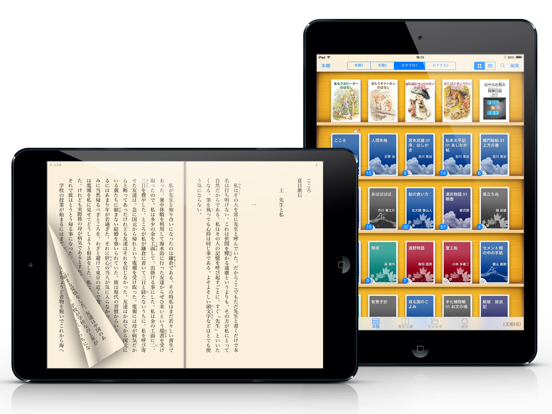
iBunkoHD provides you the best way to read novels, documents and comic books on iPad.
Thanks to a realistic interface, you can enjoy reading as you would with a real paper book. Reading on your iPad is now easier than ever!
This is a great iPad app for all the book lovers!
Won Good Design Award 2010
Ranked #1 in the Japanese App Store in 2010
Read books and comics in vertical setting with comfort
・Support both horizontal (left open) and vertical (right open) writings.
・The app automatically detects the binding direction of a PDF document.
Double page spread and page effect
・When viewed landscape mode, the pages switch to the double page spread. The pages containing landscape format …
Read the full description
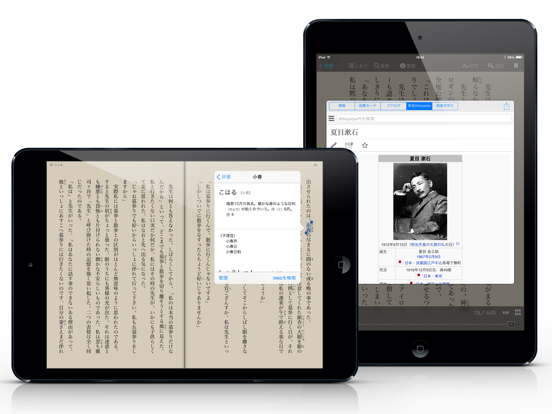
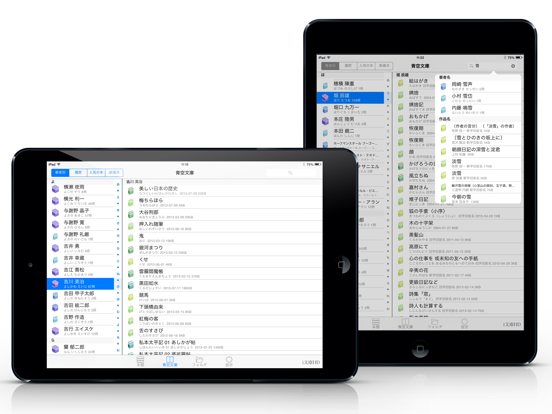
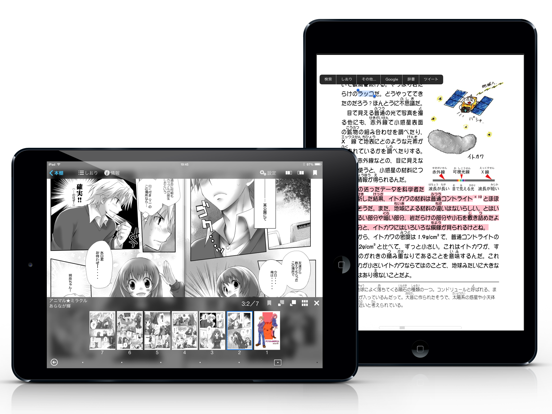
iBunkoHD provides you the best way to read novels, documents and comic books on iPad. Thanks to a realistic interface, you can enjoy reading as you would with a real paper book. Reading on your iPad is now easier than ever! This is a great iPad app for all the book lovers! Won Good Design Award 2010 Ranked #1 in the Japanese App Store in 2010 Read books and comics in vertical setting with comfort ・Support both horizontal (left open) and vertical (right open) writings. ・The app automatically detects the binding direction of a PDF document. Double page spread and page effect ・When viewed landscape mode, the pages switch to the double page spread. The pages containing landscape format images are automatically treated as a double page spread. ・You can "flip" pages just like reading a real paper book. Feature about 230 built-in books and "Aozora Bunko" ・ You can download a book with simple controls from "Aozora Bunko", the Japanese digital library that provides copyright-free Japanese literary works. ・ The app comes with the well-known books from "Aozora Bunko". "Bookshelf" function ・Create a bookshelf as you need. ・You can easily choose a book you'd like to read by browsing the book covers displayed on the shelf. "Bookmark" function ・You can place as many bookmarks as you want and add notes on it. ・Select text as a bookmark in order to highlight the sentence. Supported file formats. iBunkoHD supports the following file formats as books: - .txt .pdf - .zip .rar (containing .txt or .jpg/.png files) - .cbz .cbr Transfer files ・Transfer the files using iTunes 'File Sharing' via the USB cable as well as via Dropbox, SkyDrive, pogoplug, Box, SugarSync. The app also supports both the WebDAV and the FTP servers. Utilize data from PDF ・Support the table of contents or hyperlinks on the file. ・Select and search words (when the data contains text). ・Using our own processing technology, app can select a Japanese words smoothly. Smart screen design removing the white space ・Eliminate unnecessary white space for better readability on the screen. Thumbnails of pages show quick reference for where you'd like to read ・List the page thumbnails at the bottom of the screen or in the full screen. ・The page with bookmarks will be attached a mark. You can also display only the page thumbnails which contain bookmarks. History back pages ・Viewed pages are saved in history so you can easily go back to the previous page. Look up words in the dictionary ・You can use the iPad's built-in dictionary as well as other dictionary apps that support custom URL schemes. ・Just select text and tap the button to look up the word. Support Bluetooth keyboards ・You can read without touching the screen by using the compatible device. Passcode lock ・You can set passcode lock on specific bookshelves or the "folder" screen that stored transferred files. Various page settings ・Available various settings such as enable/disable the flipping effect or change the position of the tap control. ・Customize your iBunkoHD to suit your own preferences! You will find many more convenient functions and settings.
Installs
Apple does not publish download counts. Estimates are in testing.
We publish iOS estimates only after they pass a back-test against real numbers. Chart history below is measured.
Estimated store revenue Estimated Beta
App Store, worldwide, monthly rate from the last 12 chart days to 19 Nov 2026
Below the top 100 grossing apps in the markets we calibrate. In the United States that usually means under about $6.4M a month. App Store purchases and subscriptions only, before Apple's 15 to 30% fee. Ads and web payments are not included.
Ratings
7 ratings, 7 reviews
No rating breakdown published for this app.
Recent reviews
Latest public reviews from the store
No reviews in our sample for this app yet.
Top chart positions
Latest App Store chart ranks by country, last 10 days
- Countries ranked
- 1 of 50
- Best rank
- #80
- Top 10 placements
- 0
- of 1 chart placements
- Average rank
- #80
Best countries on App Store
- 🇯🇵 Japan · Top paid, Books#80
| Country | Chart | Category | Rank | Best (10 days) | Date |
|---|---|---|---|---|---|
| 🇯🇵 Japan | Top paid | Books | #80 | #74 | 19 Nov 2026 |
iBunkoHD history
Release, install milestones, listing and store changes
- First released on the store 9 May 2010
Update frequency
How often iBunkoHD ships a new version, month by month
1 updates in the last 12 months. More often than most similar apps: they shipped a median of 0 updates in the same year.
Recent versions
Current version 3.4.42
- Version 3.4.428 Jan 2026
- Minor bug fixes
Listing keywords
Words and phrases iBunkoHD repeats most in its store listing
Top phrases: double page spread (3), aozora bunko (3), double page (3), page spread (3), real paper book (2).
Highlighted words also appear in the title. Counts cover the title, short description and description.
Compliance
What the listing and the app package show
- Store status
- Live
- Upkeep
- Updated 8 Jan 2026
- Age rating
- 4+
Apps like iBunkoHD
 Quran Audio in Arabic, EnglishISLAMOBILE★ 3.7
 Himnario Gracia y DevociónBaldomero Cho★ 4.7
 Opera: Carmina BuranaAppCube Ltd★ 3.06
 Amelia - Story Book for KidsOhNoo Studio★ 4.5
 산책: 내가 산 책들별책★ 4.66
 MangaMax秀娟 桑★ 3.3
 Giant Print Women BibleAPPS STARS DESENVOLVEDORES★ 4.64
 French English Audio Bible良普 李★ 4.12
 ASV Bible*RAVINDHIRAN SUMITHRA★ 4.78
iBunkoHD: questions and answers
Who makes iBunkoHD?
iBunkoHD is published by DWANGO Co., Ltd..
When was iBunkoHD last updated?
The latest version (3.4.42) was released on 8 Jan 2026.
Is iBunkoHD free?
No. iBunkoHD is a paid app priced at $6.99.
Is iBunkoHD still available?
Yes. iBunkoHD is live on App Store as of 1 Jul 2026.
Track iBunkoHD and its competitors
Watch any app for new versions, rating drops, chart moves and removals. Free plan, no card.