
- Installs
- —
- Apple does not publish download counts
- Rating
- 4.72
- Ratings
- 5.6K
- 5.6K reviews
- Version
- 5.5.6
- Updated 28 Oct 2026
- Released
- 6 Jan 2012
- Tracked since 10 May 2026
- Size
- 37 MB
- Needs 12.0
Screenshots

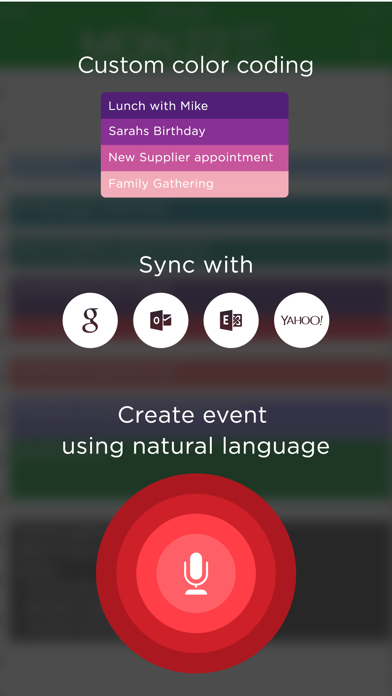
About iCalendar
The description on the store listing
** A MUST-HAVE CALENDAR APP FOR EVERY IPHONE, IPAD, AND IPOD **
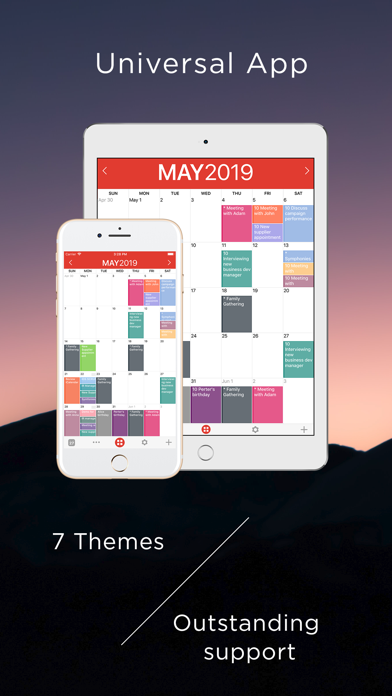
iCalendar is the ultimate calendar for your iPhone, iPad and iPod Touch focusing on your productivity. It’s seamless, highly usable interface allows you to enter events quickly and helps you keep track of your busy schedule. It integrates with your iCloud, Google, Exchange, Outlook, or Yahoo! account to provide you with the most convenient calendaring experience.
EASILY TRACK YOUR SCHEDULE
- View your daily, weekly, monthly, and yearly schedule.
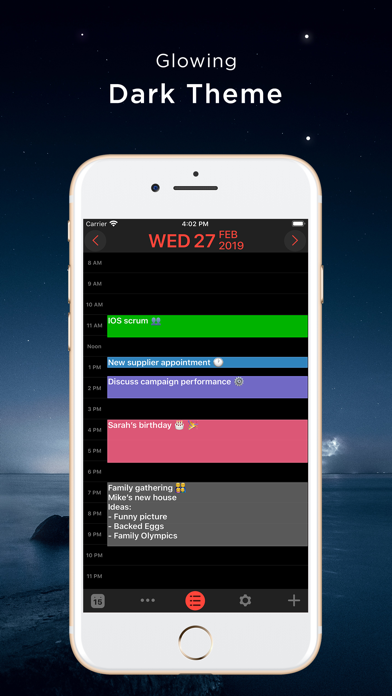
- Custom color-code your events. Use predefined colors, or make up your own colors.
- iCalendar implements quickest way on the market to navigate between dates
- Fast and powerful …
Read the full description
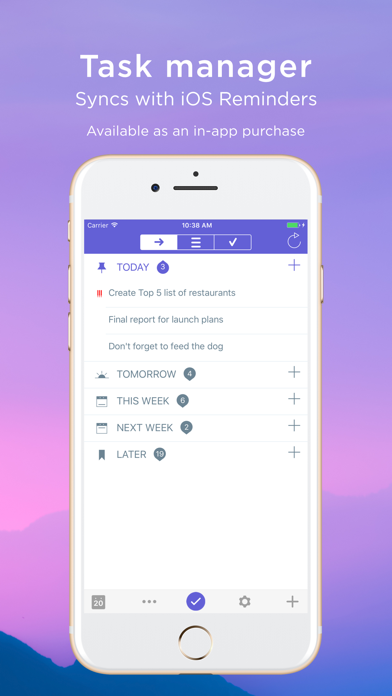
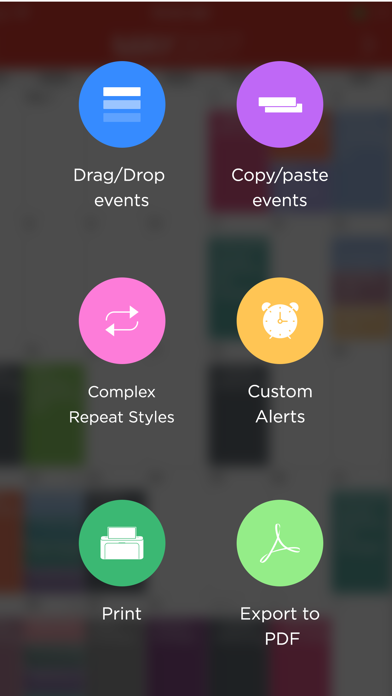
** A MUST-HAVE CALENDAR APP FOR EVERY IPHONE, IPAD, AND IPOD ** iCalendar is the ultimate calendar for your iPhone, iPad and iPod Touch focusing on your productivity. It’s seamless, highly usable interface allows you to enter events quickly and helps you keep track of your busy schedule. It integrates with your iCloud, Google, Exchange, Outlook, or Yahoo! account to provide you with the most convenient calendaring experience. EASILY TRACK YOUR SCHEDULE - View your daily, weekly, monthly, and yearly schedule. - Custom color-code your events. Use predefined colors, or make up your own colors. - iCalendar implements quickest way on the market to navigate between dates - Fast and powerful search: Search events by title, location, and notes. NEW IN VERSION 4.0 - Task Manager: Manage your tasks within your calendar in a fun and easy manner and sync with iOS Reminders. Available as in-app purchase for USD 0.99. FULL OF PRODUCTIVITY TOOLS - Drag and drop an event to update its timing. - Copy and paste events. - Create custom repeating events (e.g. repeat on the third Friday every month, and many more). - Add custom alerts/reminders for events and snooze alerts - Access your event details quickly by tapping on the event. - Customize the visible time period (e.g. from 9:00 AM – 5:00 PM) to help you focus on most important events. EVEN MORE - Time Zone Support: View and create your events in your preferred time zone and never get confused when you travel. - Complete print functionality. Print daily, weekly, monthly, and yearly views. - Export any view (day, week, month, year) as a PDF file. - Use built-in maps to set the location of your events. - Dial into a conference call with one touch right from iCalendar. Add phone numbers from your contacts to events with the ability to use pause and wait, which is ideal for conference calls. - Set location of an event as the address or phone number of one of your contacts. - Access all your events directly from the Month view - no need to go to each individual day to review full list of events. - Use the app icon badge to indicate either the number of upcoming events or the day of the month. - Google Calendar sync: sync all of your calendars, create and edit Google Calendar events, and use Google Calendar custom reminders (SMS, email and/or alert). - Add, edit and delete calendars right from iCalendar. - Support of portrait and landscape to match your orientation preference. - iCalendar is a universal app. Download once and use across all your devices. - For more details: http://www.symfonies.com/icalendar/ iCalendar offers access to interesting calendars from Calendar Store as an optional in-app purchase. You may subscribe to your holidays calendar (national/religious) or subscribe to interesting calendars (e.g. local/global sports events, stocks, weather, and many others). With an optional in-app purchase yearly subscription, you get full and ongoing access to the Calendar Store including (live) updates in your calendar. A subscription always starts with a one-month free trial, so you can try before you buy. One year subscriptions for the Calendar Store costs $1.99. Payment will be charged to your iTunes Account at confirmation of purchase and after the 1 month free trial. Subscriptions automatically renew unless auto-renew is turned off at least 24-hours before the end of the current period. Your account will be charged for renewal within 24-hours prior to the end of the current 1 year period. You can turn off auto-renew at any time from your iTunes account settings. Cancellation of the current active subscription period is not allowed. Our terms of service and privacy policy are found at http://www.symfonies.com/terms-of-service/ and http://www.symfonies.com/privacy-policy/ respectively. If you have a question, need help or would like to request a feature, please do not hesitate to contact us. We respond to EVERY email we receive: [email protected]
Installs, last 30 days
Apple does not publish download counts. Estimates are in testing.
Estimated store revenue Estimated Beta
App Store, worldwide, monthly rate from the last 12 chart days to 19 Nov 2026
Below the top 100 grossing apps in the markets we calibrate. In the United States that usually means under about $6.4M a month. App Store purchases and subscriptions only, before Apple's 15 to 30% fee. Ads and web payments are not included.
Ratings
5,611 ratings, 5,611 reviews
- 5 ★84%
- 4 ★9.7%
- 3 ★2.9%
- 2 ★1.2%
- 1 ★2.3%
Recent reviews
Latest public reviews from the store
- 3 Aug 2023
Love it!! Only 1 downfall
I absolutely love this app and have been using it for a very long time. I love the color coding and that I can look at the month and know what I have going on. It’s so convenient. My only complaint is I need to have times written on each block. For example, when I write “4pm Dr appt” it changes the time to 4pm but it takes that I wrote 4pm. I do not like that. I have to go back into the spot and change it again to say 4pm Dr appt. There has to be a way to change this. I do not like to have to click on each block to see the start time. It wasn’t always like this, it came after an update a few years ago and I really don’t like it. If I title a spot as “4pm dr appt” I want it to stay and say that. I hope this can get fixed. It’s inconvenient.
- 23 Jan 2023
Still one of my favorite apps
This continues to be one of my most used apps. It is much superior to the native calendar app, and others I have tried. My favorite thing is the way you can see at a glance in month view what you are doing each day, color coded with readable text. My only complaint is that, while it is a cool and helpful feature that when you enter in a time, it automatically schedules it to that particular time, I still would like for it to leave the time as text. I understand why some people would want for it to delete that automatically, but there are some days where I want it only to display the time, as I know based on my color coding it means I’m going in to work, but I go in at different times throughout the week so I like to have the time displayed. Instead it changes my text to “New Event” which is not helpful.. The work around is that when I type in the time, I select and copy the text, then after creating the event, I paste it in again, and then it lets me have that as the text. But that gets a little tedious, so I would like if there were an option in settings that would let the time not be deleted from the text to begin with. (If that makes sense??) Despite this issue, the ap
- 21 Dec 2022
Great for keeping on schedule with college assignments
This saved me when I was trying to make sure I didn’t miss any assignments my last 2 years of college. I haven’t had to use this for a few years after that. But I need to used it today to make sure I did a couple tasks today. I forgot to put a time on them after I had already saved them but it kept glitching and taking me back to the previous screen. Also, I remember that this didn't sync at all with Google Calendar which would’ve saved me a lot of manual labor of having to enter my assignments from the syllabus. Other than that this is a solid app to use for reminders and settings tasks and color coding them for each class like I needed.
- 9 Jun 2019
Top Calendar App
I have used this calendar for many many years. People constantly ask me what I use. The monthly view and the ability to arrange your schedule in such a clear manner are not equaled by any other app I’ve tried. Although some navigation steps have changed over the years, it is still outstanding. The company I work for does not have employee scheduling apps. We make our schedules months in advance. For me it’s a 1 minute activity to set up my calendar to submit a screen shot monthly schedule, others need to fill out calendars and then hoping it’s the same as on their own device. As I like to manage my time this app is a perfect fit. Probably my favorite of any app.
What reviewers bring up
Topics mentioned in the latest 8 reviews, by how many reviews mention them
Liked in good reviews (6 reviews)
- calendar 5
- view 4
- see 4
- complaint 3
- month 3
- event 3
- color coding 2
- extensively 2
Raised in bad reviews (0 reviews)
No topic comes up twice.
Top chart positions
Latest App Store chart ranks by country, last 10 days
- Countries ranked
- 42 of 50
- Best rank
- #5
- Top 10 placements
- 1
- of 43 chart placements
- Average rank
- #63.5
Best countries on App Store
- 🇵🇹 Portugal · Top paid, Productivity#5
- 🇳🇴 Norway · Top paid, Productivity#16
- 🇵🇭 Philippines · Top paid, Productivity#19
- 🇮🇹 Italy · Top paid, Productivity#23
- 🇨🇦 Canada · Top paid, Productivity#30
- 🇳🇿 New Zealand · Top paid, Productivity#35
| Country | Chart | Category | Rank | Best (10 days) | Date |
|---|---|---|---|---|---|
| 🇵🇹 Portugal | Top paid | Productivity | #5 | #3 | 19 Nov 2026 |
| 🇳🇴 Norway | Top paid | Productivity | #16 | #5 | 19 Nov 2026 |
| 🇵🇭 Philippines | Top paid | Productivity | #19 | #3 | 19 Nov 2026 |
| 🇮🇹 Italy | Top paid | Productivity | #23 | #17 | 19 Nov 2026 |
| 🇨🇦 Canada | Top paid | Productivity | #30 | #12 | 19 Nov 2026 |
| 🇳🇿 New Zealand | Top paid | Productivity | #35 | #31 | 19 Nov 2026 |
| 🇿🇦 South Africa | Top paid | Productivity | #37 | #36 | 19 Nov 2026 |
| 🇵🇪 Peru | Top paid | Productivity | #37 | #37 | 19 Nov 2026 |
| 🇬🇷 Greece | Top paid | Productivity | #38 | #36 | 19 Nov 2026 |
| 🇫🇮 Finland | Top paid | Productivity | #39 | #34 | 19 Nov 2026 |
iCalendar history
Release, install milestones, listing and store changes
- First released on the store 6 Jan 2012
Update frequency
How often iCalendar ships a new version, month by month
1 updates in the last 12 months. Less often than most similar apps: they shipped a median of 2 updates in the same year.
Recent versions
Current version 5.5.6
- Version 5.5.628 Oct 2026
What's New ... - Improved compatibility with iOS 27 and watchOS 27. Thank you for using iCalendar! We would really appreciate it if you could take a moment to review our app on the App Store. Your suggestions and feedback help us keep improving. Please don’t hesitate to contact us with any questions or suggestions at [email protected]. We respond to every email we receive. Stay tuned for more features to come!
- Version 5.5.42 Jul 2024
This app has been updated by Apple to prepare for watchOS 27 compatibility. No new features are included. What's New ... - Upgrades for iOS 17. Thank you for using iCalendar! We would really appreciate if you take a moment to review our app on the App Store. Your suggestions and feedback will help us keep improving. Do not hesitate to contact us for any question or suggestion. We respond to every email we receive. Our email is [email protected] Stay tuned for more features to come.
Listing keywords
Words and phrases iCalendar repeats most in its store listing
Top phrases: calendar store (3), google calendar (3), daily weekly monthly (2), ipad and ipod (2), month free trial (2).
Highlighted words also appear in the title. Counts cover the title, short description and description.
Compliance
What the listing and the app package show
- Store status
- Live
- Upkeep
- Updated 28 Oct 2026
- Age rating
- 4+
Apps like iCalendar
 Mi Tigo PanamáGrupo de Comunicaciones Digitales S.A.★ 4.73
 ClockZ | Clock Display + AlarmRage Box★ 4.51
 Brain.fm: Focus & Sleep MusicBrain.fm★ 4.55
 Translate ٞImpala Studios★ 4.58
 Forms for Google Forms & QuizNiharika Jindal★ 4.7
 百度网盘Beijing Duyou Science and Technology Co.,Ltd.★ 3.38
 InSaver : Video DownloaderThembi Mothalo★ 4.59
 Cleaner Master:ai cleanerAPPFORGE TECHNOLOGIES PTE. LTD.★ 4.7
 Rove Dash CamROVE Dash Cam★ 4.25
iCalendar: questions and answers
Who makes iCalendar?
iCalendar is published by Symfonies, Inc..
When was iCalendar last updated?
The latest version (5.5.6) was released on 28 Oct 2026.
Is iCalendar free?
No. iCalendar is a paid app priced at $2.99.
Is iCalendar still available?
Yes. iCalendar is live on App Store as of 19 Nov 2026.
Track iCalendar and its competitors
Watch any app for new versions, rating drops, chart moves and removals. Free plan, no card.