
- Installs
- —
- Apple does not publish download counts
- Rating
- 2.5
- Ratings
- 10
- 10 reviews
- Version
- 1.0
- Updated 23 Jan 2018
- Released
- 23 Jan 2018
- Tracked since 11 May 2026
- Size
- 43 MB
- Needs 8.0
Screenshots


About iCapture: Document Scanner
The description on the store listing
iCapture: using iPhone camera to scan document, receipts, notes whiteboard, business card, etc.
iCapture is like a scanner in your pocket. Easy to use: Auto scan and detect document by Camera live view or photo from Library. Export scanned images into clear and sharp images or PDF files.
Our features:
- Capture and crop a picture of a whiteboard or blackboard
- Make digital copies of your printed documents, business cards, poster, invoices, receipts, certificates and trim them precisely
- Image Processing: auto cropping, auto detection and processing image into good shape, make document look clear and sharp. We also support image filters for scanned documents/images.
- Document …
Read the full description
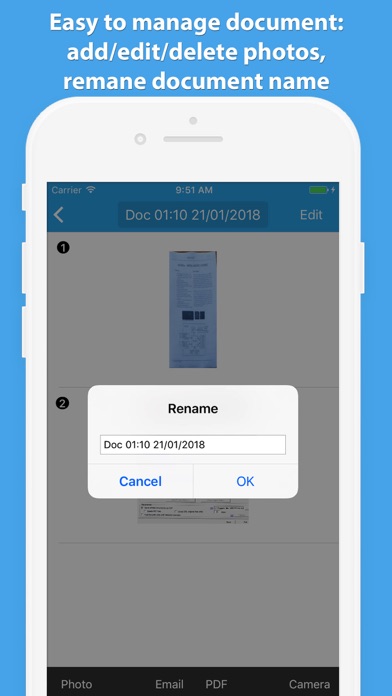
iCapture: using iPhone camera to scan document, receipts, notes whiteboard, business card, etc. iCapture is like a scanner in your pocket. Easy to use: Auto scan and detect document by Camera live view or photo from Library. Export scanned images into clear and sharp images or PDF files. Our features: - Capture and crop a picture of a whiteboard or blackboard - Make digital copies of your printed documents, business cards, poster, invoices, receipts, certificates and trim them precisely - Image Processing: auto cropping, auto detection and processing image into good shape, make document look clear and sharp. We also support image filters for scanned documents/images. - Document Management: easy to manage documents when using app ( add/edit/delete images, edit document's title) - Support iPhone X screen. - Improve and developing: we are still working hard everyday to bring best product with good quality to users. Please feel free to give us your feedback. iCapture is FREE and No Ads inside.
Installs
Apple does not publish download counts. Estimates are in testing.
We publish iOS estimates only after they pass a back-test against real numbers. Chart history below is measured.
Estimated store revenue Estimated Beta
App Store, worldwide, monthly rate from the last 12 chart days to 19 Nov 2026
Below the top 100 grossing apps in the markets we calibrate. In the United States that usually means under about $6.4M a month. App Store purchases and subscriptions only, before Apple's 15 to 30% fee. Ads and web payments are not included.
Ratings
10 ratings, 10 reviews
No rating breakdown published for this app.
Recent reviews
Latest public reviews from the store
- 24 Jan 2018
Excellent app - Highly recomended
This app can scan EVERY printed document. No login or any payment required. All is automatic: Camera can auto detect document area immediately and crop it. Very useful for me everyday scanning: my shop receipts, business cards.
Top chart positions
Latest App Store chart ranks by country, last 10 days
Not in any tracked top chart in the last 10 days.
iCapture: Document Scanner history
Release, install milestones, listing and store changes
- First released on the store 23 Jan 2018
Recent versions
Current version 1.0
- Version 1.023 Jan 2018
This update from Apple will improve the functionality of this app. No new features are included.
Listing keywords
Words and phrases iCapture: Document Scanner repeats most in its store listing
Top phrases: clear and sharp (2).
Highlighted words also appear in the title. Counts cover the title, short description and description.
Compliance
What the listing and the app package show
- Store status
- Live
- Upkeep
- No update since 23 Jan 2018
- Age rating
- 4+
Apps like iCapture: Document Scanner
 Super VPN: Fast Private ProxyGeek Incorporated★ 4.4
 Hubtel RetailerHubtel Limited★ 4.32
 Monthly Calendar 2022 - CalistOmoboto LLC★ 4.38
 Firstly: To-Do List & PlannerfocusCove LLC★ 4.7
 CBUS 311City of Columbus, Ohio★ 1.8
 Themes for Powerpoint - DesiGNGraphic Node★ 4.22
 iSiloDC & Co.★ 3.82
 Flashlight Pro [Multipurpose LED light]KAVAPOINT★ 3.88
 WiPryOscium LLC★ 2.68
iCapture: Document Scanner: questions and answers
Who makes iCapture: Document Scanner?
iCapture: Document Scanner is published by Hung Nguyen.
When was iCapture: Document Scanner last updated?
The latest version (1.0) was released on 23 Jan 2018.
Is iCapture: Document Scanner free?
Yes. iCapture: Document Scanner is free to download.
Is iCapture: Document Scanner still available?
Yes. iCapture: Document Scanner is live on App Store as of 1 Jul 2026.
Track iCapture: Document Scanner and its competitors
Watch any app for new versions, rating drops, chart moves and removals. Free plan, no card.