
- Installs
- —
- Apple does not publish download counts
- Rating
- 1.33
- Ratings
- 21
- 21 reviews
- Version
- 1.5
- Updated 28 Dec 2022
- Released
- 19 Aug 2019
- Tracked since 10 May 2026
- Size
- 17 MB
- Needs 13.0
Screenshots

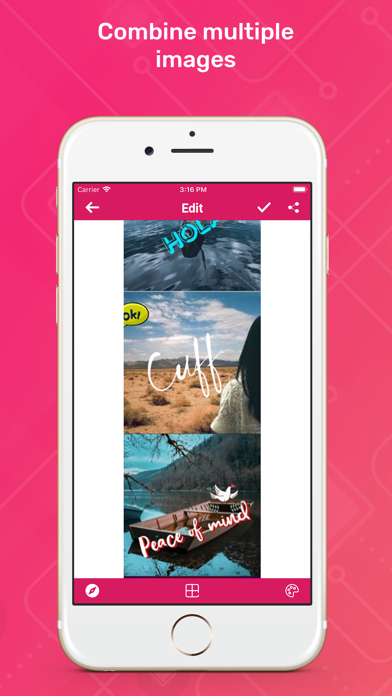


About Image Combiner
The description on the store listing
Users now are very much interested in the image compression, merge image, combine image, combine jpg, photo merge, merge images, combine images, image combine operations. Image Combiner is one of the best iOS app that facilitates the user with the best user experience while dealing with combine image or merge image operations. Image combiner app is a high-utility photo-editing app that encompasses a wide range of editing options that enhance the combined image via certain editing criteria like horizontal or vertical view, spacing between the display of images, individual frame editing, the whole image frame orientation by sliding mechanism. The horizontal and vertical both view of the …
Read the full description
Users now are very much interested in the image compression, merge image, combine image, combine jpg, photo merge, merge images, combine images, image combine operations. Image Combiner is one of the best iOS app that facilitates the user with the best user experience while dealing with combine image or merge image operations. Image combiner app is a high-utility photo-editing app that encompasses a wide range of editing options that enhance the combined image via certain editing criteria like horizontal or vertical view, spacing between the display of images, individual frame editing, the whole image frame orientation by sliding mechanism. The horizontal and vertical both view of the merged images depicts the notion of the earlier filmstrip mechanisms that elucidate the existence of the big screen notion to the combined images photo montage. Utilities: - Select images from the phone memory. - Click on the tick option on the top right corner of the screen which will lead yo to the combiner screen. - The combiner window offers the user three options: alignment of the images, Space adjustment in different sections of the photo montage, and a collection of grid colour options. - You can also crop ,zoom in/out your particular image in frame. - Select the alignment view of the images whether horizontal or vertical view. - The spacing section employs a sliding mechanism to induce cell spacing among the images. Three spacing options: invoke space between the images, modify the frame of the individual frames, and alter the frame boundary by giving it a circular drift at the corners. - Grid color options present an enormous assembly of color options to give a finishing look to the image combiner photo montage. - Easily save and share the combined image photo montage over WhatsApp, Instagram, snap chat, etc. Features: - Easy to install. - Free to operate. - Easy-to-use functionality. - Attractive and intuitive design. - User-friendly GUI. - Import images from the phone memory. - Professional image combiner ( jpg combiner ) tool. - Instant click executions. - Horizontal and vertical merge operations facilitated. - Various space editing options to enhance the appealing power of the photo montage. - Stunning grid color options to provide a well-furnished look. - Once installed, no further internet connection is required. - Lightweight application, will not drain a phone battery and other resources. Image Combiner is a feature-driven free iOS app that employs professional photo maker and photo editor tools embedded with articulate imager combiner, imager merger and image combiner editor. Merge your stunning images into a single frame and flaunt them instantly with the aid of the prolific Image Combiner app. Hurry Up!!! Install the Image Combiner app NOW!!!
Installs
Apple does not publish download counts. Estimates are in testing.
We publish iOS estimates only after they pass a back-test against real numbers. Chart history below is measured.
Estimated store revenue Estimated Beta
App Store, worldwide, monthly rate from the last 13 chart days to 20 Nov 2026
Below the top 100 grossing apps in the markets we calibrate. In the United States that usually means under about $6.4M a month. App Store purchases and subscriptions only, before Apple's 15 to 30% fee. Ads and web payments are not included.
Ratings
21 ratings, 21 reviews
No rating breakdown published for this app.
Recent reviews
Latest public reviews from the store
No reviews in our sample for this app yet.
Top chart positions
Latest App Store chart ranks by country, last 10 days
Not in any tracked top chart in the last 10 days.
Image Combiner history
Release, install milestones, listing and store changes
- First released on the store 19 Aug 2019
Recent versions
Current version 1.5
- Version 1.528 Dec 2022
- Bug fixes - Performance improvements
Listing keywords
Words and phrases Image Combiner repeats most in its store listing
Top phrases: image combiner (9), photo montage (5), color options (3), image combine (3), grid color options (2).
Highlighted words also appear in the title. Counts cover the title, short description and description.
Compliance
What the listing and the app package show
- Store status
- Live
- Upkeep
- No update since 28 Dec 2022
- Age rating
- 4+
Apps like Image Combiner
 Video CollageaZeR DiLLs★ 4.08
 Vee for VideoMedious★ 2.98
 Beauty Camera -Selfie, StickerBhuvan Gupta★ 4.5
 FinalCamXShenzhen Xiaozhen Technology Co.,Ltd.★ 4.44
 Magic Studio - AI Photo EditorMagicStudio.com★ 4.62
 Foto Impresiones: 1 Hr PhotoSoftwareX★ 4.98
 SnapGeo - AI Location FinderRECEP ASLAN★ 4.24
 Family Photo Maker - AIRick-y Media★ 4.12
 BeautifAI: AI Try OnJAI UYGULAMA VE YAPAY ZEKA TEKNOLOJILERI ANONIM SIRKETI★ 4.36
Image Combiner: questions and answers
Who makes Image Combiner?
Image Combiner is published by Kevin Ghori.
When was Image Combiner last updated?
The latest version (1.5) was released on 28 Dec 2022.
Is Image Combiner free?
Yes. Image Combiner is free to download.
Is Image Combiner still available?
Yes. Image Combiner is live on App Store as of 1 Jul 2026.
Track Image Combiner and its competitors
Watch any app for new versions, rating drops, chart moves and removals. Free plan, no card.