
- Installs
- —
- Apple does not publish download counts
- Rating
- —
- Ratings
- —
- Version
- 1.9.0
- Updated 16 Nov 2020
- Released
- 18 Jan 2011
- Tracked since 10 May 2026
- Size
- 3 MB
- Needs 10.7
Screenshots
About Ink2Go
The description on the store listing
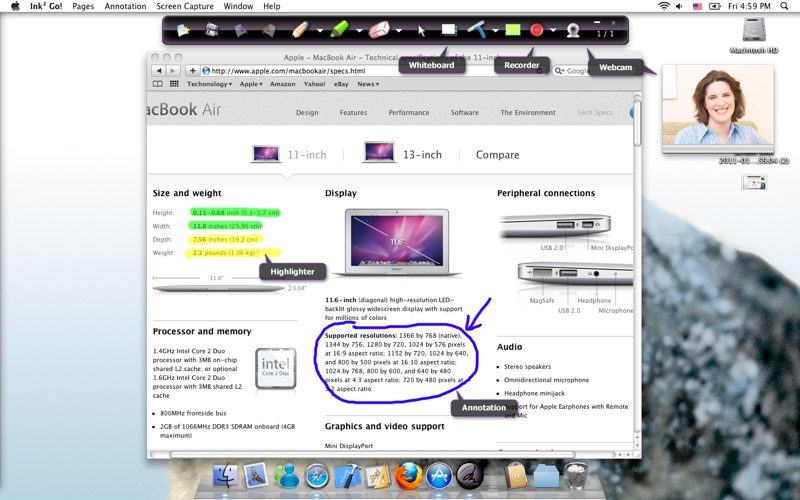
Ink2Go is an extremely simple and powerful screen annotation and recording software. Using Ink2Go you can easily write on top of any other application currently active on the desktop, even on a running video. You can then save your annotations as an image file or even record the whole session as a video for sharing.
Ink2Go is a perfect tool for presenters to share ideas during a live session, for educators to create effective video tutorials and for salespeople to create impressive video presentations.
The toolbar can be changed to span vertically.
Go under the Ink2Go menu, the toolbar can be set to either horizontal or vertical orientation to fit your needs.
1. Keynote’s Presentation …
Read the full description
Ink2Go is an extremely simple and powerful screen annotation and recording software. Using Ink2Go you can easily write on top of any other application currently active on the desktop, even on a running video. You can then save your annotations as an image file or even record the whole session as a video for sharing. Ink2Go is a perfect tool for presenters to share ideas during a live session, for educators to create effective video tutorials and for salespeople to create impressive video presentations. The toolbar can be changed to span vertically. Go under the Ink2Go menu, the toolbar can be set to either horizontal or vertical orientation to fit your needs. 1. Keynote’s Presentation Mode – Users are now able to use Ink2Go in Keynote’s presentation mode, without the need to configure the settings in Ink2Go. 2. “Interactive Whiteboard” feature – Ink2Go can now readily support Keynote’s presentation on an iPad when it mirrors (with the help of Air Display) the screen of a Macbook or iMac, allowing users to turn their iPads into Interactive Whiteboards. 3. Global Hotkeys – Users can use the global hotkeys to easily switch between annotation mode and writing mode, showing and hiding of toolbar, toggling between whiteboard and desktop, and to show and hide web camera. 4. Sliding Toolbar – Users can now minimize or hide the Ink2Go toolbar to the side of the screen for easy later retrieval. 5. Whiteboard and Blackboard – Users can now choose either white or black background when they are in the Whiteboard mode. 6. Saving of Tool Settings – Ink2Go will save the tool settings before the program exits so that the users can conveniently use the same settings in later sessions. Features Screen Annotation - Let you write, draw or highlight on any content being shown on the desktop from any app, be it a webpage, a slideshow or a running video. - Save the current desktop with your annotations as an image. Screen Recording - Record the desktop together with your annotations as a video. - Record your voice from the microphone. - Let you define a region of interest on the screen and only record within that region. - Allow pause and resume during a recording session. Web camera - Toggle the webcam view on/off for recording. For a video presentation, showing your webcam view might help you connect better with your audience. Whiteboard - Toggle between your desktop screen and a whiteboard with just a single-click. Helpful when you want to quickly show your idea on a clean page. Multiple pages - Let you create a new page to annotate without destroying the current annotations. You can easily go back and forth between the created pages. Intuitive UI - Floating toolbar that can be moved around, so that it never gets into the way. - Pens, highlighters and erasers of various colors and sizes for your convenience. - Mouse mode that let you control other applications as per normal while your annotations are still showing on top. Presentation Mode - Work with other presentation software like Apple Keynote and OpenOffice Impress.
Installs
Apple does not publish download counts. Estimates are in testing.
We publish iOS estimates only after they pass a back-test against real numbers. Chart history below is measured.
Estimated store revenue Estimated Beta
App Store, worldwide, monthly rate from the last 14 chart days to 21 Nov 2026
Below the top 100 grossing apps in the markets we calibrate. In the United States that usually means under about $6.4M a month. App Store purchases and subscriptions only, before Apple's 15 to 30% fee. Ads and web payments are not included.
Ratings
No rating breakdown published for this app.
Recent reviews
Latest public reviews from the store
No reviews in our sample for this app yet.
Top chart positions
Latest App Store chart ranks by country, last 10 days
Not in any tracked top chart in the last 10 days.
Ink2Go history
Release, install milestones, listing and store changes
- First released on the store 18 Jan 2011
Recent versions
Current version 1.9.0
- Version 1.9.016 Nov 2020
Fixed crashes on Big Sur.
Listing keywords
Words and phrases Ink2Go repeats most in its store listing
Top phrases: keynote’s presentation (3), presentation mode (3), keynote’s presentation mode (2), global hotkeys (2), running video (2).
Highlighted words also appear in the title. Counts cover the title, short description and description.
Compliance
What the listing and the app package show
- Store status
- Live
- Upkeep
- No update since 16 Nov 2020
- Age rating
- 4+
Apps like Ink2Go
 GoTime RepairAudatex North America Inc.★ 3.94
 Super VPN: Fast Private ProxyGeek Incorporated★ 4.4
 Hubtel RetailerHubtel Limited★ 4.32
 Monthly Calendar 2022 - CalistOmoboto LLC★ 4.38
 CBUS 311City of Columbus, Ohio★ 1.8
 Themes for Powerpoint - DesiGNGraphic Node★ 4.22
 iSiloDC & Co.★ 3.82
 Flashlight Pro [Multipurpose LED light]KAVAPOINT★ 3.88
 WiPryOscium LLC★ 2.68
Ink2Go: questions and answers
Who makes Ink2Go?
Ink2Go is published by Teevers Pte. Ltd..
When was Ink2Go last updated?
The latest version (1.9.0) was released on 16 Nov 2020.
Is Ink2Go free?
No. Ink2Go is a paid app priced at $19.99.
Is Ink2Go still available?
Yes. Ink2Go is live on App Store as of 10 May 2026.
Track Ink2Go and its competitors
Watch any app for new versions, rating drops, chart moves and removals. Free plan, no card.