
- Installs
- —
- Apple does not publish download counts
- Rating
- 4.64
- Ratings
- 8.7K
- 8.7K reviews
- Version
- 6.5.16
- Updated 19 Oct 2026
- Released
- 27 Jul 2015
- Tracked since 11 May 2026
- Size
- 67 MB
- Needs 13.0
Screenshots
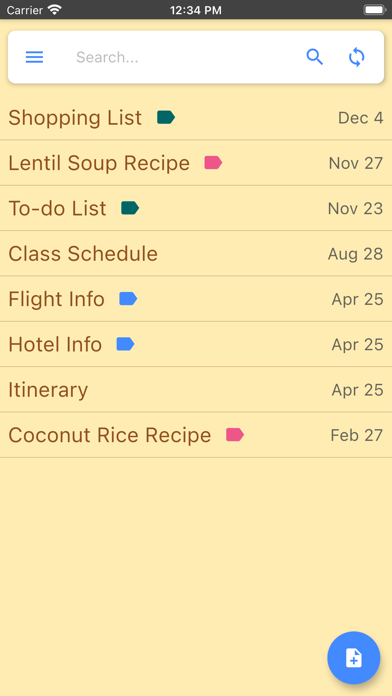
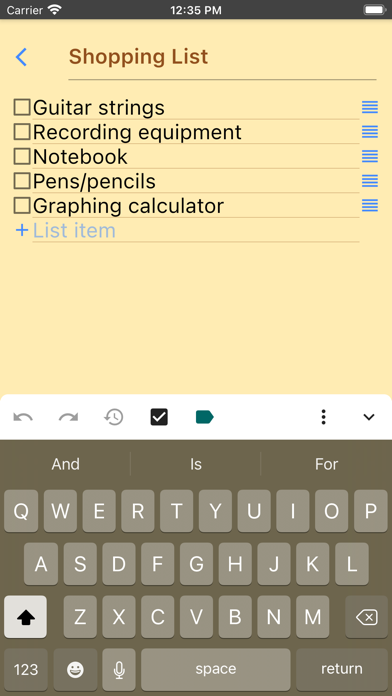
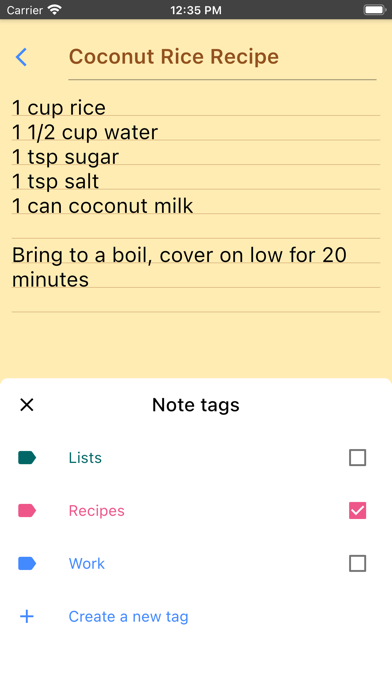
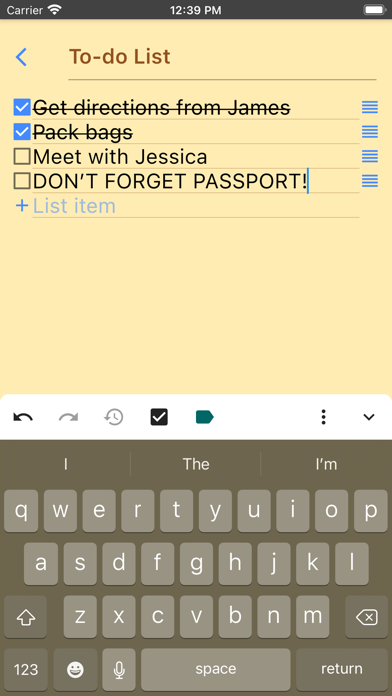
About Inkpad Notepad - Notes - To do
The description on the store listing
InkPad Notepad is the simple, elegant, easy way to keep notes on your phone, or on the web.
Once upon a time, you had to write down notes in a paper notepad and carry it around with you. If you wrote a shopping list or to do list, you might go to the store and discover you had forgotten your notepad. But how often do you forget to bring your mobile phone with you? Introducing InkPad, the notepad you’ll only forget as often as your phone!
Inkpad Notepad let's you access your notes online on our website. You can create or edit notes from the convenience of your computer's web browser, and always have access to your notes from your phone when you're offline too.
CREATE NOTES
InkPad is …
Read the full description
InkPad Notepad is the simple, elegant, easy way to keep notes on your phone, or on the web. Once upon a time, you had to write down notes in a paper notepad and carry it around with you. If you wrote a shopping list or to do list, you might go to the store and discover you had forgotten your notepad. But how often do you forget to bring your mobile phone with you? Introducing InkPad, the notepad you’ll only forget as often as your phone! Inkpad Notepad let's you access your notes online on our website. You can create or edit notes from the convenience of your computer's web browser, and always have access to your notes from your phone when you're offline too. CREATE NOTES InkPad is designed to look like a paper notepad, and is just as simple to use. When you open InkPad, you’ll see a list of all notes you’ve created. To add a new note, tap on the “+” button at the bottom of the screen. CREATE TO DO LIST Create a note as usual, then select the "to do list" button at the top of the note screen. CREATE SHOPPING LIST Create a note as usual, then select the "shopping list" button at the top of the note. EDIT NOTE OR TO DO LIST Now you can write your note. Just like a paper notepad, you don’t have to do anything special to save your notes, they are auto-saved for you. SAVE As mentioned above, notes are auto-saved. You don’t have to do anything special to save them. SYNC NOTES ONLINE Inkpad Notepad lets you sync/backup notes online. You can access your online notes on our website by signing in with the same account you selected in the mobile app. SEARCH YOUR NOTES OR TO DO LISTS Inkpad Notepad now gives you an option to search your notes or to do lists. From the home screen, tap on the search icon, then begin writing. As you write, the list of notes will be filtered to only display notes containing the search keyword. Press the "X" button to clear the note search, and view all notes as usual. SHARE NOTES At the bottom of each note is a “share” button. Tapping it brings up all the ways to share. Typical ways include email, SMS, etc. CHANGE NOTE’S TITLE To change a notes title, tap on the title area at the top of that note. DELETE NOTE If you don’t want a note any longer, you can delete it in several ways: 1) Open the note, tap the “delete” button at the bottom of the page. 2) From the main notes screen, swipe-left the title of a note, then tap on “delete”. BACKUP NOTES To backup a note, press the share button and email to yourself the note you want to backup. TYPICAL USES Write To do lists, shopping lists, addresses, email, SMS, Twitter updates*, write lyrics, poems, or even a novel if you feel like it! The uses are limited only by your imagination. Follow @InkpadNotes on twitter and facebook to receive updates about InkPad Note pad. *Assumes separate Twitter client is installed, Twitter cannot post note pad content longer than 140 characters. Privacy Policy: https://www.inkpadnotepad.com/privacy Terms of Use: https://www.inkpadnotepad.com/terms
Installs, last 30 days
Apple does not publish download counts. Estimates are in testing.
Estimated store revenue Estimated Beta
App Store, worldwide, monthly rate from the last 13 chart days to 20 Nov 2026
Below the top 100 grossing apps in the markets we calibrate. In the United States that usually means under about $6.4M a month. App Store purchases and subscriptions only, before Apple's 15 to 30% fee. Ads and web payments are not included.
Ratings
8,668 ratings, 8,668 reviews
- 5 ★82%
- 4 ★10%
- 3 ★2.1%
- 2 ★1.4%
- 1 ★4.4%
Recent reviews
Latest public reviews from the store
- 6 Sep 2024
Awesome
This is By Far the best app available, as well as the first app I download anytime I buy a new phone. Being able to use their app for making notes that syncs to all your devices for free is incredible and it syncs periodically as well. Or you can pay a couple bucks and get they’re premium version which I flip between them. But I utilize it for all my little phone subscriptions. I’ll make a note of the app, subscription, email used, and password and now it’s available wherever I go. Sure I can save the password to the cloud but if you damage that phone and get a new one you have no way of two factor authentication especially if you broke the screen. I can’t say enough how much this little app is worth it.
- 26 Jul 2024
Love it, but help please!!
I love this app and things are really easy to find, I just wish there were three additional options to make organization a lot nicer and easier: 1. The size is pretty big so I can’t see as much as I’d like to see when just looking at my phone screen, I wish there was a way to adjust the font size or a zoom in/out so I can see more of the whole note/screen at one time. I see there’s differing heading options, but nothing smaller than the default font size which is pretty big and bulky text. Some small times new Roman would be fantastic haha. Something like that would be amazing please!! 2. Update so we can have specific lines within one note with checkboxes but not all. When I select the checkbox option it automatically makes every single line within the entire note to have a checkbox, I couldn’t just do a section of the note with check boxes. I would love to be able to select specific lines within the note to have the checkboxes within one note, so it leaves surrounding/not selected lines without the check boxes, for example. 3. Whenever I paste from somewhere else, I have to click allow paste every single time. I wish there was an option to set it to automatically alway
- 2 Oct 2023
Perfect. So Perfect.
THIS is the notes app I’ve been searching for! It has the features I need, is very intuitive, and it’s not cluttered by don’t-need-fluff. Here’s the perfect package of features this app provides for me: Organization: Folders, Tags, Nested notes, and it’s all searchable! WEB access is flawless… fast sync is automatic. Export options are available in all the “share” ways, including Print. Font options make for easier reading. Checkboxes can be activated so it’s a list… items are manually sortable and easy to check/uncheck Note HISTORY is available Couple things…. I pay $1.99 for Premium because it is SO worth it to me! Would love to see two bonus features: —Attachments allowed —Email INTO InkPad NotePad
- 22 Aug 2023
Please, please, please
I’m giving five stars because I’m hoping you can solve this problem which just recently occurred. This has been the best app for me when I need to make lists - especially grocery lists. HOWEVER, now if I want checkboxes, the rows double in height, which makes it much harder to easily scan my list as I’m shopping. PLEASE go back to allowing checkboxes with narrow rows. The checkboxes make it so easy to see what still needs to be accomplished (put in grocery cart) on my list. Plus I can delete the checked items as I shop, which also helps shopping go faster. I even went so far as to try ‘Reminders’ and ‘Notes’ on my iPhone 13. They still cannot hold a candle to ‘Inkpad’ when it comes to making lists.
What reviewers bring up
Topics mentioned in the latest 8 reviews, by how many reviews mention them
Liked in good reviews (6 reviews)
- notes 6
- inkpad 3
- email 3
- worth 3
- items 3
- try 3
- especially 2
- checkboxes 2
Raised in bad reviews (1 reviews)
No topic comes up twice.
Top chart positions
Latest App Store chart ranks by country, last 10 days
- Countries ranked
- 2 of 50
- Best rank
- #49
- Top 10 placements
- 0
- of 2 chart placements
- Average rank
- #55.5
Best countries on App Store
- 🇵🇭 Philippines · Top grossing, Productivity#49
- 🇹🇼 Taiwan · Top grossing, Productivity#62
| Country | Chart | Category | Rank | Best (10 days) | Date |
|---|---|---|---|---|---|
| 🇵🇭 Philippines | Top grossing | Productivity | #49 | #49 | 18 Nov 2026 |
| 🇹🇼 Taiwan | Top grossing | Productivity | #62 | #62 | 13 Nov 2026 |
Inkpad Notepad - Notes - To do history
Release, install milestones, listing and store changes
- First released on the store 27 Jul 2015
Update frequency
How often Inkpad Notepad - Notes - To do ships a new version, month by month
2 updates in the last 12 months. About as often as similar apps, which shipped a median of 2 updates in the same year.
Recent versions
Current version 6.5.16
- Version 6.5.1619 Oct 2026
- Redesigned home screen with a cleaner look and a new search experience. - Ask Inkpad AI or search your notes directly from the home screen. - The search bar tucks away while you scroll, giving your notes more room. - Sync status and actions are now easier to see in the notes list header. - General bug fixes and stability improvements.
- Version 6.3.5930 Dec 2025
What's new: - Pinned notes: Pin notes to the top of your notes list, making it easier to find and access frequently used or important content. - AI generated titles: Inkpad's AI can generate titles that match your content, saving you time and helping organize your notes. - Option to report AI generated content.
Listing keywords
Words and phrases Inkpad Notepad - Notes - To do repeats most in its store listing
Top phrases: inkpad notepad (5), notes online (3), paper notepad (3), shopping list (3), list create note (2).
Highlighted words also appear in the title. Counts cover the title, short description and description.
Compliance
What the listing and the app package show
- Store status
- Live
- Upkeep
- Updated 19 Oct 2026
- Age rating
- 4+
Apps like Inkpad Notepad - Notes - To do
 Contact Cleanup舜 陈★ 4.62
 Degoo: Online Cloud StorageDegoo Backup AB★ 4.49
 Countdowns - Event CountdownShayes Apps LLC★ 4.69
 Urban VPNUrban Cyber Security INC★ 4.61
 Voice Language Translator ProDREAMTEAM APPS sp. z o.o.★ 4.52
 Mail App for GmailBloop LTD★ 4.56
 Off The Record: Ticket LawyerOff the Record, Inc.★ 4.62
 Ooma OfficeOoma Inc.★ 4.87
 Clean Now:Clean Up StorageAPPADIX COMPANY LIMITED★ 4.41
Inkpad Notepad - Notes - To do: questions and answers
Who makes Inkpad Notepad - Notes - To do?
Inkpad Notepad - Notes - To do is published by Workpail, LLC.
When was Inkpad Notepad - Notes - To do last updated?
The latest version (6.5.16) was released on 19 Oct 2026.
Is Inkpad Notepad - Notes - To do free?
Yes. Inkpad Notepad - Notes - To do is free to download.
Is Inkpad Notepad - Notes - To do still available?
Yes. Inkpad Notepad - Notes - To do is live on App Store as of 20 Nov 2026.
Track Inkpad Notepad - Notes - To do and its competitors
Watch any app for new versions, rating drops, chart moves and removals. Free plan, no card.