
- Installs
- —
- Apple does not publish download counts
- Rating
- —
- Ratings
- —
- Version
- 1.0.1
- Updated 6 Sep 2014
- Released
- 16 Dec 2011
- Tracked since 11 May 2026
- Size
- 0 MB
- Needs 10.6
Screenshots
About IP Cam Config
The description on the store listing
IP Cam Config lets you use your Mac to connect supported "Windows Only" Ethernet and WiFi network IP cameras to your local network.
+ Overview +
One of the ways to get the most out of our popular iCam mobile app is to set up a number of WiFi network IP cameras around your house so that you are not just limited to monitoring the room occupied by the computer. One issue for non-Windows users is that the majority of the more "reasonably-priced" WiFi cameras officially only support Windows.
What most users don't know is that you can still connect to and view these cameras from a non-Windows device once they have been configured to connect to your local network. The problem is that the …
Read the full description
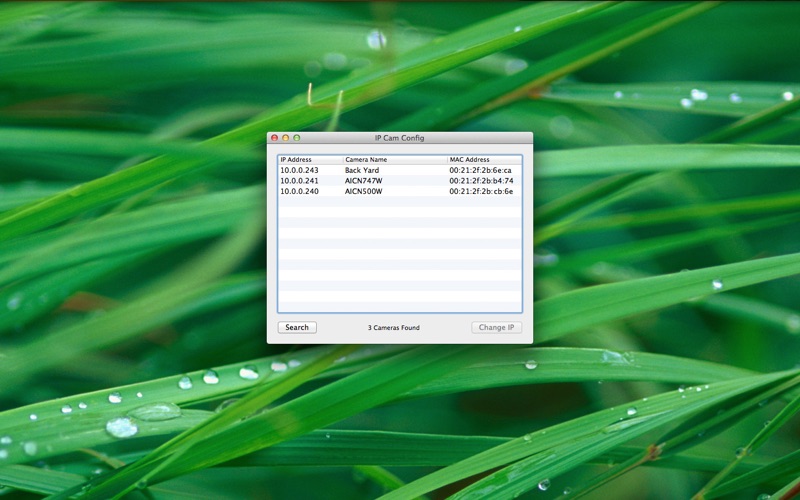
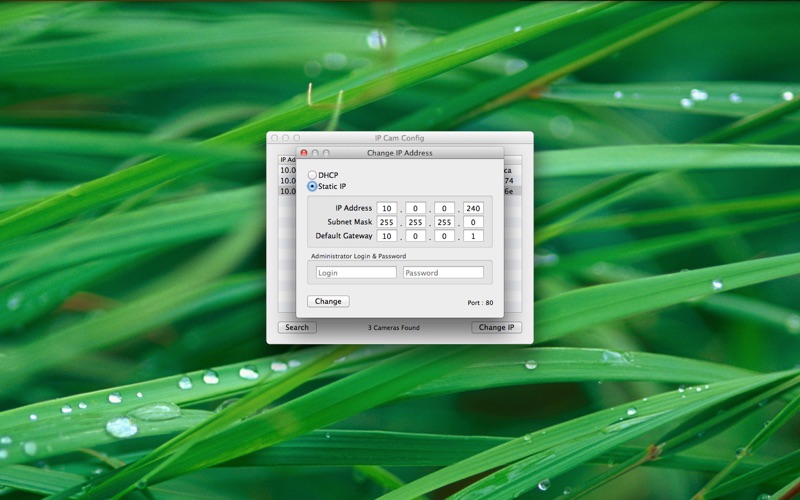
IP Cam Config lets you use your Mac to connect supported "Windows Only" Ethernet and WiFi network IP cameras to your local network. + Overview + One of the ways to get the most out of our popular iCam mobile app is to set up a number of WiFi network IP cameras around your house so that you are not just limited to monitoring the room occupied by the computer. One issue for non-Windows users is that the majority of the more "reasonably-priced" WiFi cameras officially only support Windows. What most users don't know is that you can still connect to and view these cameras from a non-Windows device once they have been configured to connect to your local network. The problem is that the configuration applications included with these cameras are often Windows-only. If you do not have a Windows computer at your disposal to run the camera manufacturer's configuration application then the simplest alternative solution is to use IP Cam Config to configure the camera to connect to your local network. + What cameras are supported? + IP Cam Config has been tested as being compatible with the following AirLink101 network IP cameras: - SkyIPCam1500W - SkyIPCam1747W - SkyIPCam500W - SkyIPCam747W - SkyIPCam500 Cameras from other manufacturers (such as TrendNET and DIGITUS, for example) seem to share the same internals as the AirLink101 cameras that we tested, so they should also be configurable with IP Cam Config. As more specific camera manufacturers and models are confirmed to be working with IP Cam Config we will also be adding those to the list. + How To Use IP Cam Config To Configure A Network IP Camera + To configure a new network IP camera using IP Cam Config simply follow the installation instructions included with the camera, substituting IP Cam Config for the manufacturer's configuration application. Once you have connected the camera to your local network router via an Ethernet network cable, power up the camera and wait approximately 30 seconds for the camera to start up before launching the IP Cam Config application. When you first launch IP Cam Config, the application will scan your local network to find any compatible network IP cameras. Once the app has finished searching, select which camera you would like to configure, and assign it either a Static IP address or let your router assign the camera one automatically via DHCP. (Don't forget to enter the camera's Administrator Login and Password, which are usually both "admin" by default.) Once the configuration has been changed your camera should restart and you should be able to connect to it using its newly assigned IP address within about 30 seconds or so.
Installs
Apple does not publish download counts. Estimates are in testing.
We publish iOS estimates only after they pass a back-test against real numbers. Chart history below is measured.
Estimated store revenue Estimated Beta
App Store, worldwide, monthly rate from the last 14 chart days to 21 Nov 2026
Below the top 100 grossing apps in the markets we calibrate. In the United States that usually means under about $6.4M a month. App Store purchases and subscriptions only, before Apple's 15 to 30% fee. Ads and web payments are not included.
Ratings
No rating breakdown published for this app.
Recent reviews
Latest public reviews from the store
No reviews in our sample for this app yet.
Top chart positions
Latest App Store chart ranks by country, last 10 days
Not in any tracked top chart in the last 10 days.
IP Cam Config history
Release, install milestones, listing and store changes
- First released on the store 16 Dec 2011
Update frequency
How often IP Cam Config ships a new version, month by month
0 updates in the last 12 months. Less often than most similar apps: they shipped a median of 1 updates in the same year.
Recent versions
Current version 1.0.1
- Version 1.0.16 Sep 2014
- Updated to support the latest version of OS X
Listing keywords
Words and phrases IP Cam Config repeats most in its store listing
Top phrases: ip cam config (11), cam config (11), ip cam (11), network ip (6), local network (5).
Highlighted words also appear in the title. Counts cover the title, short description and description.
Compliance
What the listing and the app package show
- Store status
- Live
- Upkeep
- No update since 6 Sep 2014
- Age rating
- 4+
Apps like IP Cam Config
 Library of AviationNazmi Yavuz★ 4.82
 MyNOVECNorthern Virginia Electric Cooperative★ 2.28
 打工人小组件光翔 卓★ 4.96
 TruckbaysTruckbays LLC★ 4.3
 Tornado PRO PlayerMohammed Altam★ 4.44
 VDX - Video ManagerARISEPEAK LP★ 1.74
 TV CastingZeasn Info Technology Co., Ltd.★ 1.86
 MySontiqSontiq, Inc.★ 2.4
 Laboratory TimerShazino★ 4.66
IP Cam Config: questions and answers
Who makes IP Cam Config?
IP Cam Config is published by SKJM, LLC.
When was IP Cam Config last updated?
The latest version (1.0.1) was released on 6 Sep 2014.
Is IP Cam Config free?
No. IP Cam Config is a paid app priced at $0.99.
Is IP Cam Config still available?
Yes. IP Cam Config is live on App Store as of 11 May 2026.
Track IP Cam Config and its competitors
Watch any app for new versions, rating drops, chart moves and removals. Free plan, no card.