
- Installs
- —
- Apple does not publish download counts
- Rating
- 4.6
- Ratings
- 20
- 20 reviews
- Version
- 6.0.8
- Updated 22 Apr 2024
- Released
- 7 Apr 2015
- Tracked since 11 May 2026
- Size
- 3 MB
- Needs 12.0
Screenshots
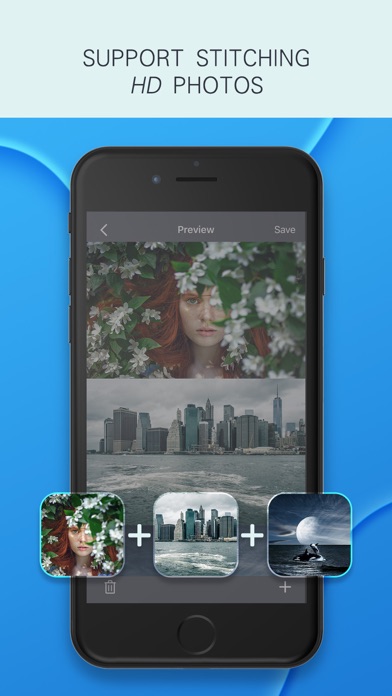
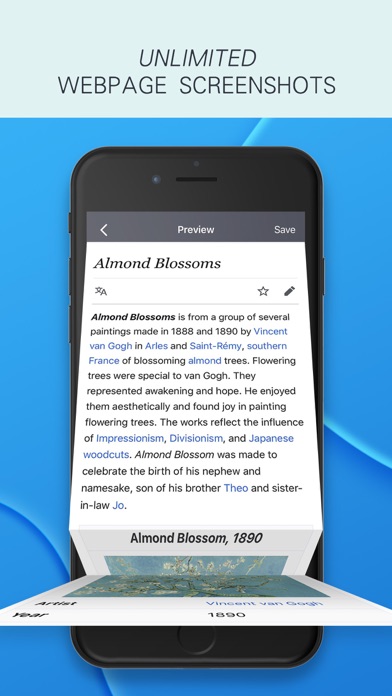


About JPics
The description on the store listing
JPics focuses on long image stitching. Support splicing photos taken by SLR, original picture quality output; support full webpage screenshots.
Applicable scenarios: Seamless stitching of chat records, movie lines, web page screenshots, life photos, screenshots, learning materials, landscapes, long Weibo, etc.
【Features】
-Super clear preservation, original picture quality output;
-The page is concise, focusing on long image stitching, no ads, no in-app purchases;
-Stitch up to 24 pictures;
-Support manual stitching to cover overlapping parts of pictures;
-Support vertical and horizontal stitching of pictures;
-Support picture cut, graffiti, add text;
-Support setting border color and gap; …
Read the full description
JPics focuses on long image stitching. Support splicing photos taken by SLR, original picture quality output; support full webpage screenshots. Applicable scenarios: Seamless stitching of chat records, movie lines, web page screenshots, life photos, screenshots, learning materials, landscapes, long Weibo, etc. 【Features】 -Super clear preservation, original picture quality output; -The page is concise, focusing on long image stitching, no ads, no in-app purchases; -Stitch up to 24 pictures; -Support manual stitching to cover overlapping parts of pictures; -Support vertical and horizontal stitching of pictures; -Support picture cut, graffiti, add text; -Support setting border color and gap; -Support border style setting (preview page, click "border" in the lower left corner); -Support full webpage screenshot (two ways to use: 1. Open JPics plugin in safari browser; 2. Copy webpage link and start JPics); -Support system photo album plugin, you can directly stitch long images in the system photo album without opening the App, at most 10 pictures at a time (usage: open the album> select multiple pictures> select the share button in the lower left corner> "more" activity > Open "JPics") -Support custom splicing template. Create custom templates such as movie lines and chat records, and automatically stitch long pictures with one click.
Installs
Apple does not publish download counts. Estimates are in testing.
We publish iOS estimates only after they pass a back-test against real numbers. Chart history below is measured.
Estimated store revenue Estimated Beta
App Store, worldwide, monthly rate from the last 15 chart days to 22 Nov 2026
Below the top 100 grossing apps in the markets we calibrate. In the United States that usually means under about $6.4M a month. App Store purchases and subscriptions only, before Apple's 15 to 30% fee. Ads and web payments are not included.
Ratings
20 ratings, 20 reviews
No rating breakdown published for this app.
Recent reviews
Latest public reviews from the store
- 3 Jul 2023
Powerful and useful
It is the most powerful tool of mixing pics together I ever used. And the price is acceptable to most users.
- 30 Dec 2021
Love it! Flashcards.
I have an archive of scanned, antique Naganuma flashcards. I’ve often wanted to use the front AND back image of a card stitched as a single image. . . which I use in a flashcards app e.g. Flashcards Deluxe or Anki. This way I can stuff more I do into a flashcard. Glad I discovered this app. Update: I’m so sad. The app appears not to work anymore! Tapping “+” to add photos no longer functions on my iPad with iOS 15.x
- 5 Nov 2020
Great App
You can use it directly from photos app for a quick combination, or add images from the app for more customization
- 17 Feb 2020
推荐一下
入门版本和专业版本的区别不明显。其实,我是想截微信评论的图,可惜无法实现,希望能补充。
What reviewers bring up
Topics mentioned in the latest 8 reviews, by how many reviews mention them
Liked in good reviews (7 reviews)
- photos 2
- add 2
Raised in bad reviews (1 reviews)
No topic comes up twice.
Top chart positions
Latest App Store chart ranks by country, last 10 days
- Countries ranked
- 3 of 50
- Best rank
- #24
- Top 10 placements
- 0
- of 3 chart placements
- Average rank
- #39
Best countries on App Store
- 🇨🇳 China · Top paid, Photo & Video#24
- 🇭🇰 Hong Kong SAR China · Top paid, Photo & Video#44
- 🇹🇷 Türkiye · Top paid, Photo & Video#49
JPics history
Release, install milestones, listing and store changes
- First released on the store 7 Apr 2015
Recent versions
Current version 6.0.8
- Version 6.0.822 Apr 2024
Fix bugs .
Listing keywords
Words and phrases JPics repeats most in its store listing
Top phrases: pictures support (3), long image stitching (2), lower left corner (2), original picture quality (2), picture quality output (2).
Highlighted words also appear in the title. Counts cover the title, short description and description.
Compliance
What the listing and the app package show
- Store status
- Live
- Upkeep
- No update since 22 Apr 2024
- Age rating
- 4+
Apps like JPics
 Video CollageaZeR DiLLs★ 4.08
 Vee for VideoMedious★ 2.98
 Beauty Camera -Selfie, StickerBhuvan Gupta★ 4.5
 FinalCamXShenzhen Xiaozhen Technology Co.,Ltd.★ 4.44
 Magic Studio - AI Photo EditorMagicStudio.com★ 4.62
 Foto Impresiones: 1 Hr PhotoSoftwareX★ 4.98
 SnapGeo - AI Location FinderRECEP ASLAN★ 4.24
 Family Photo Maker - AIRick-y Media★ 4.12
 BeautifAI: AI Try OnJAI UYGULAMA VE YAPAY ZEKA TEKNOLOJILERI ANONIM SIRKETI★ 4.36
JPics: questions and answers
Who makes JPics?
JPics is published by 捷 廖.
When was JPics last updated?
The latest version (6.0.8) was released on 22 Apr 2024.
Is JPics free?
No. JPics is a paid app priced at $0.99.
Is JPics still available?
Yes. JPics is live on App Store as of 1 Jul 2026.
Track JPics and its competitors
Watch any app for new versions, rating drops, chart moves and removals. Free plan, no card.