
- Installs
- —
- Apple does not publish download counts
- Rating
- —
- Ratings
- —
- Version
- 8.50
- Updated 25 Dec 2023
- Released
- 15 Sep 2020
- Tracked since 10 May 2026
- Size
- 96 MB
- Needs 10.9
Screenshots


About JWildfire
The description on the store listing
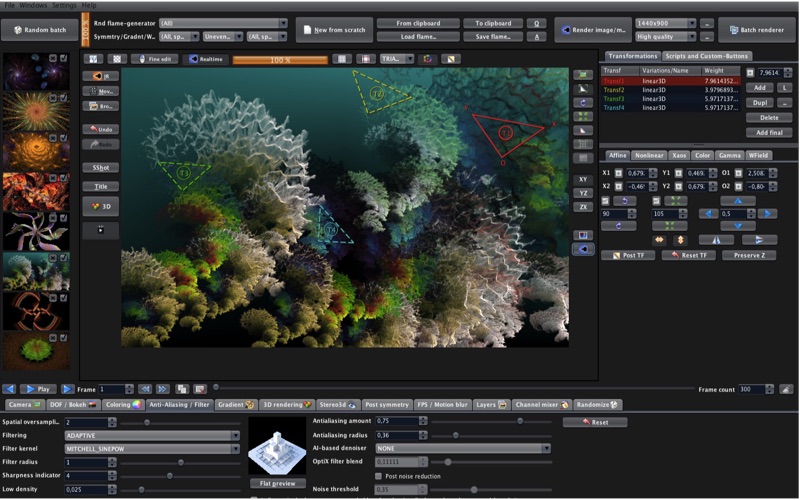
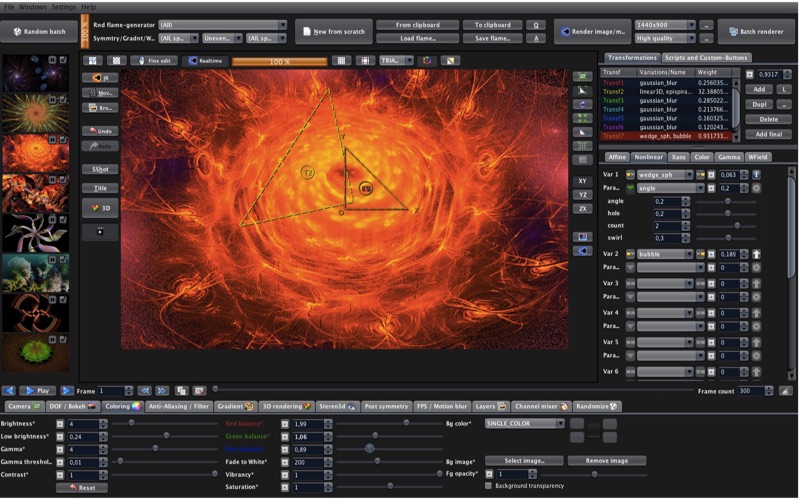
JWildfire is a very sophisticated flame fractal generator whose roots go back about 25 years.
Key Features:
- is probably the most versatile Flame fractal editor available
- has lots of parameters, most of them can be animated by motion-curves/keyframes
- visually appealing graphical user interface which is optimized for exploring the fractal realm in a very playful way
- contains about 800 variations/formulas
- lots of random-flame-generators which produce nice fractals forms as starting point for your own creations
- numerous sub-modules like
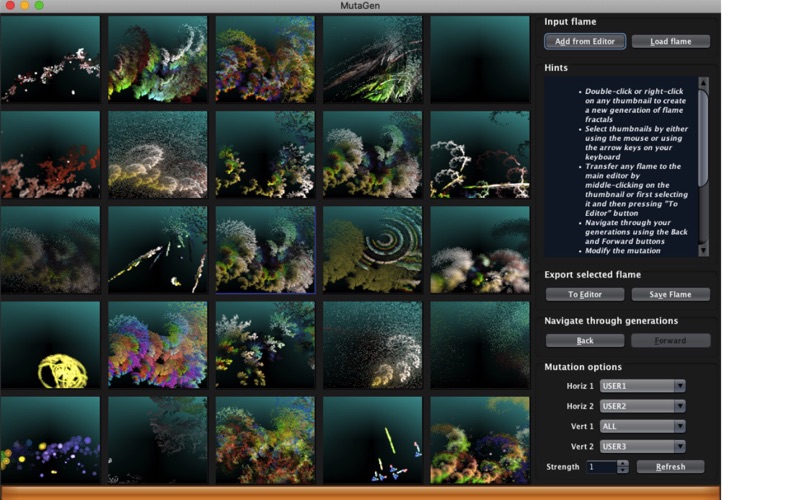
- MutaGen: for creating mutations of existings frames
- Interactive/Infinite renderer
- Dancing Flames: sound-synchronized …
Read the full description
JWildfire is a very sophisticated flame fractal generator whose roots go back about 25 years. Key Features: - is probably the most versatile Flame fractal editor available - has lots of parameters, most of them can be animated by motion-curves/keyframes - visually appealing graphical user interface which is optimized for exploring the fractal realm in a very playful way - contains about 800 variations/formulas - lots of random-flame-generators which produce nice fractals forms as starting point for your own creations - numerous sub-modules like - MutaGen: for creating mutations of existings frames - Interactive/Infinite renderer - Dancing Flames: sound-synchronized animation of parameters - Java-based scripting-interface which easily lets you create your own fractals-generators - Continuous development/improvement since the last 10 years - The project is Open Source, so you can even contribute to it: https://github.com/thargor6/JWildfire Note: By purchasing the application in the App Store you are helping a lot to make it possible to distribute it on the macOS-platform. This means, the software remains open source (of course!), and you may still build it on your own.
Installs
Apple does not publish download counts. Estimates are in testing.
We publish iOS estimates only after they pass a back-test against real numbers. Chart history below is measured.
Estimated store revenue Estimated Beta
App Store, worldwide, monthly rate from the last 19 chart days to 27 Nov 2026
Below the top 100 grossing apps in the markets we calibrate. In the United States that usually means under about $6.4M a month. App Store purchases and subscriptions only, before Apple's 15 to 30% fee. Ads and web payments are not included.
Ratings
No rating breakdown published for this app.
Recent reviews
Latest public reviews from the store
No reviews in our sample for this app yet.
Top chart positions
Latest App Store chart ranks by country, last 10 days
Not in any tracked top chart in the last 10 days.
JWildfire history
Release, install milestones, listing and store changes
- First released on the store 15 Sep 2020
Recent versions
Current version 8.50
- Version 8.5025 Dec 2023
- introducing a new type of transform: background transforms. - a background transform calculates a layer of a background, typically using one of the dc-type of variations - this way you can add very interesting backgrounds which also evaluate very fast (in comparison to the "classical iterations") - the intensity ("brightness") of the background is controlled by the "weight" parameter of the background transform - use the small "B"-button (which is located right of the "Final"-transform-button) to add a random background transform to the current layer - currently, about 60 variations support background transforms - please note, that you can also combine them with regular "pre_"-type-variations - you can make most variations to work as a "pre_"-type-variation in the user-interface by pressing the small "pre"-buttons - this way you can apply interesting deform-effects to your backgrounds - background-transforms can also be animated like regular transforms - you can control the position, size and orientation by changing the affine-part of the background transform ("triangles") - please note that this affine-transform is applied to the coordinates of the background - so it appears somewhat like an inverse transform - e.g. moving to the right, will move the background to the left - e.g. scaling down the triangle will zoom into the background, etc. - currently, the following variations support background-transforms directly: colormap_wf, dc_acrilic, dc_apollonian, dc_booleans, dc_cairotiles, dc_circlesblue, dc_circuits, dc_code, dc_ducks, dc_fingerprint, dc_fractaldots, dc_fractcolor, dc_gabornoise, dc_glypho, dc_gmandelbroot, dc_grid3D, dc_hexagons, dc_hoshi, dc_hyperbolictile, dc_inversion, dc_kaleidocomplex, dc_kaleidoscopic, dc_kaliset, dc_kaliset2, dc_layers, dc_linear, dc_mandala, dc_mandbrot, dc_mandelbox2D, dc_menger, dc_moebiuslog, dc_pentatiles, dc_perlin, dc_poincaredisc, dc_portal, dc_quadtree, dc_randomoctree, dc_rotations, dc_spacefold, dc_squares, dc_starsfield, dc_sunflower, dc_tesla, dc_tree, dc_triantess, dc_truchet, dc_turbulence, dc_voronoise, dc_vortex, dc_warping, dc_worley, f_complex, fract_dragon_wf, fract_formula_julia_wf, fract_formula_mand_wf, fract_julia_wf, fract_mandelbrot_wf, fract_meteors_wf, fract_pearls_wf, fract_salamander_wf, iconattractor_js, swirl3D_wf - new "mobius_dragon_3D"-variation by Whittaker Courtney, with added GPU-support - variation-filter in the user interface ("Background transform"), which shows only variations which are suitable for background transforms - new RANDOM_BACKGROUND-mutation to add background-transforms, which is available both in the "Quick Mutations"-tab and the MutaGen-window as well - new "Flame with Background"-random-flame-generator to generate flames with background-transforms -new "Underwater"-random-flame-generator, most generated flames also work well with the GPU render -new "RANDOM_BG_COLOR"-mutation, makes it easy to play with different backgrounds for "Underwater"-flames -adjusted the variation-type of many variations, leading to better random-flames in some cases -slightly improved the quality of various random-flame-generators
Listing keywords
Words and phrases JWildfire repeats most in its store listing
Top phrases: flame fractal (2), open source (2).
Highlighted words also appear in the title. Counts cover the title, short description and description.
Compliance
What the listing and the app package show
- Store status
- Live
- Upkeep
- No update since 25 Dec 2023
- Age rating
- 4+
Apps like JWildfire
 AI Cut - Photo Generate & EditBeijing Changhai Internet Technology Co., Ltd.★ 4.1
 Birthday Invitations Makerwilliam leandro aristizabal giraldo★ 4.7
 AI VistaSCIENJOY META TECHNOLOGY LLC★ 2.9
 Logotipo - AI Logo GeneratorMobile Ocean★ 4.02
 Anime AI Maker: DreamtuneLYKOV STUDIO LTD★ 4.34
 DIY Wallpaper Maker DIYScreenEvgenii Fomin★ 4.68
 Vintage Camera - Film FiltersPlane Cubes★ 4.42
 Color Widgets - WallpapersFlying Pigeons LLC★ 4.34
 Ai Tattoo Designer MakerHoang Tuan★ 4.67
JWildfire: questions and answers
Who makes JWildfire?
JWildfire is published by Andreas Maschke.
When was JWildfire last updated?
The latest version (8.50) was released on 25 Dec 2023.
Is JWildfire free?
No. JWildfire is a paid app priced at $8.99.
Is JWildfire still available?
Yes. JWildfire is live on App Store as of 10 May 2026.
Track JWildfire and its competitors
Watch any app for new versions, rating drops, chart moves and removals. Free plan, no card.