
- Installs
- —
- Apple does not publish download counts
- Rating
- —
- Ratings
- —
- Version
- 3.01
- Updated 21 Mar 2014
- Released
- 26 Feb 2014
- Tracked since 10 May 2026
- Size
- 720 MB
- Needs 10.7
Screenshots


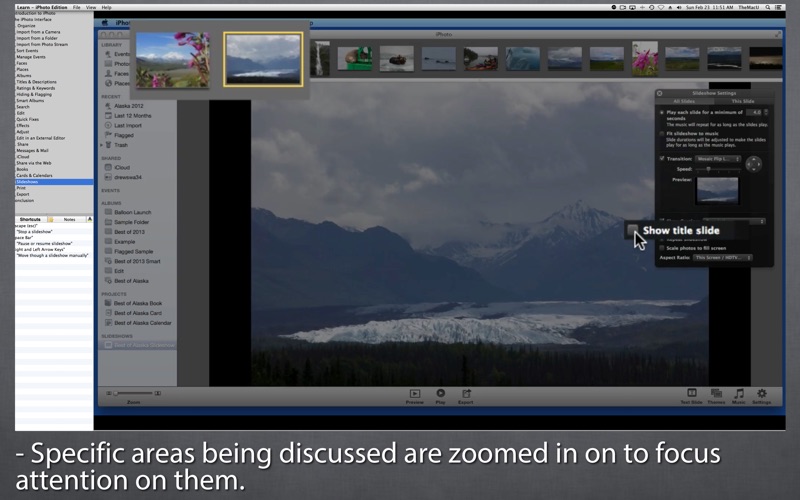

About Learn - iPhoto Edition
The description on the store listing
Get the most out of iPhoto for Mac with our "Learn - iPhoto Edition" video training app!
•2+ hours of HD video tutorials!
•28 individual lessons guided by an iPhoto expert.
•Simple interface that makes is easy to navigate through the videos.
•The videos guide the viewer with zooms and highlights of what is being discussed.
•The keyboard shortcuts associated with each lesson are listed in the sidebar.
•Use the notes pane to jot down things to remember from each lesson, then output all your notes in a single PDF document!
Divided into three main sections (Organize, Edit & Share) this course covers the entire process from importing photos, adding metadata, organizing, editing and …
Read the full description
Get the most out of iPhoto for Mac with our "Learn - iPhoto Edition" video training app! •2+ hours of HD video tutorials! •28 individual lessons guided by an iPhoto expert. •Simple interface that makes is easy to navigate through the videos. •The videos guide the viewer with zooms and highlights of what is being discussed. •The keyboard shortcuts associated with each lesson are listed in the sidebar. •Use the notes pane to jot down things to remember from each lesson, then output all your notes in a single PDF document! Divided into three main sections (Organize, Edit & Share) this course covers the entire process from importing photos, adding metadata, organizing, editing and finally sharing your images with friends & family. Organizational tools such as Events, Faces, Places and Smart Albums are all discussed. In the Edit section of the course learn to make a photo look great with the effects and adjust tools in iPhoto. In the output section discover all the ways to share your photos such as emailing just a couple images, sharing albums on iCloud, creating a book, calendar or slideshow! **Get this and all TheMacU Tutorials for Mac & iOS for one low price with our All Access subscription on TheMacU.com!** Course Contents... -Introduction to iPhoto -The iPhoto Interface A. Organize 1. Import from a Camera 2. Import from a Folder 3. Import from Photo Stream 4. Sort Events 5. Manage Events 6. Faces 7. Places 8. Albums 9. Titles & Descriptions 10. Ratings & Keywords 11. Hiding & Flagging 12. Smart Albums 13. Search B. Edit 1. Quick Fixes 2. Effects 3. Adjust 4. Edit in an External Editor C. Share 1. Messages & Mail 2. iCloud 3. Share via the Web 4. Books 5. Cards & Calendars 6. Slideshows 7. Print 8. Export -Library Management & Troubleshooting -Conclusion The voice and guide behind this training App is Drew Swanson. Drew is a 20+ year Mac user and has been using Macs professionally in the graphic design and photography fields for over 15 years. Since 2007 Drew has been a member of The Apple Consultants Network, working in the Boise Idaho area to provide support and training to Mac users at their home and business. In 2009 Drew started TheMacU to provide video training courses to Mac users anywhere in the World.
Installs
Apple does not publish download counts. Estimates are in testing.
We publish iOS estimates only after they pass a back-test against real numbers. Chart history below is measured.
Estimated store revenue Estimated Beta
App Store, worldwide, monthly rate from the last 13 chart days to 20 Nov 2026
Below the top 100 grossing apps in the markets we calibrate. In the United States that usually means under about $6.4M a month. App Store purchases and subscriptions only, before Apple's 15 to 30% fee. Ads and web payments are not included.
Ratings
No rating breakdown published for this app.
Recent reviews
Latest public reviews from the store
No reviews in our sample for this app yet.
Top chart positions
Latest App Store chart ranks by country, last 10 days
Not in any tracked top chart in the last 10 days.
Learn - iPhoto Edition history
Release, install milestones, listing and store changes
- First released on the store 26 Feb 2014
Recent versions
Current version 3.01
- Version 3.0121 Mar 2014
Added iPhoto Library management and troubleshooting lesson!
Listing keywords
Words and phrases Learn - iPhoto Edition repeats most in its store listing
Top phrases: events faces places (2), learn iphoto edition (2), events faces (2), faces places (2), iphoto edition (2).
Highlighted words also appear in the title. Counts cover the title, short description and description.
Compliance
What the listing and the app package show
- Store status
- Live
- Upkeep
- No update since 21 Mar 2014
- Age rating
- 4+
Apps like Learn - iPhoto Edition
 Video CollageaZeR DiLLs★ 4.08
 Vee for VideoMedious★ 2.98
 Beauty Camera -Selfie, StickerBhuvan Gupta★ 4.5
 FinalCamXShenzhen Xiaozhen Technology Co.,Ltd.★ 4.44
 Magic Studio - AI Photo EditorMagicStudio.com★ 4.62
 Foto Impresiones: 1 Hr PhotoSoftwareX★ 4.98
 SnapGeo - AI Location FinderRECEP ASLAN★ 4.24
 Family Photo Maker - AIRick-y Media★ 4.12
 BeautifAI: AI Try OnJAI UYGULAMA VE YAPAY ZEKA TEKNOLOJILERI ANONIM SIRKETI★ 4.36
Learn - iPhoto Edition: questions and answers
Who makes Learn - iPhoto Edition?
Learn - iPhoto Edition is published by Swanson Digital, LLC.
When was Learn - iPhoto Edition last updated?
The latest version (3.01) was released on 21 Mar 2014.
Is Learn - iPhoto Edition free?
No. Learn - iPhoto Edition is a paid app priced at $4.99.
Is Learn - iPhoto Edition still available?
Yes. Learn - iPhoto Edition is live on App Store as of 10 May 2026.
Track Learn - iPhoto Edition and its competitors
Watch any app for new versions, rating drops, chart moves and removals. Free plan, no card.