
- Installs
- —
- Apple does not publish download counts
- Rating
- 4.03
- Ratings
- 145
- 145 reviews
- Version
- 4.1.0
- Updated 21 Feb 2026
- Released
- 24 Apr 2012
- Tracked since 10 May 2026
- Size
- 80 MB
- Needs 14.0
Screenshots

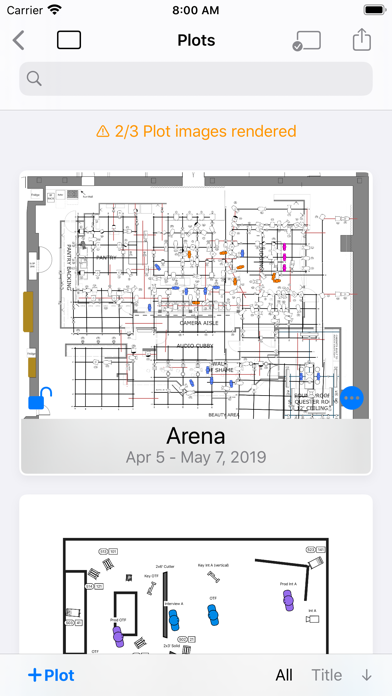


About Lighting Designer
The description on the store listing
Never draw a lighting setup on a scrap of paper again.
Lighting Designer is a quick and intuitive way to create overhead lighting plots for film, theater, television, concerts, and anything else you can light. The wide selection of equipment and simple yet powerful interface makes it easier than ever to illustrate and communicate your lighting setups, from most Apple devices. Your Silicon Mac is powerful and gives you the most screen to work with; your iPad is large and versatile; your iPhone will go with you anywhere. And if you like, your work can sync among all your Apple devices using iCloud, so you can start plotting on one and finish on another.
LD is perfect for tech scouts, …
Read the full description
Never draw a lighting setup on a scrap of paper again. Lighting Designer is a quick and intuitive way to create overhead lighting plots for film, theater, television, concerts, and anything else you can light. The wide selection of equipment and simple yet powerful interface makes it easier than ever to illustrate and communicate your lighting setups, from most Apple devices. Your Silicon Mac is powerful and gives you the most screen to work with; your iPad is large and versatile; your iPhone will go with you anywhere. And if you like, your work can sync among all your Apple devices using iCloud, so you can start plotting on one and finish on another. LD is perfect for tech scouts, working while traveling, or just choosing the couch over your desk chair. While expensive drafting programs can take hours to use and years to master, Lighting Designer is an accessible way to plan your next show! Features: • Organize your setups into Shows, with details like shooting dates and crew members • Choose from over 2000 built-in types of lights, grip equipment, camera gear, actors, and objects like furniture and musical instruments • With a Crescit Premium account, you can have access to an additional 25,000+ pieces of lighting equipment, gels, and gobo templates • Use your own images to create custom fixtures on your Plots (read the User Guide for image specs) • For each light, specify wattage, beam spread, light output, DMX address, color, and many other details • Certain fixtures include info for exposure approximation; all can be user-configured and have their exposure reverse-calculated from real-world readings • Use Groups to create flexible collections of lights • Notes allow you to describe every detail of your setup • Pack your Truck to share gear among multiple Plots • Draw a Floor Plan using basic shapes, and images from your device • Lights can target other objects, and objects can rig onto each other for easy adjustments • Email editable Plots to the crew, with images, equipment, and crew lists • Undo/Redo functionality • Dark Mode presents a dark workspace to reduce eyestrain and minimize your device's light in a dark environment
Installs since 29 Aug 2026
Apple does not publish download counts. Estimates are in testing.
Estimated store revenue Estimated Beta
App Store, worldwide, monthly rate from the last 13 chart days to 20 Nov 2026
Below the top 100 grossing apps in the markets we calibrate. In the United States that usually means under about $6.4M a month. App Store purchases and subscriptions only, before Apple's 15 to 30% fee. Ads and web payments are not included.
Ratings
145 ratings, 145 reviews
No rating breakdown published for this app.
Recent reviews
Latest public reviews from the store
- 27 Nov 2021
It’s great
Makes camera positioning easy
- 15 Jan 2020
Excellent but still doesn’t have all of the basics
I love this for making plots super quick BUT, it is limited to 4 universes. When rigs now have way beyond that. So I cannot do this for larger rigs or even distributed rigs. Such a bummer I had to put this app on the back burner for now.
- 18 Oct 2019
Idea
I think having some templates or demo shows might help make it easier to understand at first
- 12 May 2019
Great program, very helpful
Just started using this program and thus far, I’m a huge fan. I feel like a laptop version is critical, but small steps... I really appreciate the level of control and the density of the functionality and detail you can add and manipulate. Clearly a lot of time and thought went into this. Haven’t gotten deep enough to add truck/ crews / contact info but am looking forward to seeing how that works. Having done my plots and layouts by hand previously this is a huge help. Bry Thomas Sanders Director of Photography
What reviewers bring up
Topics mentioned in the latest 45 reviews, by how many reviews mention them
Liked in good reviews (19 reviews)
- plot 6
- lighting 5
- looking 5
- show 5
- program 4
- create 4
- tool 4
- set 4
Raised in bad reviews (19 reviews)
- crashes 9
- money 6
- crashing 5
- waste 5
- fixtures 3
- however 3
- thought 3
- trying 3
Top chart positions
Latest App Store chart ranks by country, last 10 days
- Countries ranked
- 2 of 50
- Best rank
- #65
- Top 10 placements
- 0
- of 2 chart placements
- Average rank
- #81.5
Best countries on App Store
- 🇫🇷 France · Top paid, Photo & Video#65
- 🇨🇦 Canada · Top paid, Photo & Video#98
Lighting Designer history
Release, install milestones, listing and store changes
- First released on the store 24 Apr 2012
Update frequency
How often Lighting Designer ships a new version, month by month
1 updates in the last 12 months. More often than most similar apps: they shipped a median of 0 updates in the same year.
Recent versions
Current version 4.1.0
- Version 4.1.021 Feb 2026
Removed cloud sync functionality
Listing keywords
Words and phrases Lighting Designer repeats most in its store listing
Top phrases: lighting designer (3), apple devices (2).
Highlighted words also appear in the title. Counts cover the title, short description and description.
Compliance
What the listing and the app package show
- Store status
- Live
- Upkeep
- Updated 21 Feb 2026
- Age rating
- 4+
Apps like Lighting Designer
 Dr. Headshot: Corporate PhotosJuergen Gunz★ 4.89
 Video Rotate – Flip Videoout thinking limited★ 2.42
 Negative Image: Photo EnhancerOfir Yagil★ 4.25
 بانوراما فيديو- تصميم فلاترAdeeb Haddad★ 4.13
 Labobo Wallpapers HD & 4KAdam Majd★ 4.76
 GlamCam: Funny Face EditorOfly Tech Co., Ltd.★ 4.32
 Yern - AI with friendsEnframed OU★ 4.55
 Video Rotate - Fix rotationArthur Eduardo Skaetta Alvarez Desenvolvimento de Software LTDA.★ 4.46
 iReact - Reaction VideosBoris Milanov★ 4.29
Lighting Designer: questions and answers
Who makes Lighting Designer?
Lighting Designer is published by Scenario Software LLC.
When was Lighting Designer last updated?
The latest version (4.1.0) was released on 21 Feb 2026.
Is Lighting Designer free?
No. Lighting Designer is a paid app priced at $24.99.
Is Lighting Designer still available?
Yes. Lighting Designer is live on App Store as of 14 Nov 2026.
Track Lighting Designer and its competitors
Watch any app for new versions, rating drops, chart moves and removals. Free plan, no card.