
- Installs
- —
- Apple does not publish download counts
- Rating
- 4.62
- Ratings
- 6.4K
- 6.4K reviews
- Version
- 7.3.18
- Updated 6 Nov 2026
- Released
- 3 Sep 2015
- Tracked since 11 May 2026
- Size
- 311 MB
- Needs 17.6
Screenshots


About LiquidText
The description on the store listing
*** Named “Most Innovative iPad App of the Year” by Apple App Store ***
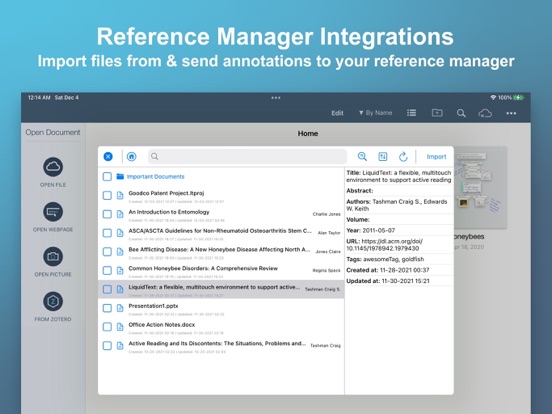
LiquidText offers a fast, natural way to review, gather, and organize information across all your documents and webpages—then apply the results to writing reports, meeting prep, or simply studying. Pull out key facts and connect them together, squeeze a document to compare sections, draw a line to connect ideas in different documents, comment on multiple pages at once, build upon your thoughts, and much more.
► WHAT PEOPLE ARE SAYING:
* "If you want to experience the power of going beyond paper, you can download LiquidText" – Cult of Mac
* One of Macworld’s Top 24 Apps for iPad Pro
* One of Time Magazine's Ten …
Read the full description
*** Named “Most Innovative iPad App of the Year” by Apple App Store *** LiquidText offers a fast, natural way to review, gather, and organize information across all your documents and webpages—then apply the results to writing reports, meeting prep, or simply studying. Pull out key facts and connect them together, squeeze a document to compare sections, draw a line to connect ideas in different documents, comment on multiple pages at once, build upon your thoughts, and much more. ► WHAT PEOPLE ARE SAYING: * "If you want to experience the power of going beyond paper, you can download LiquidText" – Cult of Mac * One of Macworld’s Top 24 Apps for iPad Pro * One of Time Magazine's Ten Best apps for iPad Pro * * "There's a better way to organize your research, and the app is it." – iMore, Serenity Caldwell * “All you need for deep research projects.” – Macworld, Jackie Dove * "The world changed with...LiquidText" – Law360, Paul Kiesel * "LiquidText may just be *the* app for reviewing and annotating PDFs using Apple's tablet and stylus." – CIO Magazine, James Martin * “One of the most powerful, original iPad apps I've tried in years” – Federico Viticci, MacStories.net ► LIQUIDTEXT’S COMPLETE FEATURE SET INCLUDES: (Features with * require a paid upgrade.) Import • Create a workspace and import all the documents and web pages you need • Compatible with PDF, Word, and PowerPoint document types • Import from Dropbox, iCloud Drive, Box, email, and more • Import content from webpage or send to LiquidText directly from Safari • Instant OCR to select text in scanned documents; do a full document-OCR to search as well!* • Import documents & metadata directly from reference managers (supports Zotero and Mendeley)* Interact • Pull excerpts from all the documents in your project into the Workspace area • Add your own notes (typed or written) to the Workspace area • Freely draw on your notes, or on the workspace itself* • Organize excerpts and notes into groups • Connect anything - draw live “ink links” that span pages, documents, notes, and more* • Create mind-maps by drawing “ink links” connecting your excerpts/notes to one another * • Get context - tap notes and excerpts to find original source Compare • Pinch a document to compare different distant pages side by side • Collapse text to see annotated parts side-by-side • Collapse text to view search results(s) side-by-side • Import unlimited number of documents into a project, view up to 3 at once* Annotate • Freely draw* or highlight on your document, notes, or the workspace itself • Add margin notes/comments to text, images, notes, and excerpts • Comment on two or more selections simultaneously • Replace document with a newer version (and annotations are brought to new doc)* Search • Search for keywords across all your LiquidText documents • Find keywords in title or text of your documents* • Bulk highlight, tag, or link to your search results* Realtime Collaboration • Invite colleagues into your shared projects and work together in near realtime* • Leave comments and notifications for your collaborators* • Privacy controls: set whether each workspace & document in your project is shared or private* Easy Export • Export your project as a PDF (includes your Workspace and documents) • Export your project as a Word file (converts your notes/excerpts into a linear document) • Send a full LiquidText file for those with the app. • Send files by email or to Dropbox, iCloud Drive, Zotero, and more* Sync & Backup* • Real-time, cross-platform sync • Continuous cloud backup • Multi-device display: • Use your desktop or tablet as additional display for your other device • Use your tablet for freehand inking while viewing and keyboarding on your desktop See our terms of use at https://www.liquidtext.net/terms-of-use Learn more at LiquidText.net | Better Than Paper
Installs, last 30 days
Apple does not publish download counts. Estimates are in testing.
Estimated store revenue Estimated Beta
App Store, worldwide, monthly rate from the last 13 chart days to 20 Nov 2026
Below the top 100 grossing apps in the markets we calibrate. In the United States that usually means under about $6.4M a month. App Store purchases and subscriptions only, before Apple's 15 to 30% fee. Ads and web payments are not included.
Ratings
6,386 ratings, 6,386 reviews
- 5 ★81%
- 4 ★11%
- 3 ★3.0%
- 2 ★1.4%
- 1 ★4.3%
Recent reviews
Latest public reviews from the store
- 11 Mar 2026
Intuitive Workspace
Love this app. Using it is intuitive and the functionality is wholly unique from other workspace apps and its utility is not a redundancy. Most importantly, it functions outside of the scope of the tools available within Apple’s own productivity suite. It’s a future-proof product that doesn’t need AI to remain useful and relevant. Its interface is simple while feeling futuristic. I cannot understate how appreciative I am that AI is not needlessly embedded into every facet of this app. I would appreciate if the developers would allocate some resources to improve the app’s compatibility with native iPadOS accessibility software, namely its screen reader. Currently, it’s abysmal and the team could stand to consult an actually blind or visually impaired person for tips and feedback on how to translate some of the app’s best elements into accessible form. My last note is that I so desperately wish the app was available as a one time payment rather than on a subscription basis. I understand the case for using a subscription model, but in a world where no one owns even licensure to anything anymore, it be great to make a lump sum payment. Thanks for this app and I look forward
- 18 Oct 2025
Fantastic idea, limited usefulness
Most developers treat their early adopters with respect, but not these guys. They charged quite a bit for the pro version before the app had realized its promise. Then they offered utopian pricing when they added a few new features, and so on... Below is my review of the original pro version. The one thing that's changed is annoying new links to features one needs to spend more for. Can't do it as an independent researcher. --- The way this app is marketed and designed, I would have thought it would make an excellent PDF reader for academic texts, including ebooks, but I was wrong. First and foremost, navigation is a problem. If the text actually has built-in structure that LT can see, great. But even then, one has to click to see the outline, and the outline immediately disappears after one clicks. Moving around the document becomes extremely cumbersome that way. Worse, with no bookmarking feature or ability to create one's own outline, accessing unlinked endnotes while reading becomes frustratingly time-consuming. In theory, one can use the app's excerpt feature to create such navigational tools, but those are nearly as useless on a 9.7" screen. I can't see much improvement on
- 16 Nov 2024
Perfect app for college, just one little thing
To start this off: I absolutely adore this app. I don’t think I can sing its praises enough. The fact that I’m successful in my classes is because this can double as a note-taking tool for online textbooks. It is such an amazing app for school work because it’s incredibly easy to organize notes into specific sections and even if you don’t pay the subscription to make your own bookmarks, the app will automatically sort out chapters for you so that you can easily jump to the right section. And as someone who doesn’t use it on multiple devices, I didn’t have to pay an annual subscription fee for the basics, just paid once and got exactly what I needed. My main problem, which can hardly be considered as a turn-off, are the fact that if you leave a project or the app for even a moment, the highlighter size resets to the middle option. This is literally the only problem. I totally understand that it may be to ensure that some things don’t carry over to projects that might cause problems, but if I leave project A for a second and then return to it (still project A), I feel like my highlighter size should remain the same. I have the same opinion for switching workspaces on a
- 10 Nov 2018
Good start toward a useful app
Update: many of the items mentioned below have been addressed (added a star). App updates have improved responsiveness to Apple Pencil. Nice workflow and useful tool. Still needs a desktop companion. MORE IMPORTANTLY export is still a weak spot. They’ve improved your ability to control how the annotations export (would be nice to save those settings) but it is still the case that when you look at your annotations to export they are all there, images presented nice and neat, BUT when you open the exported files those images have become “[image]” and nothing else. If I didn’t want them in my notes I would not have captured them. MarginNote can do this and also have better study capabilities. They fall down in multiple other areas though - if LiquidText could fix this one issue it would be my go-to app for active reading. If it also have a desktop app it would be perfect. _______________________________________________ Visually appealing and nice functionality for highlighting & noting pdf files. The functions for comparing different portions of a document and summary overviews of your notes are not available in competitor apps that I’ve seen. Needs a portrait view on the iP
What reviewers bring up
Topics mentioned in the latest 8 reviews, by how many reviews mention them
Liked in good reviews (4 reviews)
- remain 3
- subscription 2
- understand 2
- workspace 2
- organize 2
- devices 2
- reading 2
- within 2
Raised in bad reviews (2 reviews)
- interface 2
- problems 2
- reviews 2
- first 2
- these 2
- read 2
- gets 2
Top chart positions
Latest App Store chart ranks by country, last 10 days
- Countries ranked
- 1 of 50
- Best rank
- #40
- Top 10 placements
- 0
- of 1 chart placements
- Average rank
- #40
Best countries on App Store
- 🇮🇳 India · Top grossing, Productivity#40
| Country | Chart | Category | Rank | Best (10 days) | Date |
|---|---|---|---|---|---|
| 🇮🇳 India | Top grossing | Productivity | #40 | #30 | 20 Nov 2026 |
LiquidText history
Release, install milestones, listing and store changes
- First released on the store 3 Sep 2015
Update frequency
How often LiquidText ships a new version, month by month
4 updates in the last 12 months. About as often as similar apps, which shipped a median of 4 updates in the same year.
Recent versions
Current version 7.3.18
- Version 7.3.186 Nov 2026
FEATURE UPDATE ▶ By popular demand: select and resize/recolor ink! ▶ Select and move multiple documents at once! ▶ Numerous general reliability improvements.
- Version 7.3.1213 Jul 2026
You can now pin documents within a project for quicker access. This update also includes general app stability improvements and bug fixes. Thanks for using the app!
- Version 7.3.105 Jun 2026
This update includes general app stability improvements, major bug fixes, and overall enhancements to make the app smoother, more reliable, and easier to use.
- Version 7.3.87 May 2026
This update includes UI improvements, general stability enhancements, and bug fixes to make the app smoother, faster, and more reliable.
Listing keywords
Words and phrases LiquidText repeats most in its store listing
Top phrases: side by side (3), document to compare (2), dropbox icloud drive (2), export your project (2), notes and excerpts (2).
Highlighted words also appear in the title. Counts cover the title, short description and description.
Compliance
What the listing and the app package show
- Store status
- Live
- Upkeep
- Updated 6 Nov 2026
- Age rating
- 17+
Apps like LiquidText
 Galaxy VPN - Fast & SecurityBLUE REV SOAR TECHNOLOGY LIMITED★ 4.61
 Miro: your visual workspaceRealtimeBoard Inc.★ 4.69
 A Cleaner: Storage CleanupHONG KONG LITTLE BEAR INFORMATION TECHNOLOGY CO., LIMITED★ 4.3
 Add Watermark -Batch ProcessSaraswati Javalkar★ 4.84
 PlatoVPN Fast:Super VPN ProxyMogoTech Inc.★ 4.73
 Group Text | Mass MessageMass Text LLC★ 4.34
 ViVi Keyboard: Theme & ChatbotMetaverse Technology LTD★ 4.27
 Drukpa Lunar CalendarLich Viet JSC★ 4.75
 Microsoft 365 AdminMicrosoft Corporation★ 4.65
LiquidText: questions and answers
Who makes LiquidText?
LiquidText is published by LiquidText, Inc..
When was LiquidText last updated?
The latest version (7.3.18) was released on 6 Nov 2026.
Is LiquidText free?
Yes. LiquidText is free to download.
Is LiquidText still available?
Yes. LiquidText is live on App Store as of 20 Nov 2026.
Track LiquidText and its competitors
Watch any app for new versions, rating drops, chart moves and removals. Free plan, no card.