
- Installs
- —
- Apple does not publish download counts
- Rating
- 1.0
- Ratings
- 1
- 1 reviews
- Version
- 1.9.2
- Updated 28 Oct 2025
- Released
- 20 Feb 2021
- Tracked since 10 May 2026
- Size
- 9 MB
- Needs 15.1
Screenshots

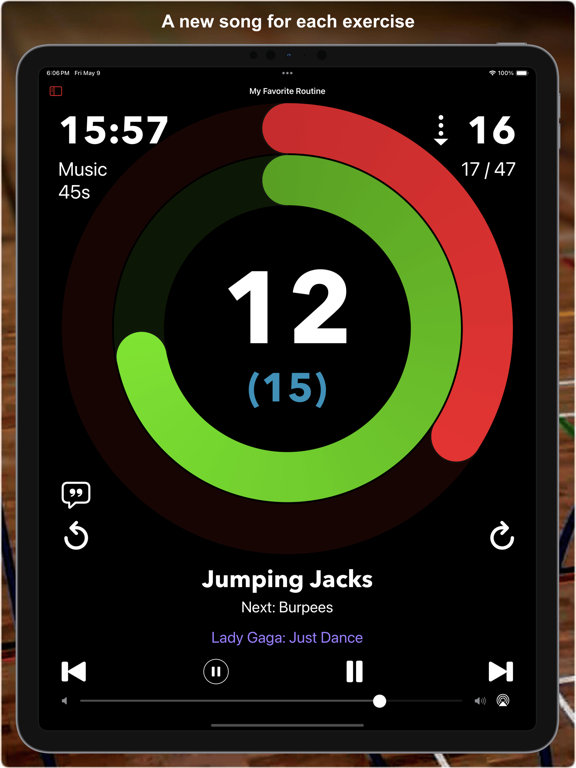


About MC-Timer
The description on the store listing
MC-Timer plays music for timed intervals.
You can use this app to have some fun during workout sessions like Tabata, intervals, HIIT, or circuit training, where you have multiple, timed sets of exercise and rest phases. For more complex routines, the names of your exercises can be shown and randomized, optionally also audibly announced. MC-Timer will guide you through your planned workout by playing music during the high-effort exercise phases and by being quiet during the pauses.
No need to constantly look at your watch.
Just listen to the music.
Your music.
When the work phases are shorter than the typical duration of a song, then you can nicely play a new song for each set. Let …
Read the full description
MC-Timer plays music for timed intervals. You can use this app to have some fun during workout sessions like Tabata, intervals, HIIT, or circuit training, where you have multiple, timed sets of exercise and rest phases. For more complex routines, the names of your exercises can be shown and randomized, optionally also audibly announced. MC-Timer will guide you through your planned workout by playing music during the high-effort exercise phases and by being quiet during the pauses. No need to constantly look at your watch. Just listen to the music. Your music. When the work phases are shorter than the typical duration of a song, then you can nicely play a new song for each set. Let yourself be surprised and allow MC-Timer to play a randomly chosen song for each set. And if you do not want to listen to mellow song intros, you can set MC-Timer to play a suitably long section from the "heart" of the song. While the workout is playing, you can see your progress within each set and within the entire session by looking at the progress rings and the countdown timers. The progress rings are distinct and remain legible even from the other side of the room. To make this possible, the display will stay on while MC-Timer is playing your session. MC-Timer synchronizes the workout definitions across your devices. If you like to use a bigger screen, play the workouts using MC-Timer on iPad or Apple TV. The workout details are fully customizable. You can, but you don't have to: - define any number of repeated sets of "music" and "pause" phases; - insert special sets without music to create longer pauses; - define one or more lists of exercise names to be shown or announced; - choose all the songs that will be played; - use the playlist or exercise lists as is or randomized; - select whether you want to skip to the next song for each set; - play tracks from the beginning or from the middle. Alerts!!! - optionally, use countdown beeps or just a single warning beep; - pick a fun alert sound to play at the start or end of each music phase, or at the end of the session; - select from 62 custom sounds: bells, horns, special effects, Science Fiction and cute animals; A few geeky details: - Each set consists of a "music" phase and a "pause" phase, optionally repeated multiple times. - Music and pause times are entered in seconds. - The start delay (or the default 5-second countdown) is not counted for the workout duration. - A complete session always ends at its last music phase, i.e. the very last pause is skipped. - When you have multiple exercise lists, you can assign which list to use for which set. - You can define exercise pairs like "lunges, left/right" which can be split into "lunges, left" followed by "lunges, right". - You can enable or randomize lead phrases like "Next up: " for the voice announcements or define your own. - MC-Timer accurately times your workout; unlike other apps, there are no timing errors that accumulate as the session progresses. - The counters/timers in the playback view can be tapped to toggle between counting up or down. - The shuffle mode randomises the order in which the songs are played. That is to say: songs will not be repeated until all songs in the playlist have been played. - You can override the default system-wide appearance and always use the app in its dark or light appearance. Medical Advice Please consult with a physician prior to engaging in a new exercise program; even more so if this is not something that you are used to. MC-Timer on the Apple TV You can easily playback your workout sessions directly on Apple TV by using the MC-Timer companion app for Apple TV. However, you cannot edit the sessions there; you need to do that on your iPhone or iPad and sync your changes via iCloud. Also note that since your (iTunes) media library is not available on Apple TV, you will need an Apple Music subscription in order to play music on Apple TV.
Installs
Apple does not publish download counts. Estimates are in testing.
We publish iOS estimates only after they pass a back-test against real numbers. Chart history below is measured.
Estimated store revenue Estimated Beta
App Store, worldwide, monthly rate from the last 14 chart days to 21 Nov 2026
Below the top 100 grossing apps in the markets we calibrate. In the United States that usually means under about $6.4M a month. App Store purchases and subscriptions only, before Apple's 15 to 30% fee. Ads and web payments are not included.
Ratings
1 ratings, 1 reviews
No rating breakdown published for this app.
Recent reviews
Latest public reviews from the store
No reviews in our sample for this app yet.
Top chart positions
Latest App Store chart ranks by country, last 10 days
- Countries ranked
- 1 of 50
- Best rank
- #83
- Top 10 placements
- 0
- of 1 chart placements
- Average rank
- #83
Best countries on App Store
- 🇨🇦 Canada · Top paid, Health & Fitness#83
| Country | Chart | Category | Rank | Best (10 days) | Date |
|---|---|---|---|---|---|
| 🇨🇦 Canada | Top paid | Health & Fitness | #83 | #66 | 13 Nov 2026 |
MC-Timer history
Release, install milestones, listing and store changes
- First released on the store 20 Feb 2021
Update frequency
How often MC-Timer ships a new version, month by month
0 updates in the last 12 months. Less often than most similar apps: they shipped a median of 1 updates in the same year.
Recent versions
Current version 1.9.2
- Version 1.9.228 Oct 2025
- Fixes problems related to handling a custom intial "countdown" step. - Avoids unneccary session reloads.
Listing keywords
Words and phrases MC-Timer repeats most in its store listing
Top phrases: mc timer (11), apple tv (6), music phase (3), music and pause (2), timer to play (2).
Highlighted words also appear in the title. Counts cover the title, short description and description.
Compliance
What the listing and the app package show
- Store status
- Live
- Upkeep
- Updated 28 Oct 2025
- Age rating
- 4+
Apps like MC-Timer
 Advocate Centre ClubThe Center Club★ 4.26
 知源中医Chongqing Caochen Technology Co., Ltd.★ 4.96
 Easy Keto: Low Carb RecipesMartin Stein★ 4.56
 GFX NewGemini Fit Personal Training, Inc★ 4.98
 U Look So Good: Cycle SyncingUS Digital★ 4.64
 Aquila 360 Fitness AppAquila Fitness Consulting Systems, Ltd.★ 4.74
 iCondomRaaza Ltd★ 4.1
 Ultrasonic RepellerAleksandr Balyberdin★ 3.56
 Sleep Tools - Free HD Alarm Clock - Sleep Cycle Calculator - Soothing Night and Bed Time Audio Music Player to Fall Asleep - With Dream Utilities - Universal TonesBigBang, Inc.★ 3.44
MC-Timer: questions and answers
Who makes MC-Timer?
MC-Timer is published by tredje design.
When was MC-Timer last updated?
The latest version (1.9.2) was released on 28 Oct 2025.
Is MC-Timer free?
No. MC-Timer is a paid app priced at $2.99.
Is MC-Timer still available?
Yes. MC-Timer is live on App Store as of 1 Jul 2026.
Track MC-Timer and its competitors
Watch any app for new versions, rating drops, chart moves and removals. Free plan, no card.