
- Installs
- —
- Apple does not publish download counts
- Rating
- 4.78
- Ratings
- 39.5K
- 39.5K reviews
- Version
- 4.31.2
- Updated 9 Nov 2026
- Released
- 18 Nov 2014
- Tracked since 10 May 2026
- Size
- 86 MB
- Needs 15.1
Also on Google Play: Mileage Tracker by Driversnote (39.3K ratings)
Screenshots


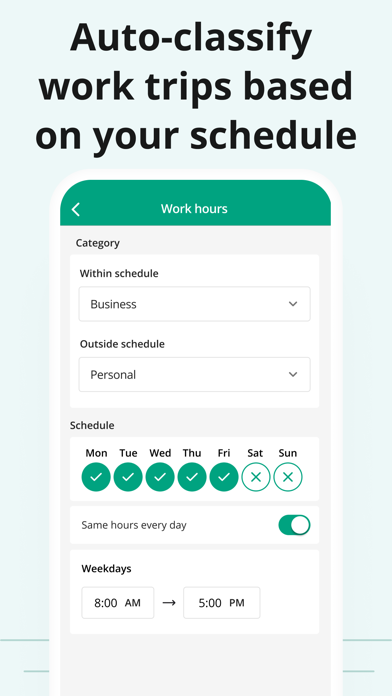

About Mileage Tracker by Driversnote
The description on the store listing
Say goodbye to tedious paper mileage logs with the most accurate automatic mileage tracker.
Accurately track business mileage and create IRS-compliant logs at the touch of a button.
With Driversnote, you get all the reimbursement or deductions you’re entitled to. Join millions of drivers and simplify miles tracking to just 3 steps: Track, Classify and Report!
◉ CLAIM YOUR TIME BACK
Our mile tracker saves you hours of manually logging journeys. The app records all the information you need in real time.
◉ TAX TIME ISN’T A HEADACHE ANYMORE
Effortlessly get tax-compliant mileage logs of your work-related driving for reporting to the IRS.
◉ BE THE MOST ORGANIZED EMPLOYEE
Create and send …
Read the full description
Say goodbye to tedious paper mileage logs with the most accurate automatic mileage tracker. Accurately track business mileage and create IRS-compliant logs at the touch of a button. With Driversnote, you get all the reimbursement or deductions you’re entitled to. Join millions of drivers and simplify miles tracking to just 3 steps: Track, Classify and Report! ◉ CLAIM YOUR TIME BACK Our mile tracker saves you hours of manually logging journeys. The app records all the information you need in real time. ◉ TAX TIME ISN’T A HEADACHE ANYMORE Effortlessly get tax-compliant mileage logs of your work-related driving for reporting to the IRS. ◉ BE THE MOST ORGANIZED EMPLOYEE Create and send your trip logs to your employer in a matter of seconds. ◉ TAX AUDIT COMING UP? Access your previous and current logs anytime, anywhere. ◉ WORLD-CLASS SUPPORT Simply send an email to our brilliant Support team with any questions and they’ll get back to you. The only mileage tracker you need as a business, sole trader, employee, employer, or just about anyone who drives! ► 1. TRACK ※ Track trips completely automatically - the car mile tracker will start tracking once you reach a certain speed. ※ Want to track an individual trip? Just tap START and STOP and leave the rest to our smart GPS automatic mile tracker. ※ Effortless odometer tracking. ※ Forgot to track travel during the day? Enter the start and end addresses of your drives and the app will do the rest for you. ► IBEACON: Further Improve Automatic Miles Tracking Place an iBeacon in your car and Driversnote will track only your preferred vehicle's miles every time you enter or leave your car. Get a free iBeacon when you sign up for the annual Pro subscription on our website. ► 2. CLASSIFY ※ Categorize each trip as Business, Personal, Medical or Charity for a compliant driving log ※ Set your working hours for automatic classification of trips as Business and Personal ※ Add notes to your recorded journeys ※ Review your trips at a glance and easily edit details ► 3. REPORT ※ IRS-compliant reports for your employee reimbursement or car expenses tax claim ※ Claiming deductions by the actual expenses method? Use the percentage split to report the percentage of miles you traveled for work ※ Create separate logs for separate vehicles and workplaces ※ Choose if you want to show odometer readings ※ Have your reports include the total miles, start and end dates, distance, reimbursement amount or % split between business and personal driving ※ Get your vehicle log books in PDF or Excel, or send them directly through the app ► DRIVERSNOTE FOR WEB: Bring All the Functionality to Your Desktop ※ Review your logs and edit details easily ※ Add trips you forgot to record ※ Generate your mileage reports ► KEEP ON TOP OF YOUR LOGBOOK ※ Customize your reimbursement rate if it’s different from the one the IRS sets ※ Set reporting reminders so you never forget to report your miles ※ Save addresses you visit often ► DRIVERSNOTE FOR TEAMS: Perfect for Business Reimbursement Programs ※ Invite and remove users ※ Employees use the automatic mileage tracker ※ Employees create & share consistent logbooks with their managers ※ Managers review and approve reimbursement expense claims in one simple overview ※ Privacy - managers can only see the trips employees report ► PRIVACY BY DESIGN ※ We never sell data ※ We will never provide your information to other parties for marketing purposes ※ See more in our Privacy Policy ► SUPPORT ※ Looking for a quick answer to your question? Visit our comprehensive Help Center straight from the app. ※ Our efficient and effective Support team is ready to assist you at any time at [email protected] ※ Privacy Policy: https://www.driversnote.com/privacy-policy ※ Terms of Service: https://www.driversnote.com/terms-of-service ※ Terms of Use (EULA): https://www.apple.com/legal/internet-services/itunes/dev/stdeula/
Installs, last 30 days
Apple does not publish download counts. Estimates are in testing.
Estimated store revenue Estimated Beta
App Store, worldwide, monthly rate from the last 13 chart days to 20 Nov 2026
Below the top 100 grossing apps in the markets we calibrate. In the United States that usually means under about $6.4M a month. App Store purchases and subscriptions only, before Apple's 15 to 30% fee. Ads and web payments are not included.
Ratings
39,516 ratings, 39,516 reviews
No rating breakdown published for this app.
Recent reviews
Latest public reviews from the store
- 18 May 2026
Great App… when it works.
I drive A LOT for someone who is not a trucker. I have driven about 70,000 miles since downloading this app, then purchasing the motion-sensing device that auto-tracks trips. I learned the hard way that, even though my iPhone is less than 15” away from the “bug,” it does not always automatically track trips. I have lost a minimum of 20% of mileage because it worked so well the first month I had it, I’d forget to check if the auto-track bug had activated the app. THAT has been a bane of my trip tracking existence. To be fair, however, IF YOU CHECK EVERY TRIP EVERY TIME YOU BEGIN TO ROLL, the app is really accurate and works perfectly. I pay a monthly subscription for it, purchased the bug, and expected it to work as advertised. Auto-track is extremely iffy. I’ve had situations where I have forgotten to check the app a few miles away from my previous destination. When typing in that location, the app says something like, “the location you selected is too far away”. BUT I WAS JUST THERE! IT’S on the last stop, and I didn’t teleport a few miles away. My car is my office. I’m busy, take a ton of phone calls between service calls… I don’t believe it’s too much
- 3 Mar 2023
Best ever!
I have two self-employed professions, both of which require that I track mileage. for years. I have looked for the proper and easy to use method of doing that…drivers note is that answer! I can have different categories of mileage. All I do is select the reason I’m driving and tracking mileage and the rest is automatic. I can also do anything else with my phone while it’s tracking. I can make calls I can use GPS I can search the web there’s nothing you can’t do while it continues to track. And then if you forget to stop it it will remind you that you have a trip tracking and do you want to continue or do you want to stop. It gives you plenty of time before it asks that question which means you could be in a house you could be in a store it’ll continue to track even then. It’s just great! It sends me reports at the end of every month along with an invoice. it’s so easy to put it together when it comes to be tax time. I love this app!! I just can’t say enough good things about it. Also, their customer service and administrative people are extremely easy to contact and helpful! Such a pleasure!
- 14 Jun 2019
Tried the rest, this is the best
I am a full-time Lyft Driver, driving 2000 miles a week. I wanted an app that just tracked where I went all day, for tax deduction purposes and also to analyze my routes against my daily earnings and hours on the road to see where I was making the most profit. This is by far the easiest, cleanest and most useful app for tracking miles that I could find. Just START in the morning and STOP when you get back. You can also mark segments of the ride with color-coded trails for different modes of transportation, like: business, personal, medical etc. I really like the manual feature of starting and stopping because the other apps I tried either didn’t have this feature or made it difficult to change the default settings from automatic tracking to manual. Nothing is more annoying than a bunch of useless trips being saved like spam that needed to be deleted. With Driversnote, you are prompted before each ride to set your odometer since there is most usually a gap between when you stop your work day and start up again the next day. Also, there is a feature at the bottom of the tracker that allows you to make notes, in case you missed tracking a part of your ride before you started
- 19 Sep 2018
Great app!
For over 25 years I have worked as an outside sales rep, and keeping track of business miles has been a major headache for me, especially when I had two or three different cars in one year! In addition to the hassle of trying to keep up with it everyday, I dreaded separating personal miles from business miles and compiling all the data for each car on the IRS Form 2106 at tax time! That task consumed many hours and was a major headache! I just downloaded this app about 5 hours ago.... still much to learn about it. But this a great mileage app! Now I can easily track my small fleet of four vehicles that I use in one business, plus my personal vehicle. I can easily track mileage for all of them and switch back and forth between “business” use and “private” use with one touch of the screen! Wow! And how easy to print a PDF report for each car by week, month or year.....and it’s so easy to send the file to my OneDrive cloud and save the reports to my laptop! It amazes me that it does all this in the FREE version! Great job, guys! I can’t wait to learn more about the iBeacon automatic tracking feature which apparently tracks your mileage without you needing to turn on your p
What reviewers bring up
Topics mentioned in the latest 8 reviews, by how many reviews mention them
Liked in good reviews (3 reviews)
- different 3
- automatic 3
- tracking 3
- tax 3
- track mileage 2
- business 2
- personal 2
- driving 2
Raised in bad reviews (4 reviews)
- service 3
- subscription 2
- features 2
- customer 2
- however 2
- decided 2
- through 2
- company 2
Top chart positions
Latest App Store chart ranks by country, last 10 days
- Countries ranked
- 29 of 50
- Best rank
- #2
- Top 10 placements
- 13
- of 34 chart placements
- Average rank
- #37.9
Best countries on App Store
- 🇫🇮 Finland · Top grossing, Finance#2
- 🇸🇪 Sweden · Top grossing, Finance#2
- 🇩🇰 Denmark · Top grossing, Finance#2
- 🇦🇺 Australia · Top grossing, Finance#2
- 🇿🇦 South Africa · Top grossing, Finance#3
- 🇳🇿 New Zealand · Top grossing, Finance#4
| Country | Chart | Category | Rank | Best (10 days) | Date |
|---|---|---|---|---|---|
| 🇫🇮 Finland | Top grossing | Finance | #2 | #1 | 20 Nov 2026 |
| 🇸🇪 Sweden | Top grossing | Finance | #2 | #1 | 20 Nov 2026 |
| 🇩🇰 Denmark | Top grossing | Finance | #2 | #2 | 20 Nov 2026 |
| 🇦🇺 Australia | Top grossing | Finance | #2 | #1 | 20 Nov 2026 |
| 🇿🇦 South Africa | Top grossing | Finance | #3 | #2 | 20 Nov 2026 |
| 🇳🇿 New Zealand | Top grossing | Finance | #4 | #2 | 20 Nov 2026 |
| 🇨🇿 Czechia | Top grossing | Finance | #4 | #1 | 20 Nov 2026 |
| 🇳🇱 Netherlands | Top grossing | Finance | #4 | #3 | 20 Nov 2026 |
| 🇳🇴 Norway | Top grossing | Finance | #5 | #2 | 20 Nov 2026 |
| 🇦🇹 Austria | Top grossing | Finance | #6 | #4 | 20 Nov 2026 |
Mileage Tracker by Driversnote history
Release, install milestones, listing and store changes
- First released on the store 18 Nov 2014
Update frequency
How often Mileage Tracker by Driversnote ships a new version, month by month
8 updates in the last 12 months. More often than most similar apps: they shipped a median of 3 updates in the same year.
Recent versions
Current version 4.31.2
- Version 4.31.09 Nov 2026
- Save your Home and Office in Settings > Locations and give each a default trip type. They sync with the web, too. - Open the app and your web edits are already waiting. No more manual syncing. - Editing a trip? You'll now see the right mileage rate for that vehicle, in the right currency and unit. - Plus smoother sign-up and setup, and a stack of fixes under the hood. Questions? Reach out to [email protected]
- Version 4.30.628 Oct 2026
Your dashboard just got smarter. Driversnote is back on Android Auto, and both CarPlay and Android Auto now show your tracking status when you get in the car, even if the app wasn't open on your phone. Also new: - A busy Inbox no longer crashes the app - Saved locations keep their address
- Version 4.29.023 Aug 2026
Summer’s been busy for us, here’s what’s new: - You now get alerted in Reports when a deadline's coming up - Fixed note editing so the keyboard doesn’t get in the way - Return trips open with the map centered on the correct area PS: Never miss an app update. You'll now be prompted when a new one is available. Questions? Reach out to [email protected]
- Version 4.28.44 Jul 2026
Smoother tracking ahead — here's what we fixed: - Auto-tracking not turning off straight away when you changed permissions - An error loading trips when no active vehicle was set up - Some text appearing in the wrong language If you need help, you can always reach out to our fantastic support team at [email protected]
Listing keywords
Words and phrases Mileage Tracker by Driversnote repeats most in its store listing
Top phrases: mileage tracker (4), mile tracker (3), automatic mileage tracker (2), business and personal (2), start and end (2).
Highlighted words also appear in the title. Counts cover the title, short description and description.
Compliance
What the listing and the app package show
- Store status
- Live
- Upkeep
- Updated 9 Nov 2026
- Age rating
- 4+
Apps like Mileage Tracker by Driversnote
 TruliantTruliant Federal Credit Union★ 4.82
 My LoanCare GoLoanCare★ 4.82
 Fulton Bank Mobile BankingFulton Financial Corporation★ 4.76
 PSECU MobilePennsylvania State Employees Credit Union★ 4.83
 Banco Popular DominicanoBanco Popular Dominicano★ 4.86
 LGE MobileLGE Community Credit Union★ 4.85
 中国工商银行Industrial and Commercial Bank of China★ 4.74
 Your Mortgage OnlineDMI Software, Inc★ 4.87
 Travis CU MobileTravis Credit Union★ 4.83
Mileage Tracker by Driversnote: questions and answers
Who makes Mileage Tracker by Driversnote?
Mileage Tracker by Driversnote is published by Driversnote ApS.
When was Mileage Tracker by Driversnote last updated?
The latest version (4.31.2) was released on 9 Nov 2026.
Is Mileage Tracker by Driversnote free?
Yes. Mileage Tracker by Driversnote is free to download.
Is Mileage Tracker by Driversnote still available?
Yes. Mileage Tracker by Driversnote is live on App Store as of 20 Nov 2026.
Track Mileage Tracker by Driversnote and its competitors
Watch any app for new versions, rating drops, chart moves and removals. Free plan, no card.