
- Installs
- —
- Apple does not publish download counts
- Rating
- 4.5
- Ratings
- 1.9K
- 1.9K reviews
- Version
- 2026.0.2
- Updated 2 Jun 2026
- Released
- 28 Nov 2017
- Tracked since 10 May 2026
- Size
- 380 MB
- Needs 16.4
Screenshots




About MindNode – Classic
The description on the store listing
Every great idea starts with a single thought. And another. And then a million more. MindNode is the most delightful brainstorming app for Mac and iOS. It helps you capture your thoughts and create a clear picture of your idea.
Featured as Apple’s “App of the Day” & “Editors’ Choice”
WHAT’S ON YOUR MIND?
• Capture Your Thoughts
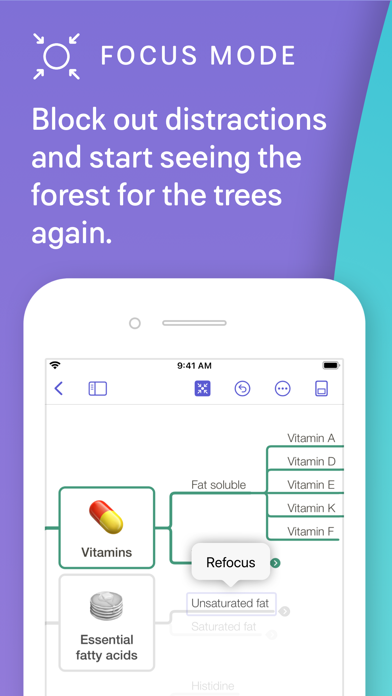
Whether as words, images, links, tasks, or notes, capture your thoughts in any form. Create an outline for an organized, hierarchical view, and observe how it grows as a mind map. Use the mind map to visually rearrange nodes and add new thoughts. MindNode is the right tool to get your ideas out of your head the way you want to.
• Organize Your Idea
Your document …
Read the full description
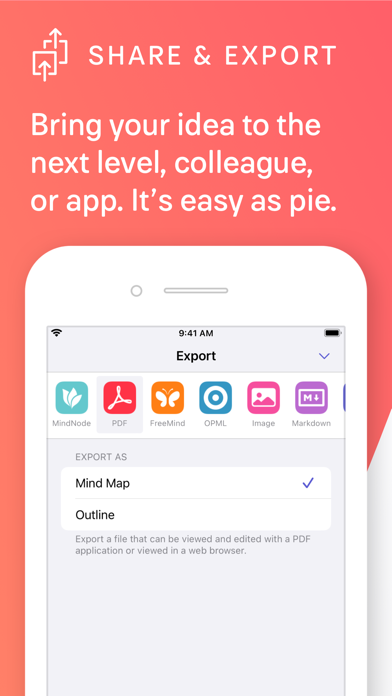
Every great idea starts with a single thought. And another. And then a million more. MindNode is the most delightful brainstorming app for Mac and iOS. It helps you capture your thoughts and create a clear picture of your idea. Featured as Apple’s “App of the Day” & “Editors’ Choice” WHAT’S ON YOUR MIND? • Capture Your Thoughts Whether as words, images, links, tasks, or notes, capture your thoughts in any form. Create an outline for an organized, hierarchical view, and observe how it grows as a mind map. Use the mind map to visually rearrange nodes and add new thoughts. MindNode is the right tool to get your ideas out of your head the way you want to. • Organize Your Idea Your document reflects your ever-changing understanding of an idea as you add and adjust thoughts. Move, tag, connect, detach, and reconnect as often as you like. Mind map and outline side-by-side. Concentrate on one thought at a time with Focus Mode, Visual Tags, and foldable branches. • Style Your Mind Map Personalize your document with beautiful out-of-the-box themes and custom stickers. Make your mind map look just right by styling every detail. With Smart Layout your idea will always look fantastic. • Share Your Vision Easily share your documents with others or move them one step further in your creative process. Send tasks to Apple Reminders, Things, or OmniFocus. Export your idea as text, image, and to many other file formats. STAY PRODUCTIVE WHEREVER YOU GO Whether it’s on your iPhone, iPad, or Mac, with MindNode, you stay productive wherever you are. Store your files on iCloud Drive and access them on all your devices. FREE EDITOR Use MindNode for free to capture your ideas with actions like editing, rearranging, and folding nodes, as well as importing and exporting files. • Capture: grow your thoughts into fully-fledged ideas • Fold branches: keep your documents organized • Import: FreeMind, MindManager, iThoughts, plain text, RTF, CSV, OPML, Markdown, TextBundle • Export: plain text, RTF, CSV, OPML, PDF, PNG image, Markdown, TextBundle, TaskPaper, FreeMind MINDNODE PLUS MindNode Plus is a cross-platform subscription for your iPhone, iPad, and Mac. It unlocks all of MindNode’s features like Outlining, Visual Tags, Focus Mode, Notes, Themes, Stickers, Connections, and much more. MindNode Plus is available as a monthly and a yearly subscription. Try out all of MindNode’s features with a free 14-day trial. • Collect everything: add text, images, and links to nodes • Outlining: create your document using a hierarchical, organized approach • Visual Tags: tag your thoughts for more context, highlight tags to see new relationships • Notes: keep your mind map easy to read without losing a single detail • Connections: connect nodes on different branches • Tasks: turn your thoughts into actions • Quick Entry: just start typing to collect thoughts • Themes: beautiful out-of-the-box themes and unlimited personal themes • Images: insert your own images and annotate them • Stickers: 260+ hand-crafted stickers with adjustable colors • Styling: rich styling options for every single part of your mind map • Layouts: top-down and horizontal • Focus Mode: put a spotlight on a single branch • Dark Mode: for when your thoughts come at night • Share Tasks: to Apple Reminders, Things, and OmniFocus WHAT OTHERS SAY ABOUT MINDNODE “The app keeps out of your way, so it doesn’t interrupt your thought processes.” – New York Times “An app on the cutting edge of iOS design and technologies.” – MacStories “Slowly grow and track your ideas, connecting nodes to help you better conceptualize your idea or thoughts.” – BusinessInsider QUESTIONS? Reach out to us at [email protected] and on Twitter (@mindnode). Let us know if you have any questions or issues. We’re always glad to help. Terms of Service: https://mindnode.com/terms
Installs, last 30 days
Apple does not publish download counts. Estimates are in testing.
Estimated store revenue Estimated Beta
App Store, worldwide, monthly rate from the last 12 chart days to 19 Nov 2026
Below the top 100 grossing apps in the markets we calibrate. In the United States that usually means under about $6.4M a month. App Store purchases and subscriptions only, before Apple's 15 to 30% fee. Ads and web payments are not included.
Ratings
1,924 ratings, 1,924 reviews
No rating breakdown published for this app.
Recent reviews
Latest public reviews from the store
- 2 Sep 2024
Great mind-mapping, so close, but…
I’ve had a Mind Node subscription for years, and used it with much success. It is great for brainstorming as long as you have a regimented perspective with the hierarchical way that layouts and node creation and connection works in the app. However, keep in mind, that’s not the full nature of *brainstorming*! Things are not always strictly hierarchical, nor pure parent-child relationships. Sometimes logic is more mesh-oriented, parents defer to other parents, or a linear flow or connection needs to be represented without imposing hierarchy or priority or parent-child type relationships. Full disclosure — I’m an app-developer myself, and I find that design often suffers from the limitation of narrow perspective — and how an app is used (or can be) informs well about design. I want so badly to use Mind Node as my single brainstorming app, but the inability to gracefully do simple linear flows without imposing hierarchy requires me to have another graphing / diagramming app — I cannot rely on Mind Node as my sole app for brainstorming. I’ve seen other user reviews requesting the same thing. The ability to create and connect nodes without imposing hierarchy or rank visu
- 25 Aug 2023
Absolutely Fantastic
I’ll admit I’m kind if a mind-map addict. An analyzer, I love the visual interaction with my information, from my calendar to tasks, from creative writing to astrological charts. I’m not kidding when I say the functionality of this app beyond amazing. The tagging system is unique, allowing you to isolate certain tags to identify correlations between various concepts or ideas you might not otherwise notice. Most mind-mapping software comes with a focus mode or branch isolator that will isolate all items on a single branch, but not across the entire map like MindNode can do. The interface interacts with iCloud, Universal Control and Handoff Perfectly without missing a beat. I’m all Apple across the board and not many apps can make the jump from one to another device wise with such reliability each and every time. Fully integrates my fonts and customized elements in iOS, iPadOS and macOS. It even interfaces with Apple Reminders to maintain task lists and updates them in real time on the map and in reminders. Ingenious. Lots of options when printing too (I use that feature quite frequently for clients) that allows you to work with three, four, however many mind-maps on a single
- 14 Mar 2023
Easy to use, highly functional, simple, clean and anti-distraction
I love how I can get started easily on a sketching ideas and plans. There is room to make things detailed and highly customizable; but the app is designed so well that I don’t feel distracted by those features when I’m creating. They really are designed to not get in the way. Usually with mindmapping software, I start excited but then get overwhelmed or distracted with all the bells and whistles. The bells and whistles are here in MindNode, but the flow is so great that for the first time I was able to just start sketching ideas out. After about 10 minutes, I had the 13 different initiatives I’m involved in at work mapped out. A) The relief to my brain was great. B) Off loading that weight and visually seeing it mapped out did something in the way I see work that has helped me be more effective. Paying the yearly amount for the expanded features was a no brainer, and I’m excited to support this software’s development. P.S. A couple of my favorite features that I don’t see anywhere else are (1) The ability to easily have multiple master nodes in the same canvas. This helps me feel like I don’t have to have the grand plan set out before I start. It removes barriers
- 24 Feb 2023
Mind Node Power User - iPad UX
I've been using mind node on the Mac for many years, as an entrepreneur and product designer, it's how I organize my brain. When I got mind node for the iPad Pro, I was disappointed. As a UX designer myself, I have some well-formed suggestions I hope the developers will consider: The app is fine with a keyboard, but the potential is for the app to work better with the pencil, so mind noding feels like hand drawing a mind map, with the app beautifully formatting the hand entry as the user progresses. Here's how 1) Pencil mode. When the user is entering data with a pencil, the app should recognize this and: A. Not have the keyboard pop up when text is being entered by scribble. B. Use the pencil for drawing, NOT scrolling. Fingers can be used to move around and zoom... pencil is a drawing/writing/manipulating tool only! 2) drawing an oval in an open area should create a new main node 3) drawing a line from an existing node should create a child node 4) scratching out a node should delete it Those are the biggies. It's close! Devs: spend some time using your app with the pencil, imagine you are drawing these mind nodes... I should never need my keyboard, and basic actions like adding
What reviewers bring up
Topics mentioned in the latest 8 reviews, by how many reviews mention them
Liked in good reviews (6 reviews)
- mindnode 4
- ability 3
- single 3
- ideas 3
- first 3
- able 3
- mind-mapping 2
- frequently 2
Raised in bad reviews (1 reviews)
No topic comes up twice.
Top chart positions
Latest App Store chart ranks by country, last 10 days
Not in any tracked top chart in the last 10 days.
MindNode – Classic history
Release, install milestones, listing and store changes
- First released on the store 28 Nov 2017
Update frequency
How often MindNode – Classic ships a new version, month by month
2 updates in the last 12 months. About as often as similar apps, which shipped a median of 2 updates in the same year.
Recent versions
Current version 2026.0.2
- Version 2026.0.22 Jun 2026
• Fixed "Add Sketch" feature on iOS 26 • Fixed conflicting keyboard shortcuts • Fixed QuickLook previews for documents created with MindNode Next
- Version 2026.0.116 Feb 2026
• Fixed an issue when applying personal hierarchical themes
Listing keywords
Words and phrases MindNode – Classic repeats most in its store listing
Top phrases: mind map (7), capture your thoughts (3), focus mode (3), mindnode plus (3), visual tags (3).
Highlighted words also appear in the title. Counts cover the title, short description and description.
Compliance
What the listing and the app package show
- Store status
- Live
- Upkeep
- Updated 2 Jun 2026
- Age rating
- 4+
Apps like MindNode – Classic
 immowelt – Real EstateAVIV Germany GmbH★ 4.69
 f3 vpn - Unlimited VPNSkyline Quantum Data Systems Limited★ 4.27
 Vantage CalendarFortyfour AB★ 4.31
 Phone Drive: File StorageEightythree Technology★ 4.68
 Authenticator App - 2FA Auth +Appshub Bilgi Teknolojileri Limited Sirketi★ 4.5
 Find Bluetooth Device TrackerWergames OU★ 4.36
 Safetunnel VPN & Fast ProxyHOME BUYER SYSTEMS LTD★ 4.55
 VPN for iPhone:Super VPN ProxyVPN PROXY MASTER★ 4.64
 Green VPN - TunnelingTHREE PANDA DIGITAL LIMITED★ 4.48
MindNode – Classic: questions and answers
Who makes MindNode – Classic?
MindNode – Classic is published by IdeasOnCanvas GmbH.
When was MindNode – Classic last updated?
The latest version (2026.0.2) was released on 2 Jun 2026.
Is MindNode – Classic free?
Yes. MindNode – Classic is free to download.
Is MindNode – Classic still available?
Yes. MindNode – Classic is live on App Store as of 19 Nov 2026.
Track MindNode – Classic and its competitors
Watch any app for new versions, rating drops, chart moves and removals. Free plan, no card.