
- Installs
- —
- Apple does not publish download counts
- Rating
- 4.54
- Ratings
- 311
- 311 reviews
- Version
- 7.0.2
- Updated 3 Nov 2026
- Released
- 18 Sep 2009
- Tracked since 10 May 2026
- Size
- 17 MB
- Needs 11.0
Screenshots
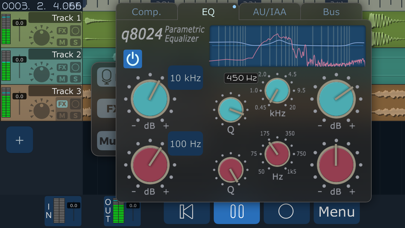
About MultiTrack DAW
The description on the store listing
The power of a digital audio workstation in the palm of your hand.
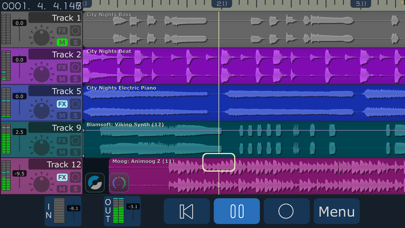
Release your creativity with up to 32 high quality audio tracks. Record multiple takes, harmonies, solos, and experiments. No more worrying about bouncing - each instrument can have its own track. More cowbell? No problem!
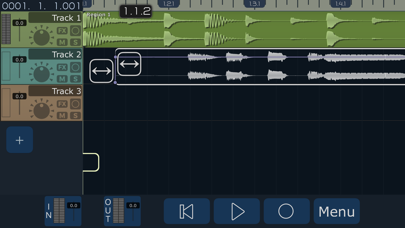
Build new songs like a recording studio, with the monitoring and overdubbing capabilities of MultiTrack DAW. Move and trim audio until it's perfect, and mix the sound until it's just right. Export your work with a multitude of sharing options.
INPUT
MultiTrack has a wide range of input capabilities, including the built-in mic, headset mics, and USB interfaces and mics. AudioUnits (AUv3) and IAA …
Read the full description
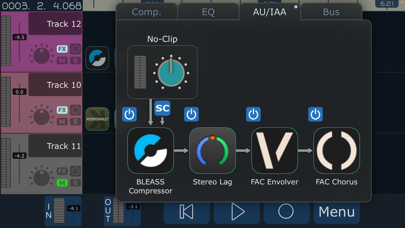
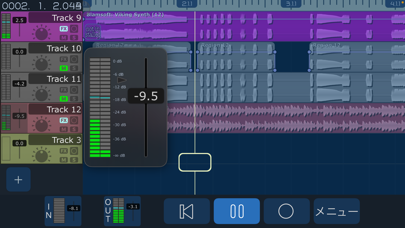
The power of a digital audio workstation in the palm of your hand. Release your creativity with up to 32 high quality audio tracks. Record multiple takes, harmonies, solos, and experiments. No more worrying about bouncing - each instrument can have its own track. More cowbell? No problem! Build new songs like a recording studio, with the monitoring and overdubbing capabilities of MultiTrack DAW. Move and trim audio until it's perfect, and mix the sound until it's just right. Export your work with a multitude of sharing options. INPUT MultiTrack has a wide range of input capabilities, including the built-in mic, headset mics, and USB interfaces and mics. AudioUnits (AUv3) and IAA (Inter-App Audio) are also supported as inputs and as effects. AUDIO FILES File types for import include mp3, ogg, wav, aac, m4a, aif, and m4a. MultiTrack now offers 8 ways to get audio files in and out: iTunes/Finder File Sharing, Wi-Fi, Drag&Drop, Copy/Paste, 'Open in...', Airdrop, the Files app, and importing from the Music Library. Whole projects can be archived in-app and shared, and sent directly to other devices using AirDrop, Wi-Fi, or any other iOS sharing method. FEATURES 2 stereo audio tracks, upgradable to 32, for simultaneous playback. 16 inputs simultaneously (USB interface required). 16, 24, or 32 bit floating point at 44.1, 48, 88.2 or 96 kHz, professional quality lossless audio for each track. Inter-App Audio / AudioUnits v3 - Generators, Instruments, and Effects supported. Up to 4 AU/IAA plugins on each track, the 2 effects busses, and the master out. Sidechain capable, use the 'SC' button to pick a source track pre/post FX. Audiobus 3 - Can be used as a sender for any track or master out. Supports saving and restoring state. Non-linear, non-destructive editing using Regions and Bins. Built-in track Compressor and EQ (2 bands parametric, 2 bands shelving). Built-in Sweet Reverb and Stereo Delay available as bus effects. Grid View with Snap to easily align regions. Freeze tracks for improved performance. Metronome adjustable from 40 to 240 BPM. Various musical Time Signatures. Ruler showing bars/beats/divisions/ticks or timecode. Volume faders have +12db of gain boost. Per-Region volume and fade in and out, with realtime audio monitoring while editing. Ability to monitor the input signal with effects, while recording the raw input. Looping with the Loop Markers. Hotbox popup control (Long-touch over track) with context sensitive buttons. Audio Browser allows preview of audio files in the song. Snap, Punch, Input Monitor, Auto Input, Undo and Redo, and many more features. Smart Snap displays red vertical lines with exact snapping placement, snaps to any other region or ruler line. MORE FEATURES Beautifully rendered waveforms at multiple zoom levels. Low latency VU meters for each track. 64 bit audio processing. Latency compensation with selectable buffer sizes. Zip compression of song projects for backup/restore. Wav, mp3, ogg, ALAC, FLAC, and m4a compression for mixdown with selectable bitrates. Free 'Sound Copy' app extension allows copying audio to the General Pasteboard from outside MultiTrack. Many, many more features. For more information visit harmonicdog.com * USB Audio requires Lightning to USB Camera Adapter.
Installs since 29 Aug 2026
Apple does not publish download counts. Estimates are in testing.
Estimated store revenue Estimated Beta
App Store, worldwide, monthly rate from the last 12 chart days to 19 Nov 2026
Below the top 100 grossing apps in the markets we calibrate. In the United States that usually means under about $6.4M a month. App Store purchases and subscriptions only, before Apple's 15 to 30% fee. Ads and web payments are not included.
Ratings
311 ratings, 311 reviews
No rating breakdown published for this app.
Recent reviews
Latest public reviews from the store
- 22 May 2024
Love it! A couple requests please 🙏🏼
I love this app and have been using it for years! Thank you for making a stable audio focused recording app that gets out of the way and lets the creativity flow! 1. I have two UI requests. The VU meters only stay up for a few seconds after clicking on them and this is frustrating when trying get all my inputs oh so perfect. It would be nice if there was an option to manually toggle the expanded view on and off. 2. Plug ins. My plug ins have tiny font and tiny buttons on them. Especially on my phone. It would be awesome if there was a toggle switch to manually maximize their windows. Also, I like that there is a button at the top of the plugin to choose from the presets. It would be nice if there was a similar button that pulled up a list of all the adjustable parameters in the plugin and then let the user make changes.
- 5 Nov 2023
No Better Mobile DAW than Multitrack
I have been using this app heavily since like 2016. It is perfect for demo-ing. It is also perfectly capable of more professional tracking. With the track add-ons you can get up to 32 tracks. I have used it successfully to do live tracking of my band with maybe 14 or 15 simultaneous tracks with no issues (obviously you will need an interface that has multiple inputs for this). It doesn't have a ton of FX, but the built-in ones are perfect for my needs. The best part of this app, in my opinion, is the simple and intuitive interface. It usually takes me a long time to learn new tracking software, but with this one I was up and running in like 15 minutes...I have plenty of other tracking software apps and desktop programs, and each have certain advantages of their own...but for the most part whenever I start a new project I find myself gravitating to Multitrack. Oh, and one more thing, bouncing down projects and exporting them is a breeze. That is often not the case with other DAW software...in my experience. Anyway...get it.
- 1 Apr 2021
Top Shelf! Again I Say! TOP SHELF!
I LOVE THIS APP! Harmonic Dog does it again! New update is really awesome! 32 tracks on an iPhone or iPad is SOOOO COOOL! Look folks how long this app has been around and it’s STILL ALIVE AND WELL! Not a fly by night outfit! If you’re looking for a user FRIENDLY DAW for your iOS device look no further, this is dope! I STILL use this app with great results! I STILL reach for this app! It’s uncomplicated, EZ to use quickly gets me to the task at hand. I’ve NEVER had issues with this app and am stunned at the continued support/maintenance of this app! While updates are few and far between... when the update rolls in it’s MAJOR and well done!! AND amazingly FREE updates! That’s a huge win cuz I HATE SUBSCRIPTION services! Thank you Harmonic Dog YOU ARE AWESOME!!!! ~~~~~~~~~~~~~~~~~~~~~~~ Another great update! Now with looping until you "got it right" option! New device support too! This is one my favorite apps! Even tho I have more "complicated" more expensive DAWs for iPad, this is the one I always goto! There's just enough bells and whistles to get a very good multitrack recording (depending on your device) and if you include it in the audio chain of AudioBus y
- 25 Jul 2020
It's simple :)
Took me 15 minutes to finally realize this app can't record midi notes. It only records actual audio. Sad. I was looking for a daw like garageband, that could record midi data, but with the ability to freeze tracks... Since garageband lacks that very important feature. This isn't it. That said, this app does look freakishly simple to use and honestly it seems much easier to work with. For some reason, garageband always feels like it doesn't really fit in an iPhone screen. I wish this app had midi recording with track locking, but I bet that would be a very complicated feature for the devs, so I don't blame them for not having it. Maybe some day, who knows? But in the mean time I guess I'll reluctantly have to look elsewhere.
What reviewers bring up
Topics mentioned in the latest 8 reviews, by how many reviews mention them
Liked in good reviews (6 reviews)
- recording 5
- tracks 4
- daw 4
- audio 3
- user 3
- few 3
- harmonic dog 2
- complicated 2
Raised in bad reviews (1 reviews)
No topic comes up twice.
Top chart positions
Latest App Store chart ranks by country, last 10 days
Not in any tracked top chart in the last 10 days.
MultiTrack DAW history
Release, install milestones, listing and store changes
- First released on the store 18 Sep 2009
Update frequency
How often MultiTrack DAW ships a new version, month by month
1 updates in the last 12 months. Less often than most similar apps: they shipped a median of 2 updates in the same year.
Recent versions
Current version 7.0.2
- Version 7.0.23 Nov 2026
MultiTrack 7 is here: a new audio engine, a new timeline, and a mixer that runs all the way to 9.1 surround. Your projects from earlier versions open in it. Version 7.0.2 - Fills the whole screen on iPhone Duo, with no black bar when it's closed. - Time stretching stays on the grid at any Dynamic Tempo. - A 6.3.6 song saved during a solo keeps its other tracks powered on once you un-solo. - A 48 kHz interface under a 44.1 kHz song no longer nudges the playhead. - Plugin icons use the system icon shape, without the thin line on iOS 26. - A large volume fader opened from the toolbar stays above the Options panel. - Duplicating a track copies its automation and tempo lane, and the new lanes play right away. - Recording automation on a button toggles it back and forth and records each change. - Dragging automation points snaps only Hold points on button lanes, and a selection moves as one group. - Songs saved by 6.3.6 or earlier keep their main-channel plugins when opened. - Stretched regions with a tempo curve play all of their audio on a tempo-off track. EVERY TRACK, FOR EVERYONE All 32 tracks are part of the app, whatever you bought before. If you paid for extra tracks, that money comes back: open Options > Upgrades for free months of Unlock All Features and a lower price on the one-time purchase. NEW IN 7 - MIDI tracks and clips, a piano roll with Draw mode, the MIDI Matrix, filter chains, Network MIDI, and Standard MIDI Files with tempo maps. - MIDI loop recording: each lap is a take, and MIDI 2.0 per-note pitch bend and pressure get curves you bend with a drag. - Automation for volume, pan, sends, EQ, compressor, pitch, Audio Unit parameters, and MIDI CC. - Tempo automation: draw ramps and curves, and audio, MIDI, and Ableton Link follow in real time. - Time signature changes anywhere on the ruler. - Time stretching and warp markers, and pitch shifting up to two octaves with formant preservation. - Surround and multichannel, from stereo to 9.1 and 4-16 channel pass-through. - Region crossfades: overlap two regions and the overlap is the crossfade. Every fade has a curve you bend by dragging its handle. - Recording latency calibration: Detect measures your mic, speaker, or interface with a short chirp. - Takes that survive a call, a lost interface, or a closed song. - Six plugins per chain on every track, bus, and the master, and four send busses. - Exports with real dither, and Normalize is now your choice. - iCloud Drive projects, drag and drop, and ZIP browsing. - Light, dark, and custom themes; German, French, and Japanese. - No account, no tracking, and no analytics or crash-reporting service. ALSO IN 7.0.1 - Bluetooth headphones keep full quality when you arm a track; Bluetooth Microphone in Song Settings > Audio Device records from the headset. - The playhead handle is put away while a take records, so brushing it no longer stops the recording. - iCloud conflicts resolve cleanly, and rare crashes on open, conversion, and punch-in are fixed. - Under Ableton Link, loop markers snap to measures. UNLOCK ALL FEATURES MIDI editing, time stretching and warp editing, and automation come with Unlock All Features: a subscription, or a one-time purchase. Everything else is part of the app. Found something? harmonicdog.com
- Version 6.3.64 Sep 2022
• Sidechain inputs for AudioUnit plugins. Use the 'SC' button on plugs that publish a sidechain input (or multiple input busses), like FabFilter (MB Pro, Timeless 3), RoughRider3, NYCompressor, or Blue Mangoo Multiband Compressor. Sidechain input can source from any other track, pre or post effects, including other tracks that also have sidechain effects. • Per-Region Volume. When editing a region, an additional Handle will control the volume (-45 to +12 dB) • Vertical dragging of Regions or multiple Regions. You ask for it, we deliver. • Tracks now allow mono or stereo regions on the same track, the VU meter will change channel count dynamically. • Separate 'Bounce' and 'Copy' buttons in the Hotbox. The Bounce button will mixdown all audio in selected regions and copy it to the Pasteboard. • Realtime monitoring of editing/moving Regions, start/stop/fadein/fadeout/volume, during playback. • Undo/Redo of track deletion/creation/moving. Tracks will animate back to original position on Undo/Redo. • Improved Loop Marker adjustment, window will now autoscroll when dragging Loop Markers. • Wi-Fi web server now has options for toggling 'Track FX', 'Bus FX' and 'Master FX' for track downloads. • AUView now has 'Speaker' icon used to toggle the output. Many more things. Version 6.3.6 Region editing now shows underlying regions through the region ghost, for easier alignment. Version 7.0 is still on it's way, stay tuned! Other recent features: • New low price! Basic MultiTrack now comes with 2 tracks and with all features enabled. If you bought MultiTrack before this version, you will of course retain your track counts and all previous purchases. • Tracks can be now be purchased in multiples of 8, up to a total of 32. • 32 bit floating point project formats! Use the '32f' option (Gear icon on the Songs Screen) to create a project with the new format. • New midi piano keyboard controller for AudioUnit Music Devices or Instruments. With Pitchbend/modwheel sliders and scalable key widths. Automatic velocity and aftertouch on supported devices. • Mixdown stems as separate tracks into a folder, with normalize option. • AudioUnit plugin view can be moved and resized, and remain onscreen. Supports multiple AU Instruments open at once on iPad. • FLAC (Free Lossless Audio Codec) and ALAC (Apple Lossless Audio Codec) implemented. • Pin button. On iPad, AU plugins and instruments now have a Pin button to keep the plugin on screen. When opening a song, all pinned plugins will restore their position. • Multi-channel wav export. • Track Duplicate feature. • Mute/Unmute per region. • iOS 14 ColorPicker for changing track color, with a wider range of colors. • Enable iOS Status Bar for iPad split view or slide over mode. • Added Bounce button to Audio Browser. • Allow reordering of track FX by dragging tabs (Compressor, EQ, and AudioUnit chain). • Allow dragging of AudioUnit windows outside of screen edges. • Adds sorting of AudioUnits in selection panels with most recently used at the top. • 'Allow Portrait' toggle switch for iPhone in Settings.app (default is on), switch off to force landscape. • Store last selected 'Ruler' and 'Time Display' metronome settings, as default for new songs. • Input Fader can expand up to a 32 channel VU Meter. • New Create Song panel with song name and bits/rates.
Listing keywords
Words and phrases MultiTrack DAW repeats most in its store listing
Top phrases: audio files (3), inter app audio (2), audio tracks (2), mp3 ogg (2), multitrack daw (2).
Highlighted words also appear in the title. Counts cover the title, short description and description.
Compliance
What the listing and the app package show
- Store status
- Live
- Upkeep
- Updated 3 Nov 2026
- Age rating
- 4+
Apps like MultiTrack DAW
 Musixmatch PromusiXmatch srl★ 4.04
 Orangetheory RadioSocial Study Media, LLC.★ 4.8
 Radio Germany : german radiosSebastien Rousseau★ 4.73
 Acoustic TunerFredrik Blank★ 3.93
 Radio Tuner - Radio Appjavad tayebi★ 4.61
 UkuTabsJonas von der Crone★ 4.29
 Songi - AI Music & Cover MakerLuvio Yazilim ve Dijital Hizmetler Limited Sirketi★ 4.49
 Jazz24: World Class Jazz RadioPacific Public Media★ 4.85
 Fiji Radio - All FIji Live FMJasmin Agravat★ 4.59
MultiTrack DAW: questions and answers
Who makes MultiTrack DAW?
MultiTrack DAW is published by Harmonicdog.
When was MultiTrack DAW last updated?
The latest version (7.0.2) was released on 3 Nov 2026.
Is MultiTrack DAW free?
No. MultiTrack DAW is a paid app priced at $4.99.
Is MultiTrack DAW still available?
Yes. MultiTrack DAW is live on App Store as of 14 Nov 2026.
Track MultiTrack DAW and its competitors
Watch any app for new versions, rating drops, chart moves and removals. Free plan, no card.