
- Installs
- —
- Apple does not publish download counts
- Rating
- —
- Ratings
- —
- Version
- 3.9.3
- Updated 17 Apr 2021
- Released
- 28 Mar 2014
- Tracked since 11 May 2026
- Size
- 14 MB
- Needs 12.0
Screenshots
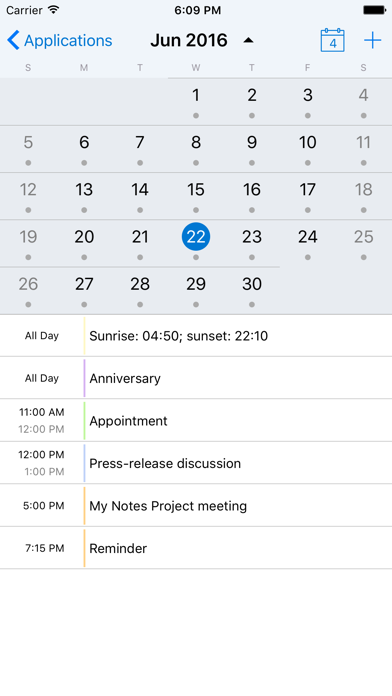
About My Notes - HCL Notes mobile
The description on the store listing
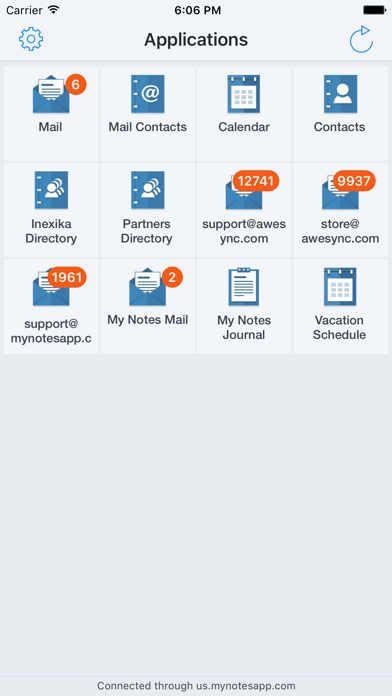
My Notes is designed to work with standard applications of HCL Notes (formerly IBM Notes and Lotus Notes).
NOTE: My Notes Dekstop application should be always up and running on your workstation with HCL/IBM/Lotus Notes client installed.
No server-side manipulations, configuration changes or applications templates modifications are needed to connect.
Start working with My Notes with 3 easy steps:
1. Install My Notes Desktop on your computer from http://www.mynotesapp.com/download/ and setup connection to HCL/IBM/Lotus Notes;
2. Install the app on your mobile phone;
3. Launch the app and connect to Desktop by scanning QR code.
- - - MAIN ADVANTAGES - - -
* EASY INSTALLATION – no …
Read the full description
My Notes is designed to work with standard applications of HCL Notes (formerly IBM Notes and Lotus Notes). NOTE: My Notes Dekstop application should be always up and running on your workstation with HCL/IBM/Lotus Notes client installed. No server-side manipulations, configuration changes or applications templates modifications are needed to connect. Start working with My Notes with 3 easy steps: 1. Install My Notes Desktop on your computer from http://www.mynotesapp.com/download/ and setup connection to HCL/IBM/Lotus Notes; 2. Install the app on your mobile phone; 3. Launch the app and connect to Desktop by scanning QR code. - - - MAIN ADVANTAGES - - - * EASY INSTALLATION – no server-side manipulations, no IT staff involved, no administrative rights needed. All you need is your computer with IBM Notes installed and your phone; * MULTIPLE PLATFORMS SUPPORTED – My Notes Desktop is available for Linux, Mac OS X and Windows computers; * IBM NOTES APPLICATIONS SUPPORTED – Mail, Calendar, Contacts, Domino Directories, Notebook. Other applications, such as Discussion/Forum, Documents Library, TeamRoom, are coming soon; * WORKS IN ANY NETWORK – the app is switched automatically between direct connection when you are in local Wi-Fi network and our cloud service when you're connected over the Internet (paid subscription required); * SECURITY – neither data nor passwords are stored on our servers. Data is strongly encrypted with AES and SSL when transmitted between your desktop and your phone; * IBM NOTES SPECIFIC FEATURES – encrypted and signed messages support, follow-up flags, full-text search through all documents in databases, etc. - - - SUBSCRIPTION AND PRICING - - - When connected to a computer with My Notes Desktop directly, for instance, via local Wi-Fi network, you can use ALL FUNCTIONS of the application FOR FREE and ADS-FREE. To use My Notes via any available Internet connection, including cellular networks, public or private Wi-Fi hotspots, you need to purchase Pro Subscription to connect via our cloud internet-service. Please note that Pro Subscription is auto-renewing subscription. See details below: * Pro Subscription price is $1.99 per month or $19.99 per year. * Subscription payment will be charged to iTunes Account at confirmation of in-app purchase. * Subscription is renewed automatically unless you turn auto-renew off at least 24 hours before the end of current period. * Your account will be charged automatically to renew subscription within 24 hours prior to the end of current period. * Cancellation of the current subscription during the active subscription period is not allowed. * Any unused portion of a free trial period, if offered, will be forfeited when the user purchases a subscription to that publication. * Our Privacy Policy: http://www.mynotesapp.com/privacy/ * Our Terms of Service: http://www.mynotesapp.com/terms/ Please see http://support.apple.com/kb/ht4098 for more details on managing your auto-renewing subscriptions. Note that we have no means to answer you if you try to get in touch using App Store reviews. Please contact us using support link below.
Installs
Apple does not publish download counts. Estimates are in testing.
We publish iOS estimates only after they pass a back-test against real numbers. Chart history below is measured.
Estimated store revenue Estimated Beta
App Store, worldwide, monthly rate from the last 13 chart days to 20 Nov 2026
Below the top 100 grossing apps in the markets we calibrate. In the United States that usually means under about $6.4M a month. App Store purchases and subscriptions only, before Apple's 15 to 30% fee. Ads and web payments are not included.
Ratings
No rating breakdown published for this app.
Recent reviews
Latest public reviews from the store
- 29 Apr 2014
Great Notes Client for the iPhone
If you’re stuck with Notes and need a bit more functionality than the iPhone Mail app, this is the way to go. It allows High Medium Low flags on emails (just like Notes) and you can access additional databases. Not all databases types are supported, but the basics are there. Also has quicker ways of doing mass edits than Mail and let you read encrypted emails without the Companion app.
What reviewers bring up
Topics mentioned in the latest 5 reviews, by how many reviews mention them
Liked in good reviews (1 reviews)
No topic comes up twice.
Raised in bad reviews (4 reviews)
- notes 3
- same 3
- settings 2
- network 2
- unless 2
- per 2
Top chart positions
Latest App Store chart ranks by country, last 10 days
Not in any tracked top chart in the last 10 days.
My Notes - HCL Notes mobile history
Release, install milestones, listing and store changes
- First released on the store 28 Mar 2014
Recent versions
Current version 3.9.3
- Version 3.9.317 Apr 2021
Added support for HCL Notes 11.x, iOS and iPad OS 14.x, new iPhone and iPad devices of 2020 year. Please update your My Notes Desktop to release 3.9.2 or above - https://www.mynotesapp.com/download/
Listing keywords
Words and phrases My Notes - HCL Notes mobile repeats most in its store listing
Top phrases: ibm notes (4), lotus notes (3), notes desktop (3), pro subscription (3), wi fi (3).
Highlighted words also appear in the title. Counts cover the title, short description and description.
Compliance
What the listing and the app package show
- Store status
- Live
- Upkeep
- No update since 17 Apr 2021
- Age rating
- 4+
Apps like My Notes - HCL Notes mobile
 Super VPN: Fast Private ProxyGeek Incorporated★ 4.4
 Hubtel RetailerHubtel Limited★ 4.32
 Monthly Calendar 2022 - CalistOmoboto LLC★ 4.38
 Firstly: To-Do List & PlannerfocusCove LLC★ 4.7
 CBUS 311City of Columbus, Ohio★ 1.8
 Themes for Powerpoint - DesiGNGraphic Node★ 4.22
 iSiloDC & Co.★ 3.82
 Flashlight Pro [Multipurpose LED light]KAVAPOINT★ 3.88
 WiPryOscium LLC★ 2.68
My Notes - HCL Notes mobile: questions and answers
Who makes My Notes - HCL Notes mobile?
My Notes - HCL Notes mobile is published by Inexika Inc..
When was My Notes - HCL Notes mobile last updated?
The latest version (3.9.3) was released on 17 Apr 2021.
Is My Notes - HCL Notes mobile free?
Yes. My Notes - HCL Notes mobile is free to download.
Is My Notes - HCL Notes mobile still available?
Yes. My Notes - HCL Notes mobile is live on App Store as of 11 May 2026.
Track My Notes - HCL Notes mobile and its competitors
Watch any app for new versions, rating drops, chart moves and removals. Free plan, no card.