
- Installs
- —
- Apple does not publish download counts
- Rating
- 3.4
- Ratings
- 15
- 15 reviews
- Version
- 3.7.11
- Updated 20 Jan 2026
- Released
- 8 Apr 2021
- Tracked since 10 May 2026
- Size
- 22 MB
- Needs 17
Also on Google Play: MyKeyboard Pro
Screenshots



About MyKeyboard Pro
The description on the store listing
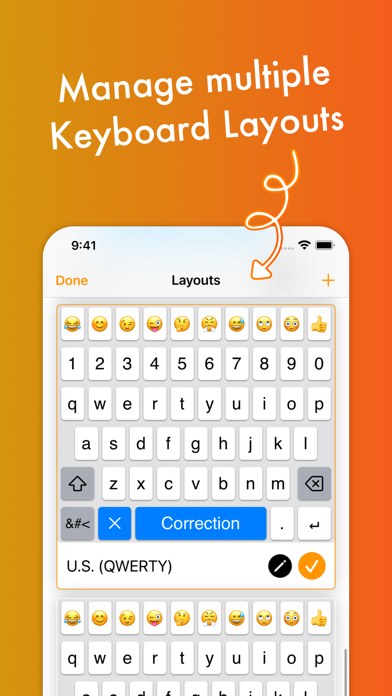
Customize virtually anything about your iOS keyboard, with simple drag and drop. Add or remove keys or rows, customize the way keys look and behave, change the duration until subkeys (the keys that pop up when holding on a key) pop up, add and remove subkeys and add keys with custom actions.
MyKeyboard is beloved by its users for its ease of use and endless possibilities. For example, the emoji row is a standard feature of the custom Keyboard and can be changed to contain all of your favorite emoji. These emoji keys then automatically contain subkeys with similar emoji which you can personalize. By default, a number row is also in the keyboard, providing you fast access to these often-used …
Read the full description
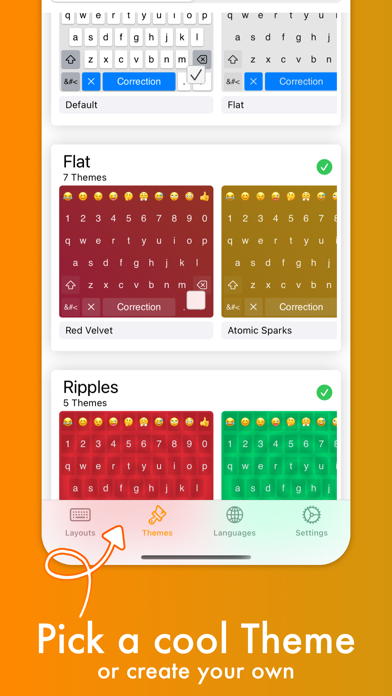
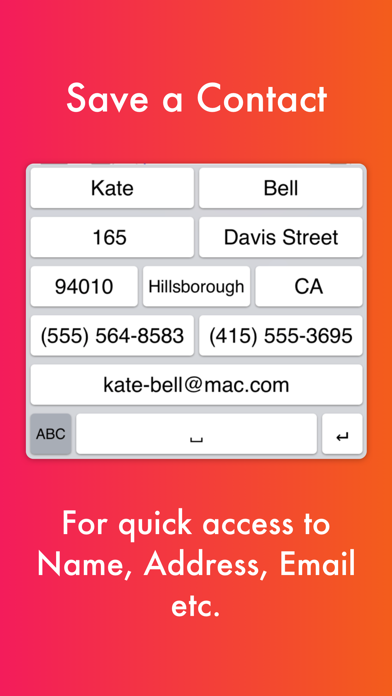
Customize virtually anything about your iOS keyboard, with simple drag and drop. Add or remove keys or rows, customize the way keys look and behave, change the duration until subkeys (the keys that pop up when holding on a key) pop up, add and remove subkeys and add keys with custom actions. MyKeyboard is beloved by its users for its ease of use and endless possibilities. For example, the emoji row is a standard feature of the custom Keyboard and can be changed to contain all of your favorite emoji. These emoji keys then automatically contain subkeys with similar emoji which you can personalize. By default, a number row is also in the keyboard, providing you fast access to these often-used keys. Another amazing feature of MyKeyboard is the switchable fonts. MyKeyboard contains 19 amazing fonts that can be used across almost all apps, including WhatsApp, Instagram, Facebook and iMessage. You can add a font key to your keyboard and switch to the font by tapping on it. Custom key actions include: - Insert Appearance - Insert - Replace Word With Appearance - Show Subkeys - Shift - Caps Lock - Cut - Copy - Paste - Accept Correction - Dismiss Correction - Learn Current Word - Switch Keyboard - Switch To Main Keyboard - Hide Keyboard - Next Input Mode - Delete Last Character - Activate Deletion Mode - Clear - Clear Left - Clear Left Word - Clear Right - Clear Right Word - Clear Word - Switch to Emoji Board (Switches you to the emoji keyboard; Learn more about this when you google emoji keyboard) These actions can be triggered on tap and hold. When no hold action is set for a specific key, the keyboard goes into trackpad mode, allowing you to shift the insertion point around by swiping. The deletion mode is similar and allows you to delete by swiping left and retract from it by swiping right. By default, it is the hold/press action on the delete key. You can also increase or decrease the key hold time until these actions are triggered, but you will have to perform swift key gestures when setting it very low. ~~ Keyboard Builder ~~ Use the keyboard builder for creating a fully customized keyboard layout in less than a minute. Your own keyboard layout is called “My Keyboard” and can be configured in every imaginable way. You can even add a copy, cut or paste key, a font key, an emoji key, a move cursor key, a “delete all” key and so much more. You can also create your own keys, for example for inserting copypasta or using copy/paste keys to perform these actions faster. We have made keyboard customization very accessible and it's easily doable for everyone. And it is customizable in every extend. For example, by adding a lot of g keys to a keyboard you could essentially create your own g board, or by adding multiple font switching keys to one, you can create your own font keyboard. ~~ Themes ~~ You can choose from a variety of free and paid themes, or go ahead and create your own customized keyboard theme. Theme customization can be used to change every aspect of your keyboard: background and foreground colors, shadow and border sizes and their colors, key corner radius and you can even set a custom height for your keys! Even a custom keyboard background image is configurable with your own photo. In the section “my themes”, you can see and manage all of your customized themes. Themes can even be shared with your friends who also use MyKeyboard!
Installs
Apple does not publish download counts. Estimates are in testing.
We publish iOS estimates only after they pass a back-test against real numbers. Chart history below is measured.
Estimated store revenue Estimated Beta
App Store, worldwide, monthly rate from the last 13 chart days to 20 Nov 2026
Below the top 100 grossing apps in the markets we calibrate. In the United States that usually means under about $6.4M a month. App Store purchases and subscriptions only, before Apple's 15 to 30% fee. Ads and web payments are not included.
Ratings
15 ratings, 15 reviews
No rating breakdown published for this app.
Recent reviews
Latest public reviews from the store
No reviews in our sample for this app yet.
Top chart positions
Latest App Store chart ranks by country, last 10 days
Not in any tracked top chart in the last 10 days.
MyKeyboard Pro history
Release, install milestones, listing and store changes
- First released on the store 8 Apr 2021
Update frequency
How often MyKeyboard Pro ships a new version, month by month
1 updates in the last 12 months. About as often as similar apps, which shipped a median of 1 updates in the same year.
Recent versions
Current version 3.7.11
- Version 3.7.1120 Jan 2026
Bugfixes and Performance Improvements
Listing keywords
Words and phrases MyKeyboard Pro repeats most in its store listing
Top phrases: clear left (2), copy paste (2), custom keyboard (2), customized keyboard (2), deletion mode (2).
Highlighted words also appear in the title. Counts cover the title, short description and description.
Compliance
What the listing and the app package show
- Store status
- Live
- Upkeep
- Updated 20 Jan 2026
- Age rating
- 4+
Apps like MyKeyboard Pro
 Library of AviationNazmi Yavuz★ 4.82
 MyNOVECNorthern Virginia Electric Cooperative★ 2.28
 打工人小组件光翔 卓★ 4.96
 TruckbaysTruckbays LLC★ 4.3
 Tornado PRO PlayerMohammed Altam★ 4.44
 VDX - Video ManagerARISEPEAK LP★ 1.74
 TV CastingZeasn Info Technology Co., Ltd.★ 1.86
 Mil-Dot BallisticsTom Holsten★ 3.82
 MySontiqSontiq, Inc.★ 2.4
MyKeyboard Pro: questions and answers
Who makes MyKeyboard Pro?
MyKeyboard Pro is published by FiveSheep OU.
When was MyKeyboard Pro last updated?
The latest version (3.7.11) was released on 20 Jan 2026.
Is MyKeyboard Pro free?
No. MyKeyboard Pro is a paid app priced at $9.99.
Is MyKeyboard Pro still available?
Yes. MyKeyboard Pro is live on App Store as of 1 Jul 2026.
Track MyKeyboard Pro and its competitors
Watch any app for new versions, rating drops, chart moves and removals. Free plan, no card.