
- Installs
- —
- Apple does not publish download counts
- Rating
- 4.34
- Ratings
- 326
- 326 reviews
- Version
- 7.0.1
- Updated 9 Jul 2021
- Released
- 5 Dec 2012
- Tracked since 10 May 2026
- Size
- 47 MB
- Needs 14.5
Screenshots
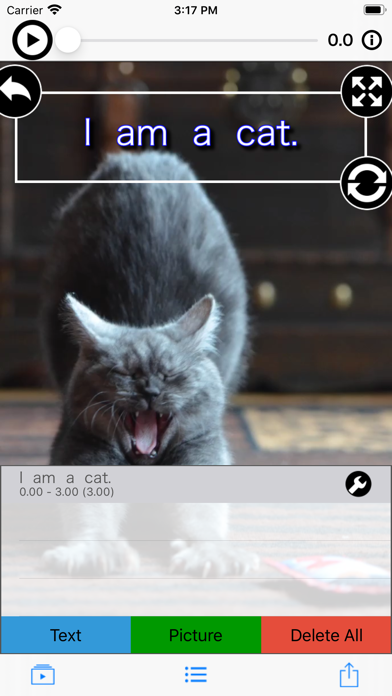
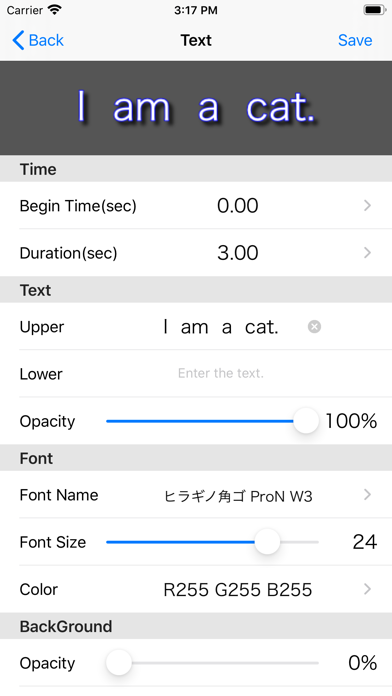
About MySubtitle
The description on the store listing
【My subtitle movie】 is a movie editing application which makes it easy to add subtitles and images to your videos.
Let's watch the "tutorial video" which can be played from the top screen of the application in order to know the basic operation method.
Please be sure to select "yes" because attention will be given to the permission of access to each device the first time it starts up. If you choose "No" by mistake
[Settings application]> [Privacy]> [Photo, microphone, camera]> [My subtitle video]
Please set the setting of "ON".
Operation explanation
*** Select a base movie.
Select the base movie from the camera button on the bottom left of the top screen.
My Album: Select a movie from My …
Read the full description
【My subtitle movie】 is a movie editing application which makes it easy to add subtitles and images to your videos. Let's watch the "tutorial video" which can be played from the top screen of the application in order to know the basic operation method. Please be sure to select "yes" because attention will be given to the permission of access to each device the first time it starts up. If you choose "No" by mistake [Settings application]> [Privacy]> [Photo, microphone, camera]> [My subtitle video] Please set the setting of "ON". Operation explanation *** Select a base movie. Select the base movie from the camera button on the bottom left of the top screen. My Album: Select a movie from My Album. Camera: Activate the camera and shoot a movie. *** Select the subtitle/picture to add. Display the list from the red button at the bottom center of the top screen. Press the character or picture button to open the edit screen. · Start position (sec) Specify the position where subtitles are added to the base moving picture. Display period (seconds) Specify the display period from the start position. · Upper letter, lower letter (only when adding subtitles) Enter the character to be added. - Picture (only when adding pictures) Select an picture to add. · In addition, specify various attributes. If it is OK with the contents set on the edit screen, press the save button, if you want to cancel, press the cancel button. *** Re-edit subtitles and pictures added. From the list on the top screen, press the edit button on the far right to open the edit screen. *** Move, rotate, enlarge, or reduce added subtitle/picture. From the list on the top screen, select the line you want to edit. · When moving Select subtitle/picture with one finger and slide to any place. · When rotating Roll subtitle/picture with two fingers (rotate up and down). Or slide the lower right grip. ・ When scaling Pinch in/out subtitles with two fingers (spread in and out). Or slide the upper right grip. ・ When resetting Double-tap the screen. Or tap the upper left grip. *** Delete added subtitle/picture. Swipe to the left of the list on the top screen, then press the delete button. To delete all lines at once, press the delete button. *** Play the edited movie. Slide the slider at the top of the top screen to the left and press the play button. *** Save the edited video to My Album. Press the arrow button at the bottom right of the top screen and select "Save Video".
Installs since 29 Aug 2026
Apple does not publish download counts. Estimates are in testing.
Estimated store revenue Estimated Beta
App Store, worldwide, monthly rate from the last 12 chart days to 19 Nov 2026
Below the top 100 grossing apps in the markets we calibrate. In the United States that usually means under about $6.4M a month. App Store purchases and subscriptions only, before Apple's 15 to 30% fee. Ads and web payments are not included.
Ratings
326 ratings, 326 reviews
No rating breakdown published for this app.
Recent reviews
Latest public reviews from the store
- 16 Jul 2020
What happened?
I love this app so much! So reliable and makes my videos much more entertaining to watch. However, recently (since October 2019, from what I’ve noticed) it starts to crash every single time you move or add or edit a subtitle. It’s not the worst thing but it gets very annoying when you have a lot of subtitles to add. On top of that, videos don’t save. Today, I watched 9 grammarly ads in a row because they have you watch an ad before you can save a video (that much I don’t mind) but it does not even save to my camera roll anymore. I figured it had to do with the length of the video but it was only 3 minutes and 45 seconds long. These issues haven't happened if my video is about a minute long, but I don’t want to say that that exactly justifies it happening in the first place. In the two times that it did save to my camera roll, it saved without any subtitles and the audio no longer matched with the video. I got too used to this app so I won’t be ditching it anytime soon, I’d just like to know what’s wrong and if it can be fixed. :)
- 1 Feb 2019
Amazing!!!
I love love LOVE this app. Very easy to edit subtitles and so many exact option that’s perfect! I will definitely get an A in my class project using this. :)
- 27 Aug 2018
Pretty good
The instructions are in Japanese, so I had to figure out how to do it myself, but once I learned how to use it everything worked out perfectly! 👍
- 27 Jan 2018
Great tool!
I love using this app! It works beautifully, and the only thing I would request is the ability to move text during the video (like a motion tween).
What reviewers bring up
Topics mentioned in the latest 8 reviews, by how many reviews mention them
Liked in good reviews (5 reviews)
- video 3
- text 3
- subtitles 2
- perfectly 2
- japanese 2
- lines 2
- added 2
- edit 2
Raised in bad reviews (2 reviews)
- minutes 2
- takes 2
Top chart positions
Latest App Store chart ranks by country, last 10 days
Not in any tracked top chart in the last 10 days.
MySubtitle history
Release, install milestones, listing and store changes
- First released on the store 5 Dec 2012
Update frequency
How often MySubtitle ships a new version, month by month
0 updates in the last 12 months. Less often than most similar apps: they shipped a median of 1 updates in the same year.
Recent versions
Current version 7.0.1
- Version 7.0.19 Jul 2021
- Fixed a minor bug.
Listing keywords
Words and phrases MySubtitle repeats most in its store listing
Top phrases: top screen (8), subtitle picture (5), edit screen (3), screen press (3), added subtitle picture (2).
Highlighted words also appear in the title. Counts cover the title, short description and description.
Compliance
What the listing and the app package show
- Store status
- Live
- Upkeep
- No update since 9 Jul 2021
- Age rating
- 4+
Apps like MySubtitle
 Lercenker继海 邓★ 4.28
 Video Compressor - Compressout thinking limited★ 4.3
 Cut and paste my face in photoMireia Lluch Ortola★ 4.51
 Comic Sketch CameraQuantis,Inc.★ 4.12
 Aviary: Photo Editor, Airbrush士昌 苑★ 4.66
 Riverflow - AI Photo EditorZero Billion, Inc.★ 4.73
 Gif Viewer & PlayerPenghui Zhao★ 4.4
 Prompt+ TeleprompterNorton Five Ltd★ 4.67
 Gif Me! Camera Creatorpierre gougelet★ 4.63
MySubtitle: questions and answers
Who makes MySubtitle?
MySubtitle is published by MekeFactory.
When was MySubtitle last updated?
The latest version (7.0.1) was released on 9 Jul 2021.
Is MySubtitle free?
Yes. MySubtitle is free to download.
Is MySubtitle still available?
Yes. MySubtitle is live on App Store as of 14 Nov 2026.
Track MySubtitle and its competitors
Watch any app for new versions, rating drops, chart moves and removals. Free plan, no card.