
- Installs
- —
- Apple does not publish download counts
- Rating
- —
- Ratings
- —
- Version
- 1.0
- Updated 21 Aug 2026
- Released
- 21 Aug 2026
- Tracked since 31 Aug 2026
- Size
- 18 MB
- Needs 18.0
Screenshots




About Navigate Back
The description on the store listing
Explore an unfamiliar city, wander through narrow streets—and suddenly you no longer know where your cruise ship is docked, where the bus is waiting, or where your hotel is. Navigate Back was created for exactly these situations.
SAVE PLACES AND PLAN TRIPS
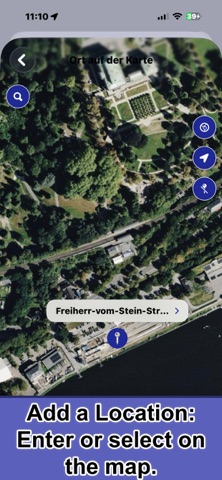
Save hotels, berths, meeting points, destinations, or the location of your car. Add an address, GPS coordinates, notes, and important contacts. Prepare your trips at home on your iPhone or iPad.
THREE WAYS TO EXPLORE
Map Navigation: Choose a saved place, an address, or GPS coordinates. Navigate Back provides turn-by-turn directions—on foot, by bicycle, by car, or by public transport. Your journey is recorded along the way, and the …
Read the full description
Explore an unfamiliar city, wander through narrow streets—and suddenly you no longer know where your cruise ship is docked, where the bus is waiting, or where your hotel is. Navigate Back was created for exactly these situations. SAVE PLACES AND PLAN TRIPS Save hotels, berths, meeting points, destinations, or the location of your car. Add an address, GPS coordinates, notes, and important contacts. Prepare your trips at home on your iPhone or iPad. THREE WAYS TO EXPLORE Map Navigation: Choose a saved place, an address, or GPS coordinates. Navigate Back provides turn-by-turn directions—on foot, by bicycle, by car, or by public transport. Your journey is recorded along the way, and the outbound and return trips can be saved as separate tracks. Compass Navigation: When there is no suitable road network, the app shows the direct direction to your destination, along with the distance, estimated arrival time, and other information. Ideal for trips away from marked paths, across open terrain, or on the water. Your actual path is recorded automatically and saved as a separate route. Free Movement: No destination and no directional guidance—simply start walking, running, or riding. Navigate Back automatically records your path. Ideal for bike rides, hikes, walks, and exploratory trips where the journey itself matters. PHOTOS, MARKERS, AND TRIP DETAILS Add markers along the way and link photos to your route. After your trip, view details such as distance, duration, pace, elevation profile, steps, and more. You can also use your recorded track to help retrace your journey. STAY ORIENTED OFFLINE With prepared offline maps, GPS, and the compass, you can check your position, direction, and distance to your destination without a cellular connection. Augmented Reality mode overlays the direction to your destination on the camera view. CONTACTS AND TRANSLATION ASSISTANCE Save phone numbers for tour guides, bus drivers, the ship’s reception desk, or family members. The conversation feature translates spoken or typed text and can read the translation aloud. Navigate Back is not an emergency, rescue, or maritime navigation service. In immediate danger, contact the local emergency services. When on the water, always use the required navigation equipment. COMPANION APP FOR APPLE WATCH On Apple Watch, you can view previously saved destinations and routes, use the compass to check direction and distance, and call important contacts. You can also start navigation on the paired iPhone. New places, contacts, and routes must be created in the iPhone or iPad app. The Watch app does not provide independent route planning or turn-by-turn navigation and requires a compatible iPhone with Navigate Back installed. PRIVACY No account, no registration, and no advertising or cross-app tracking. Location and route data are used only for features you initiate and are stored locally. When synchronization is enabled, the data is synced between your devices through your personal iCloud account. Navigate Back gives you the freedom to explore—and helps you find your way back later. Learn more about the story behind the app and all its features: https://www.onetwoapps.com/en/navigateBack.html
Installs
Apple does not publish download counts. Estimates are in testing.
We publish iOS estimates only after they pass a back-test against real numbers. Chart history below is measured.
Estimated store revenue Estimated Beta
App Store, worldwide, monthly rate from the last 13 chart days to 20 Nov 2026
Below the top 100 grossing apps in the markets we calibrate. In the United States that usually means under about $6.4M a month. App Store purchases and subscriptions only, before Apple's 15 to 30% fee. Ads and web payments are not included.
Ratings
No rating breakdown published for this app.
Recent reviews
Latest public reviews from the store
No reviews in our sample for this app yet.
Top chart positions
Latest App Store chart ranks by country, last 10 days
Not in any tracked top chart in the last 10 days.
Navigate Back history
Release, install milestones, listing and store changes
- First released on the store 21 Aug 2026
Update frequency
How often Navigate Back ships a new version, month by month
1 updates in the last 12 months. About as often as similar apps, which shipped a median of 1 updates in the same year.
Recent versions
Current version 1.0
- Version 1.021 Aug 2026
Listing keywords
Words and phrases Navigate Back repeats most in its store listing
Top phrases: direction and distance (2), iphone or ipad (2), saved as separate (2), turn by turn (2), apple watch (2).
Highlighted words also appear in the title. Counts cover the title, short description and description.
Compliance
What the listing and the app package show
- Store status
- Live
- Upkeep
- Updated 21 Aug 2026
- Age rating
- 4+
Apps like Navigate Back
 НА АВТОБУС расписание и билетыKAPITAL, OOO★ 2.72
 Bi-Bi: Заказ таксиIgor Bartashevich★ 4.66
 Live Like LocalLive Like Local PC★ 4.5
 myEUPTABytemark, Inc.★ 4.8
 Gronze MapsGronze Caminos SL★ 4.72
 RV DumpsAllstays LLC★ 2.66
 The Alaska AppAlaska.org★ 3.86
 Seville Travel Guide .Daniel Garcia★ 4.62
 ASFINAGASFINAG★ 4.78
Navigate Back: questions and answers
Who makes Navigate Back?
Navigate Back is published by Christian Drapatz.
When was Navigate Back last updated?
The latest version (1.0) was released on 21 Aug 2026.
Is Navigate Back free?
No. Navigate Back is a paid app priced at $2.99.
Is Navigate Back still available?
Yes. Navigate Back is live on App Store as of 31 Aug 2026.
Track Navigate Back and its competitors
Watch any app for new versions, rating drops, chart moves and removals. Free plan, no card.