
- Installs
- —
- Apple does not publish download counts
- Rating
- —
- Ratings
- —
- Version
- 1.8.7
- Updated 21 Apr 2026
- Released
- 15 Dec 2015
- Tracked since 10 May 2026
- Size
- 6 MB
- Needs 10.10
Screenshots


About New File Menu
The description on the store listing
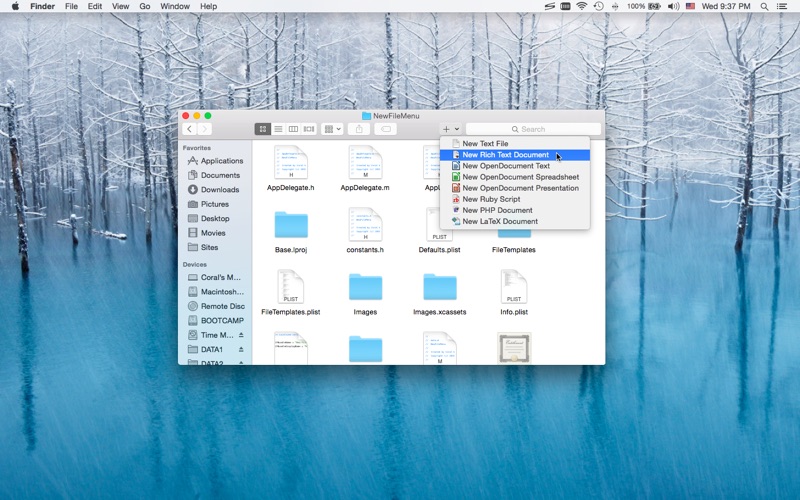
New File Menu lets you create new files quickly via the Finder context menu.
New File Menu is simply the coolest way to create a new file on the macOS platform, you can right click in any Finder window to create a new file! You can even right click on the desktop to create your files!
Important: New File Menu is implemented as a Finder extension, you need to enable "New File Menu Extension" in "System Preferences » Extensions" to make the context menu appear.
* Features
• Right click in any Finder window to create a new file
• Create new files via the "New File Menu" Finder toolbar button
• Create new files via the "New File Menu" share menu
• Create new files via drag and drop
• Over …
Read the full description
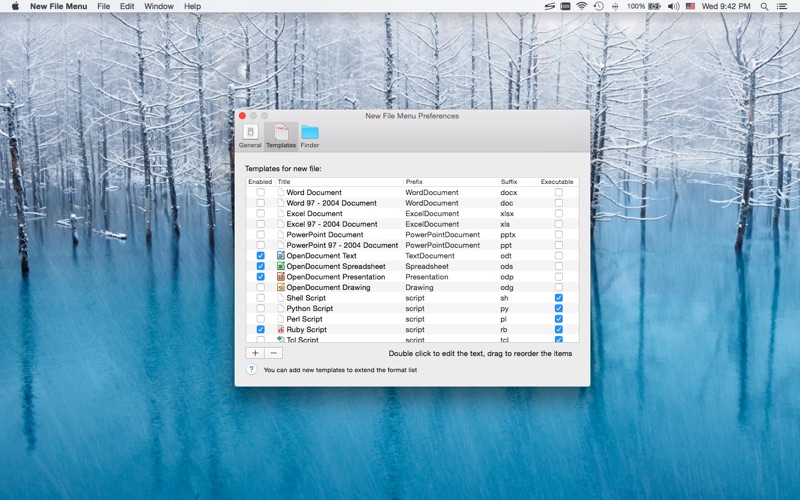
New File Menu lets you create new files quickly via the Finder context menu. New File Menu is simply the coolest way to create a new file on the macOS platform, you can right click in any Finder window to create a new file! You can even right click on the desktop to create your files! Important: New File Menu is implemented as a Finder extension, you need to enable "New File Menu Extension" in "System Preferences » Extensions" to make the context menu appear. * Features • Right click in any Finder window to create a new file • Create new files via the "New File Menu" Finder toolbar button • Create new files via the "New File Menu" share menu • Create new files via drag and drop • Over 30 built-in file templates (please enable the templates you need in the New File Menu Preferences) • Custom templates are supported, New File Menu is able to create virtually any kind of document • Various options to configure the app behavior • Create new files via quick actions in cloud storage folders * Built-in File Types • Plain text document • Rich text document • MS Office documents (Word, Excel, PowerPoint) • iWork documents (Pages, Numbers, Keynote) • OpenOffice / LibreOffice documents (Text, Spreadsheet, Presentation, Drawing) • Scripts (Shell, Python, Perl, Ruby, etc.) • Many other kinds of documents * FAQ Q: I can't find the context menu to create a new file? A: Please make sure that you've enabled "New File Menu Extension" in "System Preferences » Extensions", and make sure that you've added the specific location to New File Menu preferences. If the problem persists, please disable "New File Menu Extension" in "System Preferences » Extensions" and then re-enable it. The last resort is to relaunch Finder or restart your computer. Q: There is no file templates available, what can I do? A: Please remove the "~/Library/Group Containers/85P8ZUTQL8.net.langui.NewFileMenu/Templates" folder and relaunch New File Menu, then the folder should be recreated. (Do remember to backup any important data in the folder before removing it.) Q: Is it possible to add the context menu to mounted volumes? A: Yes. You need to add the volumes to New File Menu preferences first. Q: How to hide New File Menu from the Dock? A: Please simply quit New File Menu, the context menu extension will continue to work. Q: Is it possible to make the save panel appear faster? A: Please enable the "Keep the helper app running in the background" option in the New File Menu preferences, so that the app launching process is skipped. Should you have any further questions, please visit https://langui.net/new-file-menu/ and leave a message.
Installs
Apple does not publish download counts. Estimates are in testing.
We publish iOS estimates only after they pass a back-test against real numbers. Chart history below is measured.
Estimated store revenue Estimated Beta
App Store, worldwide, monthly rate from the last 13 chart days to 20 Nov 2026
Below the top 100 grossing apps in the markets we calibrate. In the United States that usually means under about $6.4M a month. App Store purchases and subscriptions only, before Apple's 15 to 30% fee. Ads and web payments are not included.
Ratings
No rating breakdown published for this app.
Recent reviews
Latest public reviews from the store
No reviews in our sample for this app yet.
Top chart positions
Latest App Store chart ranks by country, last 10 days
Not in any tracked top chart in the last 10 days.
New File Menu history
Release, install milestones, listing and store changes
- First released on the store 15 Dec 2015
Update frequency
How often New File Menu ships a new version, month by month
1 updates in the last 12 months. About as often as similar apps, which shipped a median of 1 updates in the same year.
Recent versions
Current version 1.8.7
- Version 1.8.721 Apr 2026
• Fixed a bug affecting the Finder sidebar drive icon display.
Listing keywords
Words and phrases New File Menu repeats most in its store listing
Top phrases: file menu (17), create new files (5), context menu (5), create new file (4), file menu preferences (4).
Highlighted words also appear in the title. Counts cover the title, short description and description.
Compliance
What the listing and the app package show
- Store status
- Live
- Upkeep
- Updated 21 Apr 2026
- Age rating
- 4+
Apps like New File Menu
 Library of AviationNazmi Yavuz★ 4.82
 MyNOVECNorthern Virginia Electric Cooperative★ 2.28
 打工人小组件光翔 卓★ 4.96
 TruckbaysTruckbays LLC★ 4.3
 Tornado PRO PlayerMohammed Altam★ 4.44
 VDX - Video ManagerARISEPEAK LP★ 1.74
 TV CastingZeasn Info Technology Co., Ltd.★ 1.86
 Mil-Dot BallisticsTom Holsten★ 3.82
 MySontiqSontiq, Inc.★ 2.4
New File Menu: questions and answers
Who makes New File Menu?
New File Menu is published by 兰桂 吴.
When was New File Menu last updated?
The latest version (1.8.7) was released on 21 Apr 2026.
Is New File Menu free?
No. New File Menu is a paid app priced at $2.99.
Is New File Menu still available?
Yes. New File Menu is live on App Store as of 10 May 2026.
Track New File Menu and its competitors
Watch any app for new versions, rating drops, chart moves and removals. Free plan, no card.