
- Installs
- —
- Apple does not publish download counts
- Rating
- 4.35
- Ratings
- 3K
- 3K reviews
- Version
- 10.2
- Updated 27 Oct 2026
- Released
- 12 Dec 2013
- Tracked since 11 May 2026
- Size
- 6 MB
- Needs 14.0
Screenshots
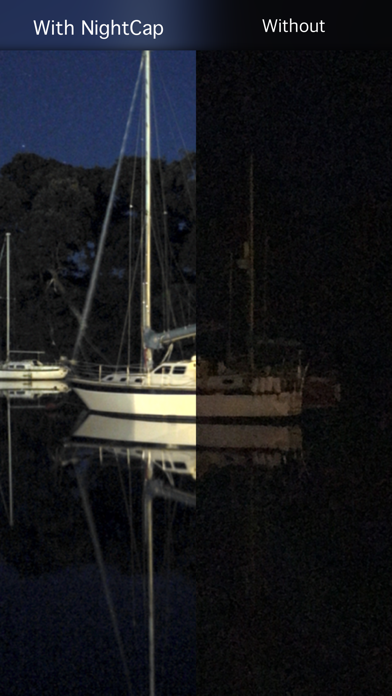
About NightCap Camera
The description on the store listing
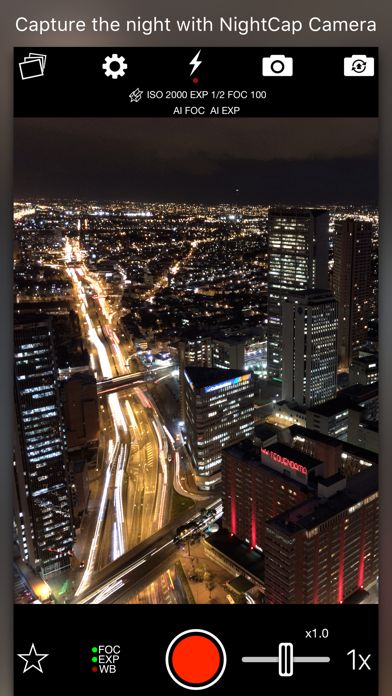
NightCap Camera is a powerful app that takes amazing low light and night photos, videos and 4K time lapse. Long exposure produces beautiful photos in low light and unique Astronomy modes capture the stars, Northern Lights (Aurora) and more!
Do you find your photos and videos dark and grainy in low light? NightCap will help by unlocking the full potential of your iPhone or iPad's camera.
AI camera control makes it easy by automatically setting optimum focus and exposure for a brighter, clearer shot. All you need to do is hold steady and tap the shutter. If you prefer manual control then instant gesture based adjustment is always available, and special camera modes give you DSLR like …
Read the full description
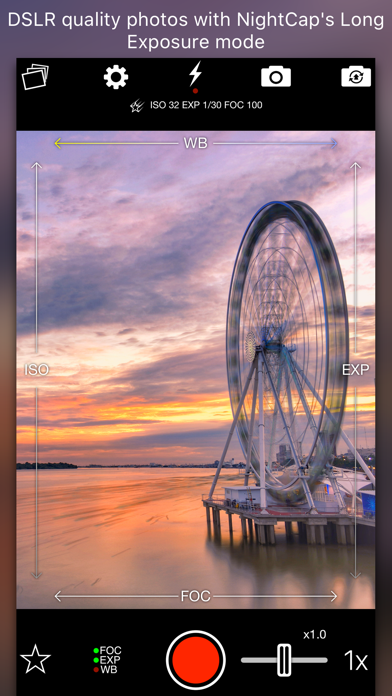
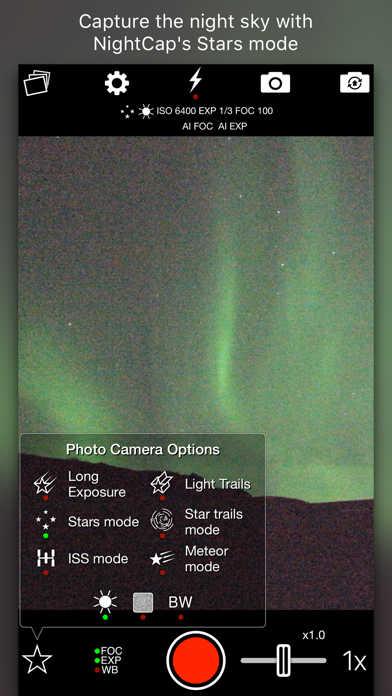
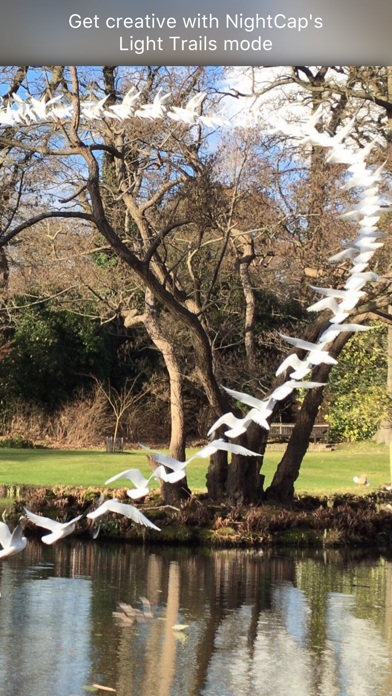
NightCap Camera is a powerful app that takes amazing low light and night photos, videos and 4K time lapse. Long exposure produces beautiful photos in low light and unique Astronomy modes capture the stars, Northern Lights (Aurora) and more! Do you find your photos and videos dark and grainy in low light? NightCap will help by unlocking the full potential of your iPhone or iPad's camera. AI camera control makes it easy by automatically setting optimum focus and exposure for a brighter, clearer shot. All you need to do is hold steady and tap the shutter. If you prefer manual control then instant gesture based adjustment is always available, and special camera modes give you DSLR like results. You can even shoot photos, videos and time lapse in black and white if you want to. Try Long Exposure mode for amazing motion blur effects and reduced image noise in low light. NightCap has an ISO Boost feature that allows 4x higher ISO than any other app, producing much brighter low light photos with low noise in Long Exposure mode! Light Trails mode preserves moving lights - ideal for moving traffic at night, fireworks or light painting. These modes are stunning when combined with HD or 4K time lapse! There are 4 dedicated astrophotography camera modes. Stars Mode is ideal for a starry sky or Northern / Southern Lights (Aurora), or leave your device capturing in Star Trails Mode and watch the stars paint circles in the sky! There are also modes for easy photography of the International Space Station (ISS) and meteors (shooting stars). Visit nightcapcamera.com for tutorials. Features: • Video recording with special Night Mode and full manual control. • Time lapse recording with adjustable speed, long exposure and light trails support and up to 4K resolution on iPhone 6s or newer or 1080p HD on older devices. • Aidie, a fully automatic AI camera operator chooses the optimum camera settings for you automatically, meaning brighter, clearer photos in low light with less risk of blurring the shot. All you need to do is hold steady and tap the shutter. • AI enhanced focusing in very low light for fast, reliable focus. • Automatic camera modes for Meteors (shooting stars), ISS (International Space Station), stars and star trails make these difficult tasks easy. • Innovative manual camera controls designed for photographers: intuitive gesture-based control of exposure, ISO, focus and even white balance. Simply swipe to adjust. • Long Exposure mode: Capture detailed, noise-free low light shots. • Light Trails mode: Perfect for light painting and even astronomy: photograph star trails with unlimited exposure time! • ISO Boost allows up to 4x higher ISO than any other app. • Light Boost instantly boosts brightness while preserving image detail. • Noise Reduction Mode helps reduce image noise. • 8x Zoom control (camera-style for easy, smooth zoom). • Full Apple Watch support with live preview and control of the main app features.
Installs, last 30 days
Apple does not publish download counts. Estimates are in testing.
Estimated store revenue Estimated Beta
App Store, worldwide, monthly rate from the last 12 chart days to 19 Nov 2026
Below the top 100 grossing apps in the markets we calibrate. In the United States that usually means under about $6.4M a month. App Store purchases and subscriptions only, before Apple's 15 to 30% fee. Ads and web payments are not included.
Ratings
2,958 ratings, 2,958 reviews
- 5 ★74%
- 4 ★10%
- 3 ★3.9%
- 2 ★2.8%
- 1 ★9.4%
Recent reviews
Latest public reviews from the store
- 19 Nov 2021
It does the job
This app is okay. I wouldn’t really recommend using it for taking pictures of the moon (unless you have a telescope handy). Even if you use their tutorial on how to take a picture of the moon, it’s still left grainy and undefined. The stars mode definitely helps taking pictures of the stars, but they are kind of just a glob in the sky. My BIGGEST issue is the constant lag and freezing. It seems that if you try to adjust the settings too much, the app doesn’t know what to do so it ultimately freezes, leaving you to close the app and start again. I’ve tried uninstalling the app, powering my phone off.. but the lag continues. It does get the job done to a certain extent, but you need lots of patience to work the app. It definitely isn’t worth $3 though. With all the downfalls this app has, it honestly should be free. The only reason i’m giving it a three star is because it does help me take pictures of the moon with my telescope. Otherwise, this is app is just messy and not worth it.
- 31 Oct 2021
Great to have more control over iPhone camera
This app does a great job in giving you additional control over your iPhone camera and I have made some cool Astro shots with it. I just wish it had a few items refined. 1. Ability to have it open at night with preset settings. When you open the app, it freezes due to trying to find the correct exposure and do a live view. This slows you down trying to capture your first shot. 2. Better ability to hold settings during a session. You get the ISO, focus and shutter set and take pictures. You stop to take a look in the photo app at your results. Then when you go back over to the app, all your settings are gone. Huge waste of time and effort and seems like a no-brainer. 3. EXIF data. I am shooting in tiff and none of the EXIF data is saved. That’s digital photography 101 to include the EXIF. I stopped having to write down shooting data 20 years ago. If you work around these items, you can get some nice shots.
- 28 Feb 2021
Good for fish photography
I bought this awhile ago for nighttime photography, but I never ended up using it and it’s been sitting on my phone for maybe a year now. I also love to take pictures of my fish, but the iphone’s autofocus tends to focus on the background rather than the fish. Understandable, but frustrating. Just today I realized I could use this app to take fish photos, and it’s incredible! not the most user friendly, but it works really well and once you figure it out you’re good. I wish i could attach a photo to this review, but it does really well with variable lighting, and the manual focus is great.
- 21 Mar 2019
The best time lapse app for iOS hands down
Time lapse photography is my hobby, and I use a variety of hardware and software to do it, from a GoPro to a mirrorless camera to a retired iPhone... and I wish all of that hardware had the software that is Nightcap. Easily the best thing about this app is its ability to combine its virtual slow shutter function with its timelapse function. This is amazing if you want to capture wind, blur moving people out of public spaces, or just make motion look smooth. The latest version appears to have resolved one of my two major complaints about the app: it used to have problems with smooth exposure ramping in slow shutter mode, causing big exposure jumps when shooting a sunrise for example... it appears that has been resolved in my last few shoots, and I imagine (although I haven’t tried it yet) that I could do a beautiful night-to-day timelapse with it and have it come out seamless. (The other complaint was how if the phone runs out of battery during a timelapse the whole video is lost, I haven’t looked into that yet.) Thank you so much to the developer for making this, it has turned an old iPhone I no longer use into my favorite timelapse camera. Cheers!
What reviewers bring up
Topics mentioned in the latest 8 reviews, by how many reviews mention them
Liked in good reviews (5 reviews)
- photography 4
- camera 4
- exposure 3
- iphone 3
- night 3
- wish 3
- take 3
- few 3
Raised in bad reviews (2 reviews)
- unfortunately 2
- however 2
Top chart positions
Latest App Store chart ranks by country, last 10 days
- Countries ranked
- 50 of 50
- Best rank
- #1
- Top 10 placements
- 12
- of 73 chart placements
- Average rank
- #38.6
Best countries on App Store
- 🇳🇴 Norway · Top paid, Photo & Video#1
- 🇩🇰 Denmark · Top paid, Photo & Video#2
- 🇫🇮 Finland · Top paid, Photo & Video#3
- 🇨🇦 Canada · Top paid, Photo & Video#5
- 🇹🇼 Taiwan · Top paid, Photo & Video#5
- 🇳🇿 New Zealand · Top paid, Photo & Video#5
| Country | Chart | Category | Rank | Best (10 days) | Date |
|---|---|---|---|---|---|
| 🇳🇴 Norway | Top paid | Photo & Video | #1 | #1 | 19 Nov 2026 |
| 🇩🇰 Denmark | Top paid | Photo & Video | #2 | #2 | 19 Nov 2026 |
| 🇫🇮 Finland | Top paid | Photo & Video | #3 | #3 | 19 Nov 2026 |
| 🇳🇴 Norway | Top paid | All apps | #3 | #3 | 19 Nov 2026 |
| 🇨🇦 Canada | Top paid | Photo & Video | #5 | #4 | 19 Nov 2026 |
| 🇹🇼 Taiwan | Top paid | Photo & Video | #5 | #3 | 19 Nov 2026 |
| 🇳🇿 New Zealand | Top paid | Photo & Video | #5 | #3 | 19 Nov 2026 |
| 🇵🇱 Poland | Top paid | Photo & Video | #6 | #1 | 19 Nov 2026 |
| 🇲🇾 Malaysia | Top paid | Photo & Video | #6 | #6 | 19 Nov 2026 |
| 🇵🇭 Philippines | Top paid | Photo & Video | #7 | #7 | 19 Nov 2026 |
NightCap Camera history
Release, install milestones, listing and store changes
- First released on the store 12 Dec 2013
Update frequency
How often NightCap Camera ships a new version, month by month
4 updates in the last 12 months. More often than most similar apps: they shipped a median of 2 updates in the same year.
Recent versions
Current version 10.2
- Version 10.227 Oct 2026
10.2 adds support for iPhone Duo. - NightCap adapts to iPhone Duo open or closed, with a layout built for each. - Improved color at high ISO: shots taken with ISO Boost keep their natural color. - A more reliable focus system. - Improved performance with large photo libraries. - Other fixes and improvements.
- Version 10.0.429 Aug 2026
10.0.4 fixes a crash in the Apple Watch app, and improves viewing and sharing photos in NightCap. 10.0.3: - Fixes a crash at launch on some iPad models. - Fixes a crash that could occur while granting photo library access during setup. 10.0.2: - Photos and videos now save much more detailed metadata. - The iPhone interface no longer rotates to landscape unexpectedly. 10.0.1 fixes a rare crash on launch affecting some devices. NightCap 10 is a complete rebuild using the latest technology, and a free update for existing customers. - Handheld long exposure — no tripod needed. NightCap steadies and aligns the shot while you hold the phone. - Aurora — a new time-lapse mode for the Northern and Southern Lights. - Camera Control on iPhone 16 and later — switch lenses, zoom and focus without touching the screen. - Improved manual controls, zoom to 16x, and improved in-app help. - Improved interface - Full compatibility with all current devices All features from version 9 are still here.
- Version 10.0.224 Aug 2026
10.0.2: - Photos and videos now save much more detailed metadata. - The iPhone interface no longer rotates to landscape unexpectedly. 10.0.1 fixes a rare crash on launch affecting some devices. NightCap 10 is a complete rebuild using the latest technology, and a free update for existing customers. - Handheld long exposure — no tripod needed. NightCap steadies and aligns the shot while you hold the phone. - Aurora — a new time-lapse mode for the Northern and Southern Lights. - Camera Control on iPhone 16 and later — switch lenses, zoom and focus without touching the screen. - Improved manual controls, zoom to 16x, and improved in-app help. - Improved interface - Full compatibility with all current devices All features from version 9 are still here.
- Version 10.0.019 Aug 2026
NightCap 10 is a complete rebuild using the latest technology, and a free update for existing customers. - Handheld long exposure — no tripod needed. NightCap steadies and aligns the shot while you hold the phone. - Aurora — a new time-lapse mode for the Northern and Southern Lights. - Camera Control on iPhone 16 and later — switch lenses, zoom and focus without touching the screen. - Improved manual controls, zoom to 16x, and improved in-app help. - Improved interface - Full compatibility with all current devices All features from version 9 are still here.
Listing keywords
Words and phrases NightCap Camera repeats most in its store listing
Top phrases: low light (8), long exposure (5), long exposure mode (3), camera modes (3), exposure mode (3).
Highlighted words also appear in the title. Counts cover the title, short description and description.
Compliance
What the listing and the app package show
- Store status
- Live
- Upkeep
- Updated 27 Oct 2026
- Age rating
- 4+
Apps like NightCap Camera
 Photo Collage Maker & PrinterVitalij Schaefer★ 4.7
 Reelsy Reel Maker IG TemplatesZed Italia S.r.l.★ 4.67
 Gram AI: Art CreatorUBI MEDIA FZE LLC★ 4.52
 Love Pic - Photo Collage MakerZipoApps★ 4.61
 Affinity Photo 2 for iPadSerif Labs★ 4.6
 Wallpaper _ Dynamic IslandEuropean Apps Solutions★ 4.52
 How Old Do I Look? Age Camera长金 胡★ 4.49
 Retouch - AI Face EditorSCALEUP YAZILIM HIZMETLERI★ 4.67
 instax UP! -Scan instax photosFUJIFILM Corporation★ 4.76
NightCap Camera: questions and answers
Who makes NightCap Camera?
NightCap Camera is published by RTD.
When was NightCap Camera last updated?
The latest version (10.2) was released on 27 Oct 2026.
Is NightCap Camera free?
No. NightCap Camera is a paid app priced at $2.99.
Is NightCap Camera still available?
Yes. NightCap Camera is live on App Store as of 19 Nov 2026.
Track NightCap Camera and its competitors
Watch any app for new versions, rating drops, chart moves and removals. Free plan, no card.