
- Installs
- —
- Apple does not publish download counts
- Rating
- 4.06
- Ratings
- 141
- 141 reviews
- Version
- 7.3.0
- Updated 21 Oct 2026
- Released
- 8 May 2010
- Tracked since 10 May 2026
- Size
- 11 MB
- Needs 17.0
Screenshots


About Note Taker HD
The description on the store listing
Zoomed ink, PDF markup, photos, shapes, typed text, folders and tagging, extensive AirPlay control, and much more.
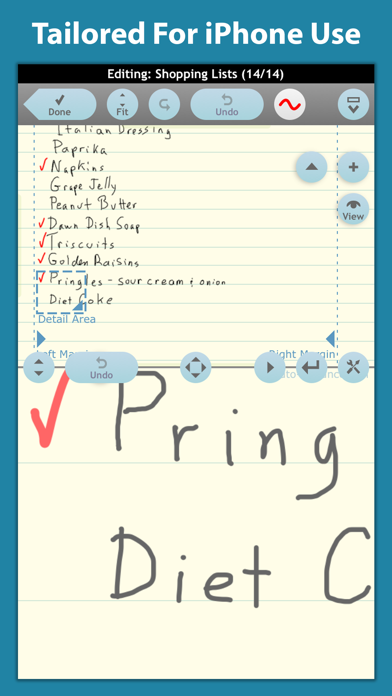
The latest upgrade of one of the first note taking apps designed specifically for the Apple iPad and now also available for the Apple iPhone, Note Taker HD has long been known as a powerful and stable application for writing and organizing handwritten notes and diagrams.
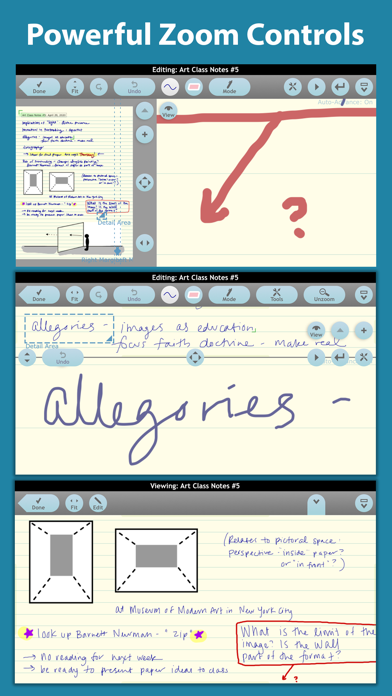
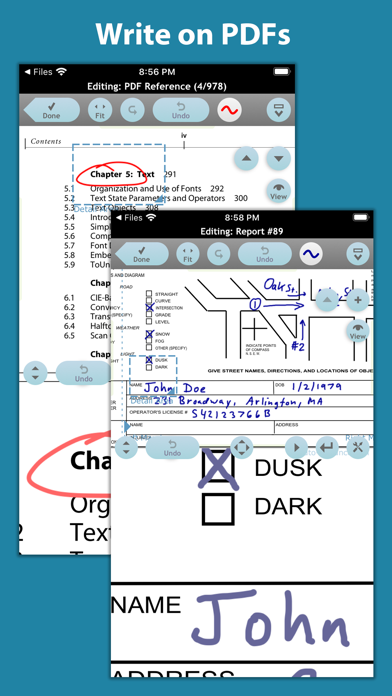
Note Taker HD can also be used to annotate PDF files. It can shrink your writing so you can easily fit a lot of text on a page. You can read the reduced-size "ink" as if you had written those letters with a very fine pen. It gives you solid functionality and control to produce the pages you need.
Documents …
Read the full description
Zoomed ink, PDF markup, photos, shapes, typed text, folders and tagging, extensive AirPlay control, and much more. The latest upgrade of one of the first note taking apps designed specifically for the Apple iPad and now also available for the Apple iPhone, Note Taker HD has long been known as a powerful and stable application for writing and organizing handwritten notes and diagrams. Note Taker HD can also be used to annotate PDF files. It can shrink your writing so you can easily fit a lot of text on a page. You can read the reduced-size "ink" as if you had written those letters with a very fine pen. It gives you solid functionality and control to produce the pages you need. Documents are flexibly organized by tags, date/time last modified, favorites, and more, with a scrolling list of thumbnail images of part of each page to help you find them later. You can email one or more pages as a single PDF file, "Open In" other apps, or, if your device supports it, print. Note Taker HD lets you create pages by writing on the screen with your finger or an iPad/iPhone-compatible stylus. You can either write directly on the page for large drawings, or have the "ink" you write shrunk down. You can write in large letters on the screen rather than trying to make tiny motions like a pencil. You just keep writing and Note Taker HD automatically adds new writing next to the old. To quickly correct mistakes, it has multi-level undo and redo buttons as well as an eraser -- just drag your finger over the page to erase the "ink" under it. You can zoom in and out on a page using the pinch gesture while viewing or editing. The Zoomed Editing window lets you see both a zoomed-out overview and a zoomed-in close-up writing area at the same time. You can use "Open In" in other apps send PDF files to Note Taker HD for annotation. Other features include: - Pages organized into documents and folders - Typed blocks of text with optional borders - 60+ highly customizable shapes - Insert and crop images from Photo Albums, Pasteboard, or the iPad/iPhone camera - Custom backgrounds from images or PDF pages - Free templates and clip art on the support web site - VGA/HDMI/AirPlay support with zoom, pan, and a moveable pointer - Wrist guard to avoid inadvertent touches - Layout variations better suited to some left-handed users - Optional fields in output footers like in a word processor - Extensive built-in help - Smooth and crisp ink on screen and in PDF output - Share editable copies of your documents with others - Backup to a single file for off-iPad/iPhone storage - Password protected folders - Support for the iOS Data Protection API - Support for languages written right-to-left - Full-screen preview mode - Automatic advance and auto-return in zoomed editing - Copy/Cut/Paste between pages, rotate/resize ink Note Taker HD was designed and programmed by Dan Bricklin, the same person who over 40 years ago came up with VisiCalc, the pioneering electronic spreadsheet that made working with numbers on a personal computer so easy. To see it in action, click on the Support link here or go directly to www.notetakerhd.com.
Installs since 29 Aug 2026
Apple does not publish download counts. Estimates are in testing.
Estimated store revenue Estimated Beta
App Store, worldwide, monthly rate from the last 13 chart days to 20 Nov 2026
Below the top 100 grossing apps in the markets we calibrate. In the United States that usually means under about $6.4M a month. App Store purchases and subscriptions only, before Apple's 15 to 30% fee. Ads and web payments are not included.
Ratings
141 ratings, 141 reviews
No rating breakdown published for this app.
Recent reviews
Latest public reviews from the store
- 29 Apr 2025
Text and sketching on the same page!
I have been using Note Taker HD for many years. It was the first note taking app I found where free-hand drawing and typed text can co-exist in same page. This is hands-down my favorite aspect of this app. Typed notes are so much more legible than hand-written. My handwriting is just so-so on regular paper and atrocious in sketch apps. As a bonus, the typed text remains as a text object rather than being incorporated into the page graphics, meaning the text can be edited at will. My second favorite feature is the zoom window that opens at the bottom of the page. This provide much more precision when drawing and prevents errant marks from wrist-detection, which I find rarely works in sketch/note apps. As mentioned above, every element on the page, including the page background, remains as a separate object. You may ask, “so what?” Well with each element remaining a distinct objet, that object can be moved, modified and even deleted without affecting other elements. For example, if you select a grid background because you are drawing mechanical-type illustrations, but don’t want the grid visible on printed output, simply change to a blank background and output. My o
- 22 Dec 2024
Does everything I need and never fails
i’ve been using this app for probably 10 years not really sure, but I work as a professional interpreter, and I do all my notetaking on this app. That’s a lot of trust in an iPad app, because if we get stuck, having to read back our notes and we lose the notes or can’t read them for some reason we are toast. I have even been able to import a PDF background of the kind of notebooks. I typically use to take interpreting notes in, so it’s completely comfortable seeing the same lined page in the same separation on the page. Being able to switch colors is great. I use it primarily for handwritten notes, because interpreting notes are not really taken in complete sentences or words, words, but I’ve tried the other features, and they all work perfectly.
- 28 Sep 2024
It will become priority software
I don’t remember exactly when I started using NoteTaker HD, but it was long enough ago that it has been one of my first installs on several iPads by now. It is a favorite because of the many things it can do, and therefore because of all the solutions it provides me, as I process through all the dang information that moves across my consciousness every day. And, because Dan Bricklin is so engaged with the product (in the videos, responses to questions, etc.),I feel a personal connection to NoteTaker HD, unlike other soulless apps from God knows who. NoteTaker HD does so many things that, if you are new, you should allow yourself time to just play and wade into it. Before long, you’ll start to realize the power you can have to organize and manage all that information, and you, too, will have lots of wow moments and priority downloads onto new generations of iPads.
- 28 May 2020
Just Updated - Express, share and manage your ideas
Note Taker HD is for more than taking notes. The modest price does not reflect the functionality that is built into the App. As a six-plus year user of Note Taker HD, I’ve found many uses for the App. The developer, a time tested programmer developed Note Taker HD, evolving the application’s functionality, now updating Note Taker HD for improved idea and note taking and management. Yes, some of the tutorials are out of date. Forget them, get Note Taker HD, the “full help, in App” manual is up to date and comprehensive. Then use the video tutorials for additional information. The full featured Note Taker HD will impress users with the many ways it can be used to capture ideas. The file management structure is first rate. Duplicate files, create templates and select different backgrounds to aid drawings. File backups, you bet - now made easier with the newer iOS. iPhone or iPad Pro, full screen or split screen. Print or share documents with ease. I use an iPad Pro, I have not tried it on an iPhone or iPad. The App is designed to work on all screen sizes. The small cost is not an introductory price. After you use Note Taker HD for a few months, return rate and post your r
What reviewers bring up
Topics mentioned in the latest 8 reviews, by how many reviews mention them
Liked in good reviews (8 reviews)
- other 6
- notes 5
- tried 4
- files 4
- ipad 4
- pdf 4
- functionality 3
- note taking 3
Raised in bad reviews (0 reviews)
No topic comes up twice.
Top chart positions
Latest App Store chart ranks by country, last 10 days
Not in any tracked top chart in the last 10 days.
Note Taker HD history
Release, install milestones, listing and store changes
- First released on the store 8 May 2010
Update frequency
How often Note Taker HD ships a new version, month by month
1 updates in the last 12 months. Less often than most similar apps: they shipped a median of 2 updates in the same year.
Recent versions
Current version 7.3.0
- Version 7.3.021 Oct 2026
Version 7.3.0 fixes issues with external screens. No other major changes.
- Version 7.1.17 Sep 2024
Version 7.1.1 fixes a crash bug with the "To Folder" tool. No other major changes.
Listing keywords
Words and phrases Note Taker HD repeats most in its store listing
Top phrases: note taker hd (7), note taker (7), taker hd (7), ipad iphone (3), pdf files (2).
Highlighted words also appear in the title. Counts cover the title, short description and description.
Compliance
What the listing and the app package show
- Store status
- Live
- Upkeep
- Updated 21 Oct 2026
- Age rating
- 4+
Apps like Note Taker HD
 CV+ Resume MakerMajed Hariri★ 4.66
 2 factor - Authenticator App25 Degrees Apps LLC★ 4.44
 Chore Chart: Family Rewards舜 吕★ 4.69
 HouwiyetiAGENCE NATIONALE DU REGISTRE DES POPULATIONS ET DES TITRES SECURISES★ 4.15
 TheBrain: Smart Notes & LinksTheBrain Technologies LP★ 4.82
 CalamariHubert Lisek★ 4.53
 Coin Pic IdentifierTech Consolidated Inc★ 4.07
 Clippit: AI Text To SpeechSpencer Yen★ 4.59
 Ai humanizer humanize ai textABDELHAFID BASAFOU★ 4.61
Note Taker HD: questions and answers
Who makes Note Taker HD?
Note Taker HD is published by Software Garden.
When was Note Taker HD last updated?
The latest version (7.3.0) was released on 21 Oct 2026.
Is Note Taker HD free?
No. Note Taker HD is a paid app priced at $4.99.
Is Note Taker HD still available?
Yes. Note Taker HD is live on App Store as of 14 Nov 2026.
Track Note Taker HD and its competitors
Watch any app for new versions, rating drops, chart moves and removals. Free plan, no card.