
- Installs
- —
- Apple does not publish download counts
- Rating
- 3.0
- Ratings
- 4
- 4 reviews
- Version
- 1.15.2
- Updated 11 May 2026
- Released
- 17 Nov 2021
- Tracked since 10 May 2026
- Size
- 83 MB
- Needs 15.6
Screenshots

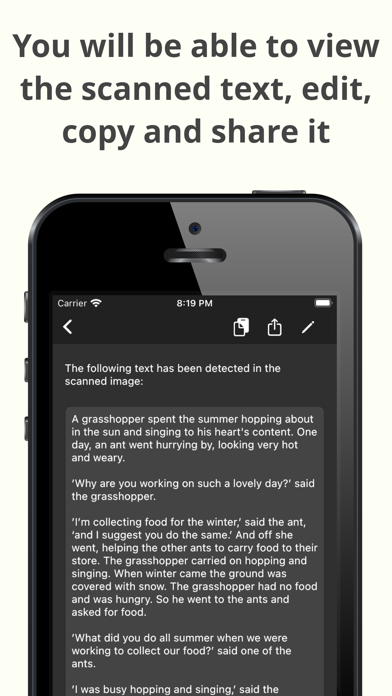

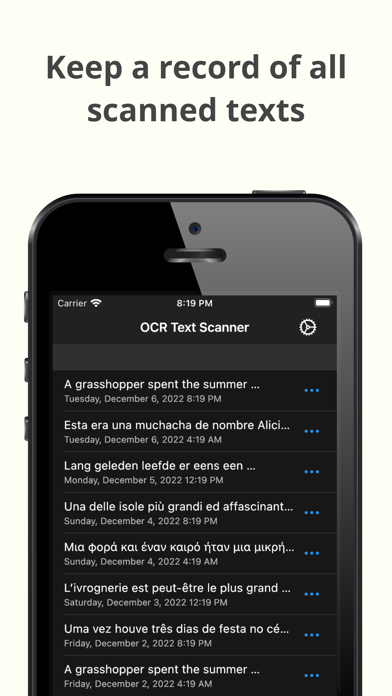
About OCR Text Scanner – Text reader
The description on the store listing
OCR Text Scanner is an OCR reader (Optical Character Recognition) that will allow you to scan texts from the physical world with your device's camera and convert them to digital format quickly and easily.
Features:
- Image to text: scan any text with the camera and get its digital representation
- You can also scan local images of your device to convert any picture to text
- Copy, edit, and share all the texts you have scanned
- Convert text scanned with the OCR reader to a PDF file
- Review any text previously recognized with the OCR scanner in the History section
> How does this application work?
To start text scanning, all you have to do is open the application, which by default will …
Read the full description
OCR Text Scanner is an OCR reader (Optical Character Recognition) that will allow you to scan texts from the physical world with your device's camera and convert them to digital format quickly and easily. Features: - Image to text: scan any text with the camera and get its digital representation - You can also scan local images of your device to convert any picture to text - Copy, edit, and share all the texts you have scanned - Convert text scanned with the OCR reader to a PDF file - Review any text previously recognized with the OCR scanner in the History section > How does this application work? To start text scanning, all you have to do is open the application, which by default will open with the camera scanner ready to scan text. From there you just have to point at the text you want to scan and press the “Scan” button. The app will show you a preview of the captured image, at this point you can choose to scan only a fraction of the taken image if you don't want to scan it all. The application will then proceed to perform text recognition and show you the recognized characters, allowing you to go from image to text quickly and easily. > Can I convert an existing picture to text? Of course! To do a photo to text conversion, go to the image scanning section and press the button to choose an image. A selector will open where you can choose which pre-existing image from your device you want to scan. From this point the process is exactly the same as when scanning with the camera: you will be shown a preview of the image where you can choose to scan it all or just a fraction, then the text recognition will start and you will be shown the recognized characters. > What can I do with scanned texts? After using the Text Scanner function to recognize text, it will be displayed on the screen. Here you can edit the recognized text to make any corrections you deem appropriate. You can then copy that text to use it in any other application on your device, as well as share it with other people or applications through the sharing option. Additionally, users who have subscribed to the Premium membership can also automatically convert scanned text into a PDF file. > Is there any type of record of the scanned texts? Yes. All texts that have been scanned with the Text Reader function, regardless of whether they were scanned with your device's camera or by image file recognition, are stored in the History section. Go to this section to see all these texts and click on any of them to see their details, copy it, share it, or export it to a file in PDF format. Here you can also delete texts that you no longer want to keep. In short, OCR Text Scanner is your trusted OCR scanner that will allow you to convert any picture to text that you can capture with your camera or from any image you have, it will allow you to perform all the appropriate actions on them and give you all the power of digitization within your mobile device. Download now to start digitizing text!
Installs
Apple does not publish download counts. Estimates are in testing.
We publish iOS estimates only after they pass a back-test against real numbers. Chart history below is measured.
Estimated store revenue Estimated Beta
App Store, worldwide, monthly rate from the last 14 chart days to 21 Nov 2026
Below the top 100 grossing apps in the markets we calibrate. In the United States that usually means under about $6.4M a month. App Store purchases and subscriptions only, before Apple's 15 to 30% fee. Ads and web payments are not included.
Ratings
4 ratings, 4 reviews
No rating breakdown published for this app.
Recent reviews
Latest public reviews from the store
No reviews in our sample for this app yet.
Top chart positions
Latest App Store chart ranks by country, last 10 days
Not in any tracked top chart in the last 10 days.
OCR Text Scanner – Text reader history
Release, install milestones, listing and store changes
- First released on the store 17 Nov 2021
Update frequency
How often OCR Text Scanner – Text reader ships a new version, month by month
2 updates in the last 12 months. More often than most similar apps: they shipped a median of 1 updates in the same year.
Recent versions
Current version 1.15.2
- Version 1.15.211 May 2026
This update includes minor improvements and some bug fixes.
- Version 1.15.17 Apr 2026
This version adds support for more languages, along with minor adjustments and bug fixes.
Listing keywords
Words and phrases OCR Text Scanner – Text reader repeats most in its store listing
Top phrases: text scanner (4), ocr text scanner (3), picture to text (3), want to scan (3), ocr text (3).
Highlighted words also appear in the title. Counts cover the title, short description and description.
Compliance
What the listing and the app package show
- Store status
- Live
- Upkeep
- Updated 11 May 2026
- Age rating
- 17+
Apps like OCR Text Scanner – Text reader
 Library of AviationNazmi Yavuz★ 4.82
 MyNOVECNorthern Virginia Electric Cooperative★ 2.28
 打工人小组件光翔 卓★ 4.96
 TruckbaysTruckbays LLC★ 4.3
 Tornado PRO PlayerMohammed Altam★ 4.44
 VDX - Video ManagerARISEPEAK LP★ 1.74
 TV CastingZeasn Info Technology Co., Ltd.★ 1.86
 MySontiqSontiq, Inc.★ 2.4
 Laboratory TimerShazino★ 4.66
OCR Text Scanner – Text reader: questions and answers
Who makes OCR Text Scanner – Text reader?
OCR Text Scanner – Text reader is published by David Serrano Canales.
When was OCR Text Scanner – Text reader last updated?
The latest version (1.15.2) was released on 11 May 2026.
Is OCR Text Scanner – Text reader free?
Yes. OCR Text Scanner – Text reader is free to download.
Is OCR Text Scanner – Text reader still available?
Yes. OCR Text Scanner – Text reader is live on App Store as of 1 Jul 2026.
Track OCR Text Scanner – Text reader and its competitors
Watch any app for new versions, rating drops, chart moves and removals. Free plan, no card.