
- Installs
- —
- Apple does not publish download counts
- Rating
- 3.92
- Ratings
- 1.1K
- 1.1K reviews
- Version
- 3.15.8
- Updated 12 Sep 2024
- Released
- 30 May 2018
- Tracked since 10 May 2026
- Size
- 167 MB
- Needs 14.0
Screenshots



About OmniFocus 3
The description on the store listing
Two-week free trial! OmniFocus Standard and Pro are in-app purchases, with discounts for people who bought earlier versions of OmniFocus for iOS. Or you can get OmniFocus for iOS, Mac, and web for just one price with the OmniFocus Subscription. Download the app for details.
Use OmniFocus to accomplish more every day. Create projects and tasks, organize them with tags, focus on what you can do right now — and get stuff done.
OmniFocus — now celebrating 10 years as the trusted, gold-standard to-do list app — brings unrivaled power and flexibility to your iPhone and iPad, making it easy to work the way you want to work.
OmniFocus manages everything in your busy life. Use projects to …
Read the full description
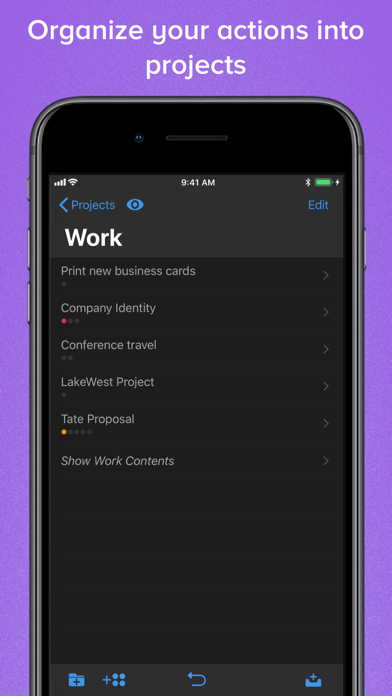
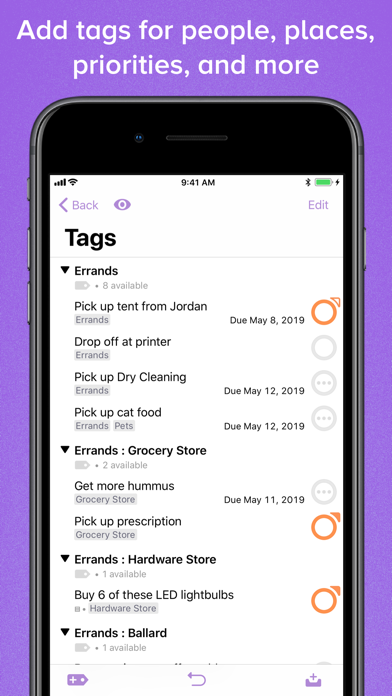
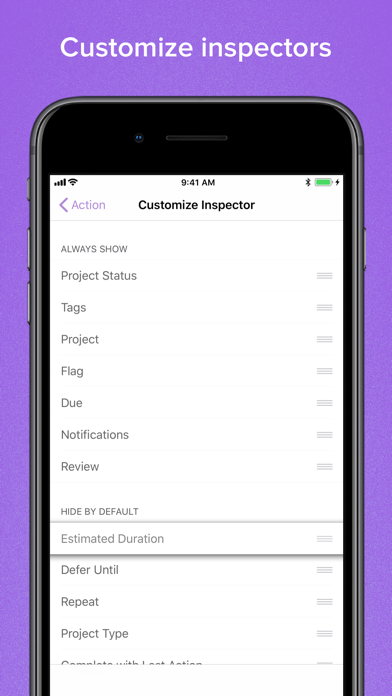
Two-week free trial! OmniFocus Standard and Pro are in-app purchases, with discounts for people who bought earlier versions of OmniFocus for iOS. Or you can get OmniFocus for iOS, Mac, and web for just one price with the OmniFocus Subscription. Download the app for details. Use OmniFocus to accomplish more every day. Create projects and tasks, organize them with tags, focus on what you can do right now — and get stuff done. OmniFocus — now celebrating 10 years as the trusted, gold-standard to-do list app — brings unrivaled power and flexibility to your iPhone and iPad, making it easy to work the way you want to work. OmniFocus manages everything in your busy life. Use projects to organize tasks naturally, and then add tags to organize across projects. Easily enter tasks when you’re on the go, and process them when you have time. Tap the Forecast view — which shows both tasks and calendar events — to get a handle on your day. Use the Review perspective to keep your projects and tasks on track. Then let our free syncing system make sure your data is the same on all your iOS devices. (And on OmniFocus for Mac and Web, available separately.) Because your data is encrypted, it’s safe in the cloud. STANDARD FEATURES • NEW: Tags add a powerful additional organizing tool. Create tags for person, energy level, priority, location, and more. • NEW: Batch editing lets you set due dates, tags, and other data for multiple tasks all at once • NEW: Flexible inspectors allow you to show only the features you use, and reorder them so your favorites are where you want them • NEW: The Forecast view shows your tasks and calendar events in order, so you can better see what’s coming up in your day • NEW: Enhanced repeating tasks are easier than ever to set up — and they work with real-world examples such as the first weekday of the month • Inbox is where you quickly add tasks — save them when you think of them, organize them later • Syncing supports end-to-end encryption so that your data is safe wherever it’s stored, on our server or yours • Notes can be attached to your tasks, so you have the information you need • Attachments — graphics and audio — add rich information to your tasks • View options let you customize each perspective by deciding what it should show and how it should filter your tasks • The Review perspective takes you through your projects and tasks — so you stay organized • With Siri support you can add tasks just by talking • OmniFocus Mail Drop adds tasks via email and works with services like IFTTT and Zapier • The Today Widget and the Apple Watch app show you your most important items — you don’t even have to open OmniFocus on your phone to know what’s up Pro features make OmniFocus even more powerful: PRO FEATURES • Custom perspectives help you create new ways to see your data by filtering and grouping projects and tags. NEW: The filtering rules are simpler to use while being more powerful than ever, letting you combine rules with “all,” “any,” and “none.” You can also choose any image to use as your custom perspective’s icon, and a custom tint color to go with it. • NEW: Today’s Forecast can include items with a specific tag, and you can reorder those tasks however you choose, so you can plan your day better • The customizable sidebar and home screen lets you organize your perspectives the way you want to, for super-fast access • The Today Widget shows a perspective of your choice in Notification Center Download OmniFocus and start your free trial! The app includes a quick tutorial and a manual — and there’s plenty more on the website. SUPPORT If you have feedback or questions, our Support Humans would love to hear from you! Send email to [email protected], call us at at 1-800-315-6664 or +1-206-523-4152, or reach us on Twitter at @omnifocus. Subscription Terms of Service: https://www.omnigroup.com/legal
Installs, last 30 days
Apple does not publish download counts. Estimates are in testing.
Estimated store revenue Estimated Beta
App Store, worldwide, monthly rate from the last 12 chart days to 19 Nov 2026
Below the top 100 grossing apps in the markets we calibrate. In the United States that usually means under about $6.4M a month. App Store purchases and subscriptions only, before Apple's 15 to 30% fee. Ads and web payments are not included.
Ratings
1,058 ratings, 1,058 reviews
No rating breakdown published for this app.
Recent reviews
Latest public reviews from the store
- 16 Feb 2022
Incredible
Longtime user, 8+ years. To put it simply OmniFocus lives up to its name. As any great tool - it’s power and utility is determined through the work of the user rather than the tool itself. The first two years were overwhelming. The next three were revelatory. Since then - it’s proved only to be indefatigable and indispensable. The most powerful thing you can do is consider and craft your Perspectives to suit your needs. Tags and Projects are only a foundation to GTD/organization. It takes persistent focus and flexibility (given energy levels - a quick store trip might fit best in OmniFocus to auto appear on arrival or a scrap sheet of paper impervious to fall damage) - and over time — you’ll have exactly curated task lists appearing only as needed and most critically just in time/place through location-initiated arrival & departure tags, completing the Review tab and respecting defer vs. due dates(overdue has to bring consequence). I simply adore The Omni Group for their endeavors, as OmniOutliner is equally compelling. Stay hungry. Stay foolish.
- 20 Jan 2022
Meets you where you are
I’ve tried a few task managers and this is the one I’ve stuck with for several years now. You can be as simple or as intricate as you want with it. Honestly, you can just begin using it by adding tasks to the inbox and checking them off from there without getting into the other functionality - then add in the other capabilities (projects, task groups, folders, tags, etc) if and when you need them or want them. Once you really get going with OmniFocus, one of a few standout features of it vs other task managers is the ability to create custom perspectives. Once you figure out how you want to use these for your own life and work, they are incredibly powerful. Many excellent resources exist out there for getting the most of this wonderful software, and the company is a great one to support. (I also personally love OmniOutliner and have both it and OmniFocus on all my Apple devices - in fact, they are the only two pieces of software I have my Mac automatically start when I log in.)
- 14 Jul 2020
The best of the BEST
I have been using OmniFocus since 2011. Each new version whether major or minor update makes the app better. A lot of people pass up this app because it’s either too expensive or too cumbersome. The old saying “you can’t judge a book by it’s cover” is defiantly true here. Yes, it is expensive, but it pays for itself in how easy your life can become if you take the time to use it. It can be as hard or easy as you wish. Over the almost 10 years I’ve used it I have learned things along the way that I wishe I had known earlier. There are several resources online with video tutorials, to help you get started. Their new subscription model will make it easier for those on a budget. Not enough can be said about the custom perspectives. I’ve got several set up for different things like work, grocery store, Netflix items I want to see. When I walk into the grocery store, I tap the grocery store perspective and all the grocery items I entered in are there. Something in the future? No problem, set the deferred date for the date in the future, and forget about it. OmniFocus will bring it back in view on that date. Do you have trouble remembering to review your task
- 21 Apr 2020
Amazing Program
OmniFocus is by far the best reminders app for work. On the surface it keeps everything sorted and organized way better than anything I’ve used in the past. I had a little trouble getting my phone and tablet to sync to my Mac correctly but that may have been user error. Once i got it working though it was amazing and the shortcuts on the Mac side have made my days so much easier. I used to forget to set reminders but on the Mac regardless of what program your in you can just hit “control, option, space” and a window pops up to add a new reminder. It’s awesome. The custom perspectives are also a very cool feature that lets you sort and view just what you need, filtering out anything thats not relevant. Those custom perspectives then sync over to all my devices. There is a lot more i need to learn to use this app to its full potential, it has a high learning curve but what I’ve gotten from it so far is incredible. My only gripe is that the subscription price of $9.99 a month seems steep. I get why they need a subscription model to stay in business but i think $4.99 would be a much more reasonable price for what is essentially a reminders app (albeit a amazing reminders ap
What reviewers bring up
Topics mentioned in the latest 8 reviews, by how many reviews mention them
Liked in good reviews (7 reviews)
- omnifocus 7
- perspectives 5
- tags 5
- powerful 4
- custom 4
- task 4
- flexibility 3
- incredible 3
Raised in bad reviews (0 reviews)
No topic comes up twice.
Top chart positions
Latest App Store chart ranks by country, last 10 days
Not in any tracked top chart in the last 10 days.
OmniFocus 3 history
Release, install milestones, listing and store changes
- First released on the store 30 May 2018
Update frequency
How often OmniFocus 3 ships a new version, month by month
0 updates in the last 12 months. Less often than most similar apps: they shipped a median of 2 updates in the same year.
Recent versions
Current version 3.15.8
- Version 3.15.812 Sep 2024
This app has been updated by Apple to prepare for watchOS 27 compatibility. No new features are included. OmniFocus 3.15.8 is a minor update focused on bug fixes. • OS Compatibility — Clarified text of alert presented when OmniFocus is launched on an unsupported OS. • Localizations — Updated localizations. If you have any feedback or questions, we’d love to hear from you! The Omni Group offers free tech support; you can email [email protected] or call 1–206–523–4152.
Listing keywords
Words and phrases OmniFocus 3 repeats most in its store listing
Top phrases: projects and tasks (3), mac and web (2), omnifocus for ios (2), tasks and calendar (2), add tasks (2).
Highlighted words also appear in the title. Counts cover the title, short description and description.
Compliance
What the listing and the app package show
- Store status
- Live
- Upkeep
- No update since 12 Sep 2024
- Age rating
- 4+
Apps like OmniFocus 3
 Le Chat by Mistral AIMistral AI★ 4.78
 Smart Cleaner-Ai CleanerTINY BOLT (HK) CO., LIMITED★ 4.33
 PrivacyPro SmartVPN & FirewallDisconnect★ 4.09
 NuvoloNuvolo★ 2.14
 PlanPop: Shared Calendar AppMoments Technologies Inc.★ 4.8
 Clema: Screen Time CompanionClema Technologies LLC★ 4.81
 gogh - Focus with Your AvatarGogh Japan★ 3.53
 VPN Freely | Premium USA VPNSilo IT Group★ 4.35
 Stay Focused App/Site BlockerINNOXAPPS LLP★ 4.44
OmniFocus 3: questions and answers
Who makes OmniFocus 3?
OmniFocus 3 is published by The Omni Group.
When was OmniFocus 3 last updated?
The latest version (3.15.8) was released on 12 Sep 2024.
Is OmniFocus 3 free?
Yes. OmniFocus 3 is free to download.
Is OmniFocus 3 still available?
Yes. OmniFocus 3 is live on App Store as of 19 Nov 2026.
Track OmniFocus 3 and its competitors
Watch any app for new versions, rating drops, chart moves and removals. Free plan, no card.