
- Installs
- —
- Apple does not publish download counts
- Rating
- 3.04
- Ratings
- 46
- 46 reviews
- Version
- 5.3.6
- Updated 30 Jun 2026
- Released
- 2 Dec 2009
- Tracked since 10 May 2026
- Size
- 172 MB
- Needs 15.0
Also on Google Play: Onebox Virtual Phone System (291 ratings)
Screenshots


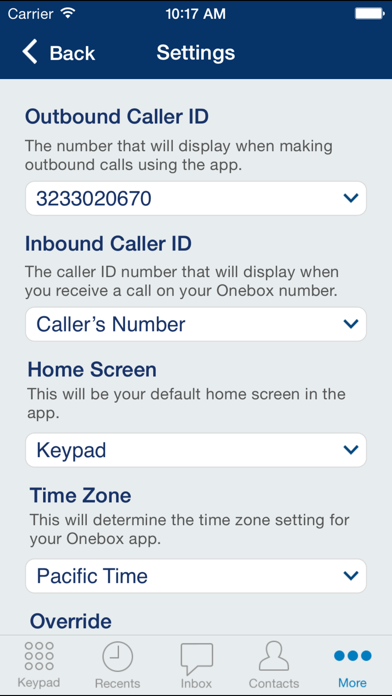

About Onebox – Virtual Phone System
The description on the store listing
Use your Onebox account while on the go with the Onebox app:
The completely reimagined Onebox mobile app is here for existing customers! Now fully VoIP-enabled, you can enjoy crystal-clear calls, reliable notifications, and smarter call handling right from your device. This brand new application replaces the legacy Onebox app, offering a refreshed, professional brand experience built for small business users who need smarter control over when and how they take calls.
What's New & Improved?
- VoIP Calling Within the App: Make and receive calls directly over the internet, no longer needing to rely on carrier calling.
- Reliable Push Notifications: Experience consistent and real-time alerts. …
Read the full description
Use your Onebox account while on the go with the Onebox app: The completely reimagined Onebox mobile app is here for existing customers! Now fully VoIP-enabled, you can enjoy crystal-clear calls, reliable notifications, and smarter call handling right from your device. This brand new application replaces the legacy Onebox app, offering a refreshed, professional brand experience built for small business users who need smarter control over when and how they take calls. What's New & Improved? - VoIP Calling Within the App: Make and receive calls directly over the internet, no longer needing to rely on carrier calling. - Reliable Push Notifications: Experience consistent and real-time alerts. The new app resolves the broken notification issues present in the legacy app. - Enhanced Contact Management: - Shared Onebox Contacts: Easily import contacts from your device and share them across your multiple Onebox numbers, providing better visibility across all your extensions. This improved system replaces the "Speed Dial" contact feature from the old app. - Flexible Call Handling: Gain smarter control by routing calls to voicemail, an external number, or based on your specific schedules set up in Account Manager. - Granular Call Log Details: Review detailed call logs that specify if calls were forwarded to voicemail, an external number, or answered by another user. - Complete Branding Refresh: Navigate through an intuitive design with a sleek, modern user interface. - Core Business Phone System Features: Continue to manage call forwarding settings, read or listen to voicemail transcriptions and messages, and send and receive text messages using your Onebox number. Your calls will still be answered with a professionally recorded custom greeting and can be directed to any employee, anywhere in the world. The app also includes incoming call settings with easy-to-use menu options for call routing, voicemail, and conferencing. New App: Important Changes The all-new Onebox app is now your dedicated hub for seamless calling and messaging on the go. Here is a summary of key changes in the new Onebox mobile app – for full functionality, please use the web-based account manager. - Faxing: All faxing capabilities, including sending and receiving faxes, are now managed exclusively through your web account manager and unavailable in the mobile app. - Admin User Message Access (Inbox): The ability for admin users to switch between different user inboxes has been removed from the mobile app. You can only view messages for the account you are currently logged into. - Deleted Messages (Trash Folder): When a message is deleted within the app, it is permanently removed from the app. Customers can continue to access deleted messages or recover deleted items, by visiting the Trash folder in your web account manager. - Caller ID Behavior: - Outbound Calls: Will always show your logged-in Onebox number as the Caller ID. - Inbound Calls: Will show the phone number of the person calling you. - Home Screen & Time Zone: The previous "Home Screen" has been removed to simplify navigation. The app's time display is now automatically set by your device's native time zone settings. NOTE: A valid Onebox account is required to use the mobile app. Please note that some features may require additional services. Emergency calling (911) is not available using the Onebox application. CONTACT & SUPPORT Have questions or need support? Please visit our Help Center or contact our support team directly. We’re here to help! TERMS & PRIVACY By using this app, you agree to Onebox's Terms of Use and Privacy Policy.
Installs
Apple does not publish download counts. Estimates are in testing.
We publish iOS estimates only after they pass a back-test against real numbers. Chart history below is measured.
Estimated store revenue Estimated Beta
App Store, worldwide, monthly rate from the last 12 chart days to 19 Nov 2026
Below the top 100 grossing apps in the markets we calibrate. In the United States that usually means under about $6.4M a month. App Store purchases and subscriptions only, before Apple's 15 to 30% fee. Ads and web payments are not included.
Ratings
46 ratings, 46 reviews
No rating breakdown published for this app.
Recent reviews
Latest public reviews from the store
No reviews in our sample for this app yet.
Top chart positions
Latest App Store chart ranks by country, last 10 days
Not in any tracked top chart in the last 10 days.
Onebox – Virtual Phone System history
Release, install milestones, listing and store changes
- First released on the store 2 Dec 2009
Update frequency
How often Onebox – Virtual Phone System ships a new version, month by month
3 updates in the last 12 months. More often than most similar apps: they shipped a median of 2 updates in the same year.
Recent versions
Current version 5.3.6
- Version 5.3.630 Jun 2026
- You can now forward calls from the mobile app while on an active inbound call. - Several bug fixes and accessibility improvements.
- Version 5.3.521 May 2026
We've made a number of behind-the-scenes improvements to keep things running smoothly, including bug fixes and performance enhancements for a faster, more reliable experience. Thank you for using Onebox!
- Version 5.3.324 Mar 2026
This release brings performance upgrades and overall refinements. Thanks for using Onebox!
Listing keywords
Words and phrases Onebox – Virtual Phone System repeats most in its store listing
Top phrases: account manager (4), voicemail an external (2), web account manager (2), call handling (2), caller id (2).
Highlighted words also appear in the title. Counts cover the title, short description and description.
Compliance
What the listing and the app package show
- Store status
- Live
- Upkeep
- Updated 30 Jun 2026
- Age rating
- 17+
Apps like Onebox – Virtual Phone System
 UnovonVoyzze Communications Inc★ 1.2
 AgentDash for Real EstateRealty Search Solutions Network, LLC★ 3.64
 My Alliance WiFiAlliance Communications★ 4.84
 Kaakateeya Marriages since1980Kaakateeya.com India Private Limited★ 3.4
 HDBoxDawar Karim★ 3.6
 REKK - Call RecorderCLEVERCONTROL LLC★ 3.31
 Gold Price TodayQais Ali★ 4.47
 Firstpath-StaffFirstPath Inc★ 2.0
 ServiceMonsterServiceMonster LLC★ 2.78
Onebox – Virtual Phone System: questions and answers
Who makes Onebox – Virtual Phone System?
Onebox – Virtual Phone System is published by J2 Web Services, Inc..
When was Onebox – Virtual Phone System last updated?
The latest version (5.3.6) was released on 30 Jun 2026.
Is Onebox – Virtual Phone System free?
Yes. Onebox – Virtual Phone System is free to download.
Is Onebox – Virtual Phone System still available?
Yes. Onebox – Virtual Phone System is live on App Store as of 1 Jul 2026.
Track Onebox – Virtual Phone System and its competitors
Watch any app for new versions, rating drops, chart moves and removals. Free plan, no card.