- Installs
- —
- Apple does not publish download counts
- Rating
- 4.2
- Ratings
- 1.3K
- 1.3K reviews
- Version
- 4.6.5
- Updated 28 Aug 2021
- Released
- 7 Aug 2012
- Tracked since 10 May 2026
- Size
- 19 MB
- Needs 12.0
Also on Google Play: Paint Tester (2.4K ratings)
Screenshots
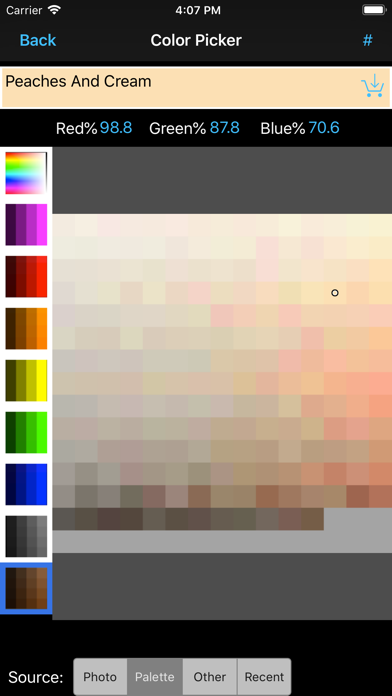
About Paint Tester
The description on the store listing
See how new colors look on your walls before you paint!
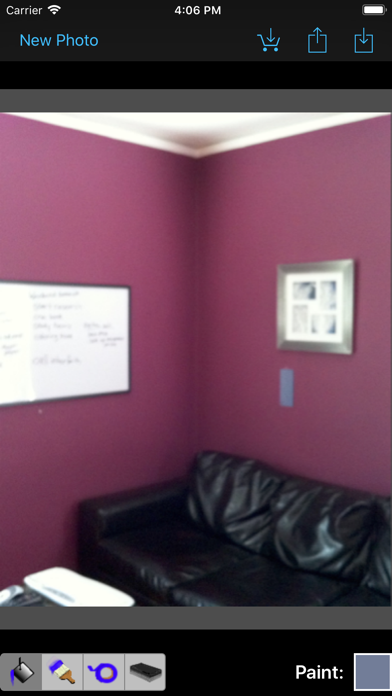
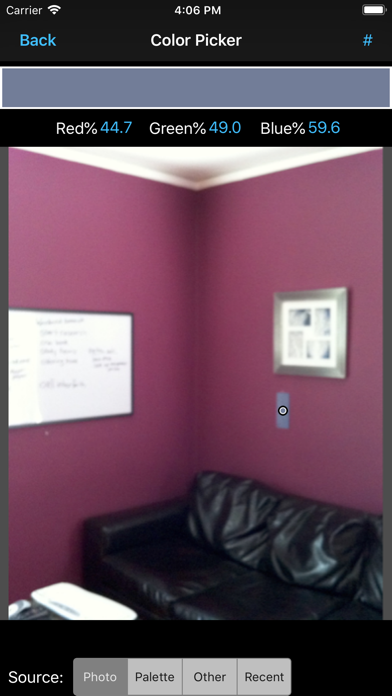
Finding the right color for a room can be a challenge, but Paint Tester shows you the results without all the pain of painting and repainting! Easily try out colors from the palette or take a photo of a color you'd like to try, and apply it to pictures of your own home! Know what you're getting in to before the first drop of paint touches the walls.
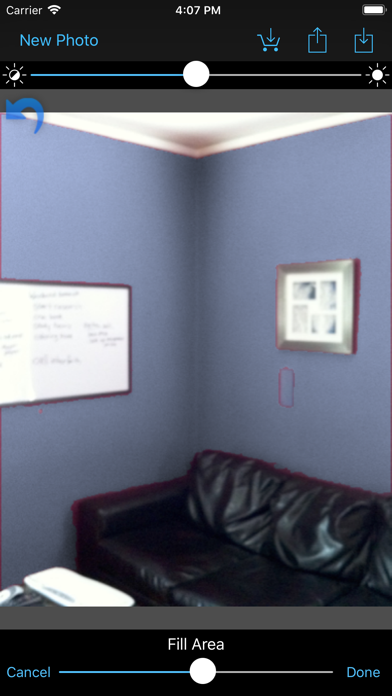
Paint Tester's variety of tools and smart paint bucket make it easy to change the wall color in a picture in a matter of seconds!
Start by taking a picture of the room you'd like to paint, then use the paint bucket to apply colors to the walls. In a well lit photo, the smart paint bucket …
Read the full description
See how new colors look on your walls before you paint! Finding the right color for a room can be a challenge, but Paint Tester shows you the results without all the pain of painting and repainting! Easily try out colors from the palette or take a photo of a color you'd like to try, and apply it to pictures of your own home! Know what you're getting in to before the first drop of paint touches the walls. Paint Tester's variety of tools and smart paint bucket make it easy to change the wall color in a picture in a matter of seconds! Start by taking a picture of the room you'd like to paint, then use the paint bucket to apply colors to the walls. In a well lit photo, the smart paint bucket will color the wall without bleeding on to neighboring walls or the ceiling. This gives you the control to get a clean picture of how the color would look, and you can even use multiple colors at the same time to try an accent wall! If you didn't like how the first color looks, use the color picker to choose another, and just tap with the paint bucket to replace it! For great results try taping a color sample to the wall and take a photo of it. Use the color picker to select the sample, then use the paint bucket to start applying the color right next to the sample. Because the sample and the wall will be lit the same, this can take a lot of the guesswork out of how the color will look in the lighting of the room.
Installs, last 30 days
Apple does not publish download counts. Estimates are in testing.
Estimated store revenue Estimated Beta
App Store, worldwide, monthly rate from the last 13 chart days to 20 Nov 2026
Below the top 100 grossing apps in the markets we calibrate. In the United States that usually means under about $6.4M a month. App Store purchases and subscriptions only, before Apple's 15 to 30% fee. Ads and web payments are not included.
Ratings
1,290 ratings, 1,290 reviews
- 5 ★59%
- 4 ★23%
- 3 ★5.6%
- 2 ★3.0%
- 1 ★9.2%
Recent reviews
Latest public reviews from the store
- 26 Jan 2025
Simple is good!
The only app out of 3-4 that I tried that allows one to do simple flood fills based on (the well known) smart select selection tool (with a flood fill %) AND allows further touch up with a manual line or brush tool AND smartly asks if one wants to paint “everywhere” (replace color everywhere) or just “connected” or “locally”. One can quickly & easily recolor all parts of the image (walls, baseboards, doors, etc.) All other apps I tried had expensive AI subscription junk (there’s a time & place for it) or could only do realtime or only one wall or had no control over the flood fill (& could not do manual touch ups), etc. My only qualm (hence the -1 star) was: 1. the annoying snap-back to the full-zoom everytime I hit Done., & 2. One time when attempting to flood fill white baseboards with another color refused to work for some unknown reason.
- 22 Mar 2021
Love it!
I’ve tried a handful of paint color testing apps and this is by far the easiest and best. I’m in my 50s and although I’m not a dummy when it comes to using apps, I’m no Cameron Winklevoss either.... This is the app I’m sticking with while I decide on interior and exterior colors when I paint my house this year. Very easy to use. Take a photo, tap the color you want, then it fills in the area u want filled. U then can fill in the edges using various brush sizes, change the colors easily, etc.... great app!
- 4 Jul 2020
Pretty good app
I was looking for an app that would let me paint all areas of the front of our house. I have a hard time visualizing the colors the wife was suggesting. With this app we worked together and painted it up as she visualized. Some suggestions for app improvement: 1) In the Recents of the color picker, allow the user to delete colors no longer want to have as a recent (maybe long press to bring up delet option or just select a color and have a trash can appear). Trying different shades of a color makes it hard to figure out which one it was used when referring back to what you last used. 2) Also on the Recents page, have the name of the color show up at the top as it does when choosing from the color palette. Having this might eliminate having to do #1 above (but it would still be good to be able to delete) 3) have an option to delete the color number before saving a copy of the picture. When trying different colors, every single color used ends up being referenced on the saved copy, even if not all colors were used. 4) Stop having the picture going to full screen (after being zoomed in) whenever the brush size changes or when switching from bucket to brush to tap, etc. that�
- 16 Apr 2020
Limited and buggy
In fairness, I am trying to use Paint Tester in for an exterior job, while I believe the program was designed with interior jobs in mind. The difference is significant. Lighting variations outdoors can be much greater than indoors, and surfaces can be more variable. Paint tester does allow you to get a rough visualization of how colors will look in a particular application and relative to other colors. It also provides a read out on the formulas ( % of various colors in each) for every color you use in your project and saves a palette, including formula information, for each project/photo. On the downside: It’s difficult to get an even coat. The color varies according to variations in the surface you’re covering. This is inevitable if the program is to preserve textures in the original, but the trade off is a very uneven look. Colors don’t remain true. Colors change in an attempt to adjust to lighting and, again, according to the color you’re trying to cover. The adjustments are not always on target. Program doesn’t always respond appropriately. On a number of occasions, while working on a photo, I’ve wanted to bring in a color from another photo. Paint Tester does
What reviewers bring up
Topics mentioned in the latest 8 reviews, by how many reviews mention them
Liked in good reviews (7 reviews)
- paint 6
- colors 5
- tried 4
- brush 4
- photo 3
- etc 3
- tap 3
- negative reviewer 2
Raised in bad reviews (0 reviews)
No topic comes up twice.
Top chart positions
Latest App Store chart ranks by country, last 10 days
Not in any tracked top chart in the last 10 days.
Paint Tester history
Release, install milestones, listing and store changes
- First released on the store 7 Aug 2012
Update frequency
How often Paint Tester ships a new version, month by month
0 updates in the last 12 months. Less often than most similar apps: they shipped a median of 1 updates in the same year.
Recent versions
Current version 4.6.5
- Version 4.6.528 Aug 2021
App tracking transparency
Listing keywords
Words and phrases Paint Tester repeats most in its store listing
Top phrases: paint bucket (5), smart paint bucket (2), color picker (2), paint tester (2), smart paint (2).
Highlighted words also appear in the title. Counts cover the title, short description and description.
Compliance
What the listing and the app package show
- Store status
- Live
- Upkeep
- No update since 28 Aug 2021
- Age rating
- 4+
Apps like Paint Tester
 MMGuardian App for Child PhonePervasive Group Inc.★ 1.4
 Blospam - Spam DefenderSYSTEM AUTOMATION LIMITED★ 4.68
 Clinometer+Tue Nguyen Minh★ 4.54
 Ringtone Maker -Apps Farm LLC★ 4.18
 ToolBox: AR Ruler, Level ToolVlad Polyanskiy★ 4.36
 Score Anything – ScorekeeperIlya Panchenko★ 4.91
 heylinkShenzhen Dinghefeng Technology Co., Ltd.★ 4.45
 Video Saver ™Thi Van Vo★ 4.1
 Power PDF - PDF ManagerComcSoft Corporation★ 4.78
Paint Tester: questions and answers
Who makes Paint Tester?
Paint Tester is published by Luminant Software, Inc.
When was Paint Tester last updated?
The latest version (4.6.5) was released on 28 Aug 2021.
Is Paint Tester free?
Yes. Paint Tester is free to download.
Is Paint Tester still available?
Yes. Paint Tester is live on App Store as of 20 Nov 2026.
Track Paint Tester and its competitors
Watch any app for new versions, rating drops, chart moves and removals. Free plan, no card.