
- Installs
- —
- Apple does not publish download counts
- Rating
- —
- Ratings
- —
- Version
- 0.0.9
- Updated 19 Oct 2026
- Released
- 7 Jul 2026
- Tracked since 10 Nov 2026
- Size
- 119 MB
- Needs 15.5
Screenshots


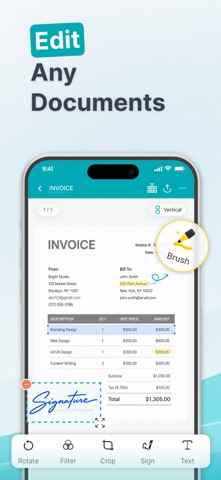


About PDF Editor, Reader, Scanner
The description on the store listing
Turn your phone into an all-powerful mobile office! PDF Editor, Reader, Scanner is the only app you need to digitize, edit, sign, print, and convert any document — instantly, right from your pocket.
Drowning in paper receipts, IDs, and loose documents?
High-Speed Scanner & OCR
- Auto-detect and scan invoices, contracts, notes, and receipts with precision.
- Specialized high-resolution scanning for Passports, ID Cards, and Driver's Licenses.
- Extract text from any image instantly with advanced OCR technology.
- Save scans as high-quality PDFs, ready for storage or sharing.
Stuck with an uneditable PDF?
Complete PDF Editing Suite
- Add text, change fonts, and annotate …
Read the full description
Turn your phone into an all-powerful mobile office! PDF Editor, Reader, Scanner is the only app you need to digitize, edit, sign, print, and convert any document — instantly, right from your pocket. Drowning in paper receipts, IDs, and loose documents? High-Speed Scanner & OCR - Auto-detect and scan invoices, contracts, notes, and receipts with precision. - Specialized high-resolution scanning for Passports, ID Cards, and Driver's Licenses. - Extract text from any image instantly with advanced OCR technology. - Save scans as high-quality PDFs, ready for storage or sharing. Stuck with an uneditable PDF? Complete PDF Editing Suite - Add text, change fonts, and annotate directly on any document. - Use the freehand Brush to highlight, draw, or take free-form notes. - Compress PDF file size without sacrificing quality — perfect for sharing. - Advanced page management: reorder pages, merge multiple files, or split PDFs with ease. Urgent contract needs a signature — right now? E-Signature & Business Tools - Create smooth electronic signatures (E-Sign) and fill forms on the go. - Generate professional invoices in seconds — perfect for freelancers and small businesses. Need a physical copy but only have your phone? Direct Print — No Computer Needed - Print any PDF or document wirelessly from your phone in seconds. - Works with AirPrint (iOS) and any Wi-Fi enabled printer — home, office, or library. - Print single pages or entire multi-page documents with full layout control. - Set page size, orientation, and number of copies before you print — no surprises. File format not compatible? Universal Format Converter — 15+ Formats - Seamless two-way conversion: PDF ↔ Word (DOC), Excel (XLS), PowerPoint (PPT). - Convert images (JPG, IMG) and text files (TXT, HTML, MD) to PDF in seconds. - Read and convert e-books (EPUB) and more, including CBR/CBZ comic formats. Need to share files but worried about privacy? Reliable Document Security - Use the Hide tool to blackout or blur sensitive details — bank numbers, ID info — before sharing. - Add personalized Watermarks to prevent unauthorized copying. - All files processed with strict privacy measures. Zero data leaks. Smart File Management & Sharing - Import instantly from device storage, camera, or cloud. - Create unlimited folders to organize documents your way. - Share PDFs via Email, AirDrop, Messages, Google Drive, Dropbox, OneDrive, and more. - Accidentally deleted something? Restore it from Trash anytime. PERFECT FOR AI-POWERED DOCUMENT WORK - Lawyers & contract reviewers - Students summarizing research - Accountants extracting invoice data - Freelancers rewriting proposals - Anyone managing sensitive or complex documents PERFECT FOR PRINTING - Contracts & legal documents - Invoices & receipts - Study notes & assignments - Certificates & ID copies - Meeting agendas & reports SUBSCRIPTION & PURCHASE INFORMATION - Unlock premium features with subscription: weekly, monthly and yearly. - Payment will be charged to your iTunes Account at confirmation of purchase. - Subscription automatically renews unless auto-renew is turned off at least 24 hours before the end of the current period. - Account will be charged for renewal within 24 hours prior to the end of the current period. - You can manage or turn off auto-renew in your Apple ID Account Settings any time after purchase. Stop stressing over paperwork. Download the PDF Editor, Scanner, Converter app today and let us solve all your document problems effortlessly! Privacy Policy: https://tvgsoft.com/privacy-policy Terms of Service: https://tvgsoft.com/terms-of-service
Installs
Apple does not publish download counts. Estimates are in testing.
We publish iOS estimates only after they pass a back-test against real numbers. Chart history below is measured.
Estimated store revenue Estimated Beta
App Store, worldwide, monthly rate from the last 12 chart days to 19 Nov 2026
Below the top 100 grossing apps in the markets we calibrate. In the United States that usually means under about $6.4M a month. App Store purchases and subscriptions only, before Apple's 15 to 30% fee. Ads and web payments are not included.
Ratings
No rating breakdown published for this app.
Recent reviews
Latest public reviews from the store
No reviews in our sample for this app yet.
Top chart positions
Latest App Store chart ranks by country, last 10 days
Not in any tracked top chart in the last 10 days.
PDF Editor, Reader, Scanner history
Release, install milestones, listing and store changes
- First released on the store 7 Jul 2026
Update frequency
How often PDF Editor, Reader, Scanner ships a new version, month by month
1 updates in the last 12 months. More often than most similar apps: they shipped a median of 0 updates in the same year.
Recent versions
Current version 0.0.9
- Version 0.0.919 Oct 2026
- Bug fix and improvement.
Listing keywords
Words and phrases PDF Editor, Reader, Scanner repeats most in its store listing
Top phrases: pdf editor (3), editor reader scanner (2), pdf editor reader (2), auto renew (2), current period (2).
Highlighted words also appear in the title. Counts cover the title, short description and description.
Compliance
What the listing and the app package show
- Store status
- Live
- Upkeep
- Updated 19 Oct 2026
- Age rating
- 4+
Apps like PDF Editor, Reader, Scanner
 Super VPN: Fast Private ProxyGeek Incorporated★ 4.4
 Hubtel RetailerHubtel Limited★ 4.32
 Monthly Calendar 2022 - CalistOmoboto LLC★ 4.38
 Firstly: To-Do List & PlannerfocusCove LLC★ 4.7
 CBUS 311City of Columbus, Ohio★ 1.8
 Themes for Powerpoint - DesiGNGraphic Node★ 4.22
 iSiloDC & Co.★ 3.82
 Flashlight Pro [Multipurpose LED light]KAVAPOINT★ 3.88
 WiPryOscium LLC★ 2.68
PDF Editor, Reader, Scanner: questions and answers
Who makes PDF Editor, Reader, Scanner?
PDF Editor, Reader, Scanner is published by TVGSOFT LIMITED.
When was PDF Editor, Reader, Scanner last updated?
The latest version (0.0.9) was released on 19 Oct 2026.
Is PDF Editor, Reader, Scanner free?
Yes. PDF Editor, Reader, Scanner is free to download.
Is PDF Editor, Reader, Scanner still available?
Yes. PDF Editor, Reader, Scanner is live on App Store as of 10 Nov 2026.
Track PDF Editor, Reader, Scanner and its competitors
Watch any app for new versions, rating drops, chart moves and removals. Free plan, no card.