- Installs
- —
- Apple does not publish download counts
- Rating
- 4.71
- Ratings
- 7K
- 7K reviews
- Version
- 6.2.0
- Updated 13 Oct 2026
- Released
- 27 Aug 2011
- Tracked since 10 May 2026
- Size
- 72 MB
- Needs 16.6
Screenshots




About PDF Pro - Reader Editor Forms
The description on the store listing
PDF Pro lets you read, edit and annotate your PDF documents directly on your iPhone and iPad. Highlight text, take notes, embed shapes or draw with your finger. You can even embed voice recordings or photo annotations. Full-text-search your entire PDF library with just a single tap.
Above all PDF Pro comes with full-featured PDF form and signature support.
Key-Features At A Glance:
• POWERFUL SEARCH:
∙ Full-text-search your entire PDF library.
∙ Search inside specific documents with easy navigation through the search results.
∙ Look-up selected text directly on Wikipedia or in the included dictionaries.
• FILE-MANAGEMENT:
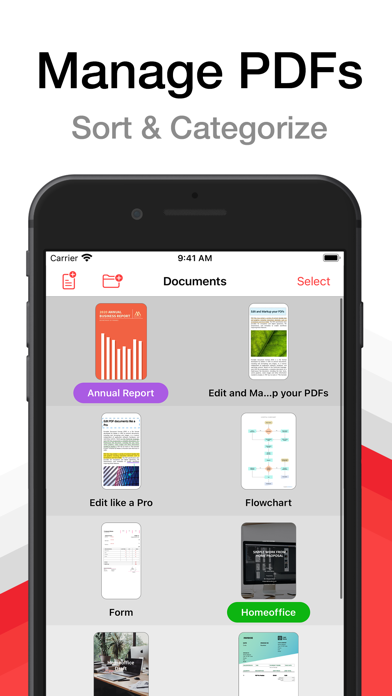
∙ Group your PDFs in folders and tag them with colorful labels.
∙ …
Read the full description
PDF Pro lets you read, edit and annotate your PDF documents directly on your iPhone and iPad. Highlight text, take notes, embed shapes or draw with your finger. You can even embed voice recordings or photo annotations. Full-text-search your entire PDF library with just a single tap. Above all PDF Pro comes with full-featured PDF form and signature support. Key-Features At A Glance: • POWERFUL SEARCH: ∙ Full-text-search your entire PDF library. ∙ Search inside specific documents with easy navigation through the search results. ∙ Look-up selected text directly on Wikipedia or in the included dictionaries. • FILE-MANAGEMENT: ∙ Group your PDFs in folders and tag them with colorful labels. ∙ Import PDFs from your Dropbox®, Microsoft OneDrive® or Google Drive®. ∙ Add PDFs via USB or WiFi. ∙ Open E-Mail attachments. • CLEAR VIEW: ∙ Easily browse through all your annotations. ∙ Full PDF outline support. You can even search the outline. ∙ Get an overview of all your bookmarked or annotated pages just with a single tap. • SHARE and PRINT: ∙ Easily share your annotated documents with your friends or co-workers. ∙ Print your annotated and edited PDFs. ∙ You can even share or print single pages of a document. • HIGH SPEED and STABILITY: ∙ Rapid viewing of PDF documents. ∙ Smooth display of very large PDF files. • NIGHT MODE: ∙ Makes reading in the dark much easier on the eyes. • SECURITY: ∙ Support for password-protected PDFs • AND MUCH MORE... Premium Features and Premium Offer include: • ANNOTATIONS and NOTES: ∙ Highlight text, take notes or draw with your finger. ∙ Powerful shape editor for arrows, rectangles, circles, lines and much more. ∙ Embed audio and photo annotations into your PDFs. ∙ Use predefined stamps or create your own. • DOCUMENT EDITOR: ∙ Create new pages. ∙ Export pages or merge them into existing documents. ∙ Reorder, rotate and delete pages. • CONTENT EDITOR: • Modify the existing content of PDF documents. • MULTITASKING: ∙ Work with multiple PDFs at a time. ∙ Copy and paste annotations, shapes, images or text from one PDF document into another. • FORM SUPPORT: ∙ Just fill out your PDF form, sign it with your handwritten signature and you are ready to send it via E-Mail or print it via AirPrint®. A monthly or annual subscription is required to get access to all premium features and premium offer. --- Subscriptions automatically renew monthly or yearly depending on your plan unless auto-renew is turned off at least 24-hours before the end of the current period. Plans are priced at $1.99USD monthly and $15.99USD yearly (pricing may vary in countries other than the U.S.). Payment will be charged to your App Store Account at confirmation of purchase. To avoid automatic renewal, you must turn off auto-renew at least 24 hours before your subscription ends. You can turn off auto-renew at any time from your App Store Account Settings. Terms of Use: https://pdf-pro.net/terms-of-service/ Privacy Policy: https://pdf-pro.net/privacy-policy/
Installs, last 30 days
Apple does not publish download counts. Estimates are in testing.
Estimated store revenue Estimated Beta
App Store, worldwide, monthly rate from the last 12 chart days to 19 Nov 2026
Below the top 100 grossing apps in the markets we calibrate. In the United States that usually means under about $6.4M a month. App Store purchases and subscriptions only, before Apple's 15 to 30% fee. Ads and web payments are not included.
Ratings
6,990 ratings, 6,990 reviews
No rating breakdown published for this app.
Recent reviews
Latest public reviews from the store
- 25 Mar 2026
Love the multi device collab
Love the Mac/iOS collab, since I once paid for all the pdf expert apps(readdle is the app maker, they are frauds believe dat!) everyone they had, supposed to be lifetime, hundreds later & suddenly, no more of that…horse shart but pdf pro is the replacement that seems to be rated not great but docs work from iPhone to iPad to Mac & that sure beats these other rip off sons o 6itches that steal your money then change their deal suddenly🫡
- 8 Feb 2026
Love
Love this app. It helps keep all my doc organized! Easy to use and find what I need!
- 15 Jan 2026
Love it
This is superior in editing and importing and annotation pdf. Especially on iPad Pro
- 2 Sep 2025
美中不足
性能很优越,只可惜没有自然人声朗读功能
What reviewers bring up
Topics mentioned in the latest 50 reviews, by how many reviews mention them
Liked in good reviews (28 reviews)
- pdf 10
- pro 5
- interface 3
- ipad 3
- application 2
- especially 2
- documents 2
- hundreds 2
Raised in bad reviews (16 reviews)
- subscription 3
- feature 3
- apple 3
- files 3
- edit 3
- pdf expert 2
- developer 2
- purchase 2
Top chart positions
Latest App Store chart ranks by country, last 10 days
- Countries ranked
- 3 of 50
- Best rank
- #61
- Top 10 placements
- 0
- of 4 chart placements
- Average rank
- #79.8
Best countries on App Store
- 🇷🇺 Russia · Top grossing, Productivity#61
- 🇳🇬 Nigeria · Top grossing, Productivity#80
- 🇨🇱 Chile · Top grossing, Productivity#94
| Country | Chart | Category | Rank | Best (10 days) | Date |
|---|---|---|---|---|---|
| 🇷🇺 Russia | Top grossing | Productivity | #61 | #31 | 19 Nov 2026 |
| 🇳🇬 Nigeria | Top grossing | Productivity | #80 | #80 | 12 Nov 2026 |
| 🇷🇺 Russia | Top free | Productivity | #84 | #76 | 19 Nov 2026 |
| 🇨🇱 Chile | Top grossing | Productivity | #94 | #94 | 12 Nov 2026 |
PDF Pro - Reader Editor Forms history
Release, install milestones, listing and store changes
- First released on the store 27 Aug 2011
Update frequency
How often PDF Pro - Reader Editor Forms ships a new version, month by month
3 updates in the last 12 months. Less often than most similar apps: they shipped a median of 4 updates in the same year.
Recent versions
Current version 6.2.0
- Version 6.2.013 Oct 2026
6.2: IMPROVED: - Faster display of complex pages - More accurate colors in CMYK documents with blend modes - Lower memory usage after closing documents - Better VoiceOver support throughout the app - Updated password field with a message for wrong passwords - Template info now opens as a sheet FIXED: - Crash when closing the share sheet - Crash when using the eraser while drawing - Crash when exporting large documents with forms - Annotation changes sometimes lost when leaving the app - Document content hidden behind the sidebar on iPad - Text annotations closing while the keyboard appears - Pages shifting when the keyboard appears - Search navigator hard to read in dark mode - Search navigator covering pages in the thumbnail grid and Document Editor - Wrong title shown after switching tabs on iPad - Missing close button for document info on iPhone - Device staying awake after leaving Wi-Fi transfer - Edit button disappearing in the annotation list - Text clipping when editing rotated text annotations - Sharing documents with very long names not working - Asian text in annotations disappearing in other PDF viewers - Some symbols being removed from annotations and form fields - Form field text showing unrelated symbols when a font is missing - Text fields rejecting input in some forms - Copied form fields not being fillable in some documents - Several issues with interactive forms using scripts - Shaded boxes appearing over artwork in CMYK documents - Annotations being lost when flattening fails - Text annotations causing font errors in Adobe Acrobat - Cloud borders being cut off in other PDF viewers - Translation errors in several languages --- PDF Pro is also available for Windows and macOS! For more information visit: https://www.pdf-pro.net Do you like PDF Pro? If you have a moment to leave a review on the App Store we would really appreciate it!
- Version 6.1.03 Sep 2026
6.1: IMPROVED: - Increased contrast between white pages and the background - Faster display of pages containing a large number of links - Faster startup of the Content Editor - Smoother annotation editing in complex documents such as building plans - Text form fields rotated by 90° can now be edited FIXED: - Washed-out or too-dark colors in CMYK documents with transparency - Thin lines and other page content missing in complex documents - Bold and italic only partially applied in the Content Editor - Annotations disappearing or hiding others while selected - Pages shifting when showing or hiding the user interface - Clear Field button staying disabled for some form fields - Text fields with a fixed font size rejecting input - Chained form field calculations not updating correctly - Unchecked radio buttons appearing square or disappearing - Freeform highlights becoming opaque after flattening - Reordering pages failing to save in some documents - Handwritten signatures appearing inverted in dark mode - Text selection and highlighting of ligatures --- PDF Pro is also available for Windows and macOS! For more information visit: https://www.pdf-pro.net Do you like PDF Pro? If you have a moment to leave a review on the App Store we would really appreciate it!
- Version 6.0.016 May 2026
6.0: NEW: - iOS 26 support IMPROVED: - Faster opening of documents with thousands of pages or annotations - Smoother scrolling and zooming in complex documents - Background auto-saving for better UI responsiveness - Improved highlight rendering where text lines overlap FIXED: - Minor bugs have been fixed --- PDF Pro is now available for Windows! For more information visit: https://www.pdf-pro.net Do you like PDF Pro? If you have a moment to leave a review on the App Store we would really appreciate it!
- Version 5.7.124 Jul 2025
5.7.1: FIXED: - Minor bugs have been fixed 5.7: NEW: - Password-protected directories - Password protection for app IMPROVED: - Improved the performance of the document editor FIXED: - Minor bugs have been fixed --- PDF Pro is now available for macOS! For more information visit: https://www.pdf-pro.net Do you like PDF Pro? If you have a moment to leave a review on the App Store we would really appreciate it!
Listing keywords
Words and phrases PDF Pro - Reader Editor Forms repeats most in its store listing
Top phrases: auto renew (3), pdf documents (3), pdf pro (3), entire pdf library (2), features and premium (2).
Highlighted words also appear in the title. Counts cover the title, short description and description.
Compliance
What the listing and the app package show
- Store status
- Live
- Upkeep
- Updated 13 Oct 2026
- Age rating
- 4+
Apps like PDF Pro - Reader Editor Forms
 Galaxy VPN - Fast & SecurityBLUE REV SOAR TECHNOLOGY LIMITED★ 4.61
 Miro: your visual workspaceRealtimeBoard Inc.★ 4.69
 A Cleaner: Storage CleanupHONG KONG LITTLE BEAR INFORMATION TECHNOLOGY CO., LIMITED★ 4.3
 Add Watermark -Batch ProcessSaraswati Javalkar★ 4.84
 PlatoVPN Fast:Super VPN ProxyMogoTech Inc.★ 4.73
 Group Text | Mass MessageMass Text LLC★ 4.34
 ViVi Keyboard: Theme & ChatbotMetaverse Technology LTD★ 4.27
 Drukpa Lunar CalendarLich Viet JSC★ 4.75
 Microsoft 365 AdminMicrosoft Corporation★ 4.65
PDF Pro - Reader Editor Forms: questions and answers
Who makes PDF Pro - Reader Editor Forms?
PDF Pro - Reader Editor Forms is published by Dominic Rodemer.
When was PDF Pro - Reader Editor Forms last updated?
The latest version (6.2.0) was released on 13 Oct 2026.
Is PDF Pro - Reader Editor Forms free?
Yes. PDF Pro - Reader Editor Forms is free to download.
Is PDF Pro - Reader Editor Forms still available?
Yes. PDF Pro - Reader Editor Forms is live on App Store as of 19 Nov 2026.
Track PDF Pro - Reader Editor Forms and its competitors
Watch any app for new versions, rating drops, chart moves and removals. Free plan, no card.