
- Installs
- —
- Apple does not publish download counts
- Rating
- 4.37
- Ratings
- 1.7K
- 1.7K reviews
- Version
- 10.1
- Updated 23 Oct 2026
- Released
- 1 Apr 2010
- Tracked since 10 May 2026
- Size
- 66 MB
- Needs 10.0
Screenshots


About PDF Reader Pro Edition®
The description on the store listing
**Winner of the Tabby Awards for best iPad- Productivity/Documents App**
PDF Reader Pro Edition is the best app to read, manage and annotate PDF files and it works beautifully on iOS 12.
The most powerful PDF reader, carefully designed and optimized specially for the iPhone & iPad.
The best mobile PDF reader for your iPad Pro and Apple Pencil.
Part of the @work campaign by Apple.
Some of the great features of PDF Reader Pro Edition are:
• Real-time online collaboration & chat
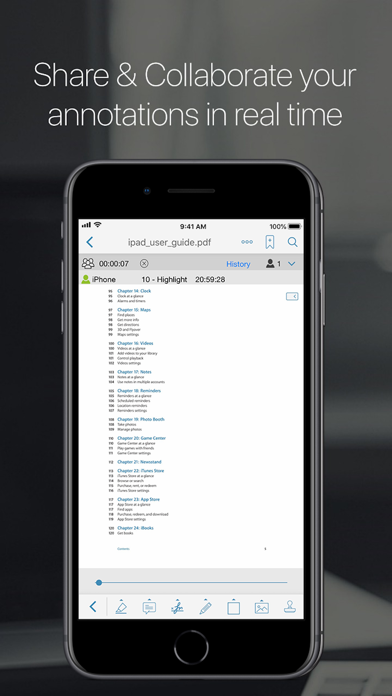
Now you can collaborate and add annotations with other users on the same file over the internet in real time and you can chat about your progress simultaneously.
They will be able to see what changes you are making …
Read the full description
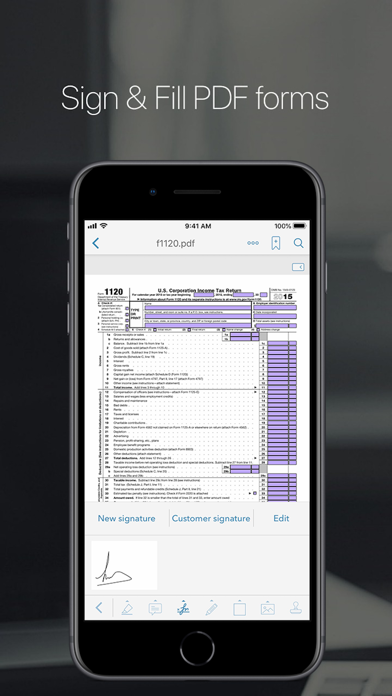
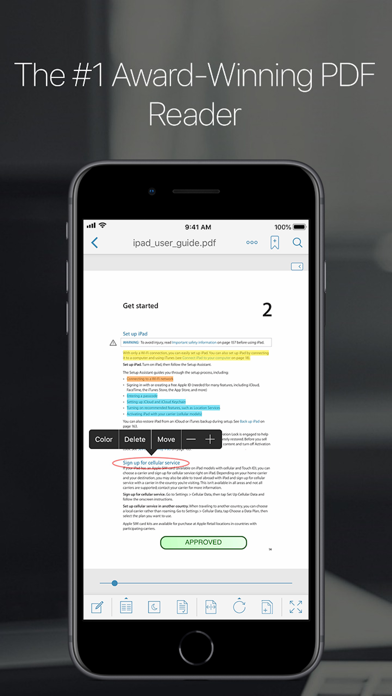
**Winner of the Tabby Awards for best iPad- Productivity/Documents App** PDF Reader Pro Edition is the best app to read, manage and annotate PDF files and it works beautifully on iOS 12. The most powerful PDF reader, carefully designed and optimized specially for the iPhone & iPad. The best mobile PDF reader for your iPad Pro and Apple Pencil. Part of the @work campaign by Apple. Some of the great features of PDF Reader Pro Edition are: • Real-time online collaboration & chat Now you can collaborate and add annotations with other users on the same file over the internet in real time and you can chat about your progress simultaneously. They will be able to see what changes you are making as you make them all in real time. • PDF forms support Now you can fill out PDF forms directly on your iPad/iPhone. • Full Annotations/highlight support Now you can add notes directly from your iPad anywhere on the document. Highlighter, stamps, sticky notes, text boxes, underlines, strikeout, dynamic stamps (with date & time), freehand drawing, signature, free highlight, lines, arrows, rectangles and ovals, fully compatible with Apple Preview and Adobe Acrobat. • New EasyReview mode With this new amazing feature you are able to mark up PDF documents faster and easier than ever before. Just tap on the part of text where you need to make changes and correct it in the text editor (similar to Word). The text will be marked as removed and the new text will have a different color so you can easily identify it. When you save the PDF file all the modifications will appear as standard annotations (replace text and insert text annotations). • Fresh new user interface specially design to merge beautifully with iOS 12. • Create new PDF files Extract and email pages from a PDF file or create a new document using pages from an existing file. • Share & collaborate Connect with all your colleagues and friend to share and collaborate your PDF files and annotations in real time. • Rotate function You can rotate a single page or the whole document. • Vault folder Securely store your important PDF files. • Bookmarks/Outlines Bookmark pages on your PDF files. Add outlines to create or modify a table of contents for your document directly from your iPad. • Reflow mode • Full Web browser to download PDF files from the web • Scanner Create multipage documents in PDF format. • Document manager Copy, cut, paste and delete your documents. Organize your PDFs into folders. • PDF hyperlinks support Jump back and forth within the document. Jump back button to quickly go back to the page you came from. • Text search Easily find any word on your PDF file. • Save email attachments Open attachments directly from the Mail app, you can also open PDF files from any other application using the Open in function. • Download PDF files from Safari Use the Open in function to download a PDF file from Safari to PDF Reader Pro Edition. • Transfer files You can easily and securely copy your PDF files from your Mac or PC using Airdrop, the USB or WiFi sharing feature. • Print Print your PDF files and annotations directly from the app. • Email your files Email your PDF files directly from the app, you can email the entire document with all annotations or you can also email specific pages from a PDF file. You can also email a flatten copy of a PDF file, this option will compress and flatten your annotations onto the document to prevent them from being modified. • Cloud support Download/upload your PDF files to iCloud, Dropbox, Box, Google Drive, SugarSync & OneDrive. • Great for presentations Use Airplay or an HDMI cable to show your documents on an external display while you annotate them in real time. • The only mobile PDF Reader application that supports Vitrium* protected PDF files (Like University of Phoenix ebooks) Join the hundred of thousands users already enjoying all the great features of PDF Reader Pro Edition. More amazing features coming soon!
Installs, last 30 days
Apple does not publish download counts. Estimates are in testing.
Estimated store revenue Estimated Beta
App Store, worldwide, monthly rate from the last 12 chart days to 19 Nov 2026
Below the top 100 grossing apps in the markets we calibrate. In the United States that usually means under about $6.4M a month. App Store purchases and subscriptions only, before Apple's 15 to 30% fee. Ads and web payments are not included.
Ratings
1,744 ratings, 1,744 reviews
No rating breakdown published for this app.
Recent reviews
Latest public reviews from the store
- 23 Nov 2025
No response from support
I purchased the software for the automatic scroll feature. I haven’t been able to figure out how to turn on the auto scroll. I sent support an email asking how. It’s been a week and no response.
- 24 Dec 2024
Meets my needs 100%
I maintain a small library of flight and aircraft maintenance reference documents to refer to when reviewing refresher material, or working on the plane. This just works, docs are easy to organize, share, email etc.
- 25 Jan 2022
Not to bad, i m happy with the purchase but...
This is a short review. So far, i am loving the app, i use my google drive to access and save important pdf for class, however, i am also a Mega drive user, and there are no support for that specific cloud ☁️ a bit sad but still an amazing app:)
- 16 Oct 2021
Useful but…
I cannot get this to act as default PDF editor/reader on IPad Pro and it often doesn’t appear in the choices to use in opening pdf files. Also, it closes itself every time I do manage to send a new pdf file for it to open - so I have to reopen the program just to see the new file! When was the last update?
What reviewers bring up
Topics mentioned in the latest 50 reviews, by how many reviews mention them
Liked in good reviews (3 reviews)
- google drive 2
- support 2
- cloud 2
Raised in bad reviews (44 reviews)
- waste 12
- money 12
- open 12
- ipad 9
- files 8
- pdf 8
- refund 6
- paid 5
Top chart positions
Latest App Store chart ranks by country, last 10 days
- Countries ranked
- 5 of 50
- Best rank
- #83
- Top 10 placements
- 0
- of 5 chart placements
- Average rank
- #91
Best countries on App Store
- 🇬🇷 Greece · Top grossing, Business#83
- 🇵🇭 Philippines · Top grossing, Business#85
- 🇸🇪 Sweden · Top grossing, Business#90
- 🇦🇹 Austria · Top grossing, Business#98
- 🇰🇷 South Korea · Top grossing, Business#99
| Country | Chart | Category | Rank | Best (10 days) | Date |
|---|---|---|---|---|---|
| 🇬🇷 Greece | Top grossing | Business | #83 | #61 | 17 Nov 2026 |
| 🇵🇭 Philippines | Top grossing | Business | #85 | #85 | 10 Nov 2026 |
| 🇸🇪 Sweden | Top grossing | Business | #90 | #90 | 13 Nov 2026 |
| 🇦🇹 Austria | Top grossing | Business | #98 | #98 | 13 Nov 2026 |
| 🇰🇷 South Korea | Top grossing | Business | #99 | #60 | 15 Nov 2026 |
PDF Reader Pro Edition® history
Release, install milestones, listing and store changes
- First released on the store 1 Apr 2010
Update frequency
How often PDF Reader Pro Edition® ships a new version, month by month
1 updates in the last 12 months. Less often than most similar apps: they shipped a median of 2 updates in the same year.
Recent versions
Current version 10.1
- Version 10.123 Oct 2026
PDF Reader Pro Edition is now ready for iPhone Duo, with layouts that adapt to every pose and a dedicated laptop-style workspace. • Made for every pose Read, sign and edit with your iPhone Duo closed, fully open in portrait or landscape, partially folded like a book, seated like a laptop, or standing on its edges. Your tools stay within reach and clear of the fold. Fold or unfold without losing your place or interrupting your work. • A laptop-style workspace Your page stays on the upper screen while the lower screen becomes a control deck, with every tool in a consistent position and large, easy-to-use options. Signatures, Settings, Contents, AI Mind Map and other panels open below, keeping your document in view. A keyboard tool strip keeps controls within reach while you type. • Standard and dynamic stamps All 28 Adobe Acrobat standard stamps are now available. Dynamic stamps automatically add your name, date and time. • Page by Page reading A new vertical reading mode lets you swipe through your document, stopping at each page. Page by Page and Horizontal reading now use the full screen when you hide the toolbars. • Easier sticky-note management Delete sticky notes directly from each note’s menu. • Fewer interruptions and more fixes This update also includes many smaller fixes and improvements.
- Version 925 Jun 2019
• Completely new user interface especially designed for the new iPhone and iPad Pro. • Optimized for iOS 12. • iPhone Xs, Xr and new iPad Pro support. • Performance enhancements. This update contains stability improvements. • Under-the-hood updates for better performance. • Bug fixes and performance improvements.
Listing keywords
Words and phrases PDF Reader Pro Edition® repeats most in its store listing
Top phrases: pdf files (13), pdf reader (8), pdf file (6), pdf reader pro (5), reader pro edition (5).
Highlighted words also appear in the title. Counts cover the title, short description and description.
Compliance
What the listing and the app package show
- Store status
- Live
- Upkeep
- Updated 23 Oct 2026
- Age rating
- 4+
Apps like PDF Reader Pro Edition®
 Sierra InteractiveSierra Interactive★ 4.79
 Sabbar: Leading Job App in KSASabbar, Inc.★ 4.62
 Zoho Meeting - Meet VirtuallyZoho Corporation★ 4.52
 Your Flex BenefitsAptia UK Limited★ 4.46
 Finger Vault Password ManagerMTPHoldings LLC★ 4.39
 Bria EnterpriseCounterPath Corporation★ 4.5
 TwiNote - SNS style noteKiduku Hoshida★ 4.69
 Timeero GPS Time TrackingTimeero LLC★ 4.69
 Jump Desktop (RDP, VNC, Fluid)Phase Five Systems★ 4.49
PDF Reader Pro Edition®: questions and answers
Who makes PDF Reader Pro Edition®?
PDF Reader Pro Edition® is published by iTECH DEVELOPMENT SYSTEMS INC..
When was PDF Reader Pro Edition® last updated?
The latest version (10.1) was released on 23 Oct 2026.
Is PDF Reader Pro Edition® free?
No. PDF Reader Pro Edition® is a paid app priced at $1.99.
Is PDF Reader Pro Edition® still available?
Yes. PDF Reader Pro Edition® is live on App Store as of 19 Nov 2026.
Track PDF Reader Pro Edition® and its competitors
Watch any app for new versions, rating drops, chart moves and removals. Free plan, no card.