
- Installs
- —
- Apple does not publish download counts
- Rating
- —
- Ratings
- —
- Version
- 8.9
- Updated 11 Oct 2025
- Released
- 19 Sep 2023
- Tracked since 16 May 2026
- Size
- 15 MB
- Needs 15.0
Screenshots

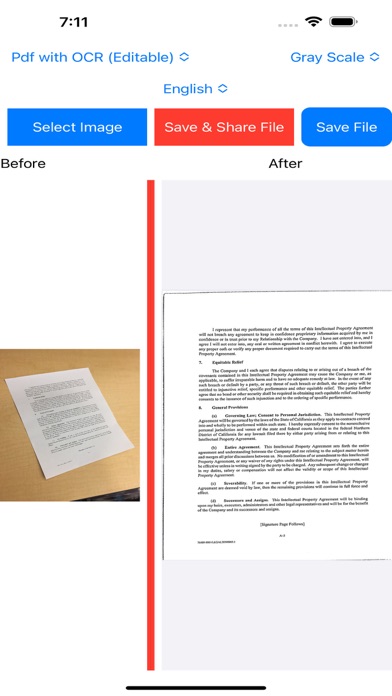


About PDF Scanner , Document Scanner
The description on the store listing
PDF Scanner & Document Scanner to correct image perspective, sharpen handwritten or printed text, and remove glare and shadows
It uses artificial intelligence and Image processing. With OCR image to text technology, editable pdf is created using both text content and format.
Welcome PDF scanning and document digitization tool - PDF Scanner & Document Scanner with OCR app! If you've been on the lookout for a versatile and robust PDF scanner that effortlessly converts physical documents, images, and photos into high-quality PDFs, your search concludes right here.
Key Features:
PDF Scanner with OCR :
Our PDF Scanner is equipped OCR technology, enabling you to convert scanned documents …
Read the full description
PDF Scanner & Document Scanner to correct image perspective, sharpen handwritten or printed text, and remove glare and shadows It uses artificial intelligence and Image processing. With OCR image to text technology, editable pdf is created using both text content and format. Welcome PDF scanning and document digitization tool - PDF Scanner & Document Scanner with OCR app! If you've been on the lookout for a versatile and robust PDF scanner that effortlessly converts physical documents, images, and photos into high-quality PDFs, your search concludes right here. Key Features: PDF Scanner with OCR : Our PDF Scanner is equipped OCR technology, enabling you to convert scanned documents into fully editable PDFs. Easily extract text from your scanned documents, making it simple to find and edit your content. Image to PDF Converter: With the Image to PDF feature, you can transform photos and images from your gallery into PDF files. Whether it's business cards, receipts, or sketches, our app can convert them all into easily shareable PDF documents. JPG to PDF & PNG to PDF Conversion: Convert your JPG and PNG files to PDF effortlessly. While preserving image quality, with our PDF conversion tool. Gray Scale or Colored Scanner Mode You can scan images as PDF in both colored and gray scale mode. Different Output Format: You can obtain document scanning results in 3 formats: PDF with OCR (editable), Image and PDF No OCR . OCR Multi-Language Support: PDF Converter & PDF Scanner with OCR app recognizes text in more than 100 languages around the world and extracts text and formats from the image and converts pdf files. You can instantly obtain your pdf with editable by choosing different languages according to your needs. English, Spanish, French, Portuguese, German, Japanese, Korean, Arabic, Russian, Turkish, Bengali, Chinese, Croatian, Danish, Dutch, Hebrew, Hindi, Indonesian, Italian, Latvian, It also supports common languages such as Lithuanian, Marathi, Norwegian, Polish, Romanian, Slovak, Slovenian, Tamil, Telugu, Urdu, Vietnamese. Scan PDF & Scan Document: Scan any type of document, be it a text document, business card, receipt, or handwritten note. Our scanner provides high-quality results with automatic edge detection and perspective correction. Lightning-Fast Processing: Experience lightning-fast scanning and processing speeds, ensuring that you can digitize your documents. Easy Sharing Options: Share your scanned PDFs and documents directly from the app. Email, print, or share them with just a few taps. Download the PDF Scanner & Document Scanner with OCR app now and unlock the full potential of your mobile device. Simplify your life, improve your productivity, and make the most of every document with our powerful scanning and PDF conversion tool. If you have any questions , feedback, or suggestions about PDF Scanner & Document Scanner, please contact our support team at [email protected] Get the PDF Scanner & Document Scanner with OCR app today and experience the transformation firsthand! Free Version Features: • Only 20 Image Scans per month Pro Version Features (includes Free Version Features): • Unlimited Scanning • PDF with OCR output • 100 languages OCR • Scanning with Camera • Color Scanning, ID/Card Scanner, QR- Scanner. Upgrade to the Pro Version to unlock all premium features. Weekly, monthly, 2 monthly, 3 monthly, 6 monthly and annual (12 monthly) subscription packages are available. There is also a One-Time Purchase for the Pro Version. We recommend that you cancel your Free Trial or Subscription Renewals 24 hours before the renewal date. Terms of Use: https://www.apple.com/legal/internet-services/itunes/dev/stdeula/
Installs
Apple does not publish download counts. Estimates are in testing.
We publish iOS estimates only after they pass a back-test against real numbers. Chart history below is measured.
Estimated store revenue Estimated Beta
App Store, worldwide, monthly rate from the last 13 chart days to 20 Nov 2026
Below the top 100 grossing apps in the markets we calibrate. In the United States that usually means under about $6.4M a month. App Store purchases and subscriptions only, before Apple's 15 to 30% fee. Ads and web payments are not included.
Ratings
No rating breakdown published for this app.
Recent reviews
Latest public reviews from the store
No reviews in our sample for this app yet.
Top chart positions
Latest App Store chart ranks by country, last 10 days
Not in any tracked top chart in the last 10 days.
PDF Scanner , Document Scanner history
Release, install milestones, listing and store changes
- First released on the store 19 Sep 2023
Update frequency
How often PDF Scanner , Document Scanner ships a new version, month by month
0 updates in the last 12 months. Less often than most similar apps: they shipped a median of 1 updates in the same year.
Recent versions
Current version 8.9
- Version 8.911 Oct 2025
Minor updates
Listing keywords
Words and phrases PDF Scanner , Document Scanner repeats most in its store listing
Top phrases: pdf scanner (10), pdf scanner document (6), scanner document scanner (6), document scanner (6), scanner document (6).
Highlighted words also appear in the title. Counts cover the title, short description and description.
Compliance
What the listing and the app package show
- Store status
- Live
- Upkeep
- Updated 11 Oct 2025
- Age rating
- 4+
Apps like PDF Scanner , Document Scanner
 Robin - Mobile AppRobin Powered, Inc★ 3.32
 Bright AisleMedia Solutions Corp★ 2.52
 Rhingie: phone call 2nd numberDating onlain, ooo★ 3.96
 PayClockLathem Time Corporation★ 2.08
 云电话-网络电话虚拟隐私小号国辉 李★ 4.74
 QuicklynQuicklyn★ 4.86
 Diligent BoardsDiligent Corporation★ 3.32
 DATABASICSDATABASICS★ 3.8
 vMEyeSuperGuangzhou Kedi Intelligence Technology Co., Ltd.★ 3.14
PDF Scanner , Document Scanner: questions and answers
Who makes PDF Scanner , Document Scanner?
PDF Scanner , Document Scanner is published by Ahmet Bacak.
When was PDF Scanner , Document Scanner last updated?
The latest version (8.9) was released on 11 Oct 2025.
Is PDF Scanner , Document Scanner free?
Yes. PDF Scanner , Document Scanner is free to download.
Is PDF Scanner , Document Scanner still available?
Yes. PDF Scanner , Document Scanner is live on App Store as of 16 May 2026.
Track PDF Scanner , Document Scanner and its competitors
Watch any app for new versions, rating drops, chart moves and removals. Free plan, no card.