
- Installs
- —
- Apple does not publish download counts
- Rating
- 4.73
- Ratings
- 295
- 295 reviews
- Version
- 6.0
- Updated 19 Jan 2026
- Released
- 18 Aug 2014
- Tracked since 10 May 2026
- Size
- 8 MB
- Needs 15.6
Screenshots


About PDFOptim
The description on the store listing
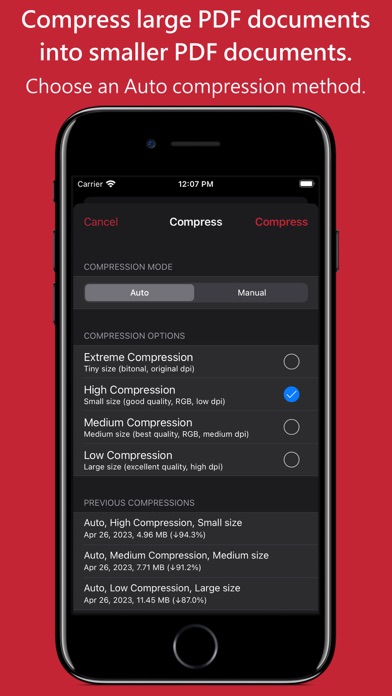
PDFOptim is a simple and intuitive way to compress, optimize and reduce PDF documents on iPhones and iPads. PDFOptim provides easy and effective ways to compress large image and graphics heavy PDF files. Inbuilt side-by-side preview to compare original and compressed PDF.
* * * PDFOptim for Mac is also available on the Mac App Store. * * *
Compressed PDF documents requires less disk space for storage and faster uploads and downloads saves transmission time and cost. PDFOptim rewrites the entire PDF documents using selected compression options as efficiently as possible without compromising the document's integrity.
If your PDF documents are in another app (For Example Mail, DropBox or …
Read the full description
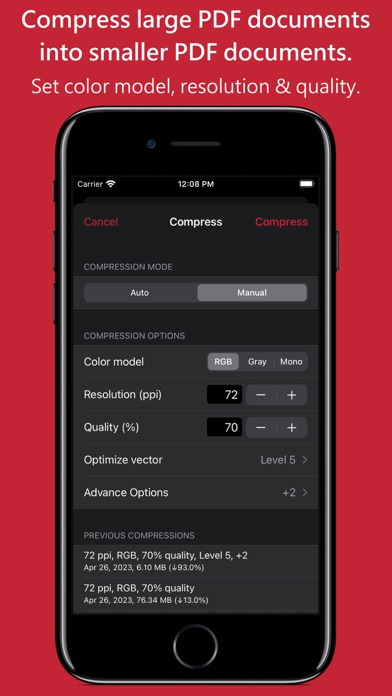
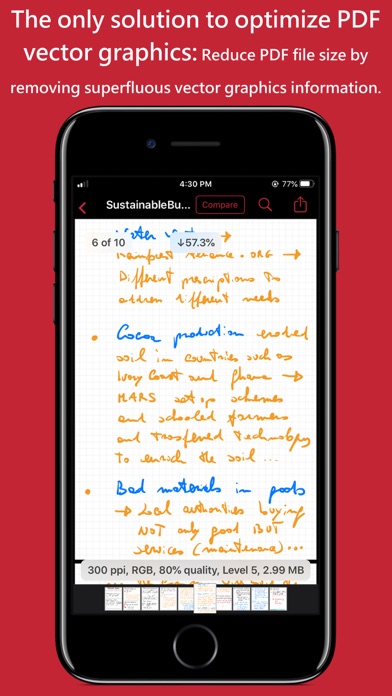
PDFOptim is a simple and intuitive way to compress, optimize and reduce PDF documents on iPhones and iPads. PDFOptim provides easy and effective ways to compress large image and graphics heavy PDF files. Inbuilt side-by-side preview to compare original and compressed PDF. * * * PDFOptim for Mac is also available on the Mac App Store. * * * Compressed PDF documents requires less disk space for storage and faster uploads and downloads saves transmission time and cost. PDFOptim rewrites the entire PDF documents using selected compression options as efficiently as possible without compromising the document's integrity. If your PDF documents are in another app (For Example Mail, DropBox or SkyDrive etc.) that uses the Open In… button, tap the button to open the PDF document in PDFOptim. You can also transfer PDF documents from your desktop computer via iTunes into PDFOptim application on your iPhone or iPad. KEY FEATURES: AUTO COMPRESSION MODE - PDFOptim analyze document’s contents and apply algorithm to generate a smallest possible PDF by maintaining the document’s visual quality. Choose one of the four predefined Auto compression methods and let the app do the hard work for you. No further user interaction required to provide technical compression options. MANUAL COMPRESSION MODE - Change compression options manually to generate optimum sized PDF of your need. You can choose compression options to set from Image Color Model, Image Resolution, JPEG Image Quality, Optimise vector graphics level and Advance option. - Image color model to choose from RGB, Gray and Mono. Selecting Monochrome color model option converts raster PDF contents into black and white which helps reduces PDF file size to greater extent. It is very helpful when compressing scanned books mainly containing text. - Image resolution ppi (pixels/inch) control to resize raster image contents. Downsampling at lower resolution decrease the file size dramatically. - Quality control. Set quality from lossless to least for resampling all raster images into PDF. It allows you to control compressed PDF size and viewing quality. -Advance options to remove PDF content properties like alternate images, page thumbnails, documents structure hierarchy and output intent. - Optimize vector graphics option removes superfluous information to reduce vector graphics heavy PDF. Increase in optimize vector from 'Level 1' to 'Level 5' reduces output PDF file size less to more respectively. This option is very useful when PDF content mainly consist of high precision vector graphics, Usually PDF drawing, note-taking and PDF markup apps creates large vector graphics heavy PDF files which can be compressed by this option efficiently. - Password protected PDF documents supported for compression using correct password. - Single or multiple compressed PDFs can be shared as single ZIP (*.zip) file. - Allows Compressed PDFs to Open In… another application, Mail, Message, Print, share PDFs to nearby iOS devices via AirDrop. - Use Copy to iTunes to save and share compressed PDFs on your desktop computer. PDF VIEWER: - Inbuilt PDF viewer with fully selectable and searchable text contents. Select and copy text to clipboard for further use. - Pinch out and Pinch in to ZoomIn and ZoomOut view and search feature to find a character, word and sentence. - Scroll through your document by thumbnail view or Go to page feature. Note: PDFOptim is standalone application running natively to compress PDF documents securely on your iOS device. You can refer User Manual for any assistance Or Contact Support. *The free version has limitation to export one compressed PDF per week. Get Premium to remove all restrictions and start exporting an unlimited number of compressed PDFs. Privacy Policy: http://rootrisetech.com/pdfoptim-privacy-policy Terms of Use(EULA): https://www.apple.com/legal/internet-services/itunes/dev/stdeula/
Installs since 29 Aug 2026
Apple does not publish download counts. Estimates are in testing.
Estimated store revenue Estimated Beta
App Store, worldwide, monthly rate from the last 12 chart days to 19 Nov 2026
Below the top 100 grossing apps in the markets we calibrate. In the United States that usually means under about $6.4M a month. App Store purchases and subscriptions only, before Apple's 15 to 30% fee. Ads and web payments are not included.
Ratings
295 ratings, 295 reviews
No rating breakdown published for this app.
Recent reviews
Latest public reviews from the store
- 6 Aug 2023
Great compression
This does an amazing job in my early usage at reducing PDF size while preserving decent quality. Thanks! It’s a bit disappointing that it does not support iOS shortcuts, and that you need to buy another copy if you want to use it on macOS. That makes it a bit pricey for a single-purpose utility app.
- 6 Aug 2023
PDFOptim made my life simpler!
I compose “how-to’s,” “tips ‘n tricks“ and recipes that I like to send & share with friends & family. These require photos & screenshots because ("A picture is worth a thousand words".) Invariably these documents run into trouble when I try to paste them into an email. Either the pictures are moved around, or the text gets scrambled about, or most often the file refuses to email because ‘it’s too big.” PDFOptim let’s me save my documents as PDF files that are 90%+ smaller than the raw documents. I’ve been able to email the small PDF documents as mail attachments without fail! Price was reasonable & it does the job I need. Takes a bit of time to get the hang of it, but easy after a few goes.
- 6 Nov 2020
App no longer works!!!
Why is it my PDF Optim app no longer works?? I paid for this app and have been using it for several months now, and suddenly, when I really needed it today, it won’t open on my iPad!! Soooo frustrating!
- 26 Jun 2020
Does what it says efficiently
Making PDF files smaller is probably the one thing that about everybody needs at some point. There are hundreds of apps that will mark up, save, reorder pages and stuff with PDF files (Good Reader is my personal favorite) but none of them will help you get a a 30mb PDF down to email size. This does it without an annoying subscription. Simple, affordable, worth every penny. I squished down a 25mb PDF to 3mb and couldn’t even tell the loss in quality. A life saver.
What reviewers bring up
Topics mentioned in the latest 8 reviews, by how many reviews mention them
Liked in good reviews (8 reviews)
- pdf 6
- quality 4
- email 4
- size 3
- file 3
- job 3
- compression 2
- efficiently 2
Raised in bad reviews (0 reviews)
No topic comes up twice.
Top chart positions
Latest App Store chart ranks by country, last 10 days
Not in any tracked top chart in the last 10 days.
PDFOptim history
Release, install milestones, listing and store changes
- First released on the store 18 Aug 2014
Update frequency
How often PDFOptim ships a new version, month by month
1 updates in the last 12 months. More often than most similar apps: they shipped a median of 0 updates in the same year.
Recent versions
Current version 6.0
- Version 6.019 Jan 2026
- Updated user interface to streamline with latest iOS. - Other minor bug fixes and improvements. If PDFOptim useful to you, we would appreciate an App Store review. It will help other people find the app and make them delighted. Thank you all users for your feedback :)
Listing keywords
Words and phrases PDFOptim repeats most in its store listing
Top phrases: pdf documents (7), vector graphics (5), compressed pdf (4), compressed pdfs (4), compression options (4).
Highlighted words also appear in the title. Counts cover the title, short description and description.
Compliance
What the listing and the app package show
- Store status
- Live
- Upkeep
- Updated 19 Jan 2026
- Age rating
- 4+
Apps like PDFOptim
 HONK PartnerHONK Technologies Inc.★ 2.35
 拦截100-浏览器广告拦截油猴脚本UU Momentum Network Technology Co., Ltd.★ 4.07
 DeepClean - Smart AI Cleaner萍萍 刘★ 4.5
 LockScreenNotesTakumi Banjoya★ 4.79
 SHMLiveSociety of Hospital Medicine★ 4.79
 Remote Control for most TVAngela Garrett★ 4.39
 Trolls world Wallpaper - liveMohammed Sahraoui★ 4.64
 TikVPN-Super Secure VPN ProxyTap Connect Inc.★ 4.55
 Easy Files - Wifi transferNguyen Cong Huy★ 4.39
PDFOptim: questions and answers
Who makes PDFOptim?
PDFOptim is published by RootRise Technologies Pvt. Ltd..
When was PDFOptim last updated?
The latest version (6.0) was released on 19 Jan 2026.
Is PDFOptim free?
No. PDFOptim is a paid app.
Is PDFOptim still available?
Yes. PDFOptim is live on App Store as of 14 Nov 2026.
Track PDFOptim and its competitors
Watch any app for new versions, rating drops, chart moves and removals. Free plan, no card.