
- Installs
- —
- Apple does not publish download counts
- Rating
- 4.64
- Ratings
- 298
- 298 reviews
- Version
- 2025.2
- Updated 6 May 2025
- Released
- 5 Feb 2020
- Tracked since 10 May 2026
- Size
- 4 MB
- Needs 15.4
Screenshots

About Peek-a-View
The description on the store listing
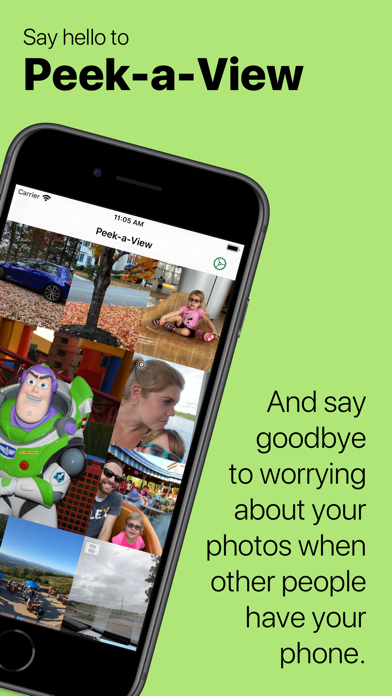
Save your photos from accidental — or deliberate! — deletion by toddlers, clients, or anyone that can't be trusted.
Peek-a-View is a read-only photo gallery. Using Peek-a-View, you can always feel safe sharing your photos with anyone, because there is literally no way to have Peek-a-View delete your photos. In fact, Peek-a-View does not write ANY data back to your photo library.
When paired with the Guided Access feature on iOS and iPadOS, you can lock your device into Peek-a-View, ensuring that the only thing that device can do is look at photos, until you decide otherwise.
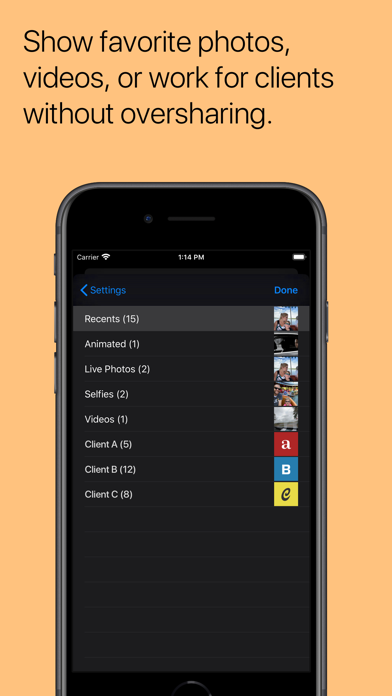
By default, Peek-a-View will show your most recent photos in your photo gallery, but it can be configured to only …
Read the full description
Save your photos from accidental — or deliberate! — deletion by toddlers, clients, or anyone that can't be trusted. Peek-a-View is a read-only photo gallery. Using Peek-a-View, you can always feel safe sharing your photos with anyone, because there is literally no way to have Peek-a-View delete your photos. In fact, Peek-a-View does not write ANY data back to your photo library. When paired with the Guided Access feature on iOS and iPadOS, you can lock your device into Peek-a-View, ensuring that the only thing that device can do is look at photos, until you decide otherwise. By default, Peek-a-View will show your most recent photos in your photo gallery, but it can be configured to only show a specific album. Furthermore, access to Peek-a-View's settings is automatically restricted when Guided Access is started. Peek-a-View will show you your 20 most recent photos for free; a one-time in-app purchase will remove that limitation. Peek-a-View fully supports Dark Mode, Dynamic Type, Live Photos, videos, and animated GIFs. With purchase, it also supports several alternative icons. Born from a trip to an amusement park with a very independent toddler, Peek-a-View was written so that my wife and I can give our phones to our precocious two-year-old and know that she won't accidentally delete any of our precious memories. Without Peek-a-View, we'd have to hope that she didn't figure out how to delete anything, or spend time fiddling with the Guided Access settings to block out the delete features on the Photos app. With Peek-a-View, we can simply open the app, start Guided Access, and hand her the phone. No deletion, no modifications, no worries. Privacy Policy: https://www.caseyliss.com/peek-a-view-privacy
Installs since 29 Aug 2026
Apple does not publish download counts. Estimates are in testing.
Estimated store revenue Estimated Beta
App Store, worldwide, monthly rate from the last 12 chart days to 19 Nov 2026
Below the top 100 grossing apps in the markets we calibrate. In the United States that usually means under about $6.4M a month. App Store purchases and subscriptions only, before Apple's 15 to 30% fee. Ads and web payments are not included.
Ratings
298 ratings, 298 reviews
No rating breakdown published for this app.
Recent reviews
Latest public reviews from the store
- 5 Feb 2026
Just what I needed!!!
This app allows me to hand my chosen phone to a stranger, so they can see photos while holding my phone. You might think of that as an odd thing to do, but I live in a unique place, and at gatherings, people want to see pictures. I want to share SOME photos, and I don’t feel like sitting next to someone and holding my phone is necessary, or I wouldn’t be sharing in the first place, but it’s easy to end up in the wrong place with a fat thumb. I have even chosen the wrong album to share. I only want to share specific photos, and this app solves the problem. I set up Guided Access to further manage it, too. What a help that is! Guided Access alone in iPhones doesn’t protect photos, nor does it keep a person out of other albums. This app does. I’d give it more stars, if I could!!!
- 19 Aug 2023
Finally fixed the bug where it couldn’t see albums
1. I’m a paid user 2. Couldn’t use the feature to pick a different album than Recent for years 3. Now it started working Casey was very kind and apologetic when I reached out, but we had been unable to tell what was wrong. Now it’s working and I’m happy!
- 20 Nov 2022
Perfect for controlling access to pictures and videos on your device
The app makes handing your phone over to another person to view photos much less fraught. While it is geared to allowing kids to play with pictures and videos in a controlled setting, it also works great with sharing a curated set of pictures with adults. It transforms your phone, in the best way possible, into a single use device: a picture (and video) frame.
- 21 Jul 2020
Thumbnail cropping is odd.
The cropping on thumbnail seems strange, the thumbnails look odd and not anything like the actual photos. It seems worse on live photos; actually maybe it is only a live photo issue but since most photos I take on my iPhone and most are by default Live photos, most of my photos look really weirdly cropped in the thumbnail view. The other thing that would be nice if we could select a person as an “album.” I don’t know if this is a limitation of the photo library API, but in Photos I can pick a name from face identification like of my wife or daughter. I would love to be able to just pick my daughters name and let her look at her own pictures.
What reviewers bring up
Topics mentioned in the latest 8 reviews, by how many reviews mention them
Liked in good reviews (6 reviews)
- access 5
- photos 4
- guided 4
- album 4
- videos 3
- see 3
- pictures 2
- specific 2
Raised in bad reviews (0 reviews)
No topic comes up twice.
Top chart positions
Latest App Store chart ranks by country, last 10 days
Not in any tracked top chart in the last 10 days.
Peek-a-View history
Release, install milestones, listing and store changes
- First released on the store 5 Feb 2020
Update frequency
How often Peek-a-View ships a new version, month by month
0 updates in the last 12 months. Less often than most similar apps: they shipped a median of 1 updates in the same year.
Recent versions
Current version 2025.2
- Version 2025.26 May 2025
This version fixes some wonkiness around rotation, particularly around still images.
Listing keywords
Words and phrases Peek-a-View repeats most in its store listing
Top phrases: peek view (12), guided access (4), view will show (2), photo gallery (2), recent photos (2).
Highlighted words also appear in the title. Counts cover the title, short description and description.
Compliance
What the listing and the app package show
- Store status
- Live
- Upkeep
- Updated 6 May 2025
- Age rating
- 4+
Apps like Peek-a-View
 Insta Story Maker: StorlyEnrich Girisim ve Bilisim Yatirimlari★ 4.62
 SnapMix: Photo Collage MakerCEM SOFTWARE LTD★ 4.12
 Ai Image Generator - Real AIAi Art Ltd★ 4.13
 video maker with photoBhalala Hiren Bharatbai★ 4.46
 ZoomCam – Distant View Camera熙 钟★ 4.58
 Life on Film: Video MakerLife on Film★ 4.63
 Wireless TransferShenzhen Socusoft Co., Ltd★ 3.67
 Video Background ChangerZipoApps★ 4.33
 QwikCut AccessQwikCut★ 3.82
Peek-a-View: questions and answers
Who makes Peek-a-View?
Peek-a-View is published by Limitliss LLC.
When was Peek-a-View last updated?
The latest version (2025.2) was released on 6 May 2025.
Is Peek-a-View free?
Yes. Peek-a-View is free to download.
Is Peek-a-View still available?
Yes. Peek-a-View is live on App Store as of 14 Nov 2026.
Track Peek-a-View and its competitors
Watch any app for new versions, rating drops, chart moves and removals. Free plan, no card.