
- Installs
- —
- Apple does not publish download counts
- Rating
- 3.67
- Ratings
- 3
- 3 reviews
- Version
- 0.4
- Updated 20 Jun 2024
- Released
- 9 Jun 2024
- Tracked since 10 May 2026
- Size
- 1 MB
- Needs 16
Screenshots



About PhonePad - Computer Remote
The description on the store listing
PhonePad - Bridging the gap between your iOS and macOS devices for a seamless and productive experience.
Transform your iPhone into a fully functional trackpad for your Mac with PhonePad. Whether you’re on the go or simply prefer the convenience of using your iOS device as a trackpad, PhonePad delivers a seamless and intuitive experience.
Key Features:
1. PhonePad integrates seamlessly with your Mac, providing a natural and responsive trackpad experience.
2. Enjoy the familiar gestures and controls you’re used to.
3. Using PhonePad's keyboard, easily type text on your Mac remotely.
4. Easily connect your device to your Mac by running the PhonePad for Mac app.
Functionality:
1. Tap once …
Read the full description
PhonePad - Bridging the gap between your iOS and macOS devices for a seamless and productive experience. Transform your iPhone into a fully functional trackpad for your Mac with PhonePad. Whether you’re on the go or simply prefer the convenience of using your iOS device as a trackpad, PhonePad delivers a seamless and intuitive experience. Key Features: 1. PhonePad integrates seamlessly with your Mac, providing a natural and responsive trackpad experience. 2. Enjoy the familiar gestures and controls you’re used to. 3. Using PhonePad's keyboard, easily type text on your Mac remotely. 4. Easily connect your device to your Mac by running the PhonePad for Mac app. Functionality: 1. Tap once to left-click 2. Tap twice to double-click 3. Tap with two fingers to right-click 4. Pan with two fingers to scroll 5. Pan with three fingers to drag 6. Tap on the keyboard icon to start typing on your Mac Requirements: 1. PhonePad app is also required to be installed on your Mac. 2. Network connection is required (connecting your Mac to your hotspot also works!) 3. Requires macOS 10.13 and iOS 16.0 or later. Download PhonePad today and unlock the full potential of your iOS device as a powerful, intuitive trackpad for your Mac! Security & Privacy: PhonePad does not collect any data from your devices. All communication is made between your iPhone and your Mac. Terms of Use: https://www.apple.com/legal/internet-services/itunes/dev/stdeula/
Installs
Apple does not publish download counts. Estimates are in testing.
We publish iOS estimates only after they pass a back-test against real numbers. Chart history below is measured.
Estimated store revenue Estimated Beta
App Store, worldwide, monthly rate from the last 13 chart days to 20 Nov 2026
Below the top 100 grossing apps in the markets we calibrate. In the United States that usually means under about $6.4M a month. App Store purchases and subscriptions only, before Apple's 15 to 30% fee. Ads and web payments are not included.
Ratings
3 ratings, 3 reviews
No rating breakdown published for this app.
Recent reviews
Latest public reviews from the store
No reviews in our sample for this app yet.
Top chart positions
Latest App Store chart ranks by country, last 10 days
Not in any tracked top chart in the last 10 days.
PhonePad - Computer Remote history
Release, install milestones, listing and store changes
- First released on the store 9 Jun 2024
Update frequency
How often PhonePad - Computer Remote ships a new version, month by month
0 updates in the last 12 months. Less often than most similar apps: they shipped a median of 1 updates in the same year.
Recent versions
Current version 0.4
- Version 0.420 Jun 2024
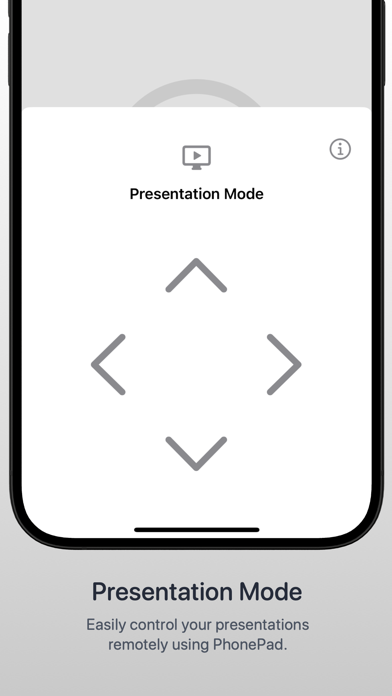
Added Presentation Mode which allows you to control your slides while presenting.
Listing keywords
Words and phrases PhonePad - Computer Remote repeats most in its store listing
Top phrases: click tap (2), ios device (2).
Highlighted words also appear in the title. Counts cover the title, short description and description.
Compliance
What the listing and the app package show
- Store status
- Live
- Upkeep
- No update since 20 Jun 2024
- Age rating
- 4+
Apps like PhonePad - Computer Remote
 Library of AviationNazmi Yavuz★ 4.82
 MyNOVECNorthern Virginia Electric Cooperative★ 2.28
 打工人小组件光翔 卓★ 4.96
 TruckbaysTruckbays LLC★ 4.3
 Tornado PRO PlayerMohammed Altam★ 4.44
 VDX - Video ManagerARISEPEAK LP★ 1.74
 TV CastingZeasn Info Technology Co., Ltd.★ 1.86
 Mil-Dot BallisticsTom Holsten★ 3.82
 MySontiqSontiq, Inc.★ 2.4
PhonePad - Computer Remote: questions and answers
Who makes PhonePad - Computer Remote?
PhonePad - Computer Remote is published by Ibrahim Chiha.
When was PhonePad - Computer Remote last updated?
The latest version (0.4) was released on 20 Jun 2024.
Is PhonePad - Computer Remote free?
Yes. PhonePad - Computer Remote is free to download.
Is PhonePad - Computer Remote still available?
Yes. PhonePad - Computer Remote is live on App Store as of 1 Jul 2026.
Track PhonePad - Computer Remote and its competitors
Watch any app for new versions, rating drops, chart moves and removals. Free plan, no card.