
- Installs
- —
- Apple does not publish download counts
- Rating
- —
- Ratings
- —
- Version
- 2025.3
- Updated 4 Oct 2025
- Released
- 21 Jul 2011
- Tracked since 10 May 2026
- Size
- 2 MB
- Needs 11.5
Screenshots
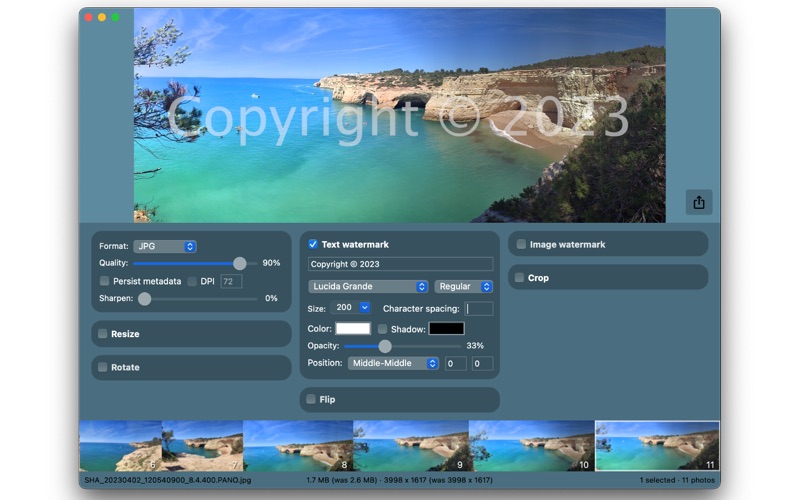
About PhotoBatcher Pro
The description on the store listing
PhotoBatcher Pro (formerly Image Bucket Pro) helps you resize, watermark, crop, transform and export photos (from a few to thousands) quickly and easily with its powerful batch/bulk exporting and photo viewing.
VIEW AND EXPORT
* Exports to: JPG, TIF, PNG, GIF, BMP and JP2
* Opens: JPG, TIF, PNG, GIF, BMP, JP2, PSD and TGA
* Option to persist original photo's metadata
* Option to set DPI of exported photos
* Export all photo or only selected photos
* Export photos to a selected folder (with optional filename prefix/postfix) or overwrite original photos
* Option to apply a sharpen filter to keep photo detail when reducing photo dimensions
RESIZE
* Width x Height - You specify …
Read the full description
PhotoBatcher Pro (formerly Image Bucket Pro) helps you resize, watermark, crop, transform and export photos (from a few to thousands) quickly and easily with its powerful batch/bulk exporting and photo viewing. VIEW AND EXPORT * Exports to: JPG, TIF, PNG, GIF, BMP and JP2 * Opens: JPG, TIF, PNG, GIF, BMP, JP2, PSD and TGA * Option to persist original photo's metadata * Option to set DPI of exported photos * Export all photo or only selected photos * Export photos to a selected folder (with optional filename prefix/postfix) or overwrite original photos * Option to apply a sharpen filter to keep photo detail when reducing photo dimensions RESIZE * Width x Height - You specify the exact width and height you want the images to be * Width (height proportional) - You specify only the width and Fotos will correctly set the height * Height (width proportional) - You specify only the height and Fotos will correctly set the width * Max width x Max height (proportional) - This option ensures that images are no larger than the specified width and height whilst keeping proportions * Longest side (other side proportional) - You specify a single size, the image's longest side will be resized to the specified size and the other side resized accordingly * Shortest side (other side proportional) - You specify a single size, the image's shortest side will be resized to the specified size and the other side resized accordingly * Resizing can be specified in pixels or percentages. CROP * Crop by specified width and height in pixels * Crop by one of 13 common preset ratios or specify your own custom ration * 9 anchor positions for cropping TRANSFORM * Image rotation (90, 180 or 270 degrees) * Image flipping (horizontally, vertically, horizontally & vertically) TEXT WATERMARK * Font type, style, size, color, character spacing * 9 alignment positions with optional x/y offsets * Text opacity * Optional drop-shadow and color * Inclusion of filename with optional full path IMAGE WATERMARK * Select an existing image file to use as a watermark * 9 alignment positions with optional x/y offsets * Control of image opacity * Option to resize image watermark as % of photo width PhotoBatcher Pro (formerly Image Bucket Pro) is a great addition for both professional and amateur photographers alike. For any support issues or questions please contact us via our website so that we can respond directly to you.
Installs
Apple does not publish download counts. Estimates are in testing.
We publish iOS estimates only after they pass a back-test against real numbers. Chart history below is measured.
Estimated store revenue Estimated Beta
App Store, worldwide, monthly rate from the last 12 chart days to 19 Nov 2026
Below the top 100 grossing apps in the markets we calibrate. In the United States that usually means under about $6.4M a month. App Store purchases and subscriptions only, before Apple's 15 to 30% fee. Ads and web payments are not included.
Ratings
No rating breakdown published for this app.
Recent reviews
Latest public reviews from the store
No reviews in our sample for this app yet.
Top chart positions
Latest App Store chart ranks by country, last 10 days
Not in any tracked top chart in the last 10 days.
PhotoBatcher Pro history
Release, install milestones, listing and store changes
- First released on the store 21 Jul 2011
Recent versions
Current version 2025.3
- Version 2025.34 Oct 2025
* Fixed window resizing. * Fixed photo selection.
Listing keywords
Words and phrases PhotoBatcher Pro repeats most in its store listing
Top phrases: proportional you specify (4), width and height (3), photobatcher pro (3), formerly image bucket (2), fotos will correctly (2).
Highlighted words also appear in the title. Counts cover the title, short description and description.
Compliance
What the listing and the app package show
- Store status
- Live
- Upkeep
- Updated 4 Oct 2025
- Age rating
- 4+
Apps like PhotoBatcher Pro
 Video CollageaZeR DiLLs★ 4.08
 Vee for VideoMedious★ 2.98
 Beauty Camera -Selfie, StickerBhuvan Gupta★ 4.5
 FinalCamXShenzhen Xiaozhen Technology Co.,Ltd.★ 4.44
 Magic Studio - AI Photo EditorMagicStudio.com★ 4.62
 Foto Impresiones: 1 Hr PhotoSoftwareX★ 4.98
 SnapGeo - AI Location FinderRECEP ASLAN★ 4.24
 Family Photo Maker - AIRick-y Media★ 4.12
 BeautifAI: AI Try OnJAI UYGULAMA VE YAPAY ZEKA TEKNOLOJILERI ANONIM SIRKETI★ 4.36
PhotoBatcher Pro: questions and answers
Who makes PhotoBatcher Pro?
PhotoBatcher Pro is published by Gavin Matthews.
When was PhotoBatcher Pro last updated?
The latest version (2025.3) was released on 4 Oct 2025.
Is PhotoBatcher Pro free?
No. PhotoBatcher Pro is a paid app priced at $6.99.
Is PhotoBatcher Pro still available?
Yes. PhotoBatcher Pro is live on App Store as of 10 May 2026.
Track PhotoBatcher Pro and its competitors
Watch any app for new versions, rating drops, chart moves and removals. Free plan, no card.