
- Installs
- —
- Apple does not publish download counts
- Rating
- —
- Ratings
- —
- Version
- 5.3
- Updated 29 Aug 2025
- Released
- 19 Feb 2020
- Tracked since 10 May 2026
- Size
- 1 MB
- Needs 17.6
Screenshots


About PhotoWith
The description on the store listing
Main functions:
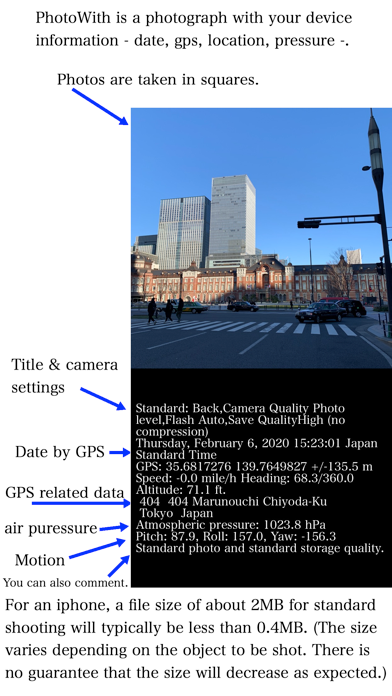
1. An app that can record date and time, GPS, shooting address, direction, altitude, pressure, and moment along with photos
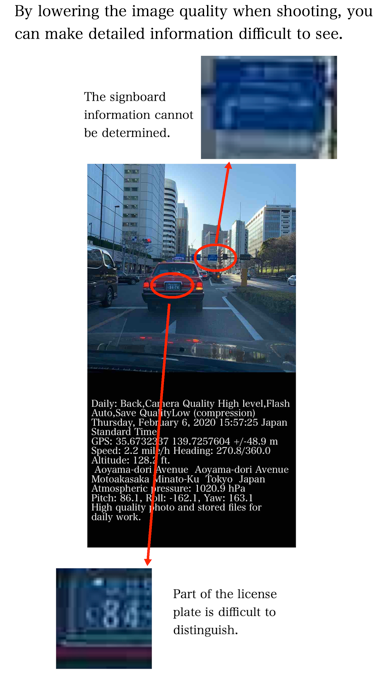
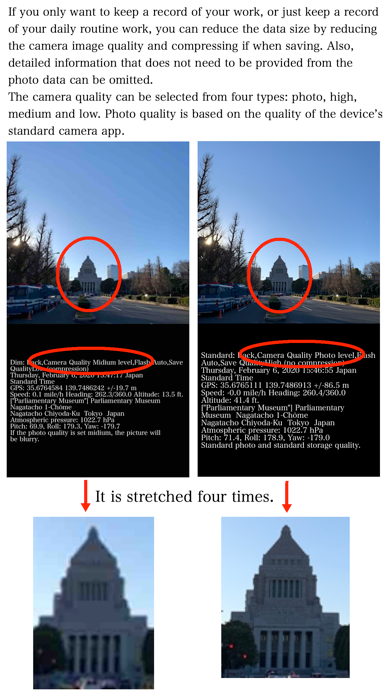
2. By adjusting the image quality and size of the photo, the data size of the photo can be much smaller than usual.
(example by iPhone: 2Mbytes per standard photo => 0.4 Mbytes /per PhotoWith)
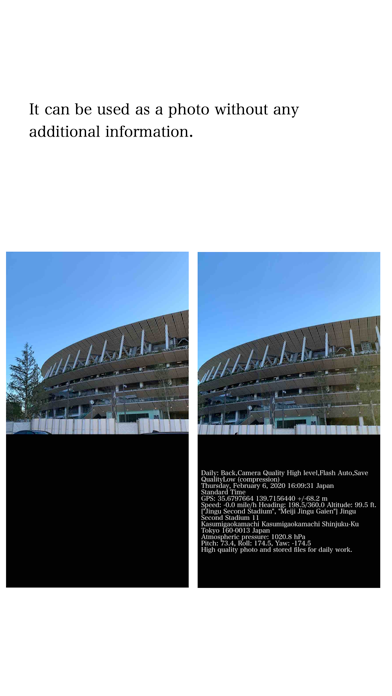
3. Date and time, GPS, location, altitude, barometric pressure, moment of shooting, etc. are recorded together with the image taken as image data, so you can visually check the necessary information just by looking at the photo.
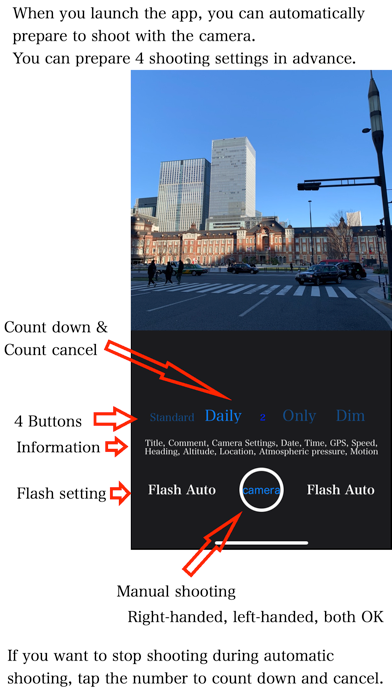
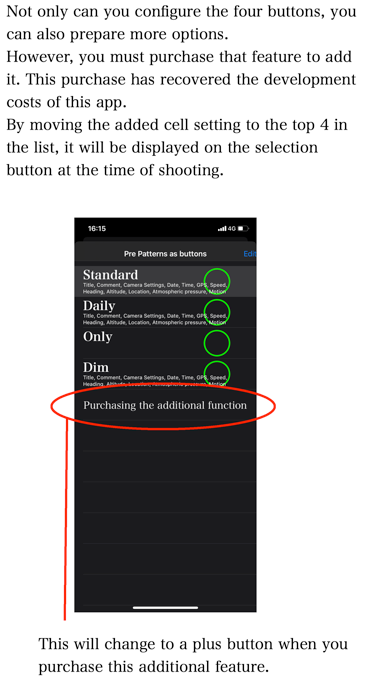
4. It is possible to perform shooting preparation at the same time as launching the application and shoot automatically.
5. There is a …
Read the full description
Main functions: 1. An app that can record date and time, GPS, shooting address, direction, altitude, pressure, and moment along with photos 2. By adjusting the image quality and size of the photo, the data size of the photo can be much smaller than usual. (example by iPhone: 2Mbytes per standard photo => 0.4 Mbytes /per PhotoWith) 3. Date and time, GPS, location, altitude, barometric pressure, moment of shooting, etc. are recorded together with the image taken as image data, so you can visually check the necessary information just by looking at the photo. 4. It is possible to perform shooting preparation at the same time as launching the application and shoot automatically. 5. There is a waiting time to decide whether to save the captured image and other information. It is possible to cancel the image without saving it. Of course, all can be manually operated. When should I use this app? 1. When simply recording daily work that is routine work, for example, clearing the room, recording the mileage of the car, the shop that went out, the cat that was walking, etc. 2. In the event of an accident or disaster, to convey the status of the place via SNS or email in a short time. 3. You have taken a picture but want to reduce the data size as much as possible. 4. When you want to avoid getting too detailed information from the viewpoint of privacy, for example, when you want to take a picture with an image quality that does not allow you to know the number of the license plate of the car in the picture. 5. When you want to take a picture by preparing several shooting conditions and immediately changing the settings according to the situation. Initial setup : 1. You need to agree to use your privacy details as -Taking photo(using camera), Saving photo in album(library)- in your device. 2. You need to agree to use your privacy details as -GPS, searching your location in your device. Cautions: - This app stores photo data in the device's standard photo library. Only setting information is stored in the app itself and the cloud environment. - This app accesses the network environment to access the cloud environment and to grasp the location information. - Check the saved photo data with the standard photo app for your device. Also, you cannot delete saved photo data directly from this app. - If your device does not have the capability, you will not be able to provide information. For example, barometric pressure information is not available for all device types. - About backup/restore, the backup/restore functions are only in this app settings information. This app don't backup/restore any photo themselves. - About backup/restore, please don't do at the same time between multiple devices, or it will be caused of data lost. For the same reason, do not perform other operations while performing backup and restore operations. - About backup function, this app don't guarantee to record perfectly, it may be different situation in each devices. - Date and time information is quoted from GPS data. Therefore, the time may be different from the device clock. - Since GPS data and atmospheric pressure data are recorded as photo data, they cannot be updated later for correction after taking a photo.
Installs
Apple does not publish download counts. Estimates are in testing.
We publish iOS estimates only after they pass a back-test against real numbers. Chart history below is measured.
Estimated store revenue Estimated Beta
App Store, worldwide, monthly rate from the last 14 chart days to 21 Nov 2026
Below the top 100 grossing apps in the markets we calibrate. In the United States that usually means under about $6.4M a month. App Store purchases and subscriptions only, before Apple's 15 to 30% fee. Ads and web payments are not included.
Ratings
No rating breakdown published for this app.
Recent reviews
Latest public reviews from the store
No reviews in our sample for this app yet.
Top chart positions
Latest App Store chart ranks by country, last 10 days
Not in any tracked top chart in the last 10 days.
PhotoWith history
Release, install milestones, listing and store changes
- First released on the store 19 Feb 2020
Recent versions
Current version 5.3
- Version 5.329 Aug 2025
Functional improvements and additions 1) Supporting iOS18.6 and iPadOS18.6 2) Support for versions below iOS 17.5 and iPadOS 17.5 has ended.
Listing keywords
Words and phrases PhotoWith repeats most in its store listing
Top phrases: backup restore (4), photo data (4), about backup (3), standard photo (3), about backup restore (2).
Highlighted words also appear in the title. Counts cover the title, short description and description.
Compliance
What the listing and the app package show
- Store status
- Live
- Upkeep
- Updated 29 Aug 2025
- Age rating
- 4+
Apps like PhotoWith
 Video CollageaZeR DiLLs★ 4.08
 Vee for VideoMedious★ 2.98
 Beauty Camera -Selfie, StickerBhuvan Gupta★ 4.5
 FinalCamXShenzhen Xiaozhen Technology Co.,Ltd.★ 4.44
 Magic Studio - AI Photo EditorMagicStudio.com★ 4.62
 Foto Impresiones: 1 Hr PhotoSoftwareX★ 4.98
 SnapGeo - AI Location FinderRECEP ASLAN★ 4.24
 Family Photo Maker - AIRick-y Media★ 4.12
 BeautifAI: AI Try OnJAI UYGULAMA VE YAPAY ZEKA TEKNOLOJILERI ANONIM SIRKETI★ 4.36
PhotoWith: questions and answers
Who makes PhotoWith?
PhotoWith is published by masaki individual.
When was PhotoWith last updated?
The latest version (5.3) was released on 29 Aug 2025.
Is PhotoWith free?
Yes. PhotoWith is free to download.
Is PhotoWith still available?
Yes. PhotoWith is live on App Store as of 10 May 2026.
Track PhotoWith and its competitors
Watch any app for new versions, rating drops, chart moves and removals. Free plan, no card.