
- Installs
- —
- Apple does not publish download counts
- Rating
- 5.0
- Ratings
- 1
- 1 reviews
- Version
- 1.2.16
- Updated 15 May 2023
- Released
- 15 Mar 2023
- Tracked since 10 May 2026
- Size
- 2 MB
- Needs 16.0
Screenshots


About Phrase Keyboard - Quick Type
The description on the store listing
Welcome to Phrase Keyboard - Quick Type, a powerful, easy-to-use iOS app that helps you enter text more efficiently and easily.
The application has the following functions:
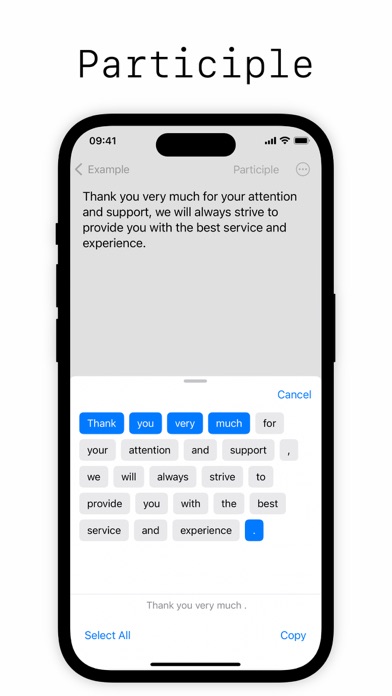
Phrase quick insertion: Just one touch on the keyboard, you can quickly insert the phrases and emoji you need, without manual input, making you more efficient and relaxed.
Custom Phrase Library: You can add, edit and delete your own phrases and emojis at any time to suit your individual needs. Whether it's emoji, everyday phrases, work phrases, or even technical terms, you can easily add them to your phrase library.
Simple and easy-to-use interface: The application adopts a simple and clear interface design, allowing …
Read the full description
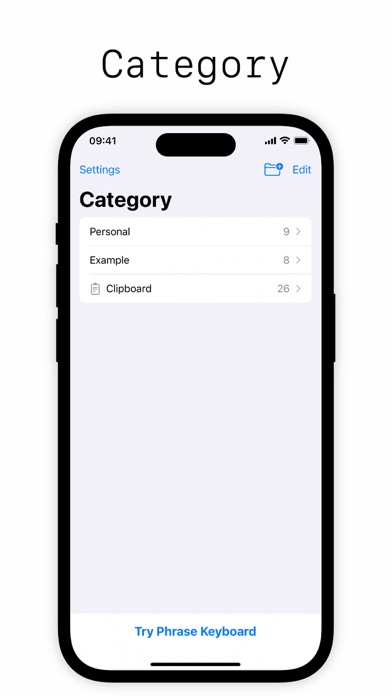
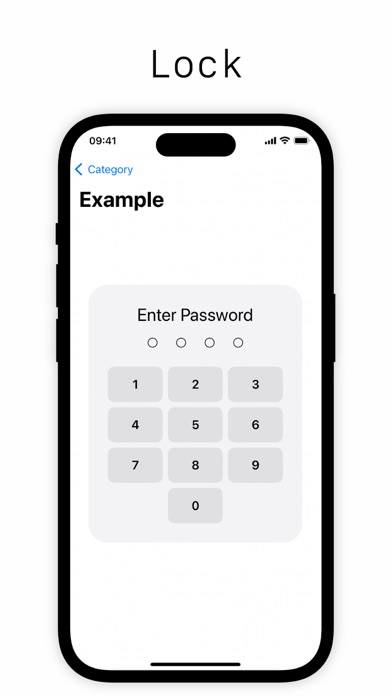
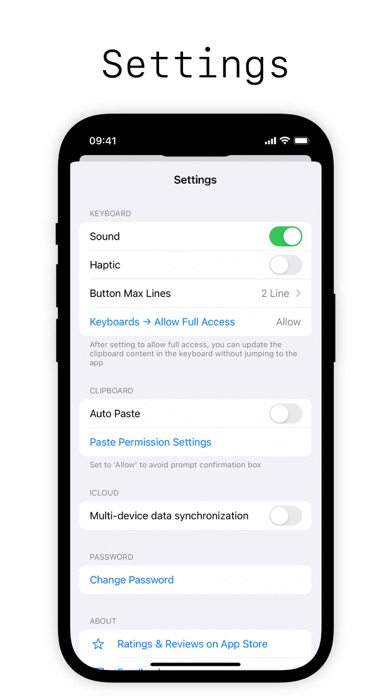
Welcome to Phrase Keyboard - Quick Type, a powerful, easy-to-use iOS app that helps you enter text more efficiently and easily. The application has the following functions: Phrase quick insertion: Just one touch on the keyboard, you can quickly insert the phrases and emoji you need, without manual input, making you more efficient and relaxed. Custom Phrase Library: You can add, edit and delete your own phrases and emojis at any time to suit your individual needs. Whether it's emoji, everyday phrases, work phrases, or even technical terms, you can easily add them to your phrase library. Simple and easy-to-use interface: The application adopts a simple and clear interface design, allowing you to get started easily and quickly master all functions. Quickly insert the phrases and emoji you need without any tedious operations. Copy and Paste: The app also supports copy and paste functions, allowing you to edit and share text, pictures and other files. With simple operations, you can easily copy what you need to other applications. Search function: The app also has a built-in search function, so you can easily find a specific phrase or emoji in the phrase bank. Clipboard: The application can save your frequently used phrases and emojis to the clipboard, which is convenient for you to copy and paste between multiple applications. Category Lock: Set passwords for phrases and emoticons to protect privacy and security. More operations: The app also supports more operations such as phrase segmentation, moving, deleting, etc., allowing you to enter text more efficiently. With Phrase Keyboard - Quick Typing, you can enter text more easily and enjoy a more efficient and enjoyable typing experience. Come and download it now!
Installs
Apple does not publish download counts. Estimates are in testing.
We publish iOS estimates only after they pass a back-test against real numbers. Chart history below is measured.
Estimated store revenue Estimated Beta
App Store, worldwide, monthly rate from the last 13 chart days to 20 Nov 2026
Below the top 100 grossing apps in the markets we calibrate. In the United States that usually means under about $6.4M a month. App Store purchases and subscriptions only, before Apple's 15 to 30% fee. Ads and web payments are not included.
Ratings
1 ratings, 1 reviews
No rating breakdown published for this app.
Recent reviews
Latest public reviews from the store
No reviews in our sample for this app yet.
Top chart positions
Latest App Store chart ranks by country, last 10 days
Not in any tracked top chart in the last 10 days.
Phrase Keyboard - Quick Type history
Release, install milestones, listing and store changes
- First released on the store 15 Mar 2023
Update frequency
How often Phrase Keyboard - Quick Type ships a new version, month by month
0 updates in the last 12 months. Less often than most similar apps: they shipped a median of 1 updates in the same year.
Recent versions
Current version 1.2.16
- Version 1.2.1615 May 2023
Added: Search Added: Clipboard Added: Category lock, set a password for the category Added: Phrase word segmentation, mobile and more operations Fixed: The flickering problem when switching keyboards
Listing keywords
Words and phrases Phrase Keyboard - Quick Type repeats most in its store listing
Top phrases: copy and paste (3), phrase keyboard quick (3), enter text (3), keyboard quick (3), phrase keyboard (3).
Highlighted words also appear in the title. Counts cover the title, short description and description.
Compliance
What the listing and the app package show
- Store status
- Live
- Upkeep
- No update since 15 May 2023
- Age rating
- 4+
Apps like Phrase Keyboard - Quick Type
 Library of AviationNazmi Yavuz★ 4.82
 MyNOVECNorthern Virginia Electric Cooperative★ 2.28
 打工人小组件光翔 卓★ 4.96
 TruckbaysTruckbays LLC★ 4.3
 Tornado PRO PlayerMohammed Altam★ 4.44
 VDX - Video ManagerARISEPEAK LP★ 1.74
 TV CastingZeasn Info Technology Co., Ltd.★ 1.86
 Mil-Dot BallisticsTom Holsten★ 3.82
 MySontiqSontiq, Inc.★ 2.4
Phrase Keyboard - Quick Type: questions and answers
Who makes Phrase Keyboard - Quick Type?
Phrase Keyboard - Quick Type is published by 万庄 黄.
When was Phrase Keyboard - Quick Type last updated?
The latest version (1.2.16) was released on 15 May 2023.
Is Phrase Keyboard - Quick Type free?
No. Phrase Keyboard - Quick Type is a paid app priced at $1.99.
Is Phrase Keyboard - Quick Type still available?
Yes. Phrase Keyboard - Quick Type is live on App Store as of 1 Jul 2026.
Track Phrase Keyboard - Quick Type and its competitors
Watch any app for new versions, rating drops, chart moves and removals. Free plan, no card.