
- Installs
- —
- Apple does not publish download counts
- Rating
- 4.75
- Ratings
- 16.2K
- 16.2K reviews
- Version
- 5.6.8
- Updated 2 Nov 2026
- Released
- 13 Oct 2011
- Tracked since 10 May 2026
- Size
- 166 MB
- Needs 12.0
Screenshots



About Pic Collage Maker PerfectImage
The description on the store listing
Perfect Image is an app that combines photo editing, photo collage, and video collage capabilities. It allows beginners and professionals to easily add text to photos and create photo collages. By using different editing tools, users can enhance the appearance of their photos and videos, and make them more artistic by adding text.
Main Features:
Collage Maker:
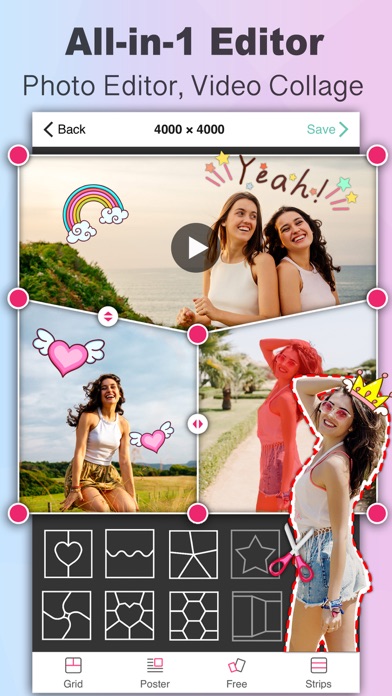
• Poster Collage: Choose from a variety of templates to create poster collages with up to 20 photos or videos.
• Template Collage: Use advanced "fusion" special effects to change the layout, ratio, border, background, and edge feathering of your collages.
• Freestyle Collage: Create collages with photos, text, and stickers using an …
Read the full description
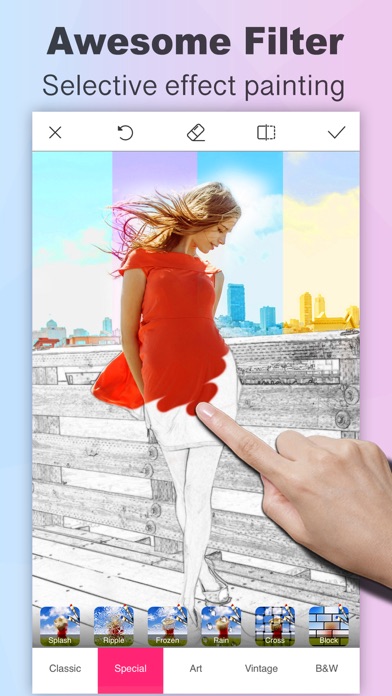
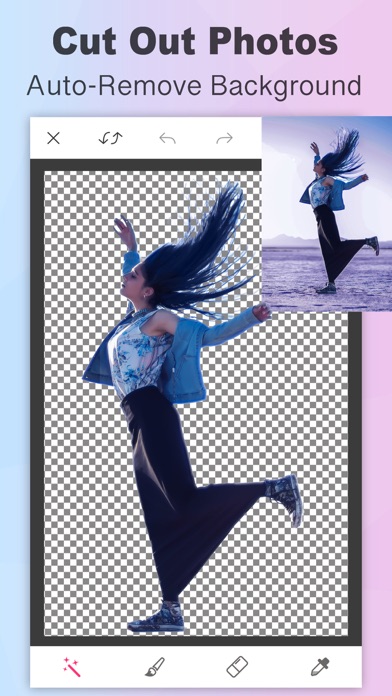
Perfect Image is an app that combines photo editing, photo collage, and video collage capabilities. It allows beginners and professionals to easily add text to photos and create photo collages. By using different editing tools, users can enhance the appearance of their photos and videos, and make them more artistic by adding text. Main Features: Collage Maker: • Poster Collage: Choose from a variety of templates to create poster collages with up to 20 photos or videos. • Template Collage: Use advanced "fusion" special effects to change the layout, ratio, border, background, and edge feathering of your collages. • Freestyle Collage: Create collages with photos, text, and stickers using an automatic layout for collage or poster effects. • Long picture Stitching: Seamlessly stitch images with high pixel output. Add text to the photo: • Massive fonts: Hundreds of fonts are built into the application and can be downloaded from the Internet, iCloud, PC/Mac, or other apps. • Rich Color Options: Use solid colors, gradient colors, texture colors, cyclic colors, and 3D color gradients, and change the color of selected text. • Curved Text: Easily curve text to any degree of curvature. • Text Shadow: Add gradient color shadow or various types of a long shadow to text. • Text Border: Apply multiple borders, including solid color, gradient color, texture color outlines, and stunning 3D stereoscopic color outlines. • Text Erasing: Remove part of the text to make it appear obscured by elements in the picture. • Easy Typesetting: Adjust letter spacing, line spacing, text stretching, automatic layout and adjustment, automatic scaling, and vertical text. • Overlay Blending: Blend text and artistic stickers with photos. • 3D Perspective: Rotate and transform text in 3D perspective. • Backgrounds and Speech Bubbles offer cartoon, artistic, comic, and other text effects. • Artistic Fonts and Symbols: Use a massive of vector artistic materials to render photo effects. Photo Painting, Doodling, and Handwriting: • Handwritten Signature: Choose from dozens of pens, such as ballpoint pens, pencils, brushes, and markers, to realistically imitate the thickness and style changes of various strokes. • Fancy Strokes: Add unique strokes such as rainbow, squid, fluorescent, sparks, and more. Sticker Doodling: Doodle on your photos using cute stickers. Photo Filters and Color Adjustment: • Special Effects Collection: Apply various exclusive filters in different categories to make your photos more artistic and compelling. Doodling Support: Partial rendering of filter effects, such as partial sketches, partial oil paintings, partial aging, and partial mosaics, satisfying all your needs. Auto Cropping and Background Changing: Cut out photos and remove unwanted elements such as people and animals. You can also create custom stickers from cropped photos. Photo Cutout: Easily import and export transparent PNG images. Photo Size: Resize the photo to any specified pixel value. Discover more features and amaze your friends with your stunning creations! Perfect Image VIP: • Subs are billed monthly/annually at a selected rate depending on the plan. • Sub renews unless auto-renew off 24h before the current period ends. • Sub fee charged to iTunes acct at purchase confirmation. Manage sub & turn off auto-renew in Acct Settings. • If eligible for free trial & sub before the trial ends, rest of trial period forfeited when purchase confirmed. • Terms of Use: https://perfectimage001.web.app/Terms.html • Privacy Policy: https://perfectimage001.web.app/PrivacyPolicy.html Contact: [email protected]
Installs, last 30 days
Apple does not publish download counts. Estimates are in testing.
Estimated store revenue Estimated Beta
App Store, worldwide, monthly rate from the last 12 chart days to 19 Nov 2026
Below the top 100 grossing apps in the markets we calibrate. In the United States that usually means under about $6.4M a month. App Store purchases and subscriptions only, before Apple's 15 to 30% fee. Ads and web payments are not included.
Ratings
16,190 ratings, 16,190 reviews
No rating breakdown published for this app.
Recent reviews
Latest public reviews from the store
- 20 Aug 2023
Need More Fonts
Desperately in need of more fonts. A Collegiate or Varsity font for sports related images is a MUST. Athletic Jersey Scripts would be a welcome addition as well. I could see myself keeping the app for good with those adds but without them, I will look elsewhere next time around. There’s a slight learning curve, and the settings section of the app can still drive me crazy bouncing back and forth between screens. But, eventually I get there. A button to invert color combos for a fast look would also be a nice add.
- 21 Jul 2023
Careful when you use this App
This App could be a 5 star App, but IF you accidentally use a premium feature, you loose everything when you save your work. So in this App you can be overwhelmed with their Ads, and then loose all the work you did in this App. I do appreciate this App and use it regularly. IF the danger didn’t exist for you loosing all your work, I would give this App five stars. Response to Developer Response When someone notes that IF one looses all their work because they ACCIDENTALLY used a paid for feature … the response back don’t use these features” shows the developer read, but did not comprehend the problem that a paid for feature can be ACCIDENTALLY used. Developer: IF there is any way to exclude all these paid for features so that I don’t use them, Please tell me how to do that. My point is after one has listened to the all the developers Ads, one can totally loose all their work.
- 28 Mar 2023
A great App
I’ve been using this app for a while and it outrank most of these photo apps. Trying to find out what extras do you get when you purchase for a year. This app I might get for a year depending on what extras comes with it. I use on my laptop about six different photo software, photoshop 6.0, photo unlead 7.0 & 8.0, Cannon Pro Photos, plus three others, which I have the CD’s. Today’s time they want you to download there software so after a year they can charge you again. That’s why I will not buy a new computer because it’s turning into nothing but a money game, the software I have can’t be installed on a new computer and those I have wasn’t cheap even back them, and they didn’t expire.
- 2 Jan 2021
Great App 👍🏼
I like about this beauty app is i can create collages, add filters, add text to photo, and fixing photo etc... All in one app !🥰 and it easy to use. Thanks for create is awesome app . I would recommend this app to everyone.😉 PS: i have read some comments about this app is not good or need to add more features and etc...Don't expect too much since it a free app. Appreciate the hard work of the people who create this app!!
What reviewers bring up
Topics mentioned in the latest 8 reviews, by how many reviews mention them
Liked in good reviews (5 reviews)
- photo 3
- image 3
- recommend 2
- collages 2
- features 2
- several 2
- editing 2
- effects 2
Raised in bad reviews (1 reviews)
No topic comes up twice.
Top chart positions
Latest App Store chart ranks by country, last 10 days
- Countries ranked
- 2 of 50
- Best rank
- #60
- Top 10 placements
- 0
- of 2 chart placements
- Average rank
- #76
Best countries on App Store
- 🇯🇵 Japan · Top grossing, Photo & Video#60
- 🇹🇼 Taiwan · Top grossing, Photo & Video#92
| Country | Chart | Category | Rank | Best (10 days) | Date |
|---|---|---|---|---|---|
| 🇯🇵 Japan | Top grossing | Photo & Video | #60 | #56 | 19 Nov 2026 |
| 🇹🇼 Taiwan | Top grossing | Photo & Video | #92 | #71 | 19 Nov 2026 |
Pic Collage Maker PerfectImage history
Release, install milestones, listing and store changes
- First released on the store 13 Oct 2011
Update frequency
How often Pic Collage Maker PerfectImage ships a new version, month by month
12 updates in the last 12 months. More often than most similar apps: they shipped a median of 2 updates in the same year.
Recent versions
Current version 5.6.8
- Version 5.6.72 Nov 2026
Bug fixes and improvements.
- Version 5.6.028 Aug 2026
Bug fixes and improvements.
- Version 5.5.716 Aug 2026
Bug fixes and improvements.
- Version 5.5.63 Aug 2026
Bug fixes and improvements.
Listing keywords
Words and phrases Pic Collage Maker PerfectImage repeats most in its store listing
Top phrases: 3d perspective (2), add text (2), auto renew (2), automatic layout (2), collage maker (2).
Highlighted words also appear in the title. Counts cover the title, short description and description.
Compliance
What the listing and the app package show
- Store status
- Live
- Upkeep
- Updated 2 Nov 2026
- Age rating
- 4+
Apps like Pic Collage Maker PerfectImage
 Picsify: AI Photo&Video EditorPicsify.Inc★ 4.51
 CameraApple★ 3.4
 Slidebox: Photo Cleaner AppSlidebox LLC★ 4.81
 EFEKT Video Effects & FiltersPicsArt, Inc.★ 4.58
 Vont - Text on Videosyouthhr★ 4.65
 LightCut - AI Video EditorYue-Jie Innovations Science and Technology Co. , Ltd.★ 4.88
 Slow Motion Video Fx EditorBrain Craft Ltd★ 4.67
 PicFrameActive Development Limited★ 4.84
 Cosmo: AI Editor, Hair FiltersSpark Dynamic★ 4.34
Pic Collage Maker PerfectImage: questions and answers
Who makes Pic Collage Maker PerfectImage?
Pic Collage Maker PerfectImage is published by 昊 李.
When was Pic Collage Maker PerfectImage last updated?
The latest version (5.6.8) was released on 2 Nov 2026.
Is Pic Collage Maker PerfectImage free?
Yes. Pic Collage Maker PerfectImage is free to download.
Is Pic Collage Maker PerfectImage still available?
Yes. Pic Collage Maker PerfectImage is live on App Store as of 19 Nov 2026.
Track Pic Collage Maker PerfectImage and its competitors
Watch any app for new versions, rating drops, chart moves and removals. Free plan, no card.