
- Installs
- —
- Apple does not publish download counts
- Rating
- —
- Ratings
- —
- Version
- 2.3.8
- Updated 29 Apr 2026
- Released
- 15 Oct 2019
- Tracked since 11 May 2026
- Size
- 129 MB
- Needs 14.0
Screenshots
About PingPongRobot
The description on the store listing
Pingpong APP Detail
Experience simple robotic engineering sequences by making your own motion, timing, drawing, dancing and loops, which can be controlled with Pingpong App program. Each Pingpong model needs specified links to assemble Pingpong Cubes. Find the link parts on G2, G3, G4, and G6 boxes. Known as a basic module of Pingpong, the CUBE is a single modular robot that contains a controller, gyroscope, accelerometer, proximity sensor, extra sensor interface, stepper motor, battery, and more.
1.How to download Pingpong APP:
Download Pingpong APP from App Store (Search APP: Pingpong Robot).
2.ON/OFF & CHARGING INSTRUCTIONS
Press and hold the yellow power button more than 2 seconds to …
Read the full description
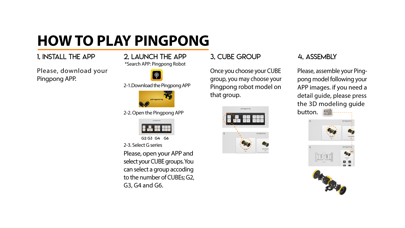
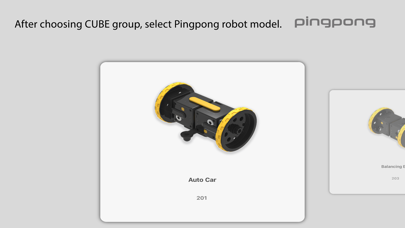
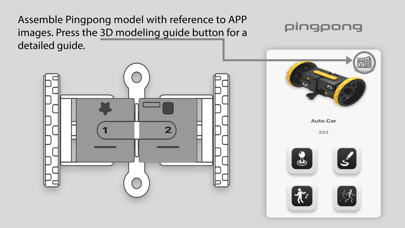
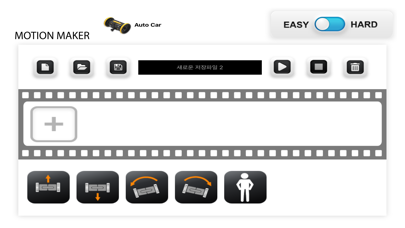
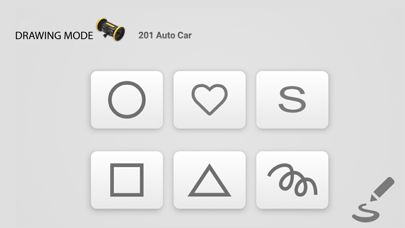
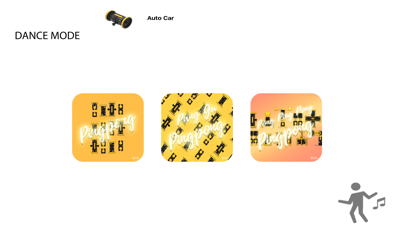
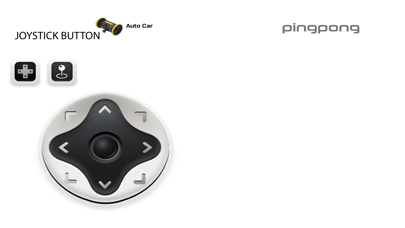
Pingpong APP Detail Experience simple robotic engineering sequences by making your own motion, timing, drawing, dancing and loops, which can be controlled with Pingpong App program. Each Pingpong model needs specified links to assemble Pingpong Cubes. Find the link parts on G2, G3, G4, and G6 boxes. Known as a basic module of Pingpong, the CUBE is a single modular robot that contains a controller, gyroscope, accelerometer, proximity sensor, extra sensor interface, stepper motor, battery, and more. 1.How to download Pingpong APP: Download Pingpong APP from App Store (Search APP: Pingpong Robot). 2.ON/OFF & CHARGING INSTRUCTIONS Press and hold the yellow power button more than 2 seconds to turn on and off Pingpong CUBE. (beeping sounds are made) 3.CHARGING 3-1.Prepare the CUBEs. Attach the parts together. 3-2.Attach the charging cable to the round disk part of the Pingpong CUBE. 3-3.The CUBE and the charger are connected by a round magnet. More than 100 CUBEs can be charged at once. 3-4.Charging Time: 6 CUBEs/hour (the charging time depends on the number of CUBEs). 3-5.If the CUBE automatically turns off, starts to lag, or displays no LED sign, this may indicate batteries are low. 4.HOW TO PLAY PINGPONG 4-1. INSTALL THE APP Download Pingpong APP in smart phone or device. (Search APP: Pingpong Robot from App Store). 4-2. LAUNCH THE APP Open Pingpong APP and select CUBE groups. Select a group depending on number of CUBEs (G2, G3, G4, or G6). 4-3. CUBE GROUP After choosing CUBE group, select Pingpong robot model. 4-4. ASSEMBLY Assemble Pingpong model with reference to APP images. Press the 3D modeling guide button for a detailed guide. 4-5. TURN ON After assembling Pingpong model, press the yellow power button more than 2 seconds to turn on all Pingpong CUBEs. 4-6. PAIRING 1ST CUBE Check first CUBE on the app screen. Press the power button from the assembled robot following the order displayed on the app screen. If 1st CUBE is successfully connected to the smartphone, a pairing signal and a beeping sound will be made. 4-7. PAIRING THE OTHERS After pairing first CUBE & APP, press the yellow power button of the remaining CUBES (follow the order from the APP screen). 4-8. PLAY ROBOT Pingpong APP provides various functions: Joystick, Dancing Mode, Drawing Mode and Motion Making. 5.CUBE COLORS After Pingpong robot is successfully connected to smartphone, it is possible to distinguish the order of each CUBE in LED colors, especially in sequences of red, green, blue, cyan, magenta, and yellow. 6.CUBE ICONS Decide on the order and position of the Pingpong CUBE with different icons, including square, triangle, circle, star, and heart.
Installs
Apple does not publish download counts. Estimates are in testing.
We publish iOS estimates only after they pass a back-test against real numbers. Chart history below is measured.
Estimated store revenue Estimated Beta
App Store, worldwide, monthly rate from the last 12 chart days to 19 Nov 2026
Below the top 100 grossing apps in the markets we calibrate. In the United States that usually means under about $6.4M a month. App Store purchases and subscriptions only, before Apple's 15 to 30% fee. Ads and web payments are not included.
Ratings
No rating breakdown published for this app.
Recent reviews
Latest public reviews from the store
No reviews in our sample for this app yet.
Top chart positions
Latest App Store chart ranks by country, last 10 days
Not in any tracked top chart in the last 10 days.
PingPongRobot history
Release, install milestones, listing and store changes
- First released on the store 15 Oct 2019
Update frequency
How often PingPongRobot ships a new version, month by month
1 updates in the last 12 months. More often than most similar apps: they shipped a median of 0 updates in the same year.
Recent versions
Current version 2.3.8
- Version 2.3.829 Apr 2026
[2.3.8 출시] 새로운 기능: - iOS에서 핸드 컨트롤 기능이 지원됩니다. - 핸드 컨트롤에 3번큐브 움직임이 지원됩니다. 개선 사항 : - 모델 선택 UI 가 개선됩니다. - 그룹번호 설정에서 취소 버튼의 동작이 보다 직관적으로 개선됩니다. - 음악에 점 8분음표가 추가됩니다. - 음악 그림모드의 추가 방식이 터치로 개선됩니다. 버그 수정: - 아이패드에서 다이얼로그가 자동으로 닫히는 문제가 수정됩니다. - 간헐적으로 펌웨어 업데이트가 시작되지 않는 문제가 수정됩니다. - 음악 그림모드에서 추가 이미지가 사라지는 문제가 수정됩니다. - 음악 재생시 재생중인 아이콘으로 화면이 따라오지 않던 문제가 수정됩니다.
Listing keywords
Words and phrases PingPongRobot repeats most in its store listing
Top phrases: pingpong robot (4), power button (4), yellow power button (3), download pingpong (3), pingpong cube (3).
Highlighted words also appear in the title. Counts cover the title, short description and description.
Compliance
What the listing and the app package show
- Store status
- Live
- Upkeep
- Updated 29 Apr 2026
- Age rating
- 4+
Apps like PingPongRobot
 Populations and Resources SimAmplify Education, Inc.★ 2.38
 Rune WriterPaul Burlov★ 4.34
 Being Moroccan ( Darija )Yasir TIRAK★ 4.56
 方格单词²上海译动智能科技有限公司★ 4.68
 Handwriting Tracing PracticeVladimir Zavada★ 4.02
 Oklahoma Learners Permit TestNilu Rathod★ 4.72
 SU CampusCharles Robinson★ 4.76
 NC CDL Permit Test PracticeNilu Rathod★ 4.82
 Mjølnir NorwegianMjølnir Learning Apps★ 4.92
PingPongRobot: questions and answers
Who makes PingPongRobot?
PingPongRobot is published by RoboRisen.
When was PingPongRobot last updated?
The latest version (2.3.8) was released on 29 Apr 2026.
Is PingPongRobot free?
Yes. PingPongRobot is free to download.
Is PingPongRobot still available?
Yes. PingPongRobot is live on App Store as of 11 May 2026.
Track PingPongRobot and its competitors
Watch any app for new versions, rating drops, chart moves and removals. Free plan, no card.