
- Installs
- —
- Apple does not publish download counts
- Rating
- 3.69
- Ratings
- 26
- 26 reviews
- Version
- 1.8
- Updated 12 Nov 2019
- Released
- 26 Apr 2017
- Tracked since 11 May 2026
- Size
- 16 MB
- Needs 11.0
Screenshots


About Pixel Master
The description on the store listing
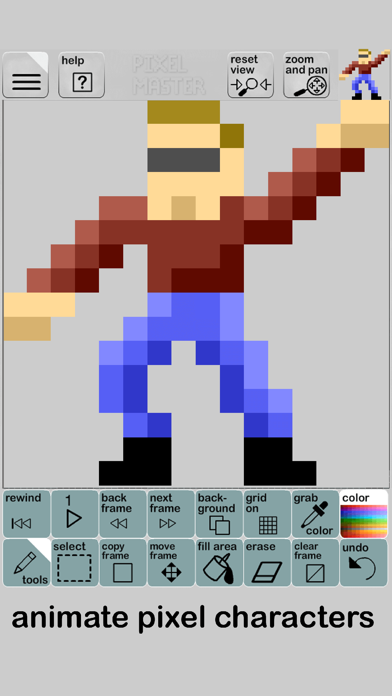
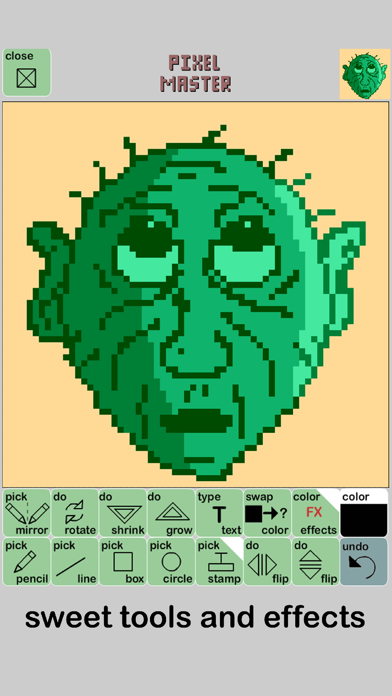
Pixel Master is an App for making custom pixel drawings and animations. Plenty of tools, effects, and export options give you the freedom to create and share your art for fun or professional use.
*smooth-as-silk pixel drawing, not your typical dot clicker- this feels amazing!
*import and pixelate your photos and artwork
*create animate gifs for social media and messaging apps
*great pixel tools including zoom, rotate, flip, and color effects
*share your final work through social media, email, or save to your photo library
*create and sample custom colors or use the easy pick palette
*onion skin feature for easier animation
*separate background layer in animation mode
*handy-dandy …
Read the full description
Pixel Master is an App for making custom pixel drawings and animations. Plenty of tools, effects, and export options give you the freedom to create and share your art for fun or professional use. *smooth-as-silk pixel drawing, not your typical dot clicker- this feels amazing! *import and pixelate your photos and artwork *create animate gifs for social media and messaging apps *great pixel tools including zoom, rotate, flip, and color effects *share your final work through social media, email, or save to your photo library *create and sample custom colors or use the easy pick palette *onion skin feature for easier animation *separate background layer in animation mode *handy-dandy undo feature *save and store up to 49 projects on your device *built in 8-bit font for placing text in your picture *stamp tool with dozens of built-in pictures *custom project sizes: 8x8 to 512x512 pixels! *export sprite sheets, animated gifs, or single .png frames *basic or advanced mode for simple drawings or complex animations *easily copy, move, and paste frames or selections across your project *up to 299 frames of animation per project *two switchable modes: single frame art, or multi-frame animation *import and export your projects via copy and paste text
Installs
Apple does not publish download counts. Estimates are in testing.
We publish iOS estimates only after they pass a back-test against real numbers. Chart history below is measured.
Estimated store revenue Estimated Beta
App Store, worldwide, monthly rate from the last 13 chart days to 20 Nov 2026
Below the top 100 grossing apps in the markets we calibrate. In the United States that usually means under about $6.4M a month. App Store purchases and subscriptions only, before Apple's 15 to 30% fee. Ads and web payments are not included.
Ratings
26 ratings, 26 reviews
No rating breakdown published for this app.
Recent reviews
Latest public reviews from the store
- 18 Dec 2019
Nice
Give me a paid option to remove the ads.
- 16 Nov 2019
Cool app
I’m loving the simplicity and usability, but I just can figure out how to delete a frame from my project. I understand I can just have it animate the frames I want, but I want to remove that extra unused frame from my project?
- 13 May 2019
More save slots
I use this app a lot. Problem is, i run out of save slots. It would really be appreciated if there were more.
- 19 Feb 2019
New Changes should be needed
When importing sprites from a sprite sheet you should make it so when you import a sprite it doesn’t rotate, instead you can crop out any sprite with a pixel perfect selection tool so it’s the right amount of pixels, also how do you export it so it’d transparent?
What reviewers bring up
Topics mentioned in the latest 15 reviews, by how many reviews mention them
Liked in good reviews (7 reviews)
- remove 2
- frames 2
Raised in bad reviews (3 reviews)
- save 2
- ads 2
Top chart positions
Latest App Store chart ranks by country, last 10 days
Not in any tracked top chart in the last 10 days.
Pixel Master history
Release, install milestones, listing and store changes
- First released on the store 26 Apr 2017
Recent versions
Current version 1.8
- Version 1.812 Nov 2019
Added More Frames! Up to 299 frames of animation now on resolutions 128x128 and lower. Up to 99 frames for larger frame sizes (256x256 --> 512x512) General bug fixes Performance increases
Listing keywords
Words and phrases Pixel Master repeats most in its store listing
Top phrases: pixel master (2), social media (2).
Highlighted words also appear in the title. Counts cover the title, short description and description.
Compliance
What the listing and the app package show
- Store status
- Live
- Upkeep
- No update since 12 Nov 2019
- Age rating
- 4+
Apps like Pixel Master
 Super VPN: Fast Private ProxyGeek Incorporated★ 4.4
 Hubtel RetailerHubtel Limited★ 4.32
 Monthly Calendar 2022 - CalistOmoboto LLC★ 4.38
 Firstly: To-Do List & PlannerfocusCove LLC★ 4.7
 CBUS 311City of Columbus, Ohio★ 1.8
 Themes for Powerpoint - DesiGNGraphic Node★ 4.22
 iSiloDC & Co.★ 3.82
 Flashlight Pro [Multipurpose LED light]KAVAPOINT★ 3.88
 WiPryOscium LLC★ 2.68
Pixel Master: questions and answers
Who makes Pixel Master?
Pixel Master is published by andrew bell.
When was Pixel Master last updated?
The latest version (1.8) was released on 12 Nov 2019.
Is Pixel Master free?
Yes. Pixel Master is free to download.
Is Pixel Master still available?
Yes. Pixel Master is live on App Store as of 1 Jul 2026.
Track Pixel Master and its competitors
Watch any app for new versions, rating drops, chart moves and removals. Free plan, no card.