
- Installs
- —
- Apple does not publish download counts
- Rating
- —
- Ratings
- —
- Version
- 6.1.2
- Updated 14 Apr 2026
- Released
- 31 May 2012
- Tracked since 10 May 2026
- Size
- 4 MB
- Needs 12.0
Screenshots


About Pixen
The description on the store listing
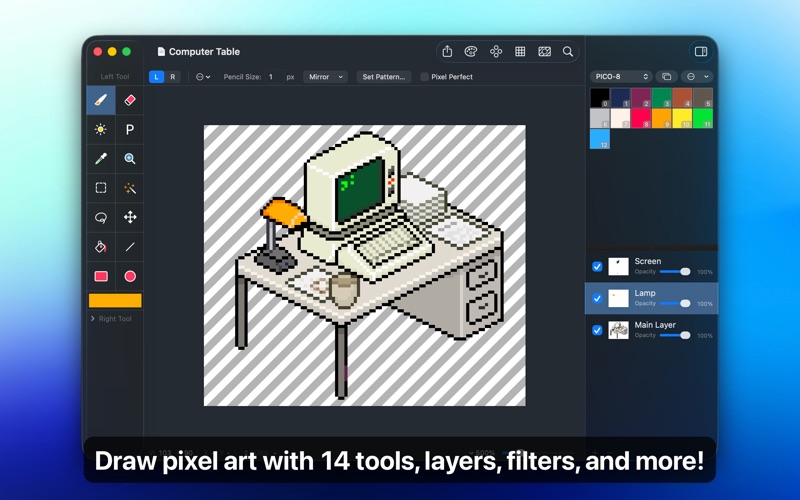
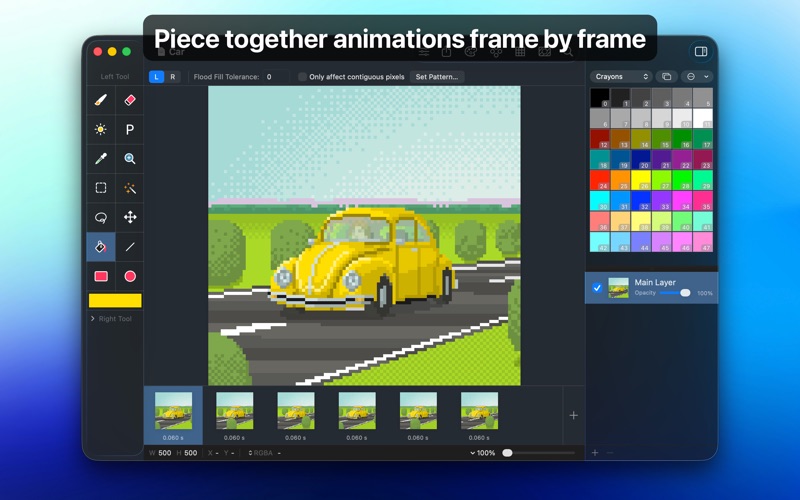
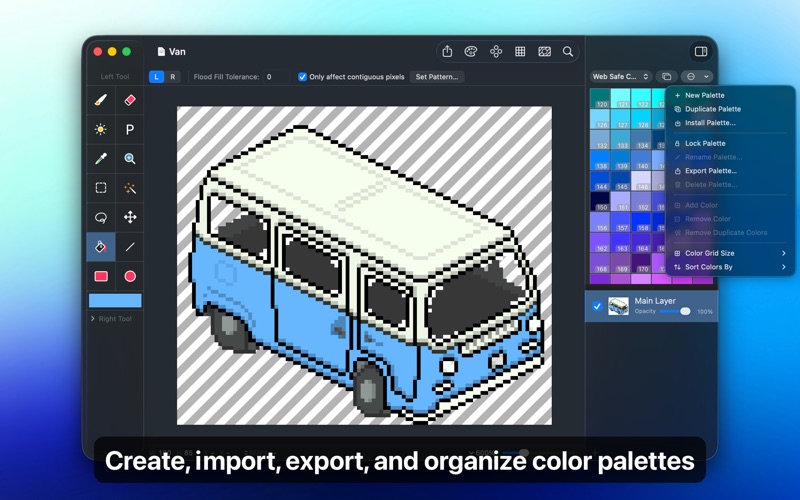
Pixen is a native pixel art editor designed for working with low-resolution raster art, such as those 8-bit sprites found in old-school video games. Pixen packs all the tools pixel artists need in an intuitive, native interface including support for high zoom levels, animation editing, color palettes, and a lot more.
LAYERS AND FILTERS
Take advantage of the flexibility layers provide when working with complex pixel art. Change opacities, blend modes, and more to compose creative effects.
Use filters to adjust colors and post-process your artwork. Invert colors, convert to grayscale, dither, apply sepia tone, remove alpha components, palettize, pixellate, adjust hue, exposure, brightness, …
Read the full description
Pixen is a native pixel art editor designed for working with low-resolution raster art, such as those 8-bit sprites found in old-school video games. Pixen packs all the tools pixel artists need in an intuitive, native interface including support for high zoom levels, animation editing, color palettes, and a lot more. LAYERS AND FILTERS Take advantage of the flexibility layers provide when working with complex pixel art. Change opacities, blend modes, and more to compose creative effects. Use filters to adjust colors and post-process your artwork. Invert colors, convert to grayscale, dither, apply sepia tone, remove alpha components, palettize, pixellate, adjust hue, exposure, brightness, contrast, and more. TOOLS Leverage Pixen's wide array of tools when composing pixel art: Pencil, Eraser, Brightness, Text, Eyedropper, Zoom, Rectangular Selection, Magic Wand, Lasso, Move, Fill, Line, Rectangle, and Ellipse. You can even assign a different tool to the left and right mouse button. For example: pencil on the left; eraser on the right. COLOR PALETTES With Pixen, you can add and organize commonly-used colors into palettes. Pixen can also import and export color palettes in the Adobe Color Table, Microsoft Palette, JASC Palette, and GIMP Palette formats. You can even perform palette operations such as sorting colors and removing duplicate colors directly in the app. ANIMATIONS Create and arrange image frames in the filmstrip view to piece together animations. Pixen can import animations from animated GIFs, animated PNGs, and sprite sheets! It can also export animations as animated GIFs, animated PNGs, movies, and sprite sheets. GRID AND ALIGNMENT CROSSHAIR Take advantage of Pixen's grid and alignment tools and create pixel-perfect artwork. PATTERNS Define custom patterns to use while drawing with the Pencil, Line, or Eraser tool (instead of a single pixel). You can even import patterns from 1-bit images. PREVIEW While editing at high zoom levels, use the Preview feature to view the canvas scaled out. You can play back animations and tile small images, useful when working on repeated patterns. CUSTOM BACKGROUNDS Pick a flat, striped, or checkered background to be drawn beneath the canvas. You can even set a reference image as a background. AND A LOT MORE... - Sync documents with Pixen for iOS over iCloud and resume your work right where you left off, regardless of device. - Pixen works great with Sidecar and Apple Pencil. You can even customize the double tap gesture. - Pixel Perfect mode removes extra pixels while drawing such that any drawn paths are at most 1 pixel in width. In other words, it removes the middle pixel of an L shape. - The Welcome window makes it easy to start a new image or animation project, open recent documents, browse the documentation, and more. - Focus on your content with Dark Mode in Pixen. - Work with all your favorite tools in full screen mode. - Customize tool hotkeys to ease the transition from other image editors. - Export your artwork in PNG, JPEG, GIF, ICO, BMP, TIFF, SVG, and PSD file formats. - Share your creations quickly and easily via AirDrop, Messages, email, and more! - Pixen has been around for over 15 years as a native Mac app and we'd like to keep it that way. - Pixen is compatible with both Intel and Apple Silicon Macs and takes full advantage of what macOS has to offer. Pixen is also available for iPhone and iPad and syncs documents over iCloud!
Installs
Apple does not publish download counts. Estimates are in testing.
We publish iOS estimates only after they pass a back-test against real numbers. Chart history below is measured.
Estimated store revenue Estimated Beta
App Store, worldwide, monthly rate from the last 12 chart days to 19 Nov 2026
Below the top 100 grossing apps in the markets we calibrate. In the United States that usually means under about $6.4M a month. App Store purchases and subscriptions only, before Apple's 15 to 30% fee. Ads and web payments are not included.
Ratings
No rating breakdown published for this app.
Recent reviews
Latest public reviews from the store
No reviews in our sample for this app yet.
Top chart positions
Latest App Store chart ranks by country, last 10 days
Not in any tracked top chart in the last 10 days.
Pixen history
Release, install milestones, listing and store changes
- First released on the store 31 May 2012
Update frequency
How often Pixen ships a new version, month by month
1 updates in the last 12 months. More often than most similar apps: they shipped a median of 0 updates in the same year.
Recent versions
Current version 6.1.2
- Version 6.1.214 Apr 2026
- Pixen is now available on the iPhone! - Added additional Apple Pencil double-tap actions when using Apple Pencil with Sidecar - Bug fixes
Listing keywords
Words and phrases Pixen repeats most in its store listing
Top phrases: color palettes (3), pixel art (3), animated gifs animated (2), gifs animated pngs (2), grid and alignment (2).
Highlighted words also appear in the title. Counts cover the title, short description and description.
Compliance
What the listing and the app package show
- Store status
- Live
- Upkeep
- Updated 14 Apr 2026
- Age rating
- 4+
Apps like Pixen
 AI Cut - Photo Generate & EditBeijing Changhai Internet Technology Co., Ltd.★ 4.1
 Birthday Invitations Makerwilliam leandro aristizabal giraldo★ 4.7
 Artimind - AI Video GeneratorAPERO TECHNOLOGIES GROUP PTE.LTD★ 1.42
 AI VistaSCIENJOY META TECHNOLOGY LLC★ 2.9
 Logotipo - AI Logo GeneratorMobile Ocean★ 4.02
 Anime AI Maker: DreamtuneLYKOV STUDIO LTD★ 4.34
 DIY Wallpaper Maker DIYScreenEvgenii Fomin★ 4.68
 Vintage Camera - Film FiltersPlane Cubes★ 4.42
 Color Widgets - WallpapersFlying Pigeons LLC★ 4.34
Pixen: questions and answers
Who makes Pixen?
Pixen is published by Furnace Creek Software LLC.
When was Pixen last updated?
The latest version (6.1.2) was released on 14 Apr 2026.
Is Pixen free?
No. Pixen is a paid app.
Is Pixen still available?
Yes. Pixen is live on App Store as of 10 May 2026.
Track Pixen and its competitors
Watch any app for new versions, rating drops, chart moves and removals. Free plan, no card.