
- Installs
- —
- Apple does not publish download counts
- Rating
- 4.28
- Ratings
- 293
- 293 reviews
- Version
- 2.0.3
- Updated 10 Jan 2026
- Released
- 28 Mar 2013
- Tracked since 11 May 2026
- Size
- 9 MB
- Needs 15.0
Screenshots
About Planit2d
The description on the store listing
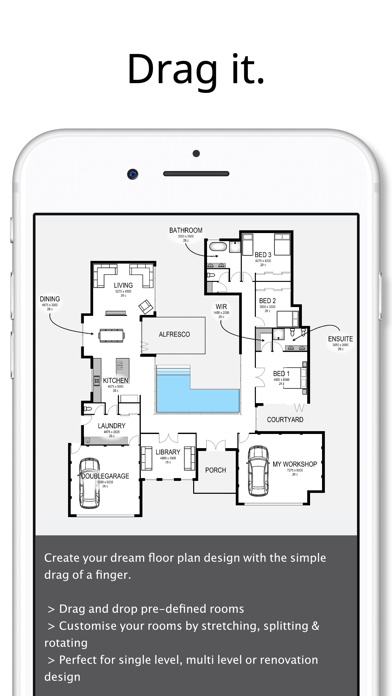
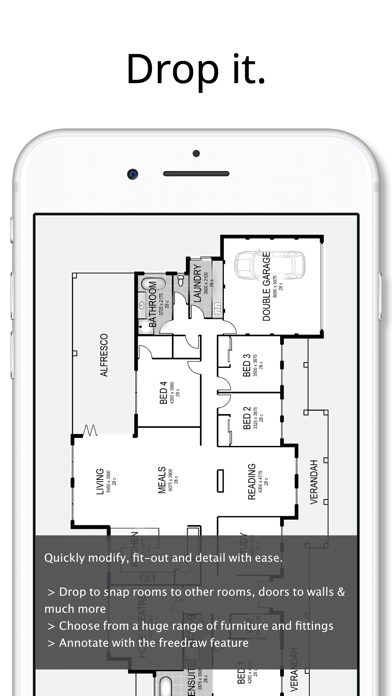
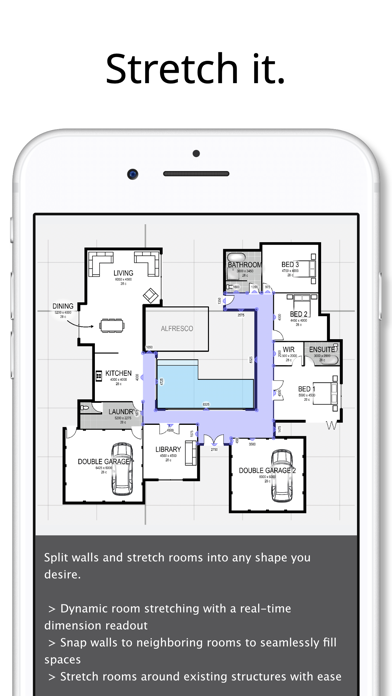
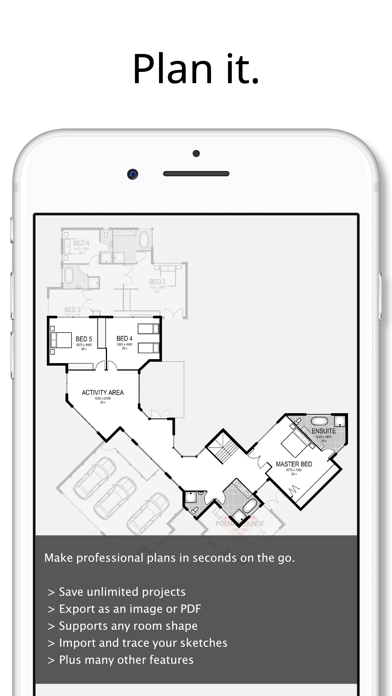
If you can imagine it, you can create your dream home design with Planit2d floor plan creator.
House design has always been a complex task reserved for an architect or other professionals.
Planit2d will change the way you think about home design. It is the fastest, most user friendly, 2D floorplan and house blueprint maker available on the App Store aimed at anyone and everyone with an idea in their mind, or a sketch on grid paper.
Travelling to work on the train and have an idea for a room or house design? At home and away from your desk? No problem. Pull out your phone and capture the idea right there and then using Planit2d as a simple floor plan creator.
Ideally suited to …
Read the full description
If you can imagine it, you can create your dream home design with Planit2d floor plan creator. House design has always been a complex task reserved for an architect or other professionals. Planit2d will change the way you think about home design. It is the fastest, most user friendly, 2D floorplan and house blueprint maker available on the App Store aimed at anyone and everyone with an idea in their mind, or a sketch on grid paper. Travelling to work on the train and have an idea for a room or house design? At home and away from your desk? No problem. Pull out your phone and capture the idea right there and then using Planit2d as a simple floor plan creator. Ideally suited to developing single, double or multiple level conceptual floor plan design to achieve accurately sized spaces, using scaled fittings and furniture. Share your house design with family and friends, or pass on to your builder or architect for further development or pricing of your house blueprint. Use your iPad or iPhone as a professional floorplanner wherever you may be. √ “Drag and Drop” physics with graph paper makes Planit2d an extremely user friendly floor planner √ Undo and redo feature for easy corrections and adjustments √ Save your house plans so you can resume at a later date √ Multi-level home design capabilities √ Import your own sketch √ Create your block of land before you create a house √ Pre-defined rooms, fittings and furniture with graph paper grid √ Plan your room blueprint using industry standard sized furniture √ Modify any room floor plan with ease √ Entire floors can be duplicated, mirrored and moved with the drag of a finger √ Save your completed home design to your device photo album √ Export your house plans as an image or PDF and add a grid, sketch, graph paper, dimensions and a scale bar √ The ability to split and/or hide sections of walls - no architect required! √ Dynamic room stretching with realtime dimension read-out on your house plan √ Don’t like the name of a pre-defined room? Simply change it to your desired description √ Move or hide room labels in those smaller spaces √ Customizable settings, units of measure and colours √ Add text or notes to your house design √ A number of “freedraw” items are available for adding detail to your home design. Limited only by your imagination √ Duplicate an entire project blueprint √ Share your house plans on Facebook or via text or email directly from your device √ Create a house design blueprint ready for construction from your sketch, no chief architect required √ Print via Airprint directly from your device (must have an Airprint enabled printer) √ Tutorials can be found at www.planit2d.com or by searching on YouTube √ Find us on Facebook. Don’t forget to “Like” us
Installs since 29 Aug 2026
Apple does not publish download counts. Estimates are in testing.
Estimated store revenue Estimated Beta
App Store, worldwide, monthly rate from the last 13 chart days to 20 Nov 2026
Below the top 100 grossing apps in the markets we calibrate. In the United States that usually means under about $6.4M a month. App Store purchases and subscriptions only, before Apple's 15 to 30% fee. Ads and web payments are not included.
Ratings
293 ratings, 293 reviews
No rating breakdown published for this app.
Recent reviews
Latest public reviews from the store
- 14 Mar 2026
Floor Plan app made Simple, Well Done and almost perfect!
I had tried multiple Floor Plan apps and found many of them lacking either to simple so not useful, to difficult to navigate so hard to create a floor plan. After a few days of trying the Planit2D app I found it to be useful, simple, well done and almost perfect. Planit2d would be perfect for me, and perhaps most users interested in designing floor plans, with three (3) features added: 1) Ability to change the opacity / background opacity of the floor you’re working on so you can see and match up to the walls of the floor below; 2) Ability to add tiny labels and arrows to stairs to indicate direction while working on stairs on a specific floor; and 3) it needs a category for storage under Fitout menu. This category should contain storage pieces that are mounted to or attached to walls like kitchen cabinets, pantries, standard closets, under stair storage, and they have doors: single, double, folding, cavity, etc. So just create a sample of Storage units in Fitout menu.
- 28 Sep 2024
SImple but effective
I needed to modify a floor plan but didn’t want to use a more featured architectural app. The simplicity of this app was perfect for my objective. The limitations are more apparent when editing once all the rooms are in place. 1 - The ability to select smaller objects and move them varies significantly with the Zoom level. Undo is VERY helpful because of this! 2 - Undo is also a great feature when zoomed in and there is limited unused screen area to touch. 3 - The snap-to feature should be capable of being disabled. Stretching can be effected by a point in another area making impossible to set the desired dimension. The room will not only need to be removed but moved diagonally from the primary structure thereby avoiding potential interference. 4 - The ability to share files between devices, including M based MacOS devices, is a major limitation. My 27” display would have been an improvement over working on a 11” iPad. I rated this app a 4 independent of the above because I was able to work with its limitation and achieve my goal. The layers are a nice feature. I used Layer 1 for the entire structure. Layer 2 was used to populate the rooms. This helped signific
- 19 Apr 2024
It’s Great But Needs Updating
Update (from me!) Thank you for the UNDO feature! I can't wait to play around with the new and improved version. This is so much fun! I can spend hours playing around with designing my future home. However, many reviewers have hit on the flaws that keep it from 5 stars. Can’t adjust the font size for rooms. Can’t label outside spaces such as “porch.” A slight adjustment makes walls go wonky, and it DESPERATELY NEEDS AN UNDO feature. Sometimes you have to literally move a room out of the house to fix the size. There should also be a way to set the size of a room or element by typing in the dimensions you want. It would be great to be able to add a houseplant, desk, or small table or bookshelf, as well. Developer, please update! :)
- 28 Jun 2023
4.25 Stars!! Built for speed
I really like this app for what I need. I need to create designs of homes within 5 minutes and I don’t want to pay for annual subscriptions and I want to be able to try the app first. This app just works for what I need and gives me abilities no other app gives. Very low learning curve, I can build a 2D layout fast, I don’t need measurement either, It just needs to look accurate. There is no other app, hand drawn or otherwise that I’ve seen that can make a 2D layout this fast and this professional. The app also features the ability to copy pre made layouts so you can make templates to get even faster. Maybe I’m missing something but there is no undo button if you delete something or move something by accident which happens all the time when your moving fast I would much rather multiple undos than a pop up to delete mid page. Could be a few more features but for what I do, it’s awesome.
What reviewers bring up
Topics mentioned in the latest 8 reviews, by how many reviews mention them
Liked in good reviews (7 reviews)
- undo 6
- add 5
- floor plan 4
- button 4
- room 4
- able 4
- designing 3
- ability 3
Raised in bad reviews (1 reviews)
No topic comes up twice.
Top chart positions
Latest App Store chart ranks by country, last 10 days
- Countries ranked
- 14 of 50
- Best rank
- #17
- Top 10 placements
- 0
- of 14 chart placements
- Average rank
- #71.6
Best countries on App Store
- 🇮🇱 Israel · Top paid, Productivity#17
- 🇳🇿 New Zealand · Top paid, Productivity#55
- 🇦🇺 Australia · Top paid, Productivity#59
- 🇵🇭 Philippines · Top paid, Productivity#67
- 🇺🇸 United States · Top paid, Productivity#72
- 🇿🇦 South Africa · Top paid, Productivity#76
| Country | Chart | Category | Rank | Best (10 days) | Date |
|---|---|---|---|---|---|
| 🇮🇱 Israel | Top paid | Productivity | #17 | #11 | 20 Nov 2026 |
| 🇳🇿 New Zealand | Top paid | Productivity | #55 | #50 | 20 Nov 2026 |
| 🇦🇺 Australia | Top paid | Productivity | #59 | #14 | 20 Nov 2026 |
| 🇵🇭 Philippines | Top paid | Productivity | #67 | #64 | 20 Nov 2026 |
| 🇺🇸 United States | Top paid | Productivity | #72 | #72 | 18 Nov 2026 |
| 🇿🇦 South Africa | Top paid | Productivity | #76 | #76 | 20 Nov 2026 |
| 🇮🇩 Indonesia | Top paid | Productivity | #77 | #76 | 20 Nov 2026 |
| 🇸🇦 Saudi Arabia | Top paid | Productivity | #77 | #74 | 20 Nov 2026 |
| 🇨🇦 Canada | Top paid | Productivity | #78 | #16 | 16 Nov 2026 |
| 🇦🇪 United Arab Emirates | Top paid | Productivity | #78 | #78 | 20 Nov 2026 |
Planit2d history
Release, install milestones, listing and store changes
- First released on the store 28 Mar 2013
Update frequency
How often Planit2d ships a new version, month by month
1 updates in the last 12 months. More often than most similar apps: they shipped a median of 0 updates in the same year.
Recent versions
Current version 2.0.3
- Version 2.0.310 Jan 2026
- Support for the latest iOS - Liquid Glass app icon
Listing keywords
Words and phrases Planit2d repeats most in its store listing
Top phrases: home design (5), house design (5), floor plan (4), graph paper (3), house plans (3).
Highlighted words also appear in the title. Counts cover the title, short description and description.
Compliance
What the listing and the app package show
- Store status
- Live
- Upkeep
- Updated 10 Jan 2026
- Age rating
- 4+
Apps like Planit2d
 HONK PartnerHONK Technologies Inc.★ 2.35
 拦截100-浏览器广告拦截油猴脚本UU Momentum Network Technology Co., Ltd.★ 4.07
 DeepClean - Smart AI Cleaner萍萍 刘★ 4.5
 LockScreenNotesTakumi Banjoya★ 4.79
 SHMLiveSociety of Hospital Medicine★ 4.79
 Remote Control for most TVAngela Garrett★ 4.39
 Trolls world Wallpaper - liveMohammed Sahraoui★ 4.64
 TikVPN-Super Secure VPN ProxyTap Connect Inc.★ 4.55
 Easy Files - Wifi transferNguyen Cong Huy★ 4.39
Planit2d: questions and answers
Who makes Planit2d?
Planit2d is published by Paul Wright.
When was Planit2d last updated?
The latest version (2.0.3) was released on 10 Jan 2026.
Is Planit2d free?
No. Planit2d is a paid app priced at $4.99.
Is Planit2d still available?
Yes. Planit2d is live on App Store as of 14 Nov 2026.
Track Planit2d and its competitors
Watch any app for new versions, rating drops, chart moves and removals. Free plan, no card.