
- Installs
- —
- Apple does not publish download counts
- Rating
- 4.69
- Ratings
- 459
- 459 reviews
- Version
- 1.8.0
- Updated 26 Oct 2026
- Released
- 20 Feb 2015
- Tracked since 10 May 2026
- Size
- 6 MB
- Needs 15.0
Screenshots
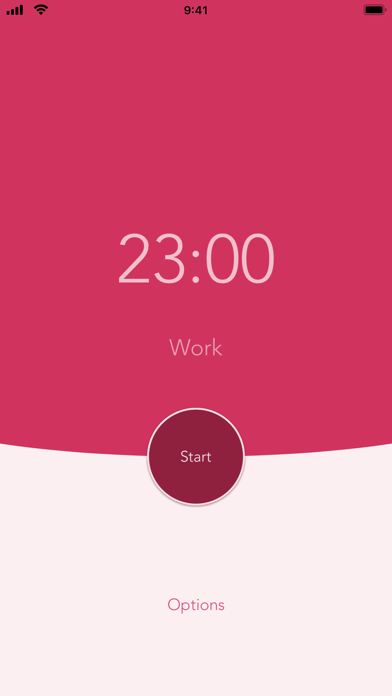


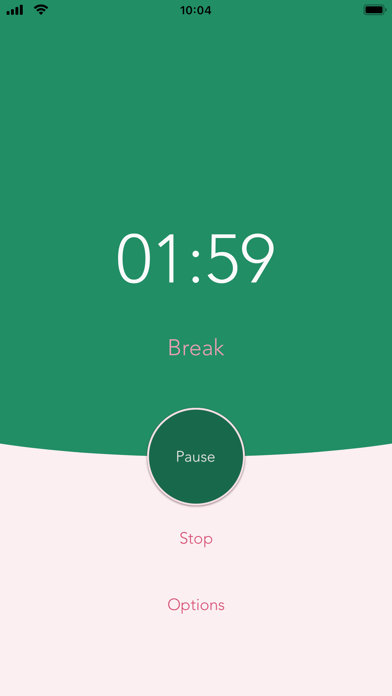

About Power Focus - Work Break Timer
The description on the store listing
Beat procrastination by working in manageable amounts of time! Boost your productivity and focus on your tasks with Power Focus, the easiest to use countdown timer.
[Phone features]
* Customize your work session timer length
* Customize your regular & long break lengths
* View daily & all-time completed work session stats
* Interactive notifications (Continue, Pause, or Stop current timer)
* More customization choices in Options
* Haptic Feedback (if your device supports it)
* Use Siri Shortcuts (iOS 12) to start your timer
* Dark Mode (iOS 13) support
[Watch features]
* Apple WatchOS support
* Perform actions (Start / Pause / Resume / Stop) from either the watch or phone and continue on …
Read the full description
Beat procrastination by working in manageable amounts of time! Boost your productivity and focus on your tasks with Power Focus, the easiest to use countdown timer. [Phone features] * Customize your work session timer length * Customize your regular & long break lengths * View daily & all-time completed work session stats * Interactive notifications (Continue, Pause, or Stop current timer) * More customization choices in Options * Haptic Feedback (if your device supports it) * Use Siri Shortcuts (iOS 12) to start your timer * Dark Mode (iOS 13) support [Watch features] * Apple WatchOS support * Perform actions (Start / Pause / Resume / Stop) from either the watch or phone and continue on either device when in range * Use the digital crown to set work duration * Haptic feedback & timer transition animations * Note: watch is best used with phone to receive notifications [How it works] Use the intervals to get tasks done and give yourself a break in between tasks. Power Focus allows you to easily control the timer at your own pace. You can also customize the timer lengths for shorter work sessions, longer breaks, and more. Take a longer break after a few completed sessions. Keep track of daily and all-time completed work sessions. Get more work done by focusing on your job in manageable chunks of time. [Privacy] If you upgrade to Pro, our app does not run third party tracking to show ads. The free version may run ads to support ongoing development. [About] Power Focus is designed, built, and maintained in California. We'd love to know how we can improve your experience, so please contact us at [email protected] or tweet us @FastRobo.
Installs since 29 Aug 2026
Apple does not publish download counts. Estimates are in testing.
Estimated store revenue Estimated Beta
App Store, worldwide, monthly rate from the last 14 chart days to 21 Nov 2026
Below the top 100 grossing apps in the markets we calibrate. In the United States that usually means under about $6.4M a month. App Store purchases and subscriptions only, before Apple's 15 to 30% fee. Ads and web payments are not included.
Ratings
459 ratings, 459 reviews
No rating breakdown published for this app.
Recent reviews
Latest public reviews from the store
- 30 Jan 2025
Nice, simple app
The thing I like most about this app is it simplicity. It does what it is supposed to do with no bells or whistles. It is supposed break up your work time into chunks of your own devising. When the timer goes off it's time for a short break. You can set the length of the break time as well. You get up and stretch or exercise or do whatever and then you get back to work. This is a great health enhancing app And it is one of my favorites.
- 10 Oct 2022
almost what I need
I was super excited when I found this app because it’s exactly what I’m looking for. I want to choose how long the sessions are, and the short and long breaks, and I don’t need any fancy extra stuff cluttering the main screen. The only problem is that the notifications don’t work! Yeah, they show up on my home screen, but I have all the sound and vibration settings on (both the app and my phone and watch settings) and yet nothing’s happening. If it would just vibrate my watch when a session or break ends, this would be awesome.
- 27 May 2022
Watch app needs work
The phone app is fine - simple, easy to navigate and set up. The watch app is a different story. It works for a period of time and then just stops. I’ll press “continue” after a work session and it won’t connect with the phone app to start the next break. Which is a key reason I want to use it. I’ve had this happen about 3 weeks ago, and then deleted and reinstalled the app. Unfortunately the same thing keeps happening. If this bug can be fixed, the app is quite useful.
- 15 Jun 2021
Nice and clean but missing a feature I needed
Love the simplicity of the app but sadly it had one major miss for me: the ability to disable auto-start on the breaks and timers. You can manually pause them, but if I'm trying to finish my train of thought before I take a break, I don't want to interrupt myself by having to reach over to pause the break timer. If that feature were added, I'd re-download in a heartbeat!
What reviewers bring up
Topics mentioned in the latest 8 reviews, by how many reviews mention them
Liked in good reviews (4 reviews)
- length 2
- timer 2
- ads 2
Raised in bad reviews (0 reviews)
No topic comes up twice.
Top chart positions
Latest App Store chart ranks by country, last 10 days
Not in any tracked top chart in the last 10 days.
Power Focus - Work Break Timer history
Release, install milestones, listing and store changes
- First released on the store 20 Feb 2015
Update frequency
How often Power Focus - Work Break Timer ships a new version, month by month
2 updates in the last 12 months. More often than most similar apps: they shipped a median of 1 updates in the same year.
Recent versions
Current version 1.8.0
- Version 1.8.026 Oct 2026
* iPhone Duo support * improved iPhone timer logic * More reliable Pomodoro sessions: your timer keeps going even if the app gets closed
- Version 1.7.27 Apr 2026
Minor updates
Listing keywords
Words and phrases Power Focus - Work Break Timer repeats most in its store listing
Top phrases: power focus (4), completed work (2), haptic feedback (2), work session (2), work sessions (2).
Highlighted words also appear in the title. Counts cover the title, short description and description.
Compliance
What the listing and the app package show
- Store status
- Live
- Upkeep
- Updated 26 Oct 2026
- Age rating
- 4+
Apps like Power Focus - Work Break Timer
 Authenticator App - 2FAFire Technologies Hong Kong Limited★ 4.36
 Phraser - Paste KeyboardCasper Riboe★ 4.7
 Documents ProSavy Soda Pty Ltd★ 4.56
 AI Detector – Search & CheckerLaraun★ 4.49
 AI Chat - Smart AI AssistantAppStation Studio Pte. Ltd.★ 4.82
 Habitat - Group AccountabilityPalmsonntag Inc.★ 4.62
 Dialpad MeetingsDialpad, Inc.★ 4.37
 Achievr - Conquer your LifeAmirreza KHODDAM★ 4.27
 Catch Santa ClausKishan Panchotiya★ 4.51
Power Focus - Work Break Timer: questions and answers
Who makes Power Focus - Work Break Timer?
Power Focus - Work Break Timer is published by Fast Robo LLC.
When was Power Focus - Work Break Timer last updated?
The latest version (1.8.0) was released on 26 Oct 2026.
Is Power Focus - Work Break Timer free?
Yes. Power Focus - Work Break Timer is free to download.
Is Power Focus - Work Break Timer still available?
Yes. Power Focus - Work Break Timer is live on App Store as of 21 Nov 2026.
Track Power Focus - Work Break Timer and its competitors
Watch any app for new versions, rating drops, chart moves and removals. Free plan, no card.