
- Installs
- —
- Apple does not publish download counts
- Rating
- 4.2
- Ratings
- 5
- 5 reviews
- Version
- 3.10
- Updated 20 Mar 2023
- Released
- 28 Jun 2019
- Tracked since 10 May 2026
- Size
- 139 MB
- Needs 14.0
Screenshots
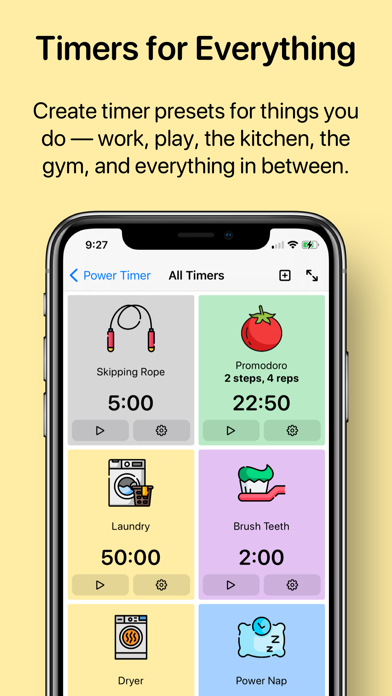
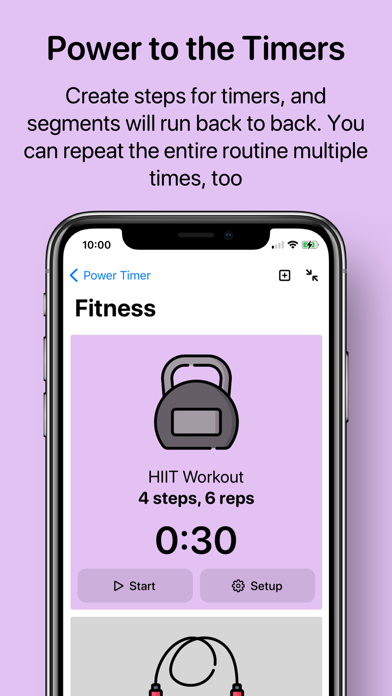


About PowerTimer
The description on the store listing
Powerful timers, put up on the big screen. PowerTimer allows you to create complex timer routines, and use full-screen mode to keep track of time.
#### Full Screen, Full Focus ####
Full screen mode gives you large text that is legible from across the room. Your iPhone or iPad will stay awake, too.
Full screen mode is perfect for your workout routine, cooking in the kitchen, or for your work and study.
#### Power to the Timers ####
Add steps to timers so that segments will run back to back. Loop the steps several times to cater to your most complex timing needs.
You also have the option to receive multiple alerts after timer expires, so that you don’t forget.
#### Nice to the eye; …
Read the full description
Powerful timers, put up on the big screen. PowerTimer allows you to create complex timer routines, and use full-screen mode to keep track of time. #### Full Screen, Full Focus #### Full screen mode gives you large text that is legible from across the room. Your iPhone or iPad will stay awake, too. Full screen mode is perfect for your workout routine, cooking in the kitchen, or for your work and study. #### Power to the Timers #### Add steps to timers so that segments will run back to back. Loop the steps several times to cater to your most complex timing needs. You also have the option to receive multiple alerts after timer expires, so that you don’t forget. #### Nice to the eye; nice to the ear #### Dark Mode support. Dynamic types. More discernible colours. More ringtones to choose from. Power Timer 2.0 looks and sounds better in so many ways. Enter full screen mode to see a timer in extra large types — you can essentially see the timer from across the room! On the iPad, there’s a more efficient layout and support for split screen. #### Full Siri integration #### As you set up the timer, you can tell Siri to trigger it with a custom voice command, such as “Doing my laundry” or “Brushing my teeth.” Power Timer has been designed to work with as little touching as possible. If you are looking for more, you can add timer actions into your own shortcuts. It’s easy to create a shortcut that “Start a 20-minute timer when I open Netflix.” Power Timer is also tapping into iOS system intelligence. Siri will pick up on your patterns of timer usage, and suggest starting certain timers as appropriate. #### Widgets #### Pin a specific timer on your Home Screen with newly added widgets. You can even launch the timer and enter full-screen mode with one tap. #### And there’s more #### We’ve updated the apps to have more and better ringtones, as well as giving you a range of fully vector-based icons so that they look nice and sharp even when scaled up. There’s also URL Scheme support such as `powertimer://expired` or `powertimer://timer?id=ABCD` to help you integrate Power Timer into your workflow. Version 2.0 will be requiring iOS and iPadOS 14.
Installs
Apple does not publish download counts. Estimates are in testing.
We publish iOS estimates only after they pass a back-test against real numbers. Chart history below is measured.
Estimated store revenue Estimated Beta
App Store, worldwide, monthly rate from the last 13 chart days to 20 Nov 2026
Below the top 100 grossing apps in the markets we calibrate. In the United States that usually means under about $6.4M a month. App Store purchases and subscriptions only, before Apple's 15 to 30% fee. Ads and web payments are not included.
Ratings
5 ratings, 5 reviews
No rating breakdown published for this app.
Recent reviews
Latest public reviews from the store
No reviews in our sample for this app yet.
Top chart positions
Latest App Store chart ranks by country, last 10 days
Not in any tracked top chart in the last 10 days.
PowerTimer history
Release, install milestones, listing and store changes
- First released on the store 28 Jun 2019
Update frequency
How often PowerTimer ships a new version, month by month
0 updates in the last 12 months. Less often than most similar apps: they shipped a median of 1 updates in the same year.
Recent versions
Current version 3.10
- Version 3.1020 Mar 2023
Hello there! PowerTimer 3.10 is here with an update on the Widgets. Now you can pin the “Recently Used” timer on the Home Screen or your Lock Screen. The widget will dynamically show you the timer that you last started. This update also fixed some issues with UI and localization. Hope you’ll enjoy this update. As always, please feel free to reach out for any feedback or suggestions.
Listing keywords
Words and phrases PowerTimer repeats most in its store listing
Top phrases: full screen (6), full screen mode (5), screen mode (5), power timer (4), enter full screen (2).
Highlighted words also appear in the title. Counts cover the title, short description and description.
Compliance
What the listing and the app package show
- Store status
- Live
- Upkeep
- No update since 20 Mar 2023
- Age rating
- 4+
Apps like PowerTimer
 Library of AviationNazmi Yavuz★ 4.82
 MyNOVECNorthern Virginia Electric Cooperative★ 2.28
 打工人小组件光翔 卓★ 4.96
 TruckbaysTruckbays LLC★ 4.3
 Tornado PRO PlayerMohammed Altam★ 4.44
 VDX - Video ManagerARISEPEAK LP★ 1.74
 TV CastingZeasn Info Technology Co., Ltd.★ 1.86
 Mil-Dot BallisticsTom Holsten★ 3.82
 MySontiqSontiq, Inc.★ 2.4
PowerTimer: questions and answers
Who makes PowerTimer?
PowerTimer is published by Sasquatch Studio Inc..
When was PowerTimer last updated?
The latest version (3.10) was released on 20 Mar 2023.
Is PowerTimer free?
Yes. PowerTimer is free to download.
Is PowerTimer still available?
Yes. PowerTimer is live on App Store as of 1 Jul 2026.
Track PowerTimer and its competitors
Watch any app for new versions, rating drops, chart moves and removals. Free plan, no card.