- Installs
- —
- Apple does not publish download counts
- Rating
- 1.4
- Ratings
- 5
- 5 reviews
- Version
- 1.7
- Updated 5 Jun 2023
- Released
- 3 Mar 2014
- Tracked since 10 May 2026
- Size
- 3 MB
- Needs 14.0
Screenshots



About Presentation Recorder
The description on the store listing
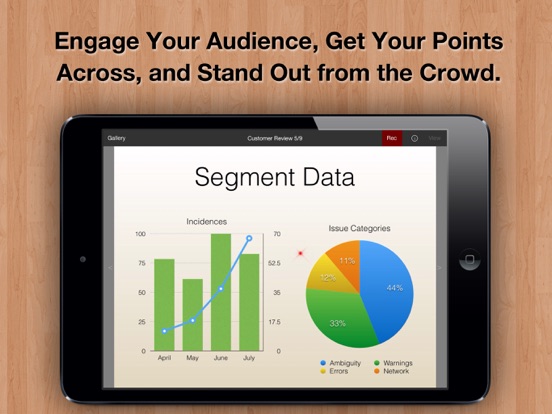
Whether you are a Sales Executive or Class Instructor, this one tool can Dramatically Amplify Your IMPACT. Create and share professional video slide presentations right on your iPad:
Step 1: Import slides as PDF.
Step 2: Tap Record.
Step 3: Everything you say is recorded in sync with the screen.
INCREASE ENGAGEMENT WITH PERSONALIZED VIDEOS
Don't just send your valued clients a static copy of your slide decks. They have piles of those. Walk them through it with a custom-tailored video presentation instead. Get your points across, and help your business stand out fro the crowd.
CREATE HD SCREENCASTS WITH KEYNOTE & POWERPOINT SLIDES
Leave your laptop at home. Do it all with your iPad. …
Read the full description
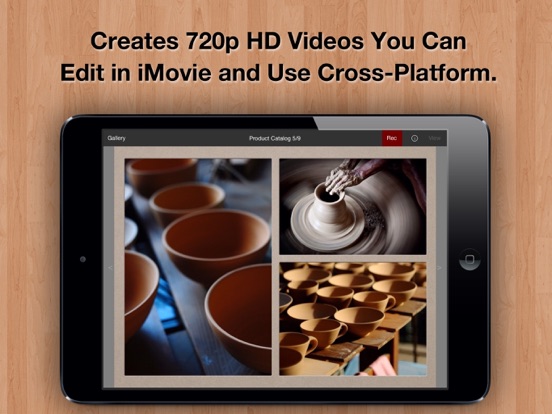
Whether you are a Sales Executive or Class Instructor, this one tool can Dramatically Amplify Your IMPACT. Create and share professional video slide presentations right on your iPad: Step 1: Import slides as PDF. Step 2: Tap Record. Step 3: Everything you say is recorded in sync with the screen. INCREASE ENGAGEMENT WITH PERSONALIZED VIDEOS Don't just send your valued clients a static copy of your slide decks. They have piles of those. Walk them through it with a custom-tailored video presentation instead. Get your points across, and help your business stand out fro the crowd. CREATE HD SCREENCASTS WITH KEYNOTE & POWERPOINT SLIDES Leave your laptop at home. Do it all with your iPad. Export slides as PDFs from Keynote / PowerPoint. Present them just as you would to a live audience. Your voice is recorded in-sync with the slides (without transitions or animations), and you can call things out using a virtual laser pointer. SHARE SECURELY OR BROADCAST TO THE WORLD, SUBSCRIPTION FREE Everyone's concerned about privacy these days. So are we. Unlike with online slide services, you retain 100% control over your slides and videos. Your content never leaves your iPad, unless you choose to share it or backup to iCloud. Email recorded videos directly to only your colleagues, or upload them to the service of your choice. Even better, there are no monthly fees, or services to be tied to. Purchase once, and use Presentation Recorder forever. OPTIONALLY EDIT YOUR HD VIDEOS IN iMOVIE (SOLD SEPARATELY) Presentation Recorder produces clear, high-definition 720p Quicktime videos that you can edit in iMovie and elsewhere. If you recently bought an iPad, you can probably download it for free. FEATURES: + Open exported PDF decks (or any PDF file) from Keynote, Mail or 3rd party Apps (note that slide transitions are not preserved in PDF files). + Supports standard 4:3 or widescreen slides (pages of any dimensions really). + Produces standard 720p HD Quicktime videos. + Virtual laser pointer. + Page picker to jump directly to any page. + Record using the iPad's built-in mic, or an external one. + Project organizer with customizable color categories. + Publish directly to YouTube, Facebook, or Vimeo from the Photos App. + Upload to Dropbox and other services by exporting videos to 3rd party Apps. + No monthly fees or service requirements.
Installs
Apple does not publish download counts. Estimates are in testing.
We publish iOS estimates only after they pass a back-test against real numbers. Chart history below is measured.
Estimated store revenue Estimated Beta
App Store, worldwide, monthly rate from the last 12 chart days to 19 Nov 2026
Below the top 100 grossing apps in the markets we calibrate. In the United States that usually means under about $6.4M a month. App Store purchases and subscriptions only, before Apple's 15 to 30% fee. Ads and web payments are not included.
Ratings
5 ratings, 5 reviews
No rating breakdown published for this app.
Recent reviews
Latest public reviews from the store
No reviews in our sample for this app yet.
Top chart positions
Latest App Store chart ranks by country, last 10 days
Not in any tracked top chart in the last 10 days.
Presentation Recorder history
Release, install milestones, listing and store changes
- First released on the store 3 Mar 2014
Update frequency
How often Presentation Recorder ships a new version, month by month
0 updates in the last 12 months. Less often than most similar apps: they shipped a median of 1 updates in the same year.
Recent versions
Current version 1.7
- Version 1.75 Jun 2023
+ Updated for the latest OS and devices
Listing keywords
Words and phrases Presentation Recorder repeats most in its store listing
Top phrases: presentation recorder (3), recorded in sync (2), virtual laser pointer (2), 3rd party (2), keynote powerpoint (2).
Highlighted words also appear in the title. Counts cover the title, short description and description.
Compliance
What the listing and the app package show
- Store status
- Live
- Upkeep
- No update since 5 Jun 2023
- Age rating
- 4+
Apps like Presentation Recorder
 Robin - Mobile AppRobin Powered, Inc★ 3.32
 Bright AisleMedia Solutions Corp★ 2.52
 Rhingie: phone call 2nd numberDating onlain, ooo★ 3.96
 PayClockLathem Time Corporation★ 2.08
 云电话-网络电话虚拟隐私小号国辉 李★ 4.74
 QuicklynQuicklyn★ 4.86
 Diligent BoardsDiligent Corporation★ 3.32
 DATABASICSDATABASICS★ 3.8
 vMEyeSuperGuangzhou Kedi Intelligence Technology Co., Ltd.★ 3.14
Presentation Recorder: questions and answers
Who makes Presentation Recorder?
Presentation Recorder is published by Qrayon, LLC.
When was Presentation Recorder last updated?
The latest version (1.7) was released on 5 Jun 2023.
Is Presentation Recorder free?
No. Presentation Recorder is a paid app priced at $9.99.
Is Presentation Recorder still available?
Yes. Presentation Recorder is live on App Store as of 1 Jul 2026.
Track Presentation Recorder and its competitors
Watch any app for new versions, rating drops, chart moves and removals. Free plan, no card.